تعارف
The Fiskars Compact Rotary Paper Trimmer is designed for precise and clean cuts on various paper types, ideal for scrapbooking, card making, and other paper crafts. Its rotary blade system ensures cuts without tearing, providing consistent results. This trimmer features a portable design, an extendable measuring deck, and permanent gridlines for enhanced accuracy.
سیٹ اپ
- پیک کھولنا: Carefully remove the trimmer from its packaging. Inspect for any damage.
- جگہ کا تعین: Place the trimmer on a stable, flat surface. The rubberized feet on the base will help prevent slipping during use.
- Extend Measuring Arm: For larger materials, the self-leveling swing-out arm can be extended to increase the measuring deck to 15.25 inches. Gently pull the orange arm outwards until it locks into place.

Image: The self-leveling swing-out arm extends to 15.25 inches for accurate cuts on large materials.
آپریٹنگ ہدایات
- مواد تیار کریں: Ensure your paper or crafting material is flat and free of creases.
- پوزیشن کا مواد: Lift the clear cut rail. Place your material against the fence and align it with the desired measurement using the 1/16-inch permanent gridlines. The expanded cut rail with an integrated smudge guard helps hold materials in place without leaving fingerprints.
- محفوظ مواد: Lower the clear cut rail to hold the material firmly in place.
- کٹ بنائیں: Press down on the orange rotary blade carriage and slide it along the rail to make a clean, straight cut. The 28mm rotary blade can cut through up to 6 sheets of 20# bond/75 gsm paper (approximately 3mm thickness).
- مواد کو ہٹا دیں: Lift the cut rail and remove the trimmed material.

Image: The trimmer's lightweight and compact design makes it portable.

Image: The trimmer can cut up to 6 sheets of paper at once.
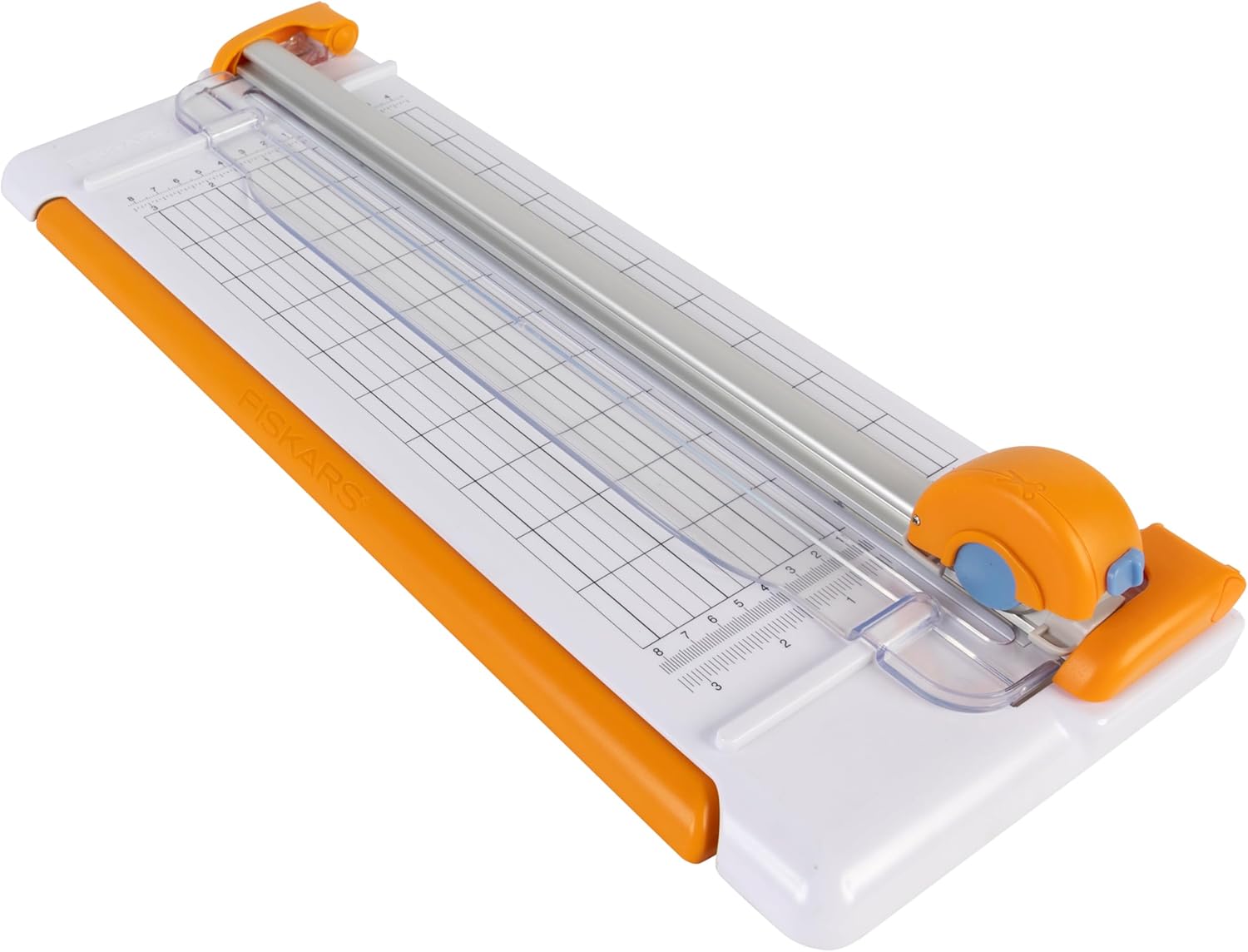
Image: Detailed 1/16-inch permanent gridlines ensure precise measurements.
مظاہرے کی ویڈیو
Video: An official demonstration of various Fiskars paper trimmers, including the compact rotary model, showcasing their ease of use and cutting capabilities.
دیکھ بھال
- بلیڈ کی تبدیلی: The trimmer uses a 28mm rotary blade. Replacement blades are available and sold separately. Refer to the packaging for specific blade type and replacement instructions.
- Cut Bar Rotation: The replaceable cut bar can be rotated four times (two on each side) to maintain clean, precise cuts. Rotate the bar when you notice a decrease in cutting performance.
- صفائی: Regularly wipe down the cutting surface and rails with a soft, dry cloth to remove paper dust and debris.

Image: The self-sharpening rotary blade ensures consistent cutting performance.
خرابی کا سراغ لگانا
- Uneven or Ragged Cuts:
- Ensure the paper is firmly pressed against the fence and held securely by the cut rail.
- Check if the rotary blade is dull. Replace or rotate the cut bar as needed.
- Avoid cutting too many sheets at once, exceeding the 6-sheet capacity can lead to poor cut quality.
- Paper Slipping:
- Verify that the trimmer is placed on a stable, non-slippery surface. The rubberized feet should provide adequate grip.
- Ensure the cut rail is fully lowered and applying even pressure across the paper.
- Difficulty Sliding Blade:
- Check for any debris or paper scraps obstructing the blade carriage path. Clean the rails thoroughly.
- Ensure the blade is properly seated in its carriage.
وضاحتیں
| فیچر | تفصیل |
|---|---|
| مصنوعات کے طول و عرض | 7.6 x 1.5 x 18.75 انچ |
| آئٹم ماڈل نمبر | 154480-1001 |
| شے کا وزن | 1.4 پاؤنڈ |
| لمبائی کاٹنا | 12 انچ |
| کاٹنے کی صلاحیت | Up to 6 sheets / 3mm thickness (20# bond/75 gsm paper) |
| بلیڈ کی قسم | 28mm Rotary Blade (F-style blades) |
| Measuring Deck Extension | Extends to 15.25 inches |
| گرڈ لائنز | 1/16 inch permanent gridlines |
| استحکام کی خصوصیات | Rubberized feet, Expanded cut rail with integrated smudge guard |

تصویر: ختمview of the trimmer with key dimensions and weight.
وارنٹی اور سپورٹ
This Fiskars product is backed by a لائف ٹائم وارنٹی, guaranteeing its exceptional performance and longevity. Fiskars tools are designed for durability and reliability season after season.
For detailed warranty information and support, please visit the official Fiskars webسائٹ: Fiskars.com/USWarranty
For additional assistance or inquiries, please contact Fiskars customer service.


