تعارف
Thank you for choosing the SINGER Cordless Smart Scissors. This innovative cutting tool is designed to provide effortless cutting for various materials, enhancing your crafting and household tasks. Please read this manual thoroughly before first use to ensure safe and optimal operation of your device.
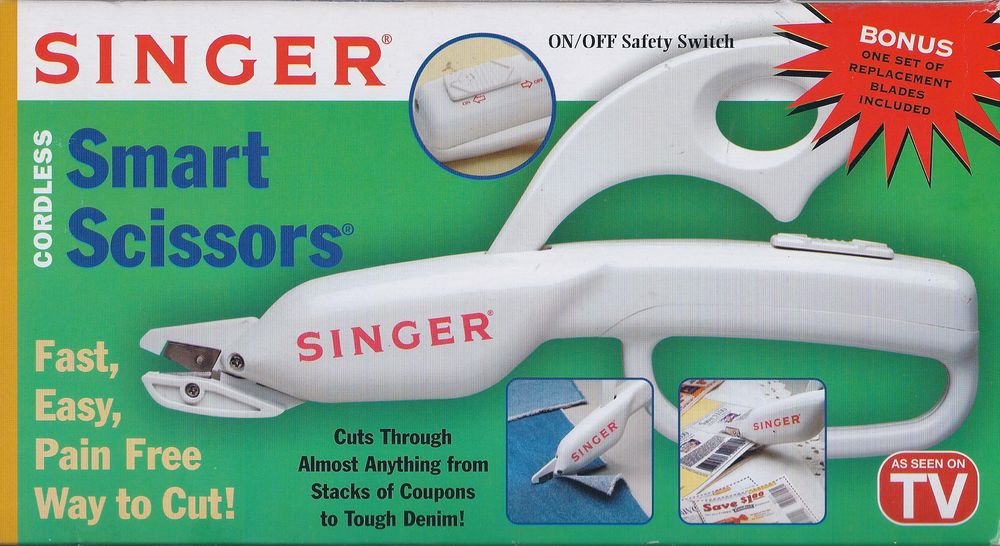
Image: The SINGER Cordless Smart Scissors, a white handheld device designed for easy cutting. It features an ergonomic handle and a visible cutting blade mechanism.
حفاظتی ہدایات
آگ، برقی جھٹکا، اور ذاتی چوٹ کے خطرے کو کم کرنے کے لیے برقی آلات استعمال کرتے وقت ہمیشہ بنیادی حفاظتی احتیاطی تدابیر پر عمل کریں۔
- Keep hands and body parts away from the cutting blades during operation.
- Do not allow children to operate this device. Store out of reach of children.
- Use only for intended purposes as described in this manual.
- آلے کو پانی یا دیگر مائعات میں نہ ڈوبیں۔
- Turn off and remove batteries before cleaning or changing blades.
- Inspect blades for damage before each use. Replace dull or damaged blades immediately.
- Do not attempt to cut extremely hard or thick materials that may damage the blades or motor.
پیکیج کے مشمولات
تمام اشیاء کی موجودگی کو یقینی بنانے کے لیے براہ کرم پیکیج کے مواد کو چیک کریں:
- 1 x SINGER Cordless Smart Scissors unit
- 1 x Set of Replacement Blades
- 1 ایکس ہدایات دستی (یہ دستاویز)
سیٹ اپ
Before using your Cordless Smart Scissors, you will need to install the batteries.
- Locate the battery compartment cover, usually on the handle.
- ٹوکری کو کھولنے کے لیے کور کو سلائیڈ یا ان کلپ کریں۔
- Insert the required batteries (e.g., 2 x AA batteries, not included) according to the polarity indicators (+/-).
- بیٹری کے کمپارٹمنٹ کور کو محفوظ طریقے سے بند کریں۔
- Ensure blades are securely attached. If replacing, refer to the "Maintenance" section.
آپریٹنگ ہدایات
Follow these steps for effective and safe operation:
- پاور آن: Locate the power switch or button, typically on the handle. Press or slide it to the "ON" position. The blades will begin to move.
- کاٹنا: Position the material you wish to cut between the blades. Gently guide the scissors along the desired cutting line. The motorized blades will do the work.
- مواد کی مطابقت: These scissors are designed to cut various materials including fabric, paper, cardboard, and tough denim. Avoid extremely thick or rigid materials that may strain the motor or damage the blades.
- بجلی بند: After use, press or slide the power switch to the "OFF" position. Ensure the blades have stopped moving before setting the device down.
دیکھ بھال
Proper maintenance ensures the longevity and performance of your Cordless Smart Scissors.
صفائی
- Always turn off the device and remove batteries before cleaning.
- Use a soft, dry cloth to wipe down the body of the scissors.
- Carefully remove any fabric fibers or debris from around the blades using a small brush or tweezers.
- کھرچنے والے کلینر کا استعمال نہ کریں یا آلے کو پانی میں نہ ڈوبیں۔
بلیڈ کی تبدیلی
Dull blades can reduce cutting efficiency. Replace blades as needed using the included replacement set.
- Ensure the device is turned off and batteries are removed.
- Locate the blade release mechanism (refer to diagrams if available, or typically a small screw/latch).
- Carefully remove the old blades, handling them by the non-sharp edges.
- Insert the new blades, ensuring they are correctly aligned and secured.
- Test the scissors on a scrap piece of material before resuming normal use.
خرابی کا سراغ لگانا
If you encounter issues with your Cordless Smart Scissors, refer to the following common problems and solutions:
| مسئلہ | ممکنہ وجہ | حل |
|---|---|---|
| Scissors not turning on. | مردہ یا غلط طریقے سے داخل کی گئی بیٹریاں۔ | بیٹری کی قطبیت کو چیک کریں یا تازہ بیٹریوں سے تبدیل کریں۔ |
| بلیڈ مؤثر طریقے سے نہیں کاٹ رہے ہیں۔ | Dull blades, debris caught in blades, or material is too thick. | Clean blades, replace blades, or try cutting thinner material. |
| Motor sounds weak or stalls. | Low battery power or attempting to cut overly thick material. | Replace batteries. Reduce material thickness. |
وضاحتیں
| برانڈ | گانا |
| ماڈل | Cordless Smart Scissors |
| رنگ | سفید |
| بلیڈ کا مواد | سٹینلیس سٹیل |
| ہینڈل مواد | پلاسٹک |
| شے کا وزن | 3.2 اونس |
| ہاتھ کی واقفیت | متضاد |
| پیکیج کے طول و عرض | 10.5 x 5.6 x 1.8 انچ |
وارنٹی اور سپورٹ
For warranty information and customer support, please refer to the documentation included with your purchase or visit the official SINGER webسائٹ کسی بھی وارنٹی دعووں کے لیے اپنی خریداری کا ثبوت رکھیں۔
آن لائن مدد: www.singer.com/support


