1. ختمview
The Roku 2 XS is a streaming player designed to deliver high-definition entertainment to your television. It supports 1080p HD streaming and includes features for motion-based gaming. This device provides access to a wide array of streaming channels, including popular services like Netflix, Hulu Plus, and Amazon Instant Video. It also offers a free mobile application for iOS and Android devices, enhancing control and content browsing. Connectivity options include Ethernet for wired connections and a USB port for playing local media.
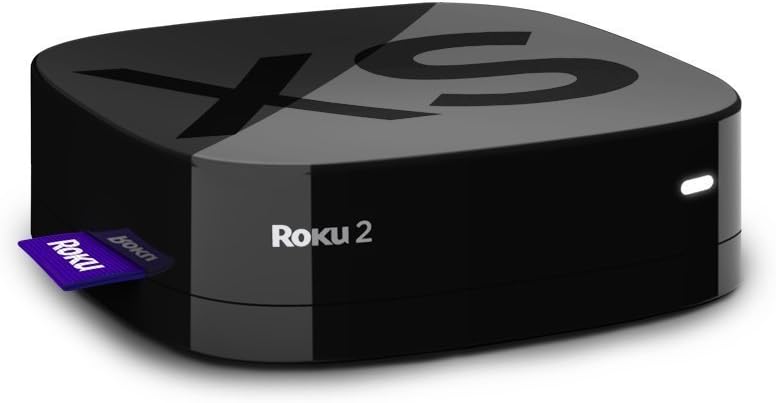
Image: The Roku 2 XS 1080p Streaming Player, a compact black device with the Roku logo, shown with a purple Roku tag اس کی طرف.
2. کیا شامل ہے۔
- Enhanced remote with motion control for games
- Angry Birds game (pre-installed or included as a code)
- دو AA بیٹریاں
- A/V cable (red/white/yellow)
- پاور اڈاپٹر
- Get Started guide
3. آپ کو کیا ضرورت ہے
- ایک ٹیلی ویژن
- High-speed Internet service (minimum 1.2 Mbps; 5 Mbps recommended for HD video)
- A wireless router (for Wi-Fi connectivity)
4. سیٹ اپ
Follow these steps to set up your Roku 2 XS streaming player:
- TV سے جڑیں: Connect the Roku 2 XS to your television using the provided A/V cable or an HDMI cable (not included). For optimal 1080p HD quality, an HDMI connection is recommended.
- پاور سے رابطہ کریں: Plug the power adapter into the Roku 2 XS and then into a wall outlet.
- پاور آن: Turn on your television and select the correct input source (HDMI or A/V) where the Roku 2 XS is connected.
- ابتدائی ڈھانچہ: Follow the on-screen instructions to connect to your Wi-Fi network and link your Roku account. If you do not have a Roku account, you will be prompted to create one.
- ریموٹ پیئرنگ: The enhanced remote should automatically pair with your device. If not, refer to the 'Remote Control' section for manual pairing instructions.
سیٹ اپ ختمview ویڈیو
ویڈیو: ایک مختصر اوورview demonstrating the setup process and features of the Roku 2 XS streaming player.
5. آپریٹنگ ہدایات
ریموٹ کنٹرول
The Roku 2 XS comes with an enhanced remote featuring motion control for gaming and dedicated buttons for popular streaming services. It also includes a voice search function for easier content discovery.
- نیویگیشن: Use the directional pad (up, down, left, right) and the 'OK' button to navigate menus and select items.
- صوتی تلاش: Press and hold the microphone button on the remote and speak your search query. This allows for quick searching of movies, TV shows, and channels.
- وقف شدہ بٹن: Utilize the dedicated buttons for direct access to services like Netflix, Hulu Plus, and Amazon Instant Video.
- موشن کنٹرول: The remote's motion sensors enable interactive gameplay for compatible games.
Accessing Channels and Content
From the Roku home screen, you can browse and launch installed channels. To add new channels, navigate to the Roku Channel Store. Many channels offer free content, while others require a subscription.
6 خصوصیات
- 1080p HD Streaming: Enjoy high-definition video quality for a clear viewتجربہ ہے.
- Motion-Based Gaming: Engage in interactive games using the remote's motion control capabilities.
- Extensive Channel Selection: Access over 600 streaming channels, including movies, TV shows, live sports, music, and news.
- One-Stop Search: Easily find movies and TV shows across multiple top channels.
- Free Mobile App: Control your Roku player, browse channels, and stream media from your iOS or Android device.
- متعدد رابطے کے اختیارات: Includes Ethernet for a stable wired connection and a USB port for playing local media files (MP4 video, AAC/MP3 audio, JPEG/PNG images).
- کومپیکٹ ڈیزائن: Small footprint, silent operation, and low power consumption.
7. وضاحتیں
| برانڈ | روکو |
| ماڈل کا نام | 3100R |
| شے کا وزن | 0.3 اونس |
| مصنوعات کے طول و عرض | 3.3 x 3.3 x 0.9 انچ |
| رنگ | سیاہ |
| قرارداد | 1080ص |
| کنیکٹوٹی ٹیکنالوجی | HDMI |
| کنیکٹر کی قسم | یو ایس بی |
| تعاون یافتہ انٹرنیٹ سروسز | Amazon Instant Video, Hulu Plus, Netflix, Pandora, YouTube |
8 دیکھ بھال
The Roku 2 XS is designed for low maintenance. To ensure optimal performance and longevity:
- زیادہ گرم ہونے سے بچنے کے لیے آلہ کو ہوادار جگہ پر رکھیں۔
- Clean the device and remote periodically with a soft, dry cloth.
- ڈیوائس کو انتہائی درجہ حرارت یا نمی کے سامنے لانے سے گریز کریں۔
9 خرابیوں کا سراغ لگانا
If you encounter issues with your Roku 2 XS, consider the following basic troubleshooting steps:
- کوئی طاقت نہیں: یقینی بنائیں کہ پاور اڈاپٹر آلہ اور کام کرنے والے الیکٹریکل آؤٹ لیٹ دونوں سے محفوظ طریقے سے جڑا ہوا ہے۔
- کوئی تصویر/آواز نہیں: Verify that the Roku 2 XS is correctly connected to your TV and that your TV is set to the correct input source. Check all cable connections.
- ریموٹ جواب نہیں دے رہا ہے: Replace the batteries in the remote. If the issue persists, try re-pairing the remote according to the 'Get Started guide'.
- Buffering/Connectivity Issues: Check your internet connection and Wi-Fi signal strength. Try restarting your wireless router and the Roku device.
- ایپ کے مسائل: Try removing and re-adding the problematic channel from your Roku device.
For more detailed troubleshooting or persistent issues, please refer to the official Roku support website or the comprehensive 'Get Started guide' included with your product.
10. وارنٹی اور سپورٹ
The Roku 2 XS 1080p Streaming Player typically comes with a 90 دن کی صنعت کار وارنٹی. وارنٹی کے دعووں کے لیے براہ کرم اپنی خریداری کا ثبوت اپنے پاس رکھیں۔
For product support, including additional guides, FAQs, and contact information, please visit the official Roku support website. You can also find helpful resources and community forums online.
قانونی دستبرداری: This product is provided in excellent condition and functions perfectly. It comes in its original box with the manual and all contents.


