1. تعارف
This manual provides comprehensive instructions for the setup, operation, and maintenance of your Geemarc CL100 Amplified Big Button Corded Phone. Please read this manual carefully to ensure proper use and to maximize the benefits of your new telephone.
The Geemarc CL100 is designed for ease of use, featuring large buttons, adjustable amplification, and visual indicators, making it suitable for individuals with hearing or visual impairments. This telephone is line-powered and does not require an external power source.
اہم نوٹ: This telephone does not include a built-in answering machine, speakerphone, caller display, talking caller ID, talking keypad, or voice assist functionality.
2. پروڈکٹ ختمview
2.1 پیکیج کے مشمولات
- Geemarc CL100 Corded Telephone Base
- ہینڈ سیٹ
- کوائلڈ ہینڈ سیٹ کی ہڈی
- ٹیلی فون لائن کی ہڈی
- صارف دستی (یہ دستاویز)
2.2 Telephone Layout
Familiarize yourself with the key components and controls of your Geemarc CL100 phone.

تصویر 1: اپر سے نیچے view of the Geemarc CL100 phone, illustrating the large numeric keypad, function buttons, and memory slots.
- ہینڈسیٹ: For speaking and listening during calls.
- عددی کی پیڈ: Large, easy-to-read buttons for dialing numbers.
- P1, P2, P3 Buttons: Priority memory buttons for frequently called numbers.
- M1-M9 Buttons: One-touch memory buttons for storing additional numbers.
- دوبارہ ڈائل بٹن: کال کردہ آخری نمبر ڈائل کرتا ہے۔
- فلیش بٹن: نیٹ ورک سروسز کے لیے استعمال کیا جاتا ہے (مثال کے طور پر، کال ویٹنگ)۔
- اسٹور بٹن: Used for programming memory numbers.
- بٹن خاموش کریں: Temporarily mutes your microphone during a call.
- Tone Control Switch: Adjusts the audio tone for clearer conversations.
- والیوم کنٹرول سوئچ: Adjusts the receiving volume during a call.
- بصری رنگر اشارے: Flashes when an incoming call is received.
- Memory Index Card: Pull-out card for noting stored memory numbers.

تصویر 2: طرف view of the phone, illustrating the ringer ON/OFF switch and the telephone line connection port.
3. سیٹ اپ
3.1 ٹیلی فون کو جوڑنا
- ہینڈ سیٹ کو جوڑیں: Plug one end of the coiled handset cord into the handset and the other end into the handset jack on the side of the telephone base.
- ٹیلی فون لائن کو جوڑیں: Plug one end of the telephone line cord into the jack labeled with a telephone icon on the back or side of the phone base. Plug the other end into your wall telephone jack.
- طاقت کا منبع: The Geemarc CL100 is powered by the telephone line and does not require an external power adapter.
- Ringer Switch: Ensure the ringer switch (located on the side) is set to "Low" or "High" for audible ringing.
3.2 ابتدائی چیکس
- Lift the handset and listen for a dial tone. If no dial tone is present, check all connections.
- Make a test call to ensure proper functionality.
4. آپریٹنگ ہدایات
4.1 کال کرنا
- ہینڈسیٹ اٹھاو۔
- ڈائل ٹون کا انتظار کریں۔
- Dial the required number using the numeric keypad.
- Upon completion of the call, carefully replace the handset in the cradle to disconnect.
4.2 کال کا جواب دینا
When an incoming call is received, the phone will ring and the visual indicator will flash.
- کال کا جواب دینے کے لیے ہینڈ سیٹ اُٹھائیں۔
- Upon completion of the call, carefully replace the handset in the cradle.
4.3 آخری نمبر دوبارہ ڈائل کریں۔
- ہینڈسیٹ اٹھاو۔
- ڈائل ٹون کا انتظار کریں۔
- دبائیں دوبارہ ڈائل کرنا button. The previously dialed number will be automatically redialed.
- Note: This function does not apply to numbers dialed from memory buttons.
4.4 خاموش فنکشن
The Mute button allows you to speak privately without your caller overhearing.
- کال کے دوران ، دبائیں خاموش button. You will still hear the caller, but they will not hear you.
- دبائیں خاموش button again to resume normal conversation.
4.5 Storing Telephone Numbers (Memory Dialing)
Your telephone can store 12 direct memory numbers: 3 priority numbers (P1, P2, P3) and 9 standard memory numbers (M1-M9). Priority memories can store up to 24 digits, and M1-M9 can store up to 32 digits.
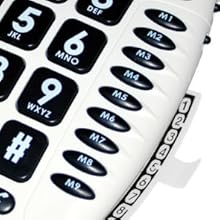
تصویر 3: Detail of the memory buttons (M1-M9) and the integrated memory index card.
- ہینڈسیٹ اٹھاو۔
- دبائیں اسٹور بٹن
- وہ ٹیلیفون نمبر ڈائل کریں جسے آپ اسٹور کرنا چاہتے ہیں۔
- دبائیں اسٹور دوبارہ بٹن.
- Press the desired memory button (P1, P2, P3, or M1-M9) where you want to save the number.
- ہینڈ سیٹ کو تبدیل کریں۔
- Note: Use the index card located under the base to record your stored numbers for easy reference. Stored memories are protected even if the phone line is unplugged.
4.6 Dialing Stored Numbers
- ہینڈسیٹ اٹھاو۔
- ڈائل ٹون کا انتظار کریں۔
- Press the appropriate memory button (P1, P2, P3, or M1-M9). The stored number will be dialed automatically.
4.7 Recall (R), * & # Buttons
These buttons are used in conjunction with new services provided on digital exchanges. For specific details on their use, please contact your network operator.
4.8 ہیئرنگ ایڈ کی مطابقت
If you are using this telephone with a hearing aid, set your hearing aid to the "T" (Telecoil) setting for optimal audio quality.
5 دیکھ بھال
- صفائی: Clean the telephone with a soft, damp کپڑا کھرچنے والے کلینر یا سالوینٹس کا استعمال نہ کریں۔
- ذخیرہ: فون کو ٹھنڈی، خشک جگہ پر براہ راست سورج کی روشنی اور انتہائی درجہ حرارت سے دور رکھیں۔
- مائعات سے پرہیز کریں: Do not expose the telephone to water or other liquids.
- ہڈی کی دیکھ بھال: Ensure the handset and line cords are not tangled or pinched to prevent damage.
6 خرابیوں کا سراغ لگانا
| مسئلہ | ممکنہ وجہ | حل |
|---|---|---|
| کوئی ڈائل ٹون نہیں۔ | ٹیلی فون لائن کی ہڈی ٹھیک طرح سے منسلک نہیں ہے۔ | Check that both ends of the telephone line cord are securely plugged in. |
| کال کرنے والا نہیں سن سکتا / کال کرنے والا مجھے نہیں سن سکتا | Volume settings are too low or Mute is active. | Adjust the Volume control. Ensure the Mute button is not pressed. |
| فون نہیں بجتا | Ringer switch is set to "Off". | Set the ringer switch (on the side) to "Low" or "High". |
| Stored memory numbers are lost | This phone protects stored memories even if the phone line is unplugged. If numbers are lost, they may not have been stored correctly. | Re-store the numbers following the instructions in Section 4.5. |
| Difficulty dialing quickly | Some older phone systems may require a slower dialing pace. | Try dialing at a slightly slower pace. Consider using the memory dial function for frequently called numbers. |
7. وضاحتیں
- ماڈل: جیمارک سی ایل 100
- قسم: تار تار ٹیلیفون
- Ampliification: Up to 30 dB receiving volume
- رنگر والیوم: Adjustable up to 85 dB
- یادداشت: 3 Priority (P1-P3), 9 One-touch (M1-M9)
- طاقت کا منبع: Line-powered (no external adapter required)
- ہم آہنگ سماعت امداد: Yes (T-coil setting)
- طول و عرض: تقریباً 7.5 x 8 x 3 انچ (19 x 20.3 x 7.6 سینٹی میٹر)
- وزن: تقریباً 2.25 پاؤنڈ (1.02 کلوگرام)
- رنگ: سفید
8. وارنٹی اور سپورٹ
8.1 وارنٹی کی معلومات
For information regarding the warranty period and terms for your Geemarc CL100 telephone, please refer to the warranty card included with your purchase or visit the official Geemarc webسائٹ وارنٹی کے دعووں کے لیے اپنی خریداری کا ثبوت رکھیں۔
8.2 کسٹمر سپورٹ
If you encounter any issues not covered in the troubleshooting section or require further assistance, please contact Geemarc customer support. Contact details can typically be found on the Geemarc webسائٹ یا مصنوعات کی پیکیجنگ پر۔
آن لائن وسائل کے لیے، ملاحظہ کریں: www.geemarc.com


