1. تعارف
This manual provides comprehensive instructions for the safe and effective use of the PeakTech True RMS P 3131 Clamp Meter with Multimeter. This device is designed for measuring AC/DC currents without circuit interruption, as well as AC/DC voltage and resistance, with continuity testing capabilities. It features a 3 3/4 digit LCD display with True RMS measurement for accurate readings.
براہ کرم ڈیوائس کو چلانے سے پہلے اس دستی کو اچھی طرح پڑھیں اور اسے مستقبل کے حوالے کے لیے اپنے پاس رکھیں۔
2. حفاظتی معلومات
WARNING: Improper use of this meter can cause damage, shock, injury, or death. Always follow all safety precautions.
- ہمیشہ مقامی اور قومی حفاظتی ضابطوں پر عمل کریں۔
- Do not use the meter if it appears damaged or if the insulation on test leads is compromised.
- پیمائش کرنے سے پہلے یقینی بنائیں کہ میٹر درست فنکشن اور رینج پر سیٹ ہے۔
- Avoid contact with live circuits. Use appropriate personal protective equipment (PPE).
- The device is rated for CAT II 600V. Do not exceed these limits.
- کم بیٹری اشارے ظاہر ہونے پر بیٹریاں فوری طور پر تبدیل کریں۔
- Do not operate the meter in explosive atmospheres.
3. پروڈکٹ ختمview اور اجزاء
The PeakTech P 3131 is a robust and reliable clamp meter. Familiarize yourself with its main components:

شکل 1: سامنے view of the PeakTech P 3131 Clamp Meter, showing the clamp jaw, function selector, LCD display, and input terminals.
- Clamp جبڑا: غیر رابطہ AC/DC موجودہ پیمائش کے لیے۔
- Function Selector Dial: To select measurement modes (A~, A=, V~, V=, Ω/Continuity, OFF).
- LCD ڈسپلے: پیمائش کی ریڈنگز، اکائیاں، اور اشارے دکھاتا ہے۔
- بٹن: AC/DC, ZERO, H/MAX (Data Hold/Max Hold).
- ان پٹ ٹرمینلز: COM (common) and VΩ (voltage/resistance) for test leads.
- ہینڈ گارڈ: Provides protection against accidental contact.
4. سیٹ اپ
4.1 بیٹری کی تنصیب
The PeakTech P 3131 requires two 1.5V AAA batteries (included). To install or replace batteries:
- یقینی بنائیں کہ ڈیوائس آف ہے۔
- میٹر کے پچھلے حصے میں بیٹری کے کمپارٹمنٹ کور کو تلاش کریں۔
- ٹوکری کھولنے کے لیے سکریو ڈرایور کا استعمال کریں۔
- Insert the two AAA batteries, observing correct polarity (+ and -).
- بیٹری کے کمپارٹمنٹ کور کو تبدیل کریں اور اسے سکرو سے محفوظ کریں۔
When the low battery indicator appears on the display, replace the batteries immediately to ensure accurate measurements.
4.2 ٹیسٹ لیڈز کو جوڑنا
جلد کے لیےtage, resistance, and continuity measurements, connect the supplied test leads:
- میں بلیک ٹیسٹ لیڈ داخل کریں۔ COM (common) input terminal.
- میں سرخ ٹیسٹ لیڈ داخل کریں۔ VΩ ان پٹ ٹرمینل

Figure 2: PeakTech P 3131 Clamp Meter shown with its carrying case, test leads, batteries, and user manual.
5. آپریٹنگ ہدایات
5.1 پاور آن/آف
Rotate the function selector dial from the "OFF" position to any desired measurement function to power on the meter. To power off, rotate the dial back to "OFF". The meter features an automatic power-off function (can be deactivated) to conserve battery life.
5.2 AC/DC موجودہ پیمائش (Clamp)
سرکٹ کو توڑے بغیر کرنٹ کی پیمائش کرنے کے لیے:
- فنکشن سلیکٹر ڈائل کو کی طرف موڑ دیں۔ A~ (AC کرنٹ) یا A= (ڈی سی کرنٹ) پوزیشن۔
- دبائیں AC/DC button if you need to switch between AC and DC current modes (if the dial position combines them).
- دبائیں صفر button to zero the display before measuring DC current, especially for small currents, to compensate for residual magnetism.
- cl کھولیں۔amp جبڑے کو ٹرگر دبانے سے۔
- Enclose only ایک conductor with the clamp جبڑے یقینی بنائیں کہ جبڑا مکمل طور پر بند ہے۔
- LCD ڈسپلے پر موجودہ قدر پڑھیں۔
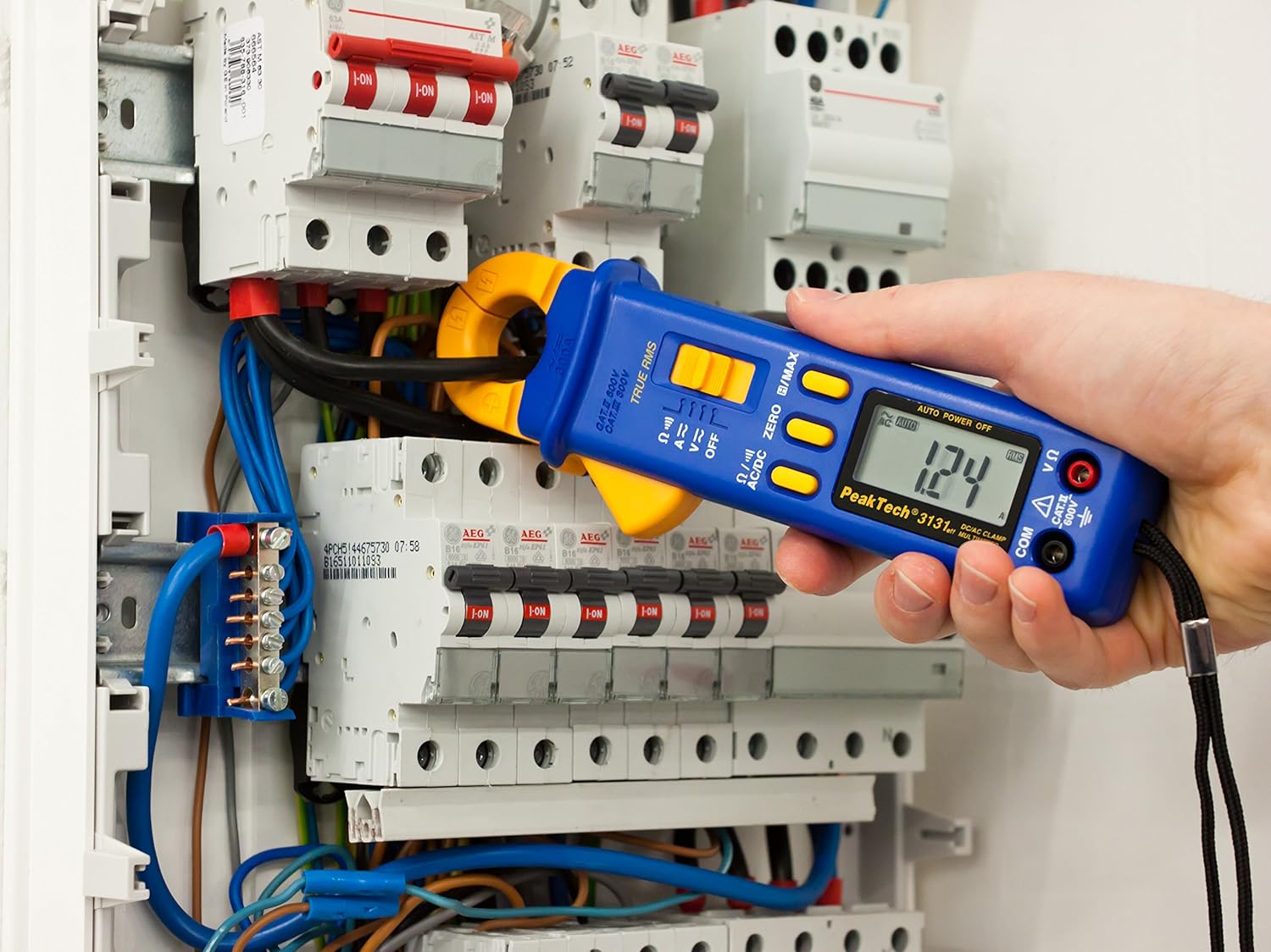
Figure 3: The PeakTech P 3131 Clamp Meter in use, measuring current on a single conductor within an electrical panel.
5.3 AC/DC والیومtage پیمائش
حجم کی پیمائش کرنے کے لئےtage:
- ٹیسٹ لیڈز کو جوڑیں جیسا کہ سیکشن 4.2 میں بیان کیا گیا ہے۔
- فنکشن سلیکٹر ڈائل کو کی طرف موڑ دیں۔ V~ (AC والیومtage) یا V= (DC والیومtagای) پوزیشن۔
- ٹیسٹ پروبس کو اس سرکٹ یا جزو کے متوازی طور پر جوڑیں جس کی آپ پیمائش کرنا چاہتے ہیں۔
- جلد پڑھیںtagLCD ڈسپلے پر ای ویلیو۔
5.4 Resistance and Continuity Measurement
To measure resistance or check for continuity:
- ٹیسٹ لیڈز کو جوڑیں جیسا کہ سیکشن 4.2 میں بیان کیا گیا ہے۔
- فنکشن سلیکٹر ڈائل کو کی طرف موڑ دیں۔ Ω/))) (Resistance/Continuity) position.
- For resistance: Connect the test probes across the component. Ensure the circuit is de-energized.
- For continuity: Touch the test probes to the two points you want to check. A continuous beep indicates a low-resistance path (continuity).
- LCD ڈسپلے پر مزاحمتی قدر پڑھیں۔
5.5 خصوصی افعال
- حقیقی RMS: The meter measures True Root Mean Square values for AC voltage and current, providing accurate readings for non-sinusoidal waveforms.
- Data Hold (H): دبائیں H/MAX ڈسپلے پر موجودہ پڑھنے کو منجمد کرنے کے لیے مختصر طور پر بٹن دبائیں جاری کرنے کے لیے دوبارہ دبائیں۔
- Maximum Value Hold (MAX): دبائیں اور تھامیں۔ H/MAX button to capture and display the maximum measured value. Press again to exit.
- ZERO Function: Used to zero the display for DC current measurements to eliminate offset errors.
- آٹو رینجنگ: The meter automatically selects the appropriate measurement range.
- آٹو پاور آف: The meter automatically turns off after a period of inactivity to save battery. This feature can typically be disabled by holding a specific button during power-on (refer to the device's on-screen indicators or a more detailed manual if available).
6 دیکھ بھال
6.1 صفائی
میٹر کے کیس کو اشتہار سے صاف کریں۔amp کپڑا اور ایک ہلکا صابن۔ کھرچنے والے یا سالوینٹس کا استعمال نہ کریں۔ استعمال کرنے سے پہلے یقینی بنائیں کہ میٹر مکمل طور پر خشک ہے۔
6.2 بیٹری کی تبدیلی
Refer to Section 4.1 for instructions on battery replacement. Always use two fresh 1.5V AAA batteries. Remove batteries if the meter is not used for an extended period to prevent leakage.
6.3 اسٹوریج
Store the meter in a cool, dry place, away from direct sunlight and extreme temperatures. Use the provided carrying case for protection.
7 خرابیوں کا سراغ لگانا
| مسئلہ | ممکنہ وجہ | حل |
|---|---|---|
| میٹر آن نہیں ہے۔ | مردہ یا غلط طریقے سے نصب بیٹریاں۔ | بیٹری polarity چیک کریں؛ بیٹریاں تبدیل کریں. |
| "OL" or "OVER" displayed. | پیمائش منتخب رینج یا میٹر کی زیادہ سے زیادہ صلاحیت سے زیادہ ہے۔ | Select a higher range (if manual ranging) or ensure measurement is within meter's limits. |
| Inaccurate DC current reading. | Residual magnetism in clamp جبڑے | دبائیں صفر button before measurement. |
| کوئی تسلسل بیپ نہیں۔ | اوپن سرکٹ یا اعلی مزاحمت۔ | Check connections; ensure circuit is complete. |
If problems persist, contact PeakTech customer support or a qualified service technician.
8. تکنیکی تفصیلات
| پیرامیٹر | تفصیلات |
|---|---|
| ڈسپلے | 3 3/4 digit LCD, max. 3999 counts |
| ڈی سی والیومtage (DCV) | 0.1 mV to 600 V (Accuracy: 0.5% + 2 digits) |
| AC جلدtage (ACV) | 1 mV to 600 V (Accuracy: 1.5% + 5 digits) |
| ڈی سی کرنٹ (DCA) | 10 mA to 300 A (Accuracy: 1% + 2 digits) |
| AC کرنٹ (ACA) | 10 mA to 300 A (Accuracy: 1% + 3 digits) |
| مزاحمت (Ω) | 0.1 Ω to 40 MΩ (Accuracy: 0.9% + 2 digits) |
| تسلسل ٹیسٹ | بزر فنکشن |
| حقیقی RMS | Yes, for AC measurements |
| جبڑے کا کھلنا | 22 mm max. conductor diameter |
| حفاظتی درجہ بندی | EN 61010-1, CAT II 600 V |
| بجلی کی فراہمی | 2 x 1.5V AAA بیٹریاں |
| طول و عرض (L x W x H) | 192 x 66 x 27 ملی میٹر (تقریباً 7.56 x 2.6 x 1.06 انچ) |
| وزن | 205 گرام (تقریباً 0.45 پونڈ) |
9. وارنٹی اور سپورٹ
PeakTech products are manufactured under strict quality control. This product is covered by a standard manufacturer's warranty against defects in materials and workmanship. Please refer to the warranty card included with your product or visit the official PeakTech webتفصیلی وارنٹی شرائط و ضوابط کے لیے سائٹ۔
For technical support, service, or calibration inquiries, please contact your local PeakTech distributor or the PeakTech customer service department. Contact information can typically be found on the PeakTech webسائٹ یا مصنوعات کی پیکیجنگ میں۔


