Druck DPI822 Thermocouple/Loop Calibrator User Manual
Model: DPI822
1. پروڈکٹ ختمview
The Druck DPI822 is a robust, hand-held instrument designed for the test and calibration of various process parameters, specifically focusing on thermocouple and loop calibration. It offers advanced features for efficient and reliable measurements in industrial applications.
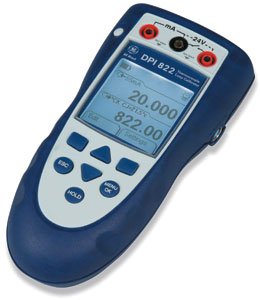
شکل 1: سامنے view of the Druck DPI822 Thermocouple/Loop Calibrator, showing its display and control buttons.
Key functionalities include simultaneous thermocouple output and mA measurement, a 24V loop power supply for energizing transmitters and control loops, and an automatic switch test for capturing open/closed trip values. It also features a switchable Hart resistor for digital communicators.
2. پیکیج کے مشمولات
Upon unpacking your DPI822 Calibrator, please verify that all the following items are present:
Druck DPI822 Thermocouple/Loop Calibrator Unit
Calibration Certificate (NIST-traceable)
صارف کا دستورالعمل (یہ دستاویز)
Set of Test Leads
اگر کوئی آئٹم غائب یا خراب ہو تو، براہ کرم فوری طور پر اپنے سپلائر سے رابطہ کریں۔
3. کلیدی خصوصیات
NIST-traceable calibration certificate with data provided prior to shipment.
Ability to measure and source thermocouples.
Advanced cold junction compensation for accurate temperature measurements.
Large, backlit display for clear visibility in various lighting conditions.
Menu-driven interface for intuitive navigation.
mA measure, switch test, and 24V loop power capabilities.
4. سیٹ اپ اور ابتدائی آپریشن
4.1 ڈیوائس پر پاورنگ
Ensure fresh batteries are installed in the battery compartment. Press and hold the power button (typically located on the top or side) until the display illuminates.
4.2 ٹیسٹ لیڈز کو جوڑنا
Connect the provided test leads to the appropriate input/output terminals on the DPI822. Refer to the labels next to each terminal for correct connection points for thermocouple, mA, and 24V loop power applications.
For Thermocouple measurements: Connect thermocouple probes to the designated thermocouple input jacks.
For mA measurements/sourcing: Connect test leads to the mA input/output jacks.
For 24V Loop Power: Connect to the dedicated 24V output terminals.
4.3 ابتدائی کیلیبریشن چیک
Although your unit is pre-calibrated, it is good practice to perform a quick functional check. Navigate through the menu to a known measurement or source function and observe the readings. Consult the calibration certificate for expected performance.
5. آپریٹنگ ہدایات
5.1 مینو نیویگیشن
The DPI822 features a menu-driven interface. Use the arrow keys (Up/Down/Left/Right) to navigate through options and the 'OK' or 'Enter' button to select. The 'ESC' button typically returns to the previous screen or cancels an operation.
5.2 Thermocouple Measurement and Sourcing
Select the thermocouple function from the main menu. Choose the desired thermocouple type (e.g., Type K, J, T) if prompted. Connect the thermocouple probe to the input terminals for measurement, or connect to the device under test for sourcing a temperature signal.
5.3 mA Measurement and Sourcing
Access the mA function from the menu. For measuring current, connect the DPI822 in series with the circuit. For sourcing current, connect the DPI822 to the input of the device requiring a current signal. Adjust the output value using the navigation keys.
5.4 24V Loop Power Supply
The DPI822 can provide 24V loop power to energize transmitters or control loops. Select the 24V loop power option and connect the appropriate leads to the device requiring power. This feature is useful for testing transmitters without an external power supply.
5.5 Automatic Switch Test
To perform an automatic switch test, select this function from the menu. Connect the DPI822 to the switch or safety system. The calibrator will automatically capture open/closed trip values, providing a fast and accurate check of the system's response.
5.6 Hart Resistor Integration
When using a Hart digital communicator, the DPI822 allows for a 250Ω Hart resistor to be switched into the loop. This eliminates the need to carry a separate resistor. Consult the menu for the option to enable or disable the Hart resistor.
6 دیکھ بھال
6.1 صفائی
Clean the exterior of the DPI822 with a soft, damp cloth. Do not use abrasive cleaners or solvents. Ensure no moisture enters the device through ports or openings.
6.2 بیٹری کی تبدیلی
When the low battery indicator appears on the display, replace the batteries immediately. Refer to the battery compartment cover for the correct battery type and polarity. Always use high-quality batteries.
6.3 اسٹوریج
Store the DPI822 in a cool, dry place, away from direct sunlight and extreme temperatures. If storing for extended periods, remove the batteries to prevent leakage.
6.4 بازیافت۔
For continued accuracy and compliance with quality standards, periodic recalibration of the DPI822 is recommended. Refer to your organization's calibration schedule or contact a certified calibration service.
7 خرابیوں کا سراغ لگانا
7.1 ڈیوائس آن نہیں ہوتی ہے۔
بیٹری کی تنصیب کو چیک کریں اور یقینی بنائیں کہ بیٹریاں تازہ ہیں۔
Verify battery polarity is correct.
7.2 غلط ریڈنگز
یقینی بنائیں کہ ٹیسٹ لیڈز محفوظ طریقے سے جڑے ہوئے ہیں اور انہیں نقصان نہیں پہنچا ہے۔
درست پیمائش کے فنکشن کی تصدیق کریں اور رینج کا انتخاب کیا گیا ہے۔
Check for proper cold junction compensation if measuring thermocouples.
Consider if recalibration is due.
7.3 ڈسپلے کے مسائل
If the display is dim, replace batteries.
If the display is blank or frozen, try restarting the device.
For issues not covered here, or if troubleshooting steps do not resolve the problem, please contact customer support.
8. تکنیکی تفصیلات
پیرامیٹر
قدر
ماڈل نمبر
ڈی پی آئی 822
کارخانہ دار
ڈرک
پیکیج کے طول و عرض
7 x 3.3 x 2 انچ
شے کا وزن
3.5 پاؤنڈز
پہلی دستیاب تاریخ
31 مئی 2012
ASIN
B0087SCCDK
نوٹ: وضاحتیں بغیر اطلاع کے تبدیل کی جاسکتی ہیں۔
9. وارنٹی کی معلومات
The Druck DPI822 Thermocouple/Loop Calibrator is covered by a standard manufacturer's warranty. Please refer to the warranty card included with your product or visit the official Druck website for detailed terms and conditions regarding warranty coverage, duration, and claims procedures. Keep your proof of purchase for warranty validation.
10. کسٹمر سپورٹ
For technical assistance, service, or inquiries regarding your Druck DPI822, please contact Druck customer support. Contact information can typically be found on the manufacturer's official website or on the product packaging. When contacting support, please have your product model number (DPI822) and serial number (if applicable) ready.
متعلقہ دستاویزات - ڈی پی آئی 822
Druck DPI 611 Hand-Held Pressure Calibrator: Features, Specifications, and Accessories Detailed information on the Druck DPI 611 hand-held pressure calibrator, including its precision engineering, pressure generation capabilities, electrical functions, user interface, advanced features, specifications, and available accessories. Learn about its compact design, accuracy, and integration with 4Sight2 calibration software.
ڈرک UPS4E لوپ کیلیبریٹر: خصوصیات، وضاحتیں، اور ترتیب Explore the Druck UPS4E, a rugged and compact loop calibrator designed for process control mA loops and mA devices. This document details its features, technical specifications, ordering information, and related products.
Druck DPI 620 Advanced Modular Calibrator - GE Sensing User Manual Comprehensive user manual for the GE Druck DPI 620 advanced modular calibrator. Discover its capabilities in electrical measurement, sourcing, HART communications, and its modular system with MC 620, PM 620, and PV 62x pressure components.
Druck DPI611 Portable Pressure Calibrator: Safety and Quick Start Guide Explore the Druck DPI611 Portable Pressure Calibrator with this Safety and Quick Start Guide. Learn about its features, models, and essential safety procedures for electrical measurement and pressure calibration tasks.