1. تعارف
Thank you for choosing the TFA 30.5027.02 Digital Thermometer/Hygrometer. This device is designed to accurately measure and display indoor temperature and humidity, providing a clear indication of the comfort level in your environment. Its ultra-flat design and high-gloss surface make it a discreet and functional addition to any room. Please read this manual carefully to ensure proper setup and operation.
2. حفاظتی معلومات
- مستقبل کے حوالے کے لیے اس ہدایت نامہ کو رکھیں۔
- یہ آلہ صرف اندرونی استعمال کے لیے ہے۔
- Do not expose the device to extreme temperatures, direct sunlight, moisture, or strong vibrations.
- آلے کو پانی یا دیگر مائعات میں نہ ڈوبیں۔
- Do not attempt to open or modify the device. This will void the warranty.
- بیٹریاں بچوں کی پہنچ سے دور رکھیں۔ اگر نگل لیا جائے تو فوری طبی امداد حاصل کریں۔
- استعمال شدہ بیٹریوں کو مقامی ضابطوں کے مطابق تلف کریں۔
- آلے کو نرم سے صاف کریں، ڈیamp کپڑا کھرچنے والے کلینر یا سالوینٹس کا استعمال نہ کریں۔
3. پیکیج کے مشمولات
براہ کرم چیک کریں کہ تمام اجزاء موجود ہیں اور غیر نقصان دہ ہیں:
- 1x TFA 30.5027.02 Digital Thermometer/Hygrometer
- 1x CR2 Lithium Battery (pre-installed or separate)
- 1x ہدایت نامہ (یہ دستاویز)
4. پروڈکٹ ختمview
The TFA 30.5027.02 features a clear digital display showing current temperature and humidity. It also includes a comfort level indicator and a maximum/minimum value memory function.

تصویر 1: سامنے والا view of the TFA 30.5027.02 Digital Thermometer/Hygrometer. The display shows temperature in Celsius and relative humidity percentage, along with a comfort level icon.
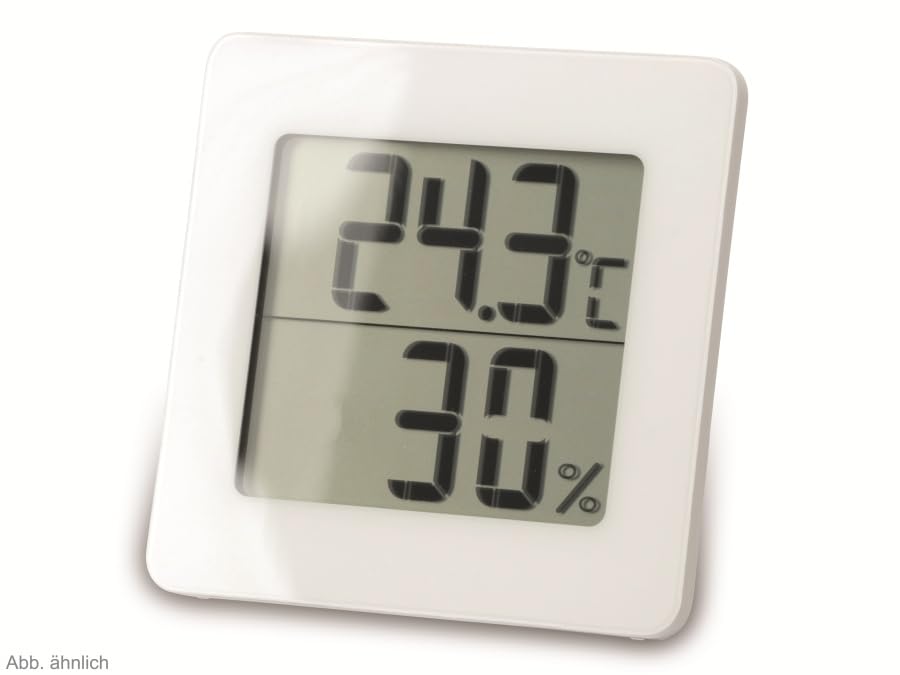
تصویر 2: متبادل view of the TFA 30.5027.02 showing different temperature and humidity readings, demonstrating the device's clear digital display.
اہم خصوصیات:
- Digital display for temperature (°C) and humidity (% RH)
- Ultra-flat design with high-gloss finish
- Comfort level indicator (smiley icon)
- Maximum and minimum value memory function
- دیوار پر چڑھنے کے قابل
5. سیٹ اپ
5.1 بیٹری کی تنصیب
- ڈیوائس کے پچھلے حصے میں بیٹری کے کمپارٹمنٹ کور کو تلاش کریں۔
- ڈھکن کو سلائیڈ کرکے یا آہستہ سے اسے کھول کر ہٹا دیں۔
- Insert one CR2 Lithium battery, ensuring the correct polarity (+/-) as indicated inside the compartment.
- بیٹری کے کمپارٹمنٹ کور کو محفوظ طریقے سے تبدیل کریں۔
- The device display should activate, showing current temperature and humidity readings.
5.2 ابتدائی جگہ کا تعین
For accurate readings, place the thermometer/hygrometer in a location free from direct sunlight, drafts, or heat sources. The device can be placed on a flat surface or mounted on a wall using the integrated mounting hole on the back.
- دیوار چڑھانا: Use a small screw (not included) suitable for your wall type. Hang the device securely.
- ٹیبل ٹاپ پلیسمنٹ: Ensure the device is stable on a flat, level surface.
6. آپریٹنگ ہدایات
6.1 ڈسپلے ختمview
The large digital display shows two main values:
- اوپری ڈسپلے: Current temperature in degrees Celsius (°C).
- لوئر ڈسپلے: Current relative humidity in percentage (% RH)۔
- کمفرٹ لیول انڈیکیٹر: A small icon (e.g., a smiley face) indicates the current indoor climate comfort level based on temperature and humidity.
6.2 زیادہ سے زیادہ/منٹ فنکشن
The device records the maximum and minimum temperature and humidity values measured since the last reset. To access these values:
- دبائیں MAX/MIN button (if present, typically on the back or side). The display will show the maximum recorded temperature and humidity.
- دبائیں MAX/MIN بٹن دوبارہ view کم از کم ریکارڈ شدہ درجہ حرارت اور نمی۔
- دبائیں MAX/MIN button a third time to return to current readings.
To reset the MAX/MIN values, press and hold the MAX/MIN button for a few seconds while viewing the MAX or MIN values. The memory will clear, and new maximum and minimum values will begin recording from that point.
6.3 Comfort Level Indicator
The comfort level indicator provides a quick visual reference for indoor climate conditions:
- خوش چہرہ: زیادہ سے زیادہ آرام کی نشاندہی کرتا ہے (مثلاً 20-25°C اور 40-70% RH)۔
- غیر جانبدار چہرہ: قابل قبول لیکن بہترین حالات کی نشاندہی نہیں کرتا۔
- اداس چہرہ: Indicates uncomfortable conditions (e.g., too dry, too humid, too hot, or too cold).
Note: Specific ranges for comfort levels may vary slightly by model. Refer to the device's display for the exact icon representation.
7 دیکھ بھال
7.1 صفائی
آلے کو نرم، قدرے ڈی سے صاف کریں۔amp cloth. Do not use abrasive cleaning agents, solvents, or alcohol, as these can damage the surface and display.
7.2 بیٹری کی تبدیلی
When the battery power is low, a low battery indicator (if available) will appear on the display. Replace the battery as follows:
- ڈیوائس کے پچھلے حصے میں بیٹری کے کمپارٹمنٹ کور کو کھولیں۔
- Remove the old CR2 Lithium battery.
- Insert a new CR2 Lithium battery, observing the correct polarity (+/-).
- بیٹری کے کمپارٹمنٹ کور کو بند کریں۔
Note: After battery replacement, the device may reset, and MAX/MIN values will be cleared.
8 خرابیوں کا سراغ لگانا
| مسئلہ | ممکنہ وجہ | حل |
|---|---|---|
| کوئی ڈسپلے یا بیہوش ڈسپلے نہیں۔ | بیٹری ختم ہو گئی ہے یا غلط طریقے سے ڈالی گئی ہے۔ | Replace the battery with a new CR2 Lithium battery, ensuring correct polarity. |
| غلط پڑھنا۔ | Device is placed in an unsuitable location (e.g., near a window, heat source, or vent). | Relocate the device to a stable indoor environment away from direct influences. Allow 15-30 minutes for readings to stabilize. |
| Comfort indicator always shows the same face | Environmental conditions are consistently outside or within a specific comfort range. | This indicates the device is functioning correctly. Adjust your indoor environment if desired. |
9. وضاحتیں
- ماڈل نمبر: 30.5027.02
- برانڈ: TFA
- رنگ: سفید
- پروڈکٹ کے طول و عرض (L x W x H): 10 x 1.2 x 8.2 سینٹی میٹر (3.94 x 0.47 x 3.23 انچ)
- آئٹم کا وزن: 70 گرام (2.47 اونس)
- بیٹری: 1 x CR2 لتیم (شامل)
- چڑھنے کی قسم: وال ماؤنٹ
- Operational Humidity Range: 20% سے 95% RH
- Upper Rated Temperature: 50°C (122°F)
- درجہ حرارت کی درستگی: ±1°C
- درجہ حرارت پڑھنے کی درستگی: ±1°C
10. وارنٹی اور سپورٹ
For warranty information and customer support, please refer to the terms and conditions provided by your retailer or contact the manufacturer directly. Keep your proof of purchase for any warranty claims.
مینوفیکچرر: TFA دوستمان GmbH اینڈ کمپنی KG
For further assistance, please visit the official TFA webسائٹ یا ان کے کسٹمر سروس ڈیپارٹمنٹ سے رابطہ کریں۔


