1. تعارف
Thank you for choosing the Hama 95236 8-inch LCD Digital Photo Frame. This manual provides important information regarding the safe operation, setup, and maintenance of your device. Please read it thoroughly before using the product and keep it for future reference.
2. حفاظتی ہدایات
- Do not open the device. Incorrect assembly or repair can lead to electric shock.
- اگر مصنوعات کو واضح طور پر نقصان پہنچا ہے تو اسے نہ چلائیں۔
- Protect the product from dirt, moisture, and overheating. Use it only in dry environments.
- پروڈکٹ کو نہ گرائیں اور نہ ہی اسے مضبوط وائبریشنز سے بے نقاب کریں۔
- مصنوعات کو صرف اس کے مطلوبہ مقصد کے لیے استعمال کریں۔
- اس پروڈکٹ کو، تمام برقی مصنوعات کی طرح، بچوں کی پہنچ سے دور رکھیں۔
- مقامی طور پر قابل اطلاق ضوابط کے مطابق پیکیجنگ مواد کو فوری طور پر ضائع کریں۔
3. پیکیج کے مشمولات
Please check that the package contains the following items:
- Hama 95236 8-inch LCD Digital Photo Frame
- پاور اڈاپٹر
- صارف دستی (یہ دستاویز)
4. پروڈکٹ ختمview
Familiarize yourself with the components and controls of your digital photo frame.
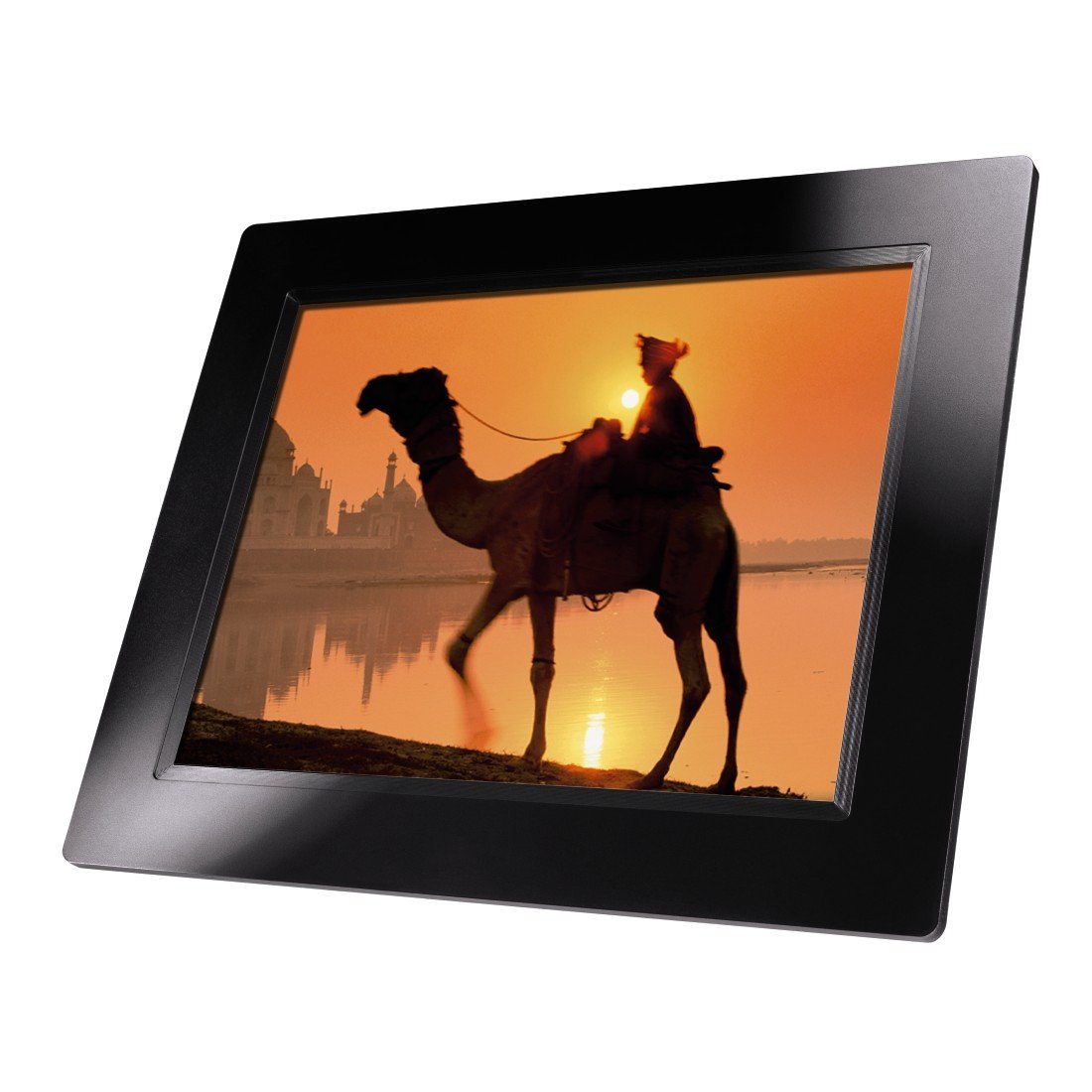
تصویر 4.1: سامنے والا view of the Hama 95236 Digital Photo Frame, showing the 8-inch LCD screen.

تصویر 4.2: طرف view of the digital photo frame, highlighting the various input ports including the SD/MMC/MS card slot, USB port, and DC IN power port.

تصویر 4.3: پیچھے view of the digital photo frame, showing the stand attachment point, ventilation grilles, and the control panel with power, navigation, and menu buttons.
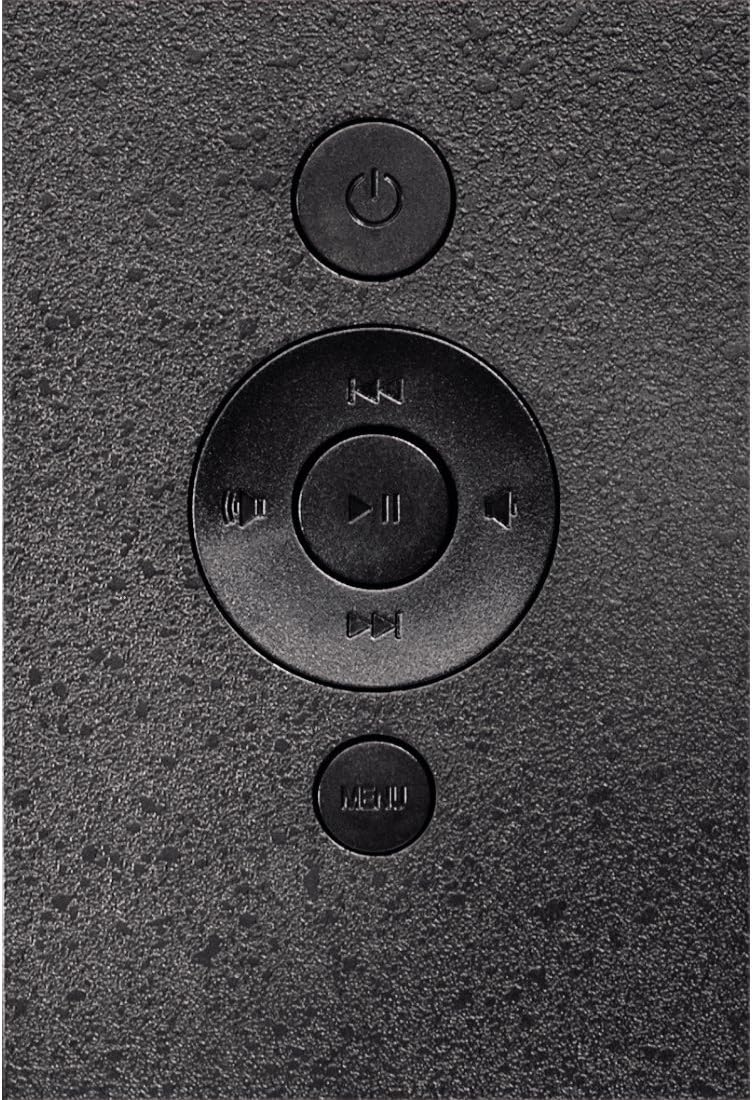
تصویر 4.4: Close-up of the control buttons located on the back of the frame. These include the power button, directional navigation buttons (up, down, left, right), play/pause/enter button, and the menu button.
4.1 بندرگاہیں اور کنٹرول
- SD/MMC/MS Card Slot: For inserting memory cards to display photos and videos.
- USB پورٹ: For connecting USB flash drives or other compatible USB storage devices.
- ڈی سی ان: Power input for connecting the provided power adapter.
- پاور بٹن: ڈیوائس کو آن یا آف کرتا ہے۔
- نیویگیشن بٹن (اوپر/نیچے/بائیں/دائیں): Used to navigate through menus and select options.
- Play/Pause/Enter Button: Confirms selections or controls media playback.
- مینو بٹن: Accesses the main menu for settings and options.
5. سیٹ اپ
5.1. اسٹینڈ کو جوڑنا
Insert the metal stand into the designated slot on the back of the digital photo frame. Ensure it is securely fastened to provide stable support for the frame.
5.2. پاور کنکشن
- Connect the power adapter to the DC IN port on the back of the photo frame.
- پاور اڈاپٹر کو کسی مناسب الیکٹریکل آؤٹ لیٹ میں لگائیں۔
- The frame will typically power on automatically or can be turned on using the power button.
5.3. Inserting a Memory Card or USB Drive
The Hama 95236 supports SD/MMC/MS memory cards and USB flash drives.
- Locate the SD/MMC/MS card slot or the USB port on the side of the frame (refer to Figure 4.2).
- Carefully insert your memory card or USB drive into the corresponding slot/port. Ensure it is inserted correctly to avoid damage.
- The frame should automatically detect the storage device and prompt you to view its contents or start a slideshow.
6. آپریٹنگ ہدایات
6.1. بنیادی نیویگیشن
Use the navigation buttons on the back of the frame to move through menus and options. The Play/Pause/Enter button confirms your selection.
6.2. مین مینو
دبائیں مینو button to access the main menu. From here, you can select different modes and settings:
- تصویر: View photos in a slideshow or individually.
- موسیقی: آڈیو چلائیں۔ files.
- ویڈیو: ویڈیو چلائیں۔ files.
- Calendar/Clock: Display the calendar and time.
- ترتیبات: Adjust various device parameters.
6.3. Photo Playback
- مین مینو سے، منتخب کریں۔ تصویر.
- Navigate to your desired folder or select all photos.
- دبائیں چلائیں/روکیں/انٹر کریں۔ button to start the slideshow.
- During a slideshow, you can use the navigation buttons to skip photos or pause playback.
6.4. نظام کی ترتیبات
تک رسائی حاصل کریں۔ ترتیبات menu to customize your photo frame:
- ڈسپلے کی ترتیبات: Adjust brightness, contrast, and display mode.
- سلائیڈ شو کی ترتیبات: Configure transition effects, display time per photo, and repeat mode.
- تاریخ اور وقت: موجودہ تاریخ اور وقت مقرر کریں۔ Note: Some users have reported that date and time settings may reset after power loss.
- زبان: Select your preferred language for the menu interface.
- اسٹوریج کی معلومات: View details about connected storage devices.
7 دیکھ بھال
7.1. آلہ صاف کرنا
- صفائی سے پہلے ہمیشہ آلہ کو بجلی کی فراہمی سے منقطع کریں۔
- Clean the screen and exterior surfaces with a soft, dry, lint-free cloth.
- Do not use aggressive cleaning agents, solvents, or abrasive materials.
7.2. ذخیرہ
اگر آلہ کو طویل مدت کے لیے ذخیرہ کر رہے ہیں، تو اسے بجلی سے منقطع کریں اور اسے براہ راست سورج کی روشنی اور انتہائی درجہ حرارت سے دور کسی ٹھنڈی، خشک جگہ پر محفوظ کریں۔
8 خرابیوں کا سراغ لگانا
| مسئلہ | ممکنہ وجہ | حل |
|---|---|---|
| ڈیوائس آن نہیں ہوتی۔ | پاور اڈاپٹر منسلک نہیں ہے یا خراب ہے۔ | Ensure the power adapter is securely connected to both the frame and the power outlet. Test the outlet with another device. |
| No images displayed. | No memory card/USB drive inserted or files تعاون یافتہ نہیں ہے۔ | Insert a compatible memory card or USB drive with supported image formats (e.g., JPEG). Check if the storage device is properly inserted. |
| Date and time reset after power off. | گھڑی کے لیے کوئی اندرونی بیٹری بیک اپ نہیں ہے۔ | This model may not retain date/time settings without continuous power. Re-enter settings if necessary after power interruption. |
| Video playback is choppy or distorted. | Unsupported video format or high bitrate. | ویڈیو کو یقینی بنائیں files are in a supported format and resolution. Convert videos to a lower resolution or bitrate if issues persist. |
| بٹن غیر جوابی ہیں۔ | سافٹ ویئر کی عارضی خرابی۔ | Disconnect the power adapter, wait a few seconds, then reconnect it to restart the device. |
9. وضاحتیں
| فیچر | تفصیل |
|---|---|
| ماڈل نمبر | 00095236 |
| اسکرین کا سائز | 8 انچ |
| ڈسپلے ریزولوشن | 800 x 600 پکسلز |
| پہلو کا تناسب | 4:3 |
| اندرونی اسٹوریج | 2 جی بی (2048 ایم بی) |
| کنیکٹوٹی | USB, SD/MMC/MS Card Slot |
| طول و عرض (L x W x H) | 2.6 x 22.2 x 17.8 سینٹی میٹر |
| وزن | 550 گرام |
| کارخانہ دار | ہما |
10. وارنٹی کی معلومات
Hama GmbH & Co KG provides a manufacturer's warranty for this product. The specific terms and conditions of the warranty period and coverage are subject to the purchase date and the region of purchase. Please retain your proof of purchase (receipt) for any warranty claims.
For detailed warranty information, please refer to the official Hama webسائٹ یا ان کے کسٹمر سپورٹ سے براہ راست رابطہ کریں۔
11. کسٹمر سپورٹ
Should you have any questions regarding this product, please contact Hama Customer Support:
- Webسائٹ: Visit the official Hama website for FAQs, drivers, and further product information. www.hama.com
- رابطہ: Refer to the contact section on the Hama webآپ کے علاقے میں فون نمبرز یا ای میل سپورٹ کے لیے سائٹ۔
سپورٹ سے رابطہ کرتے وقت براہ کرم اپنا ماڈل نمبر (00095236) اور خریداری کا ثبوت تیار رکھیں۔