1. تعارف
This manual provides comprehensive instructions for the installation, operation, and maintenance of the Phoenix P-ZB Meter Profile. Please read this manual thoroughly before using the product to ensure safe and efficient operation.
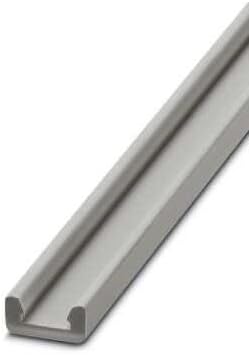
Figure 1: Phoenix P-ZB Meter Profile. This image displays the grey, elongated rail designed for mounting various electrical and electronic components.
2. حفاظتی معلومات
مصنوعات کو چوٹ یا نقصان سے بچنے کے لیے ہمیشہ درج ذیل حفاظتی تدابیر پر عمل کریں:
- یقینی بنائیں کہ تنصیب یا دیکھ بھال سے پہلے تمام بجلی منقطع ہے۔
- تنصیب اور وائرنگ کا کام صرف اہل اہلکاروں کو کرنا چاہیے۔
- Do not expose the profile to extreme temperatures or corrosive environments.
- Verify that the mounting surface is stable and capable of supporting the profile and mounted components.
3. سیٹ اپ
3.1 پیک کھولنا
Carefully unpack the P-ZB Meter Profile and inspect it for any signs of damage. Retain the packaging for future transport or storage.
- حامی کو ہٹا دیں۔file from its protective packaging.
- Check for any visible defects or missing parts.
- Confirm that the product matches the model number on your order.
3.2 تنصیب
The P-ZB Meter Profile is designed for secure mounting of various components. Follow these steps for proper installation:
- Select a suitable, flat, and stable mounting surface.
- Mark the drilling points according to the profile's mounting holes.
- Drill pilot holes if necessary, ensuring appropriate drill bit size for your fasteners.
- پرو کو محفوظ کریں۔file to the surface using appropriate screws or fasteners (not included). Ensure it is level and firmly attached.
- Mount your desired components onto the profile following their respective installation guides.
4. آپریٹنگ
The Phoenix P-ZB Meter Profile is a passive mounting component. Its operation is directly tied to the components mounted upon it. Ensure all mounted devices are correctly installed and functioning according to their individual specifications.
5 دیکھ بھال
The P-ZB Meter Profile requires minimal maintenance. Regular inspection will ensure its longevity and proper function.
- Periodically check all mounting screws for tightness.
- پرو کو صاف کریں۔file with a dry, soft cloth. Avoid abrasive cleaners or solvents.
- Inspect for any signs of corrosion or physical damage. Replace if significant damage is observed.
6 خرابیوں کا سراغ لگانا
This section addresses common issues that may arise with the P-ZB Meter Profile.
| مسئلہ | ممکنہ وجہ | حل |
|---|---|---|
| پروfile feels loose after installation. | Mounting screws are not tight enough or incorrect fasteners used. | Tighten all mounting screws. Ensure appropriate fasteners are used for the mounting surface. |
| Components do not fit securely on the profile. | Incompatible components or incorrect mounting technique. | Verify component compatibility with P-ZB profile. Refer to component's installation guide. |
7. وضاحتیں
Key technical specifications for the Phoenix P-ZB Meter Profile:
| فیچر | تفصیل |
|---|---|
| کارخانہ دار | فینکس |
| پارٹ نمبر | 1051854 |
| پیکیج کے طول و عرض | 100 x 4 x 0.11 سینٹی میٹر |
| شے کا وزن | 40 گرام |
| ماڈل نمبر | p-zb metro |
| پیکیج میں اشیاء کی تعداد | 1 |
| بیٹریاں درکار ہیں؟ | نہیں |
| ASIN | B009RNBJ88 |
| پہلی دستیاب تاریخ | 30 اکتوبر 2022 |
8. وارنٹی اور سپورٹ
This Phoenix product is manufactured to high quality standards. For specific warranty terms and conditions, please refer to the documentation provided with your purchase or visit the official Phoenix Contact webسائٹ
For technical support or inquiries, please contact Phoenix Contact customer service through their official channels. Provide your product model number (P-ZB Metro) and part number (1051854) when seeking assistance.


