تعارف
Thank you for choosing the Brondi Sydney DECT Phone. This manual provides comprehensive instructions for the proper setup, operation, and maintenance of your new cordless telephone. Please read this manual carefully before using the device to ensure optimal performance and longevity.
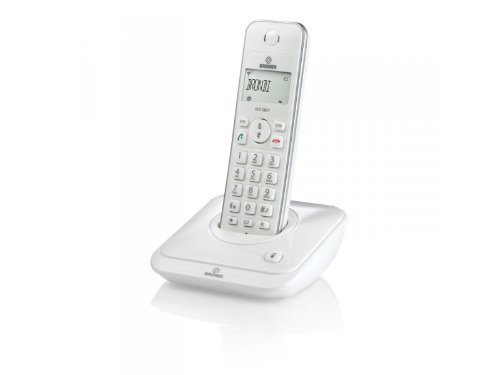
Figure 1: Brondi Sydney DECT Phone. This image shows the cordless handset resting on its charging base station.
1. سیٹ اپ
1.1 پیکنگ اور اجزاء
احتیاط سے پیکیجنگ سے تمام اشیاء کو ہٹا دیں. یقینی بنائیں کہ تمام اجزاء موجود ہیں:
- Brondi Sydney Handset
- Brondi Sydney Base Station
- بیس اسٹیشن کے لیے پاور اڈاپٹر
- ٹیلی فون لائن کی ہڈی
- Rechargeable Batteries (AAA, quantity 2) (الگ الگ فروخت کیا جا سکتا ہے)
- صارف دستی (یہ دستاویز)
1.2 بیٹری کی تنصیب
Install the rechargeable batteries into the handset:
- ہینڈ سیٹ کے پچھلے حصے پر بیٹری کے ٹوکری کا احاطہ تلاش کریں۔
- کور کو نیچے کی طرف سلائیڈ کریں یا اسے کھولنے کے لیے کنڈی کو دبائیں۔
- Insert the two AAA rechargeable batteries, observing the correct polarity (+ and -) as indicated inside the compartment.
- بیٹری کے کمپارٹمنٹ کور کو تبدیل کریں، اس بات کو یقینی بناتے ہوئے کہ یہ محفوظ طریقے سے اپنی جگہ پر کلک کرتا ہے۔
Figure 2: Battery installation. This image illustrates the correct way to insert batteries into the handset's battery compartment.
1.3 بیس اسٹیشن کنکشن
Connect the base station to power and the telephone line:
- Plug one end of the telephone line cord into the TEL LINE port on the base station.
- Plug the other end of the telephone line cord into your telephone wall jack.
- Connect the power adapter to the DC IN port on the base station.
- پاور اڈاپٹر کو معیاری الیکٹریکل آؤٹ لیٹ میں لگائیں۔
- Place the handset on the base station to charge. The charging indicator on the handset or base station should illuminate. Allow at least 12-15 hours for the initial charge.
Figure 3: Base station connections. This image shows the power adapter and telephone line cord connected to the base station ports.
1.4 Handset Registration (If Needed)
Your handset is usually pre-registered to the base station. If the handset displays "Unregistered" or similar, follow these steps:
- بیس اسٹیشن پر، دبائیں اور تھامیں PAGE/LOCATE button for approximately 5 seconds until the registration indicator light flashes.
- On the handset, navigate to the مینو، پھر منتخب کریں۔ رجسٹریشن or REGISTER HANDSET.
- Enter the PIN (default is usually 0000 or 1234) اور دبائیں۔ OK.
- The handset will display "Registering..." and then "Registered" upon successful completion.
2. آپریٹنگ ہدایات
2.1 کال کرنا اور وصول کرنا
کال کرنے کے لیے:
- دبائیں بات کریں۔ or سبز بٹن
- مطلوبہ فون نمبر ڈائل کریں۔
- دبائیں بات کریں۔ again or wait for the call to connect.
کال وصول کرنے کے لیے:
- جب فون بجتا ہے، دبائیں بات کریں۔ or سبز بٹن
کال ختم کرنے کے لیے:
- دبائیں END or سرخ button, or place the handset back on the base station.
2.2 کالر ID
If you subscribe to Caller ID service, the caller's number and name (if available) will be displayed on the handset screen before you answer the call. You can review کالر ID لاگ میں ماضی کی کالز۔
- To access the Caller ID log, press the کال کی فہرست or سی آئی ڈی بٹن
- استعمال کریں۔ اوپر/نیچے arrow keys to scroll through entries.
- To call back an entry, press the بات کریں۔ button while the entry is displayed.
2.3 Phonebook (20 Entries)
Your Brondi Sydney phone can store up to 20 phonebook entries.
اندراج شامل کرنے کے لیے:
- دبائیں مینو بٹن
- منتخب کریں۔ فون بک، پھر ADD NEW ENTRY.
- Enter the name using the alphanumeric keypad.
- دبائیں OK.
- فون نمبر درج کریں۔
- دبائیں محفوظ کریں۔ or OK.
فون بک سے ڈائل کرنے کے لیے:
- دبائیں فون بک button or navigate via مینو.
- استعمال کریں۔ اوپر/نیچے arrow keys to find the desired entry.
- دبائیں بات کریں۔ ڈائل کرنے کے لیے بٹن۔
2.4 والیوم ایڈجسٹمنٹ
کال کے دوران ، دبائیں اوپر/نیچے arrow keys on the handset to adjust the earpiece volume. To adjust the ringer volume, navigate to MENU > SETTINGS > RINGER VOLUME when the phone is idle.
3 دیکھ بھال
3.1 صفائی کی ہدایات
To keep your Brondi Sydney phone in good condition:
- Wipe the handset and base station with a soft, damp کپڑا
- Do not use harsh cleaning agents, abrasive cloths, or chemical solvents, as these can damage the surfaces.
- Ensure no liquid enters the openings of the device.
3.2 بیٹری کی دیکھ بھال
- Always use the supplied rechargeable batteries. Using non-rechargeable batteries can damage the handset.
- For optimal battery life, place the handset on the base station when not in use.
- اگر فون ایک طویل مدت تک استعمال نہیں کیا جائے گا، تو بیٹریوں کو ہٹا دیں تاکہ رساو کو روکا جا سکے۔
- مقامی ضابطوں کے مطابق ذمہ داری کے ساتھ پرانی بیٹریوں کو ضائع کریں۔
3.3 اسٹوریج
Store the phone in a cool, dry place away from direct sunlight and extreme temperatures when not in use for long periods.
4 خرابیوں کا سراغ لگانا
If you encounter issues with your Brondi Sydney phone, refer to the table below for common problems and solutions.
| مسئلہ | ممکنہ وجہ | حل |
|---|---|---|
| کوئی ڈائل ٹون نہیں۔ | Telephone line cord is disconnected. | Ensure the telephone line cord is securely plugged into the base station and the wall jack. |
| کوئی ڈائل ٹون نہیں۔ | Base station power is off. | Check that the power adapter is securely connected to the base station and a working electrical outlet. |
| Handset displays "Unregistered" | Handset lost connection or was not registered. | Follow the handset registration steps in Section 1.4. |
| خراب آواز کا معیار / جامد | Handset is too far from the base station. | بیس اسٹیشن کے قریب جائیں۔ |
| خراب آواز کا معیار / جامد | دوسرے الیکٹرانک آلات سے مداخلت۔ | Move the base station away from other electronic devices (e.g., Wi-Fi routers, microwaves). |
| ہینڈ سیٹ چارج نہیں ہو رہا ہے۔ | Handset not properly seated on the base. | Ensure the handset is correctly placed on the base station and the charging contacts are clean. |
| ہینڈ سیٹ چارج نہیں ہو رہا ہے۔ | بیٹریاں ختم یا ناقص ہیں۔ | Allow sufficient charging time (12-15 hours for initial charge). If issues persist, replace with new rechargeable AAA batteries. |
5. وضاحتیں
| فیچر | تفصیل |
|---|---|
| برانڈ | برونڈی۔ |
| ماڈل | SIDNEY_BIANCO |
| قسم | DECT کورڈ لیس ٹیلی فون |
| کالر ID | جی ہاں |
| فون بک اندراجات | 20 |
| ماڈل سال | 2012 |
| طول و عرض (پیکیج) | 18.2 x 14 x 7.2 سینٹی میٹر |
| وزن (پیکیج) | 479.99 گرام |
| بیٹریاں درکار ہیں۔ | 2 x AAA Rechargeable (Not included in package, but required for operation) |
| ASIN | B009WRN180 |
6. وارنٹی اور سپورٹ
6.1 وارنٹی کی معلومات
Brondi products are covered by a limited warranty. Please refer to the warranty card included in your product packaging or visit the official Brondi webتفصیلی وارنٹی شرائط و ضوابط کے لیے سائٹ۔ وارنٹی کے دعووں کے لیے اپنی خریداری کا ثبوت رکھیں۔
6.2 کسٹمر سپورٹ
For technical assistance, troubleshooting beyond this manual, or service inquiries, please contact Brondi customer support. Contact details can typically be found on the Brondi official webسائٹ یا مصنوعات کی پیکیجنگ پر۔
- آن لائن مدد: Visit the official Brondi webسائٹ
- ٹیلی فون سپورٹ: Refer to your product packaging or Brondi's webعلاقائی رابطہ نمبروں کے لیے سائٹ۔


