1. تعارف
This manual provides detailed instructions for the setup, operation, and maintenance of your Vibe Axcess 5-in-1 Universal Remote. Please read this manual thoroughly before using the remote control to ensure proper functionality and to maximize your user experience. This remote is designed to control up to five different audio/video devices.
2. پروڈکٹ ختمview
The Vibe Axcess 5-in-1 Universal Remote is designed to consolidate control of multiple home entertainment devices into a single unit. It features dedicated buttons for various functions and device types.
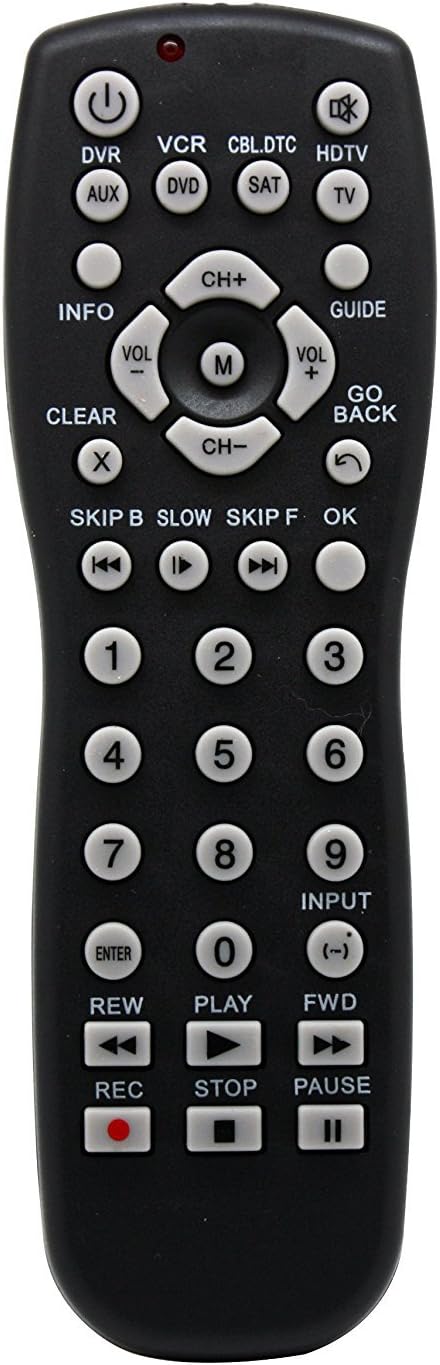
تصویر 1: سامنے والا view of the Vibe Axcess 5-in-1 Universal Remote. This image displays the remote's layout, including device selection buttons (DVR, VCR, CBL.DTC, HDTV, AUX, DVD, SAT, TV), navigation pad, number keys, and media control buttons (REW, PLAY, FWD, REC, STOP, PAUSE).

تصویر 2: Packaging of the Vibe Axcess 5-in-1 Universal Remote. The packaging highlights the remote's 5-in-1 capability and compatibility with various device types such as DVD/VCR, HDTV, DVD, AUX, and CBL/SAT/CABLE.
3. سیٹ اپ
3.1 بیٹری کی تنصیب
- ریموٹ کنٹرول کے پیچھے بیٹری کے ٹوکری کا احاطہ تلاش کریں۔
- کور کو نیچے کی طرف سلائیڈ کریں یا کنڈی دبائیں اور کھولنے کے لیے لفٹ کریں۔
- Insert two (2) AAA batteries, ensuring the positive (+) and negative (-) terminals match the diagrams inside the compartment.
- بیٹری کے کمپارٹمنٹ کور کو تبدیل کریں، اسے واپس اپنی جگہ پر سلائیڈ کرتے ہوئے جب تک کہ یہ محفوظ طریقے سے کلک نہ کرے۔
نوٹ: ہمیشہ تازہ بیٹریاں استعمال کریں اور دونوں بیٹریاں ایک ہی وقت میں تبدیل کریں۔ پرانی اور نئی بیٹریوں یا مختلف قسم کی بیٹریوں کو مکس نہ کریں۔
3.2 ریموٹ پروگرامنگ
To control your devices, the universal remote must be programmed with the correct codes for each device. There are typically two methods for programming:
3.2.1 براہ راست کوڈ انٹری
This method involves entering a specific code from a code list (usually provided with the remote or available online) for your device's brand.
- Turn on the device you wish to control (e.g., TV, DVD player).
- Press and hold the desired device button on the remote (e.g., TV, ڈی وی ڈی) for approximately 3 seconds until the indicator light (usually red) illuminates and stays on.
- While the indicator light is on, enter the 3-digit or 4-digit code for your device's brand using the number keys.
- If the code is valid, the indicator light will turn off. If the light flashes and remains on, the code was invalid; re-enter the code.
- دبانے سے ریموٹ کی جانچ کریں۔ پاور button. If the device turns off, the code is correct. If not, try the next code listed for your brand.
3.2.2 آٹو کوڈ تلاش کریں
If you cannot find a code or direct code entry fails, use the auto code search method.
- جس آلہ کو آپ کنٹرول کرنا چاہتے ہیں اسے آن کریں۔
- مطلوبہ ڈیوائس بٹن دبائیں اور تھامیں (مثال کے طور پر، TV) for approximately 3 seconds until the indicator light illuminates and stays on.
- While holding the device button, press the پاور button once. The indicator light will start flashing, indicating it is searching for a code.
- Point the remote at the device and wait for the device to turn off. This may take several minutes as the remote cycles through codes.
- ایک بار جب آلہ بند ہوجاتا ہے، فوری طور پر دبائیں۔ داخل کریں۔ button to save the code. The indicator light will turn off.
- Test the remote's functions. If some functions do not work, repeat the auto search process to find a more compatible code.
4. آپریٹنگ ہدایات
Once programmed, operating your Vibe Axcess 5-in-1 Universal Remote is straightforward.
- ڈیوائس منتخب کریں: Press the corresponding device button (e.g., TV, ڈی وی ڈی, CBL.DTC) for the device you wish to control. The indicator light will briefly illuminate to confirm selection.
- پاور آن/آف: دبائیں پاور منتخب کردہ ڈیوائس کو آن یا آف کرنے کے لیے بٹن۔
- حجم کنٹرول: استعمال کریں۔ VOL+ اور والیوم- حجم کو ایڈجسٹ کرنے کے لئے بٹن.
- چینل کنٹرول: استعمال کریں۔ CH+ اور CH- چینلز کو تبدیل کرنے کے بٹن۔
- نمبر کیز: Use the number keys (0-9) to directly enter channel numbers or other numerical inputs.
- نیویگیشن: Use the directional pad (up, down, left, right) and OK مینو نیویگیشن کے لیے بٹن۔
- میڈیا کنٹرولز: استعمال کریں۔ کھیلیں, روکیں۔, سٹاپ, REW, ایف ڈبلیو ڈی، اور آر ای سی for controlling media playback on compatible devices.
5 دیکھ بھال
5.1 صفائی
To clean your remote, gently wipe it with a soft, dry cloth. Do not use abrasive cleaners, solvents, or harsh chemicals, as these can damage the remote's finish or internal components.
5.2 بیٹری کی تبدیلی
When the remote's performance degrades or the indicator light fails to illuminate, it is time to replace the batteries. Follow the battery installation steps in Section 3.1. Dispose of used batteries responsibly according to local regulations.
6 خرابیوں کا سراغ لگانا
- ریموٹ کام نہیں کر رہا:
- چیک کریں کہ آیا بیٹریاں صحیح طریقے سے ڈالی گئی ہیں اور ختم نہیں ہوئی ہیں۔ اگر ضروری ہو تو تبدیل کریں۔
- Ensure you have selected the correct device button (e.g., TV for your television).
- Verify that the remote is programmed with the correct code for your device. Re-program if unsure.
- Ensure there are no obstructions between the remote and the device's infrared sensor.
- Some functions not working:
- Some universal remote codes may not support all original remote functions. Try another code for your device brand using the programming steps.
- Ensure the device you are trying to control supports the specific function (e.g., not all TVs have a dedicated 'INFO' button function).
- اشارے کی روشنی روشن نہیں ہوتی:
- بیٹریاں چیک کریں اور تبدیل کریں۔
- اگر بیٹری تبدیل کرنے کے بعد بھی مسئلہ برقرار رہتا ہے، تو ریموٹ ناقص ہو سکتا ہے۔
7. وضاحتیں
- ماڈل: OT795-KO
- برانڈ: وائب
- مصنوعات کے طول و عرض: 10.7 x 4 x 0.8 انچ
- آئٹم کا وزن: 4 اونس
- بیٹریاں: 2 AAA بیٹریاں درکار ہیں (شامل نہیں)
- تعاون یافتہ آلات کی زیادہ سے زیادہ تعداد: 5
- کنیکٹوٹی ٹیکنالوجی: اورکت
- خصوصی خصوصیت: یونیورسل
8. وارنٹی اور سپورٹ
For information regarding warranty coverage or technical support, please refer to the documentation included with your purchase or contact the retailer where the product was acquired. Specific warranty terms may vary.


