1. تعارف
خریداری کے لیے آپ کا شکریہasing the Fonestar AS-170RU Hi-Fi Amplifier. This device is designed to provide high-fidelity stereo audio amplification, featuring a built-in USB/MP3 player, AM/FM digital tuner, and multiple audio inputs. This manual provides detailed instructions for safe installation, operation, and maintenance of your amplifier. Please read this manual thoroughly before use and retain it for future reference.
2. حفاظتی ہدایات
- بجلی کی فراہمی: یقینی بنائیں amplifier is connected to a power supply matching the voltage specified on the unit. Disconnect the power cord from the outlet if the unit will not be used for an extended period.
- وینٹیلیشن: Do not block ventilation openings. Ensure adequate space around the unit for proper airflow to prevent overheating.
- پانی اور نمی: یونٹ کو بارش، نمی، یا ٹپکنے / چھڑکنے والے مائعات کے سامنے نہ رکھیں۔ یونٹ پر مائعات سے بھری اشیاء، جیسے گلدانوں کو نہ رکھیں۔
- حرارت کے ذرائع: یونٹ کو گرمی کے ذرائع سے دور رکھیں جیسے ریڈی ایٹرز، ہیٹ رجسٹر، چولہے، یا دیگر آلات (بشمول amplifiers) جو گرمی پیدا کرتی ہے۔
- صفائی: صرف خشک کپڑے سے صاف کریں۔ مائع کلینر یا ایروسول کلینر استعمال نہ کریں۔
- سروسنگ: اس پروڈکٹ کو خود پیش کرنے کی کوشش نہ کریں۔ تمام سروسز کو اہل سروس اہلکاروں کے حوالے کریں۔
- جگہ کا تعین: یونٹ کو ایک مستحکم، ہموار سطح پر رکھیں۔ اسے براہ راست سورج کی روشنی میں یا مضبوط مقناطیسی میدانوں کے قریب رکھنے سے گریز کریں۔
3. پیکیج کے مشمولات
براہ کرم چیک کریں کہ درج ذیل اشیاء آپ کے پیکیج میں شامل ہیں:
- Fonestar AS-170RU Hi-Fi Ampزندگی
- ریموٹ کنٹرول
- AM اینٹینا
- ایف ایم اینٹینا
- صارف دستی (یہ دستاویز)
4. پروڈکٹ ختمview
4.1 فرنٹ پینل
The front panel provides access to essential controls and the display.
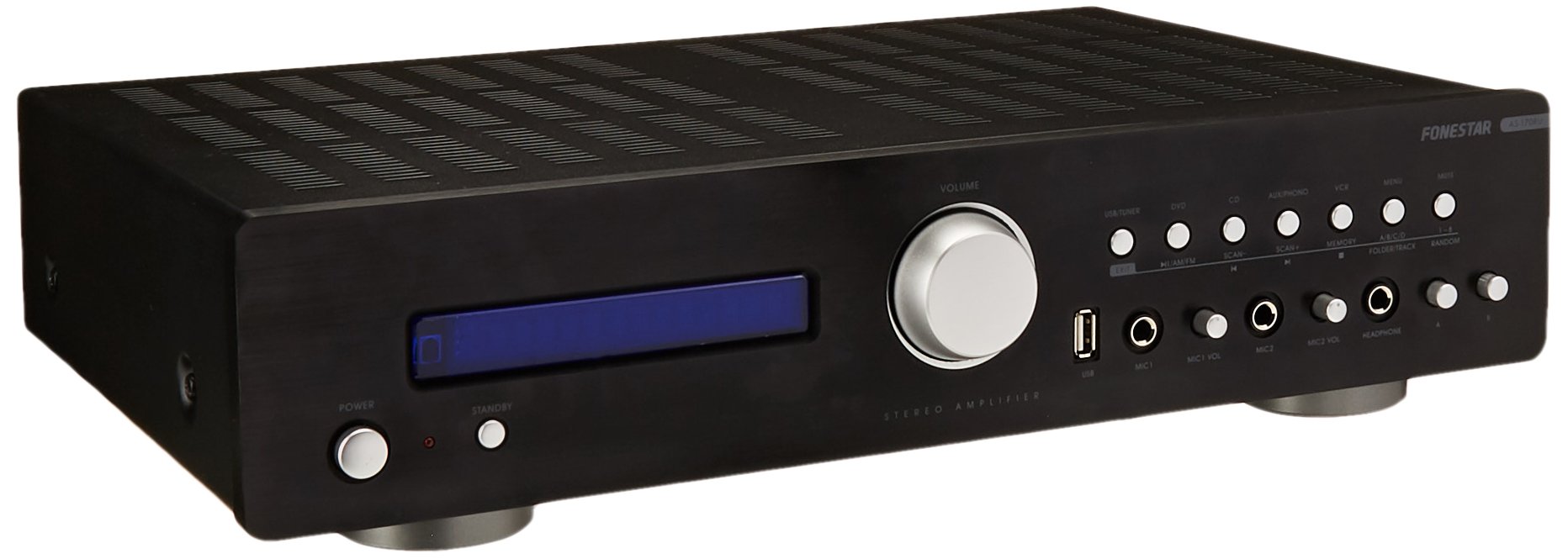
Image: Fonestar AS-170RU Front Panel. یہ تصویر سامنے دکھاتی ہے۔ view کی amplifier, showing the VFD display, USB port, headphone output, input selectors, volume knob, and other control buttons.
- پاور بٹن: موڑ دیتا ہے۔ ampلائف آن یا آف۔
- VFD Display: Shows current input, volume level, tuner information (frequency, RDS), and USB/MP3 track details (ID3 tag).
- USB پورٹ: For connecting USB storage devices to play MP3 files.
- ہیڈ فون آؤٹ پٹ: ہیڈ فون کو جوڑنے کے لیے 6.3mm جیک۔
- ان پٹ سلیکٹرز: Buttons for choosing audio sources (CD, DVD, VCR, AUX/Phono, USB/Tuner).
- حجم کنٹرول: Rotary knob to adjust the master volume level.
- مائکروفون آدانوں: Two 6.3mm microphone jacks with independent volume control.
- ٹون کنٹرولز: Buttons or menu options for adjusting Bass, Treble, and Balance.
4.2 پیچھے والا پینل
The rear panel contains all the necessary connections for your audio sources, speakers, and antennas.

Image: Fonestar AS-170RU Rear Panel. This image illustrates the rear connections of the amplifier, including speaker terminals (A/B), various RCA input jacks (CD, DVD, VCR, AUX/Phono), REC OUT, PRE OUT, AMP IN, and antenna connections (FM COAX, AM LOOP ANT).
- Speaker Outputs (A/B): Terminals for connecting two pairs of speakers. Supports 4-16 ohms for A or B, or 8-16 ohms for A+B.
- آڈیو ان پٹ (RCA):
- سی ڈی ان پٹ: For connecting a CD player.
- DVD Input: For connecting a DVD player or other audio source.
- VCR Input: For connecting a VCR or other audio source.
- AUX/PHONO Input: For connecting auxiliary devices or a turntable (Phono input may require a pre-amplifier if your turntable does not have one built-in).
- REC آؤٹ: RCA output for connecting to a recording device.
- پری آؤٹ: بیرونی طاقت سے جڑنے کے لیے RCA آؤٹ پٹ ampزندگی
- AMP میں: RCA input for connecting an external pre-ampزندگی
- اینٹینا کنکشن:
- FM COAX 75Ω: For connecting an FM antenna.
- AM LOOP ANT: For connecting the supplied AM loop antenna.
4.3 ریموٹ کنٹرول
The included remote control allows convenient operation of the ampدور سے لائفائر.

Image: Fonestar AS-170RU Remote Control. This image shows the remote control unit with various buttons for power, input selection, volume, mute, tuner functions, USB playback controls, and tone adjustments.
- تیار: پاور آن/آف۔
- ان پٹ سلیکٹرز: Buttons for CD, DVD, VCR, AUX/PHONO, USB/TUNER.
- والیوم اوپر/نیچے (VOL +/-): ماسٹر والیوم ایڈجسٹ کرتا ہے۔
- خاموش: آڈیو آؤٹ پٹ کو خاموش کرتا ہے۔
- صبح/ایف ایم: Switches between AM and FM tuner modes.
- اسکین: ریڈیو اسٹیشنوں کے لیے اسکین۔
- یاداشت: Stores radio station presets.
- USB Playback Controls: Play/Pause, Stop, Skip Track, Folder/Track navigation.
- EQ OFF / BASS / TREBLE: Access tone controls.
- RDS / ID3: Displays RDS information for radio or ID3 tag MP3 کے لئے files.
5. سیٹ اپ
5.1 مربوط اسپیکرز
- یقینی بنائیں ampلائفائر کو آف کر دیا گیا ہے اور پاور آؤٹ لیٹ سے ان پلگ کیا گیا ہے۔
- Connect your speakers to the "SPEAKERS OUTPUT" terminals on the rear panel.
- Match the positive (+) terminal of the amplifier (red) to the positive (+) terminal of your speaker, and the negative (-) terminal (black) to the negative (-) terminal.
- The AS-170RU supports two groups of speakers (A and B). You can connect one pair to "SPEAKERS A" and another to "SPEAKERS B".
- Ensure your speakers' impedance matches the amplifier's specifications: 4-16 ohms for A or B, or 8-16 ohms for A+B.
5.2 آڈیو ذرائع کو جوڑنا
Use RCA cables to connect your audio components to the corresponding input jacks on the rear panel.
- سی ڈی پلیئر: "CD" ان پٹ سے جڑیں۔
- ڈی وی ڈی پلیئر: Connect to the "DVD" input.
- وی سی آر: Connect to the "VCR" input.
- Auxiliary Device (e.g., smartphone, tablet): Connect to the "AUX/PHONO" input.
- ٹرنٹیبل: Connect to the "AUX/PHONO" input. If your turntable does not have a built-in pre-amplifier, you may need an external phono pre-ampزندگی
5.3 انٹینا سے منسلک ہونا
- ایف ایم اینٹینا: Connect the supplied FM wire antenna to the "FM COAX 75Ω" terminal. Extend the wire for optimal reception.
- AM اینٹینا: Connect the supplied AM loop antenna to the "AM LOOP ANT" terminals. Position the loop for best reception.
5.4 پاور کنکشن
Once all audio and speaker connections are made, plug the amplifier's power cord into a suitable AC power outlet.
6. آپریٹنگ ہدایات
6.1 بنیادی آپریشن
- پاور آن/آف: Press the Power button on the front panel or the STANDBY button on the remote control to turn the ampلائف آن یا آف۔
- ان پٹ ماخذ منتخب کریں: Press the desired input selector button on the front panel (CD, DVD, VCR, AUX/PHONO) or the remote control (CD, DVD, VCR, AUX/PHONO, USB/TUNER).
- حجم کو ایڈجسٹ کریں: Rotate the Volume knob on the front panel or use the VOL +/- buttons on the remote control to adjust the sound level.
- خاموش کریں: Press the MUTE button on the remote control to temporarily silence the audio. Press it again to restore sound.
6.2 USB/MP3 Playback
- Insert a USB storage device (flash drive) into the USB port on the front panel.
- Select "USB/TUNER" as the input source. The amplifier will automatically detect and begin playing MP3 files.
- Use the playback controls on the remote control (Play/Pause, Stop, Skip Track, Folder/Track) to navigate and control your music.
- The VFD display will show track information, including ID3 tags اگر دستیاب ہو.
- دی amplifier supports up to 65,000 indexable folders and files, with a maximum of 8 folder levels.
6.3 AM/FM Tuner Operation
- Select "USB/TUNER" as the input source, then press the AM/FM button on the remote control to switch between AM and FM bands.
- خودکار اسکین: Press the SCAN button on the remote control to automatically search for and store available radio stations.
- دستی ٹیوننگ: Use the tuning buttons (usually arrow keys) on the remote control to manually adjust the frequency.
- پیش سیٹ اسٹیشنز: دی amplifier supports 64 presets. Use the MEMORY button to store and recall your favorite stations.
- RDS فنکشن: If available, press the RDS button on the remote control to display Radio Data System information (e.g., station name, program type).
6.4 مائیکروفون ان پٹ
- Connect microphones to the 6.3mm MIC 1 and MIC 2 jacks on the front panel.
- Adjust the independent volume controls for each microphone to achieve the desired level.
6.5 Tone and Balance Control
دی amplifier allows adjustment of bass, treble, and balance through its menu system or dedicated buttons on the remote control. Refer to the remote control section for specific buttons like EQ OFF, BASS, TREBLE.
7 دیکھ بھال
- صفائی: Disconnect the power before cleaning. Use a soft, dry cloth to wipe the exterior surfaces. Do not use abrasive cleaners, waxes, or solvents.
- وینٹیلیشن: وقتاً فوقتاً چیک کریں کہ وینٹیلیشن کے سوراخ دھول اور ملبے سے صاف ہیں۔
- ذخیرہ: If storing the unit for an extended period, unplug it from the power outlet and store it in a cool, dry place, away from direct sunlight and extreme temperatures.
8 خرابیوں کا سراغ لگانا
If you encounter problems with your amplifier, refer to the following table for possible solutions.
| مسئلہ | ممکنہ وجہ | حل |
|---|---|---|
| کوئی طاقت نہیں۔ | پاور کی ہڈی منسلک نہیں ہے؛ پاور آؤٹ لیٹ ناقص؛ Ampاسٹینڈ بائی موڈ میں لائفائر۔ | Ensure power cord is securely plugged in. Test the outlet with another device. Press the Power/STANDBY button. |
| کوئی آواز نہیں۔ | Incorrect input selected; Volume too low; Speakers not connected properly; Mute function active. | Select the correct input source. Increase volume. Check speaker connections. Deactivate MUTE. |
| ریڈیو کا ناقص استقبال | اینٹینا منسلک نہیں ہے یا خراب پوزیشن میں ہے؛ مداخلت | Connect and adjust the position of the AM/FM antennas. Move the ampدوسرے الیکٹرانک آلات سے دور رہنے والا۔ |
| USB پلے بیک کام نہیں کر رہا ہے۔ | USB device not inserted correctly; Incompatible file format; USB device faulty. | Ensure USB device is fully inserted. Check if files are MP3 format. Try a different USB device. |
| Amplifier turns off unexpectedly or cycles power | Overheating; Short circuit in speaker wiring; Internal fault. | Ensure adequate ventilation. Check speaker wires for frayed strands causing short circuits. If the problem persists, disconnect power and contact qualified service personnel. |
9. وضاحتیں
- ماڈل: AS-170RU
- پاور آؤٹ پٹ: 80 + 80 W RMS at 4 Ω
- اسپیکر کی رکاوٹ: 4-16 Ω (A or B), 8-16 Ω (A+B)
- تحفظ: 3 circuits (short circuits, overload, overvoltage)
- USB پلیئر: MP3 file playback, ID3 tag support. Max 65,000 indexable folders/files, max 8 folder levels.
- ٹیونر: Digital AM/FM, 64 presets, RDS.
- ان پٹ: 2 x Microphone (6.3mm), 4 x RCA (CD, DVD, VCR, AUX/Phono), 1 x RCA (AMP IN)۔
- آؤٹ پٹ: 1 x RCA (REC OUT), 1 x RCA (PRE OUT), Headphone (6.3mm).
- ڈسپلے: Blue VFD.
- ٹون کنٹرول: Bass, Treble, Balance (via menu/remote).
- طول و عرض: 40 x 40 x 60 سینٹی میٹر (تقریباً 15.7 x 15.7 x 23.6 انچ)
- وزن: 7.2 کلوگرام (تقریباً 15.87 پونڈ)
10. وارنٹی اور سپورٹ
For warranty information and technical support, please refer to the warranty card included with your product or contact your authorized Fonestar dealer. Do not attempt to repair the unit yourself, as this may void your warranty.


