1. تعارف
This manual provides comprehensive instructions for the proper use and maintenance of your Horizon SF-400D Digital Precision Scale. Please read this manual thoroughly before operating the device to ensure accurate measurements and prolong its lifespan.
The Horizon SF-400D is a versatile digital precision scale designed for various weighing applications, including jewelry, coins, herbs, spices, and medication. It offers high accuracy and multiple weighing modes, along with a convenient counting function.

تصویر 1: Horizon SF-400D Digital Precision Scale. This image shows the overall design of the scale, featuring a black body, a stainless steel weighing platform, and a blue backlit LCD display with control buttons.
2. حفاظتی احتیاطی تدابیر
- Do not overload the scale beyond its maximum capacity of 500g.
- پیمانے کو انتہائی درجہ حرارت، نمی، یا براہ راست سورج کی روشنی کے سامنے لانے سے گریز کریں۔
- پیمانے کو مضبوط برقی مقناطیسی شعبوں سے دور رکھیں۔
- پیمانے کو نرم سے صاف کریں، ڈیamp کپڑا کھرچنے والے کلینر کا استعمال نہ کریں یا یونٹ کو پانی میں ڈبو دیں۔
- Ensure the scale is placed on a stable, level surface during operation to ensure accuracy.
3. مصنوعات کے اجزاء
Familiarize yourself with the main parts of your SF-400D scale:
- وزنی پلیٹ فارم: اشیاء رکھنے کے لیے سٹینلیس سٹیل کی سطح۔
- LCD ڈسپلے: Backlit screen showing weight, units, and other indicators.
- آن/آف بٹن: اسکیل کو آن یا آف کرتا ہے۔
- موڈ بٹن: Changes weighing units (g, oz, ct, dwt, gn, T).
- TARE بٹن: Resets the display to zero, useful for weighing items in a container.
- PCS Button: Activates the piece counting function.
- CAL Button: Used for calibration.
- سایڈست ٹانگیں: Located on the bottom for leveling the scale.
- بلبلا کی سطح: Integrated on the scale to assist with leveling.
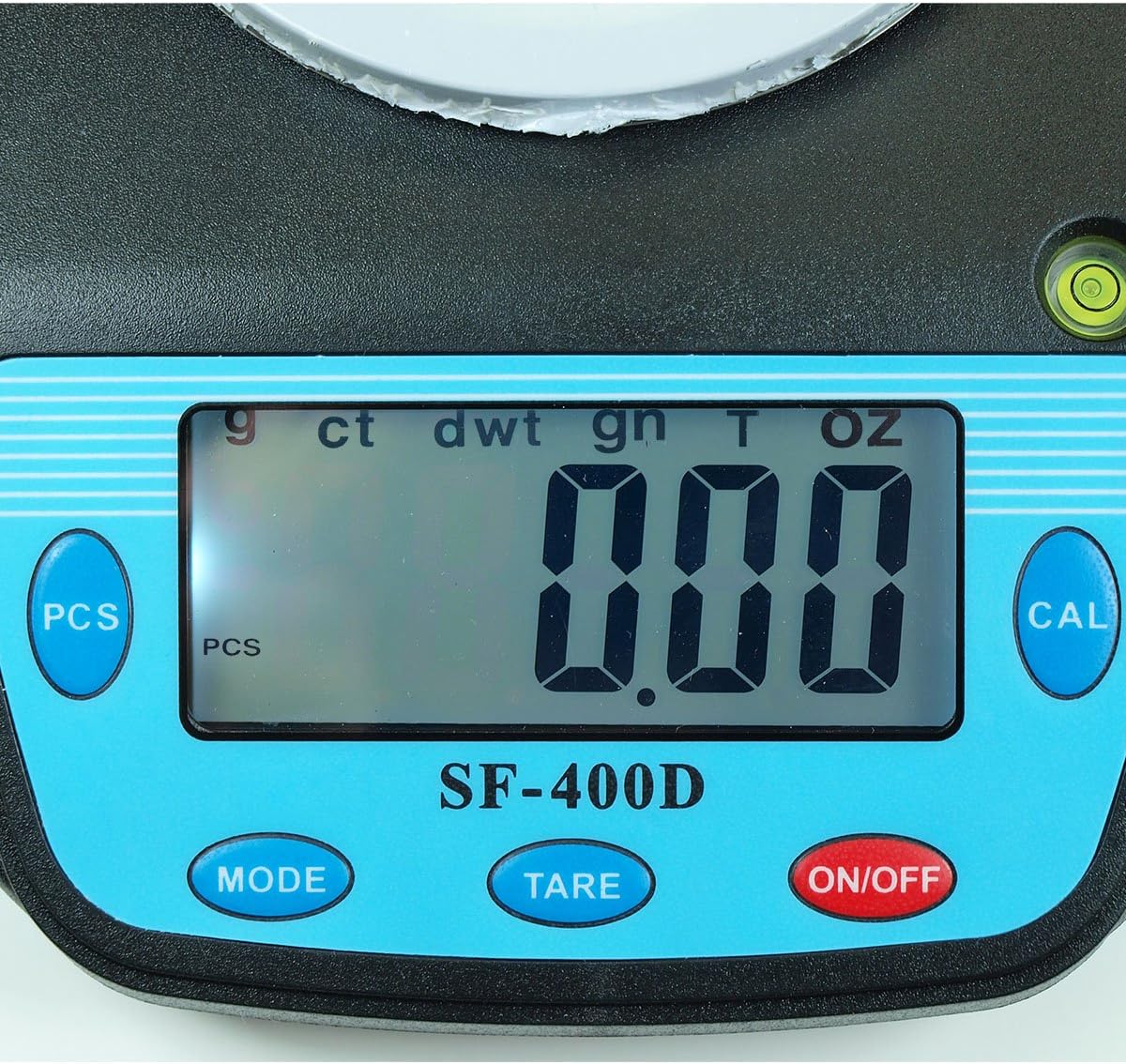
تصویر 2: Close-up of the SF-400D display and control buttons. This image highlights the LCD screen, showing various unit indicators (g, ct, dwt, gn, T, oz), and the function buttons: PCS, MODE, TARE, ON/OFF, and CAL.

تصویر 3: Underside of the SF-400D scale showing adjustable legs. Green arrows indicate the location of the four adjustable feet, which are used to level the scale for accurate measurements.
4. سیٹ اپ
4.1۔ بجلی کی فراہمی
The SF-400D scale operates on two AA batteries (included) or an optional AC power adapter (not included).
- اسکیل کے نیچے والے حصے میں بیٹری کی ٹوکری کا احاطہ کھولیں۔
- درست قطبیت (+/-) کو یقینی بناتے ہوئے دو AA بیٹریاں داخل کریں۔
- بیٹری کی ٹوکری بند کریں۔
- Alternatively, connect a compatible AC power adapter (6V, amperage not specified in product details, consult manufacturer if needed) to the power port.
4.2. Placement and Leveling
For optimal accuracy, the scale must be placed on a stable, flat, and level surface.
- Place the scale on your desired weighing surface.
- Observe the integrated bubble level.
- Adjust the four adjustable legs on the bottom of the scale by rotating them until the bubble is centered within the level indicator.
5. آپریٹنگ ہدایات
5.1. بنیادی وزن
- دبائیں آن/آف button to turn on the scale. The display will show "88888" and then "0.00" (or "0.0" depending on the unit).
- If the display does not show zero, press the پھاڑ دیں پیمانے کو صفر کرنے کا بٹن۔
- دبائیں موڈ button to select your desired weighing unit (g, oz, ct, dwt, gn, T).
- Gently place the item(s) to be weighed on the center of the stainless steel platform.
- Read the stable weight displayed on the LCD screen.
- اسکیل کو آف کرنے کے لیے، دبائیں اور دبائے رکھیں آن/آف button for a few seconds. The scale also features an auto shut-off function to conserve battery power.
5.2 ٹیرے فنکشن
The Tare function allows you to subtract the weight of a container, so only the contents are weighed.
- وزنی پلیٹ فارم پر ایک خالی کنٹینر رکھیں۔
- ڈسپلے کے مستحکم ہونے کا انتظار کریں اور کنٹینر کا وزن دکھائیں۔
- دبائیں پھاڑ دیں button. The display will reset to "0.00" (or "0.0").
- Add the items you wish to weigh into the container. The display will now show only the net weight of the items.
- تار کو صاف کرنے کے لیے، پلیٹ فارم سے تمام اشیاء کو ہٹا دیں اور دبائیں پھاڑ دیں دوبارہ اگر ڈسپلے خود بخود صفر پر واپس نہیں آتا ہے۔
5.3. Piece Counting Function (PCS)
This function is useful for counting multiple identical items.
- Turn on the scale and ensure it is zeroed.
- دبائیں پی سی ایس button. The display will show "PCS" and a sample سائز (مثال کے طور پر، "25"، "50"، "75"، "100")۔
- دبائیں موڈ button to cycle through the available sample sizes (25, 50, 75, 100 pieces). Select the sample size that matches the number of items you will place on the scale for sampجنس
- s کی صحیح تعداد رکھیںample items (e.g., 25 pieces) onto the weighing platform according to your selected sampلی سائز.
- دبائیں پی سی ایس s کی تصدیق کے لیے دوبارہ بٹن دبائیںample. The display will now show the number of pieces.
- اب آپ اسی قسم کے مزید آئٹمز شامل کر سکتے ہیں، اور پیمانہ کل گنتی ظاہر کرے گا۔
- To exit the counting mode, press the موڈ بٹن
5.4. انشانکن
Calibration ensures the accuracy of your scale. It is recommended to calibrate the scale periodically or if you suspect inaccurate readings. You will need a known calibration weight (e.g., 500g) for this process.

تصویر 4: SF-400D display showing "CAL" during calibration mode. This image illustrates the scale's screen indicating it is in calibration mode, prompting the user to place a calibration weight.
- Ensure the scale is on a stable, level surface and turned off.
- دبائیں اور تھامیں۔ CAL بٹن، پھر دبائیں آن/آف button simultaneously. Release both buttons when the display shows "CAL".
- The display will then show a flashing weight value (e.g., "500.00g"). This is the required calibration weight.
- درست انشانکن وزن (مثلاً، 500 گرام) کو وزنی پلیٹ فارم کے بیچ میں رکھیں۔
- Wait for the display to stabilize and show "PASS" or return to normal weighing mode. This indicates successful calibration.
- Remove the calibration weight. The scale is now calibrated and ready for use.
- If "FAIL" or an error message appears, repeat the calibration process.
6 دیکھ بھال
6.1. صفائی
- Wipe the scale surface with a soft, slightly damp کپڑا
- Do not use harsh chemicals, abrasive cleaners, or immerse the scale in water.
- اس بات کو یقینی بنائیں کہ اسٹوریج یا اگلے استعمال سے پہلے پیمانہ مکمل طور پر خشک ہو۔
6.2. ذخیرہ
- اسکیل کو کسی ٹھنڈی، خشک جگہ پر، براہ راست سورج کی روشنی اور انتہائی درجہ حرارت سے دور رکھیں۔
- اگر لمبے عرصے تک ذخیرہ کر رہے ہیں تو، رساو کو روکنے کے لیے بیٹریاں ہٹا دیں۔
7 خرابیوں کا سراغ لگانا
| مسئلہ | ممکنہ وجہ | حل |
|---|---|---|
| اسکیل آن نہیں ہوتا ہے۔ | Low or dead batteries; incorrect battery installation; no power from AC adapter. | Replace batteries; check battery polarity; ensure AC adapter is properly connected and functional. |
| غلط ریڈنگ۔ | Scale not level; unstable surface; needs calibration; overloaded; strong air currents or vibrations. | Ensure scale is level using adjustable legs and bubble level; place on stable surface; perform calibration; do not exceed 500g capacity; operate in a stable environment. |
| "O_Ld" or "EEEE" displayed. | پیمانہ اوورلوڈ ہے۔ | Remove excess weight immediately. Do not exceed 500g capacity. |
| Display shows "UNST". | Unstable environment or surface. | Move the scale to a more stable location, away from vibrations or drafts. |
| Counting function not working correctly. | غلط sample size selected; sample items not identical in weight. | ایس کو یقینی بنائیںample size matches the number of items placed for sampling; use identical items for accurate counting. |
8. وضاحتیں
| فیچر | تفصیل |
|---|---|
| ماڈل | SF-400D |
| صلاحیت | 500 grams (g) / 17.5 ounces (oz) |
| Accuracy (Readability) | 0.01 grams (g) / 0.0005 ounces (oz) |
| وزن کے طریقے | g (grams), oz (ounces), ct (carats), dwt (pennyweights), gn (grains), T (troy ounces), pcs (pieces) |
| پلیٹ فارم کا مواد | سٹینلیس سٹیل |
| Platform Diameter | 4.2 انچ |
| ڈسپلے | بیک لائٹ کے ساتھ LCD |
| طاقت | 2 x AA batteries (included) or 6V AC adapter (not included) |
| طول و عرض (L x W x H) | 8.25" x 6.0" x 1.75" |
| خصوصیات | Tare function, Piece Counting, Auto Shut-Off, Backlit Display, Adjustable Legs, Bubble Level |
9. وارنٹی اور سپورٹ
For warranty information or technical support, please refer to the documentation included with your purchase or contact the retailer. Specific warranty terms may vary by region and retailer.
For general inquiries or to explore other products, you may visit the Horizon Store on Amazon.


