1. تعارف
Thank you for choosing the Antec HCG-850M 850W Power Supply. This manual provides essential information for the safe and efficient installation, operation, and maintenance of your power supply unit. Please read this manual thoroughly before installation and retain it for future reference.
2. حفاظتی معلومات
اپنے سسٹم کو چوٹ یا نقصان سے بچنے کے لیے ہمیشہ درج ذیل حفاظتی تدابیر پر عمل کریں:
- مت کرو open the power supply casinجی اعلی والیومtages اندر موجود ہیں، یہاں تک کہ جب یونٹ پلگ نہ ہو۔
- مت کرو insert any objects into the power supply's ventilation openings.
- اس بات کو یقینی بنائیں کہ بجلی کی فراہمی اچھی طرح سے ہوادار جگہ پر نصب ہے۔
- Use only the modular cables provided with this power supply. Using incompatible cables can cause damage.
- Disconnect the AC power cord from the wall outlet before installing or removing the power supply.
- This product is designed for use in personal computers only.
3. پیکیج کے مشمولات
تصدیق کریں کہ تمام اشیاء آپ کے پیکیج میں موجود ہیں:
- Antec HCG-850M 850W Power Supply
- Modular Cable Set (PCI-E, SATA, Peripheral, CPU)
- AC پاور کورڈ
- بڑھتے ہوئے پیچ
- صارف دستی (یہ دستاویز)
4. پروڈکٹ ختمview
The Antec HCG-850M is an 850-watt, 80 PLUS Bronze certified, semi-modular power supply designed for high-performance personal computers. It features a quiet 135mm fan for efficient cooling and robust protection circuits to ensure stable power delivery.
4.1 کلیدی خصوصیات
- 850 Watts Continuous Power
- 80 PLUS Bronze Certified Efficiency
- Semi-Modular Cable Management
- 135 ملی میٹر خاموش پنکھا
- ATX فارم فیکٹر
- Multiple Protection Circuits (OCP, OVP, UVP, SCP, OPP, OTP)
4.2 پاور سپلائی یونٹ
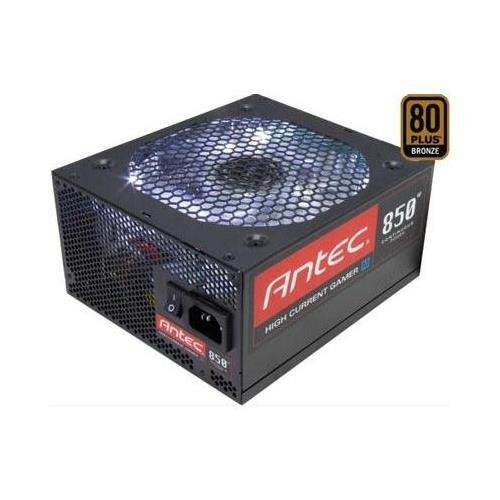
تصویر 1: سامنے view of the Antec HCG-850M 850W Power Supply, showing the fan grille and modular cable connectors. This unit provides stable power to your computer components.
5. سیٹ اپ اور انسٹالیشن
Follow these steps to install your Antec HCG-850M power supply:
- اپنا سسٹم تیار کریں: یقینی بنائیں کہ آپ کا کمپیوٹر مکمل طور پر بند ہے اور وال آؤٹ لیٹ سے ان پلگ ہے۔ اپنا کمپیوٹر کیس کھولیں۔
- پرانا PSU ہٹائیں (اگر قابل اطلاق ہو): اپنی پرانی پاور سپلائی سے تمام کیبلز منقطع کریں۔ کیس سے پرانے PSU کو کھولیں اور ہٹا دیں۔
- نیا PSU ماؤنٹ کریں: Carefully place the Antec HCG-850M into the power supply bay of your computer case. Secure it with the provided mounting screws. Ensure the fan is oriented correctly for optimal airflow (typically facing down if there's a bottom vent, or up if not).
- ضروری کیبلز کو جوڑیں:
- 24 پن ATX مدر بورڈ پاور کیبل کو جوڑیں۔
- Connect the 4+4-pin or 8-pin EPS/CPU power cable to your motherboard.
- ماڈیولر کیبلز کو جوڑیں: Attach the necessary modular cables for your components (e.g., PCI-E for graphics cards, SATA for hard drives/SSDs, Peripheral for fans/accessories). Connect them securely to both the power supply and the respective components.
- کیبل مینجمنٹ: ہوا کے بہاؤ اور جمالیات کو بہتر بنانے کے لیے کیبلز کو صفائی سے روٹ کریں۔
- کیس بند کریں اور پاور آن: Close your computer case. Connect the AC power cord to the power supply and then to a wall outlet. Flip the power switch on the PSU to the 'ON' position. Power on your computer.
6. آپریٹنگ ہدایات
Once installed, the Antec HCG-850M operates automatically. Here are some general operating guidelines:
- پاور آن/آف: Use your computer's power button to turn the system on or off. The switch on the power supply itself should generally remain in the 'ON' position during normal operation.
- نظام استحکام: Ensure your system is stable. If you experience unexpected shutdowns or reboots, refer to the troubleshooting section.
- وینٹیلیشن: Maintain good airflow around your computer case to prevent overheating of components, including the power supply.
7 دیکھ بھال
Proper maintenance can extend the lifespan of your power supply:
- دھول کی صفائی: Periodically clean dust from the power supply's fan grille and the interior of your computer case using compressed air. صفائی سے پہلے ہمیشہ AC پاور کورڈ کو منقطع کریں۔
- کیبل چیک: Occasionally check that all power cables are securely connected to the power supply and components.
- ماحولیات: Operate the power supply in a clean, dry environment with stable temperatures.
8 خرابیوں کا سراغ لگانا
If you encounter issues with your power supply, try the following steps:
8.1 سسٹم ٹو پاور نہیں ہے۔
- Ensure the AC power cord is securely plugged into both the wall outlet and the power supply.
- Check that the power supply's ON/OFF switch is in the 'ON' position.
- Verify all internal power cables (24-pin ATX, CPU, PCI-E) are correctly and firmly connected.
- دیوار کے آؤٹ لیٹ کو کسی دوسرے آلے سے جانچیں تاکہ یہ یقینی بنایا جا سکے کہ اس میں طاقت ہے۔
- If possible, test the power supply in another known working system or with a PSU tester.
8.2 System Instability or Random Shutdowns
- یقینی بنائیں کہ آپ کے سسٹم کی بجلی کی ضروریات PSU کی 850W صلاحیت سے زیادہ نہ ہوں۔
- Check for overheating components. Ensure proper case ventilation and clean any dust buildup.
- Verify all power connections are secure. Loose connections can cause intermittent power delivery.
- If the issue persists, it may indicate a fault with the power supply or another component. Consider professional diagnosis.
9. وضاحتیں
| فیچر | تفصیل |
|---|---|
| ماڈل نمبر | HCG-850M |
| آؤٹ پٹ واٹtage | 850 واٹ |
| کارکردگی کی تصدیق | 80 پلس کانسی |
| فارم فیکٹر | اے ٹی ایکس |
| کولنگ کا طریقہ | Air (135mm Fan) |
| ماڈیولر قسم | نیم ماڈیولر |
| ہم آہنگ آلات | پرسنل کمپیوٹر |
| شے کا وزن | 9 پاؤنڈز (تقریباً 4.08 کلوگرام) |
| ASIN | B00ESAI3M0 |
10. وارنٹی اور سپورٹ
Antec products are backed by a manufacturer's warranty. For specific warranty terms and conditions, please refer to the warranty card included with your product or visit the official Antec website. For technical support or customer service, please contact Antec directly through their official support channels.
Official Antec Webسائٹ: www.antec.com


