تعارف
خریداری کے لیے آپ کا شکریہasing the Philips AJ3116M/37 Digital Tuning Clock Radio. This manual provides essential information for setting up, operating, and maintaining your device. Please read these instructions carefully before use to ensure optimal performance and safety.
The Philips AJ3116M/37 is designed to provide reliable timekeeping, FM radio, and alarm functions. Key features include FM digital tuning with presets, a sleep timer, and a dual alarm system.
حفاظتی معلومات
برائے مہربانی درج ذیل حفاظتی تدابیر پر عمل کریں:
- آلے کو بارش یا نمی کے سامنے نہ رکھیں۔
- ڈیوائس کو گرمی کے ذرائع جیسے ریڈی ایٹرز یا چولہے کے قریب نہ رکھیں۔
- مناسب وینٹیلیشن کو یقینی بنائیں؛ وینٹیلیشن کے سوراخوں کو مسدود نہ کریں۔
- مینوفیکچرر کی طرف سے مخصوص اٹیچمنٹ/لوازمات ہی استعمال کریں۔
- بجلی کے طوفان کے دوران یا لمبے عرصے تک غیر استعمال ہونے پر ڈیوائس کو ان پلگ کریں۔
- تمام سروسنگ کو اہل سروس اہلکاروں سے رجوع کریں۔
باکس میں کیا ہے۔
پیک کھولنے پر، براہ کرم یقینی بنائیں کہ تمام اشیاء موجود ہیں اور اچھی حالت میں ہیں:
- Philips AJ3116M/37 Digital Tuning Clock Radio
- Power Adapter (if included, otherwise integrated)
- صارف دستی (یہ دستاویز)
پروڈکٹ ختمview
Familiarize yourself with the main components of your clock radio:
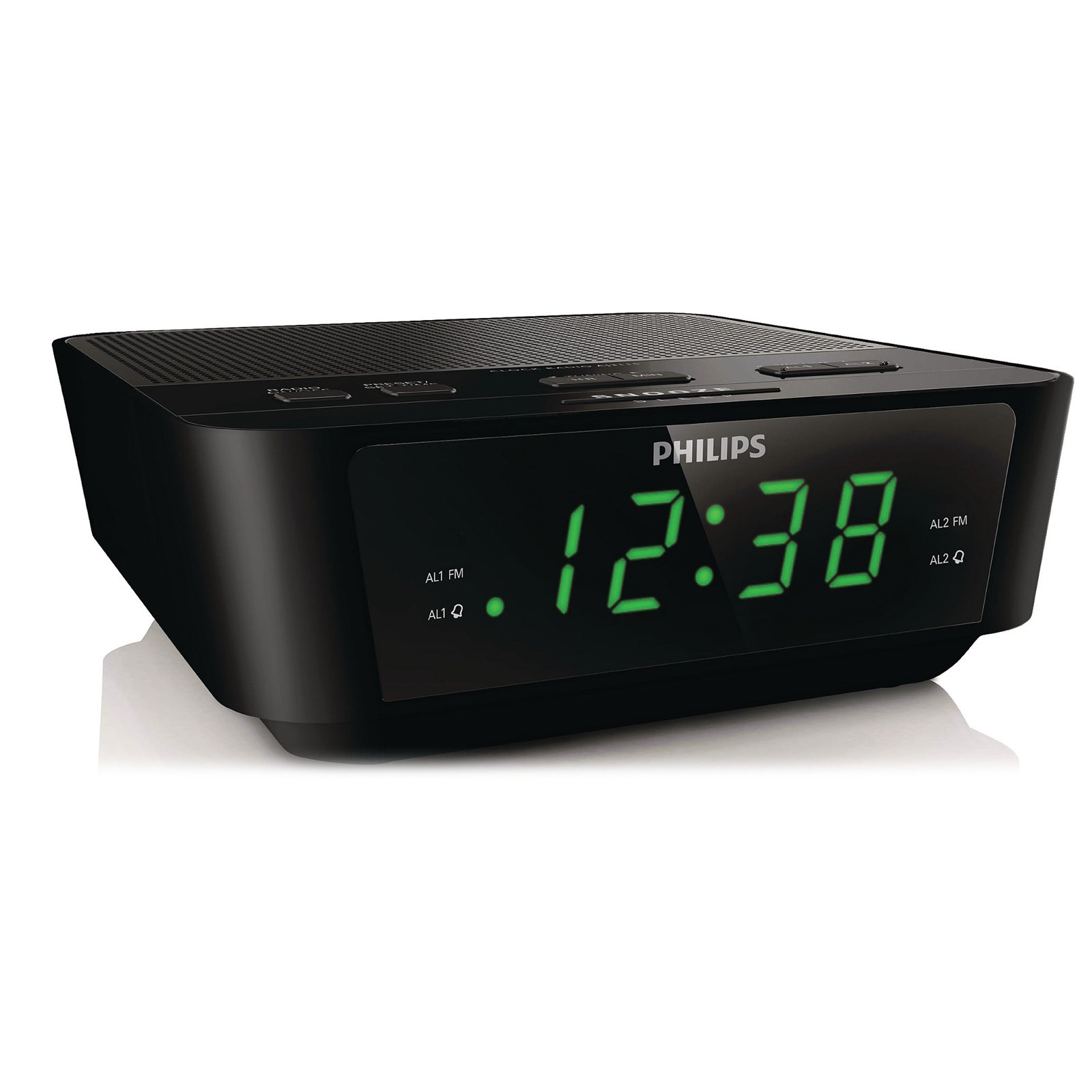
This image shows the front of the Philips AJ3116M/37 Digital Tuning Clock Radio. It features a large digital display, speaker grille, and control buttons on the top surface.
- ڈیجیٹل ڈسپلے: وقت، الارم کی حیثیت، اور ریڈیو فریکوئنسی دکھاتا ہے۔
- کنٹرول بٹن: Located on the top panel for setting time, alarms, tuning radio, and adjusting volume.
- اسپیکر: آڈیو آؤٹ پٹ کے لیے مربوط۔
- ایف ایم اینٹینا: ریڈیو کے استقبال کے لیے۔
- پاور ان پٹ: For connecting to AC power.
- بیٹری ٹوکری: Located on the bottom for backup batteries.
سیٹ اپ
-
پاور سے رابطہ کریں:
Plug the AC power adapter into the DC input jack on the back of the clock radio, then plug the adapter into a wall outlet.
-
Install Backup Batteries:
Open the battery compartment cover on the bottom of the unit. Insert 2 AA batteries (not included) according to the polarity markings (+ and -). These batteries retain time and alarm settings during a power outage but do not power the unit for normal operation.
-
وقت مقرر کریں:
دبائیں اور تھامیں۔ وقت طے button until the hour digits flash. Use the گھنٹہ اور منٹ وقت کو ایڈجسٹ کرنے کے لئے بٹن. دبائیں وقت طے تصدیق کرنے کے لیے دوبارہ۔
آپریٹنگ ہدایات
ریڈیو آپریشن
-
آن/آف کریں:
دبائیں ریڈیو آن/آف ریڈیو کو آن یا آف کرنے کے لیے بٹن۔
-
اسٹیشن پر ٹیون کریں:
دبائیں ٹیون + or ٹیون - buttons to manually adjust the frequency. For automatic tuning, press and hold ٹیون + or ٹیون - for two seconds; the radio will scan for the next strong station.
-
پیش سیٹ سیٹ کریں:
اپنے مطلوبہ اسٹیشن پر ٹیون کریں۔ دبائیں اور تھامیں۔ پری سیٹ بٹن جب تک کہ پہلے سے سیٹ نمبر چمک نہ جائے۔ استعمال کریں۔ ٹیون + or ٹیون - پیش سیٹ نمبر (1-10) کو منتخب کرنے کے لیے۔ دبائیں پری سیٹ دوبارہ بچانے کے لئے.
-
پیش سیٹ منتخب کریں:
While the radio is on, press the پری سیٹ محفوظ کردہ اسٹیشنوں کے ذریعے چکر لگانے کے لیے بار بار بٹن۔
-
حجم کو ایڈجسٹ کریں:
استعمال کریں۔ حجم +۔ or حجم - آواز کی سطح کو ایڈجسٹ کرنے کے لیے بٹن۔
الارم کے افعال
The clock radio features a dual alarm system, allowing you to set two independent alarms.
-
Set Alarm 1 or Alarm 2:
دبائیں اور تھامیں۔ الارم 1 or الارم 2 الارم کا وقت چمکنے تک بٹن۔ استعمال کریں۔ گھنٹہ اور منٹ buttons to set the desired alarm time. Press the respective الارم تصدیق کے لیے دوبارہ بٹن۔
-
الارم کا ذریعہ منتخب کریں:
الارم کا وقت مقرر کرنے کے بعد، دبائیں۔ الارم 1 or الارم 2 button repeatedly to cycle through alarm modes: بزر, ریڈیو، یا آف. An indicator will light up next to your selection.
-
Stop/Snooze Alarm:
جب الارم بجتا ہے ، دبائیں۔ اسنوز کریں button for a temporary pause (typically 9 minutes). To turn off the alarm completely, press the الارم آف بٹن
نیند کا ٹائمر
نیند کا ٹائمر آپ کو ریڈیو پر سونے کی اجازت دیتا ہے، جو ایک مقررہ مدت کے بعد خود بخود بند ہو جائے گا۔
-
Activate Sleep Timer:
While the radio is on, press the سونا button repeatedly to select a sleep duration (e.g., 120, 90, 60, 30, 15 minutes, or OFF). The radio will play for the selected duration and then turn off.
چمک دکھائیں۔
ڈسپلے کی چمک کو اپنی ترجیح کے مطابق ایڈجسٹ کریں۔
- دبائیں ڈیمر button (if available, or a similar button) to cycle through different brightness levels for the digital display.
دیکھ بھال
-
صفائی:
یونٹ کو ایک نرم کے ساتھ مسح کریں، ڈیamp کپڑا کھرچنے والے کلینر یا سالوینٹس کا استعمال نہ کریں۔ اس بات کو یقینی بنائیں کہ یونٹ صاف کرنے سے پہلے ان پلگ ہے۔
-
بیٹری کی تبدیلی:
Replace the backup batteries annually or when the battery low indicator appears (if applicable) to ensure time retention during power outages
خرابی کا سراغ لگانا
| مسئلہ | ممکنہ وجہ | حل |
|---|---|---|
| کوئی پاور / ڈسپلے آف نہیں ہے۔ | Power cord not connected properly. Power outage. | Check AC power connection. Ensure power outlet is functional. |
| ریڈیو کا ناقص استقبال | اینٹینا درست طریقے سے بڑھا یا پوزیشن میں نہیں ہے۔ دوسرے الیکٹرانکس سے مداخلت۔ | Fully extend the FM wire antenna. Reposition the unit for better reception. Move away from other electronic devices. |
| الارم نہیں بجتا ہے۔ | Alarm not activated or set incorrectly. Volume too low (if radio alarm). | Verify alarm time and source (Buzzer/Radio) are correctly set and activated. Increase radio volume if using radio alarm. |
| پاور OU کے بعد ضائع ہونے والا وقت/ترتیباتtage | بیک اپ بیٹریاں مر چکی ہیں یا انسٹال نہیں ہیں۔ | Install 2 new AA batteries in the battery compartment. |
وضاحتیں
| برانڈ | فلپس |
| ماڈل نمبر | AJ3116M/37 |
| ڈسپلے کی قسم | ڈیجیٹل |
| رنگ | سیاہ |
| خصوصی خصوصیات | Alarm, Radio, Timer |
| مصنوعات کے طول و عرض | 5.39"W x 6.46"H |
| شے کا وزن | 9.6 اونس |
| طاقت کا منبع | Battery & AC |
| بیٹریاں درکار ہیں۔ | 2 AA batteries (for backup) |
| کارخانہ دار | فلپس کنزیومر الیکٹرانکس۔ |
| یو پی سی | 609585234185 |
وارنٹی اور سپورٹ
For warranty information and customer support, please refer to the warranty card included with your product or visit the official Philips support webسائٹ آپ بھی ملاحظہ کر سکتے ہیں۔ ایمیزون پر فلپس اسٹور مزید پروڈکٹ کی معلومات کے لیے۔
کسی بھی وارنٹی دعووں کے لیے براہ کرم اپنے خریداری کا ثبوت اپنے پاس رکھیں۔


