تعارف
This manual provides essential instructions for the safe and efficient use of your ONKYO RC-1000M Audio Remote Control. Please read this manual thoroughly before using the product and retain it for future reference.
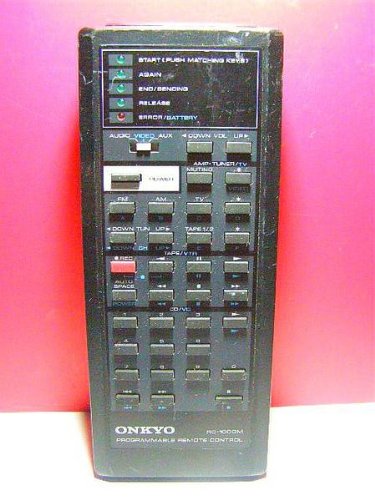
Image: The ONKYO RC-1000M Audio Remote Control, a black rectangular device with various control buttons.
سیٹ اپ
1. بیٹری کی تنصیب
- ریموٹ کنٹرول کے پیچھے بیٹری کے ٹوکری کا احاطہ تلاش کریں۔
- کور کو نیچے کی طرف سلائیڈ کریں یا اسے کھولنے کے لیے کنڈی کو دبائیں۔
- Insert two AAA batteries (not included), ensuring the positive (+) and negative (-) terminals align with the indicators inside the compartment.
- بیٹری کے کمپارٹمنٹ کور کو تبدیل کریں، اس بات کو یقینی بناتے ہوئے کہ یہ محفوظ طریقے سے اپنی جگہ پر کلک کرتا ہے۔
نوٹ: ہمیشہ نئی بیٹریاں استعمال کریں اور دونوں بیٹریاں ایک ہی وقت میں تبدیل کریں۔ پرانی اور نئی بیٹریوں یا مختلف قسم کی بیٹریوں کو مکس نہ کریں۔
2. Initial Pairing (If Applicable)
The ONKYO RC-1000M is typically pre-programmed for compatible ONKYO audio devices. No manual pairing is usually required. If the remote does not respond, ensure your audio device is powered on and within range. Refer to your ONKYO audio component's manual for specific remote control compatibility and setup instructions if issues persist.
آپریٹنگ ہدایات
The RC-1000M remote control provides comprehensive control over your ONKYO audio system. Point the remote control directly at the main unit's remote sensor.
- طاقت: Press to turn the audio component on or off.
- ان پٹ سلیکٹر: Use dedicated buttons (e.g., CD, TUNER, DVD) to switch between audio input sources.
- حجم +/-: ماسٹر والیوم لیول کو ایڈجسٹ کرتا ہے۔
- خاموش: آڈیو آؤٹ پٹ کو عارضی طور پر خاموش کر دیتا ہے۔ آواز کو بحال کرنے کے لیے دوبارہ دبائیں۔
- PLAY/PAUSE/STOP/SKIP: Control playback functions for compatible media players (e.g., CD player, network player).
- MENU/ENTER/NAVIGATION: Access and navigate on-screen menus of your ONKYO audio component.
For detailed functions of specific buttons, refer to the instruction manual of the ONKYO audio component you are controlling.
دیکھ بھال
صفائی
Wipe the remote control with a soft, dry cloth. Do not use abrasive cleaners, waxes, or solvents. Avoid spraying liquids directly onto the remote control.
بیٹری کی تبدیلی
If the remote control's range decreases or it becomes unresponsive, replace the batteries as described in the "Battery Installation" section. Dispose of used batteries according to local regulations.
ذخیرہ
When storing the remote control for extended periods, remove the batteries to prevent leakage and potential damage to the unit.
خرابی کا سراغ لگانا
| مسئلہ | ممکنہ وجہ | حل |
|---|---|---|
| Remote control does not operate. |
|
|
| Remote control operates intermittently. |
|
|
وضاحتیں
- ماڈل: RC-1000M
- برانڈ: اونکیو
- بجلی کی فراہمی: DC 3V (AAA batteries x 2)
- آپریٹنگ رینج: Approximately 7 meters (23 feet) under normal conditions.
- طول و عرض (تقریباً): Not specified in product data.
- وزن (لگ بھگ): Not specified in product data.
نردجیکرن بہتری کے لیے بغیر اطلاع کے تبدیل کیے جا سکتے ہیں۔
وارنٹی اور سپورٹ
For warranty information, technical support, or service inquiries, please refer to the documentation included with your ONKYO audio component or visit the official ONKYO webسائٹ وارنٹی دعووں کے لیے خریداری کے ثبوت کے طور پر اپنی خریداری کی رسید رکھیں۔
سرکاری ONKYO Webسائٹ: www.onkyo.com


