1. تعارف
This manual provides essential instructions for the safe operation and maintenance of your VTech VM333 Safe & Sound Video Baby Monitor. Please read this manual thoroughly before using the product to ensure proper setup and functionality. The VTech VM333 is designed to help you monitor your baby with a high-resolution color LCD screen, automatic night vision, and two-way audio communication.
2. پروڈکٹ ختمview
The VTech VM333 system includes a Parent Unit (monitor) and a Baby Unit (camera). Familiarize yourself with the components and controls of each unit.
2.1. Parent Unit
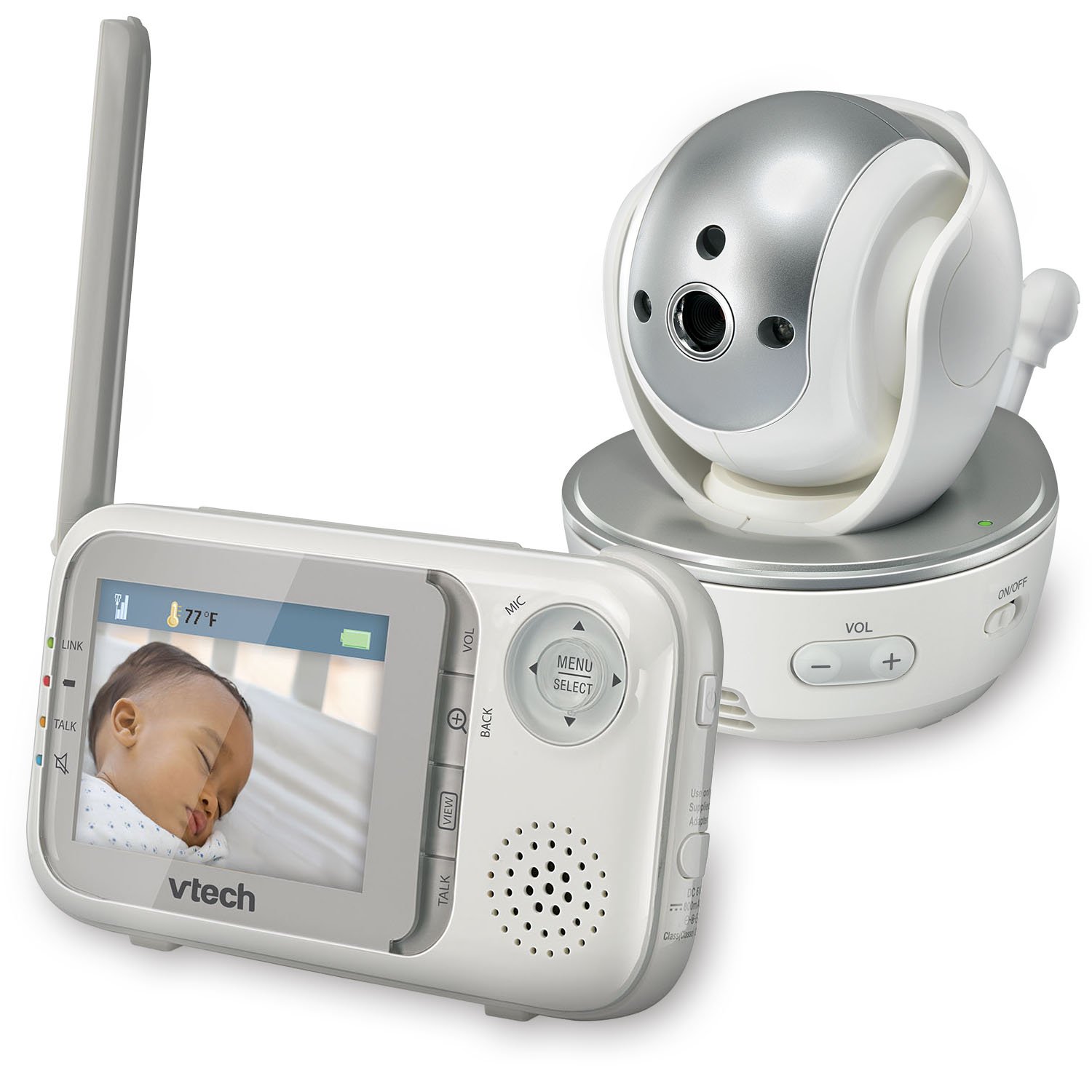
تصویر: سامنے view of the VTech VM333 Parent Unit.
- 2.8 انچ رنگین LCD اسکرین: Displays live video feed from the Baby Unit.
- مینو/منتخب بٹن: Accesses menu options and confirms selections.
- دشاتمک تیر (اوپر/نیچے/بائیں/دائیں): Navigates menus and controls camera pan/tilt.
- ZOOM Button (+/-): Magnifies the video image.
- ٹاک بٹن: Activates two-way audio communication.
- والیوم بٹن (+/-): Adjusts the Parent Unit speaker volume.
- لنک اشارے: Shows connection status between units.
- بیٹری اشارے: موجودہ بیٹری لیول دکھاتا ہے۔
- درجہ حرارت ڈسپلے: Shows the temperature detected by the Baby Unit.
2.2. Baby Unit (Camera)

تصویر: سامنے view of the VTech VM333 Baby Unit camera.
- کیمرے کا لینس: ویڈیو کیپچر کرتا ہے۔
- اورکت ایل ای ڈی: Provide night vision in low light conditions.
- مائیکروفون: Detects sound from the baby's room.
- اسپیکر: دو طرفہ آڈیو مواصلات کے لیے۔
- درجہ حرارت سینسر: Monitors room temperature.
- بجلی پر / بند سوئچ: Turns the Baby Unit on or off.
- پاور جیک: پاور اڈاپٹر سے جوڑتا ہے۔

تصویر: سائیڈ view of the VTech VM333 Baby Unit, illustrating the wall-mount bracket.
3. سیٹ اپ
3.1. Powering On the Units
- بیبی یونٹ کو جوڑیں: Plug the small end of the power adapter into the power jack on the back of the Baby Unit. Plug the large end into a wall outlet.
- Connect the Parent Unit: Plug the small end of the power adapter into the power jack on the side of the Parent Unit. Plug the large end into a wall outlet. The Parent Unit battery will begin charging.
- آن کریں: Slide the ON/OFF switch on the Baby Unit to the ON position. Press and hold the POWER button on the Parent Unit until the screen turns on.
The units are pre-linked. If they do not link automatically, refer to the "Troubleshooting" section for re-pairing instructions.
3.2. Positioning the Baby Unit (Camera)
Place the Baby Unit at least 3 feet (1 meter) away from your baby to avoid potential hazards. Ensure the camera is positioned to capture the desired viewing area. Avoid placing the Baby Unit where it can be easily reached by children.
- For optimal performance, place the Baby Unit on a flat surface or mount it to a wall using the included wall-mount bracket.
- Keep the Baby Unit and Parent Unit within range (up to 1,000 feet / 300 meters in open space). Obstacles like walls and furniture can reduce the range.
Image: Proper placement of the Baby Unit near a crib.
4. آپریشن
4.1. Basic Monitoring
Once both units are powered on and linked, the Parent Unit will display live video from the Baby Unit. Adjust the volume using the VOL +۔ اور VOL - buttons on the Parent Unit.
4.2. Pan, Tilt, and Zoom
The Baby Unit camera can be remotely controlled from the Parent Unit to adjust its viewزاویہ اور زوم کی سطح.
- پین/جھکاؤ: استعمال کریں۔ دشاتمک تیر (Up, Down, Left, Right) on the Parent Unit to move the camera lens horizontally (up to 270 degrees) and vertically (up to 124 degrees).
- زوم: دبائیں زوم + button to zoom in (2x magnification) and ZOOM - زوم آؤٹ کرنے کے لیے۔
Video: Demonstration of the VTech VM333's pan, tilt, and zoom features, showing remote camera control from the Parent Unit.
4.3. دو طرفہ گفتگو
You can speak to your baby through the Baby Unit's speaker.
- دبائیں اور تھامیں۔ بات کریں۔ پیرنٹ یونٹ پر بٹن۔
- پیرنٹ یونٹ پر مائکروفون میں واضح طور پر بات کریں۔
- جاری کریں۔ بات کریں۔ button to stop speaking and hear your baby again.

Image: Using the two-way talk feature on the Parent Unit.
4.4. Automatic IR Night Vision
The Baby Unit is equipped with infrared LEDs that automatically activate in low light conditions, providing a clear black and white video image of your baby in the dark.
Image: The Baby Unit operating in night vision mode.
4.5 ساؤنڈ ایکٹیویشن موڈ
This mode allows the Parent Unit screen to turn off automatically to save power and reduce light disturbance, and then turn back on when sounds are detected from the Baby Unit.
- دبائیں مینو/منتخب کریں۔ پیرنٹ یونٹ پر بٹن۔
- پر نیویگیٹ کریں۔ VOX حساسیت or ساؤنڈ ایکٹیویشن ترتیب
- Select your desired sound sensitivity level. A higher sensitivity will activate the screen with softer sounds.
Image: Parent Unit displaying the sound activation icon.
4.6. Temperature Monitoring and Alerts
The Baby Unit monitors the room temperature and displays it on the Parent Unit screen. You can set alerts for temperature deviations.
- دبائیں مینو/منتخب کریں۔ بٹن
- پر نیویگیٹ کریں۔ درجہ حرارت کا الرٹ ترتیبات
- Set your desired minimum and maximum temperature thresholds. The Parent Unit will beep if the temperature goes outside this range.
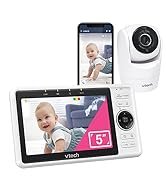
Image: Parent Unit displaying room temperature.
4.7. Multiple Camera Monitoring (Expandable System)
The VM333 system supports up to four cameras (additional cameras sold separately). You can view multiple cameras in different modes.
- سنگل View: Displays video from one camera at a time. Use the VIEW button to cycle through connected cameras.
- تقسیم View: Displays video from multiple cameras simultaneously on a split screen.
- گشتی موڈ: Automatically cycles through all connected cameras, displaying each for a few seconds.
Video: Demonstration of multi-camera viewing modes, including single view، تقسیم view, and patrol mode.
5 دیکھ بھال
- صفائی: Clean the surfaces of the Parent Unit and Baby Unit with a soft, damp کپڑا صفائی کے اسپرے یا مائع کلینر استعمال نہ کریں۔
- بیٹری کی دیکھ بھال: The Parent Unit uses a rechargeable Lithium-Ion battery. For optimal battery life, fully charge the unit before first use. Avoid extreme temperatures. If storing the unit for an extended period, remove the battery.
- لینس کی دیکھ بھال: Keep the camera lens clean to ensure clear video quality. Use a soft, lint-free cloth to gently wipe the lens if needed.
6 خرابیوں کا سراغ لگانا
| مسئلہ | حل |
|---|---|
| No video/audio on Parent Unit. |
|
| ناقص ویڈیو کا معیار۔ |
|
| Parent Unit beeps (low battery, out of range, temperature). |
|
| دوسرے آلات کے ساتھ مداخلت۔ |
|
7. وضاحتیں
| فیچر | تفصیل |
|---|---|
| ماڈل نمبر | VM333 |
| اسکرین کا سائز | 2.8 انچ (LCD) |
| وائرلیس ٹیکنالوجی | 2.4 GHz FHSS digital transmission |
| رینج | کھلی جگہ میں 1,000 فٹ (300 میٹر) تک |
| پین زاویہ | Up to 270 degrees horizontal |
| جھکاؤ کا زاویہ | Up to 124 degrees vertical |
| زوم | 2x ڈیجیٹل زوم |
| نائٹ ویژن | Automatic infrared (IR) |
| دو طرفہ آڈیو | جی ہاں |
| ساؤنڈ ایکٹیویشن | ہاں (VOX) |
| درجہ حرارت سینسر | ہاں، انتباہات کے ساتھ |
| قابل توسیع | 4 کیمرے تک (اضافی کیمرے الگ سے فروخت کیے گئے) |
| پیرنٹ یونٹ بیٹری لائف | Up to 3.5 hours (video streaming) |
| طاقت کا منبع | Rechargeable Lithium-Ion battery (Parent Unit), AC power (Baby Unit) |
| رنگ | وائٹ / سلور |
| شے کا وزن | 2 پاؤنڈ |
8. وارنٹی اور سپورٹ
For warranty information and technical support, please contact VTech customer service.
- کسٹمر سپورٹ نمبر: (800) 595-9511
- Webسائٹ: www.vtechbabycare.com
- ای میل: support@vtechbabycare.com
براہ کرم وارنٹی مقاصد کے لیے خریداری کے ثبوت کے طور پر اپنی خریداری کی رسید اپنے پاس رکھیں۔


