1. تعارف
This manual provides detailed instructions for the installation, operation, and maintenance of your Axis P1355 Surveillance/Network Camera. The Axis P13 series offers high-performance fixed cameras designed for both indoor and outdoor surveillance, delivering superb image quality with H.264 compression. These models support HDTV 720p/1080p video and are equipped with features like Wide Dynamic Range and Day/Night functionality for clear imaging in various lighting conditions. Specific models within the P13 series, including HDTV 720p, incorporate Axis Lightfinder technology for enhanced low-light sensitivity, while HDTV 1080p and 5-megapixel cameras feature P-iris control for optimized depth of field and lens resolution.
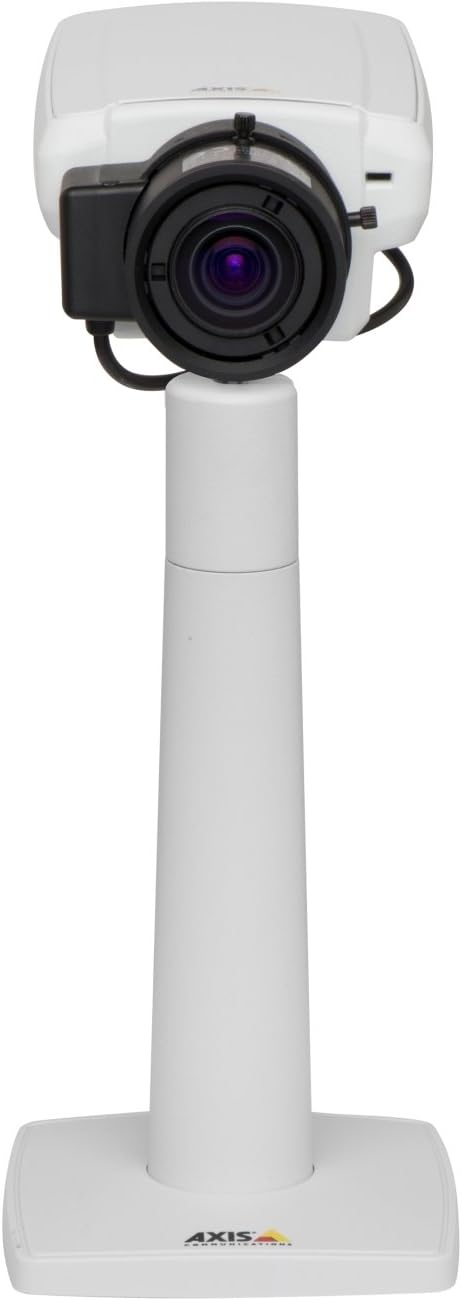
تصویر 1: The Axis P1355 Surveillance Camera shown mounted on its stand. This image illustrates the camera's physical appearance and typical mounting configuration.
2. حفاظتی معلومات
Please read all safety instructions before installing or operating the camera.
- Ensure the power source matches the camera's requirements to prevent electrical hazards.
- تنصیب مقامی برقی کوڈز کے مطابق اہل عملہ کے ذریعہ کی جانی چاہئے۔
- کیمرہ کو انتہائی درجہ حرارت، نمی، یا سنکنرن ماحول کے سامنے نہ رکھیں۔
- Avoid direct exposure of the lens to strong light sources, such as the sun, as this may damage the image sensor.
- Disconnect power before cleaning or servicing the camera.
3. سیٹ اپ اور انسٹالیشن
The Axis P1355 camera is designed for both indoor and outdoor use and supports various mounting options.
3.1 چڑھنا
The camera is typically designed for wall mount installation. Ensure the mounting surface is strong enough to support the camera's weight (approximately 2 pounds). Use appropriate screws and anchors for the chosen surface.
- Select a suitable location for optimal surveillance coverage.
- بڑھتے ہوئے بریکٹ کو دیوار سے محفوظ طریقے سے جوڑیں۔
- Mount the camera onto the bracket, ensuring it is firmly in place.
- Adjust the camera's angle for the desired field of view.
3.2 کنکشنز
The Axis P1355 camera primarily uses wired connectivity for reliable data transmission and power.
- پاور کنکشن: Connect the provided power adapter to the camera's power input and then to a suitable electrical outlet. The camera operates on a corded electric power source.
- نیٹ ورک کنکشن: Connect an Ethernet cable from the camera's network port to your network switch or router. This provides wired connectivity for video streaming and control.
- Wireless Connectivity (Optional/Configuration): While primarily wired, the camera supports Wi-Fi for certain configurations. Refer to the Axis product documentation for specific wireless setup instructions if applicable to your model variant.
4. آپریٹنگ ہدایات
Once installed and connected, the Axis P1355 camera can be configured and operated via a network interface.
4.1 ابتدائی رسائی اور ترتیب
- Use the Axis IP Utility or a similar network discovery tool to find the camera's IP address on your network.
- کھولنا a web براؤزر اور اس تک رسائی کے لیے کیمرے کا IP ایڈریس درج کریں۔ web انٹرفیس
- Log in using the default credentials (refer to Axis documentation for default username/password, typically 'root' and 'pass' or similar, which should be changed immediately).
- Follow the on-screen prompts to set up basic network settings, date/time, and user accounts.
4.2 Video Monitoring and Features
- جیو View: Access the live video feed through the web interface or compatible video management software.
- قرارداد: The camera supports video capture resolutions up to 720p and effective video resolutions of 1080 pixels, with effective still resolution of 2 MP.
- Color and Monochrome Modes: The camera can operate in both color and monochrome (black and white) modes, automatically switching based on light conditions or configured manually.
- نائٹ ویژن: Utilize the integrated night vision capabilities for surveillance in low-light or complete darkness.
- آپٹیکل زوم: Adjust the optical zoom for detailed views of specific areas.
- P-Iris Control: For models equipped with P-iris, this feature allows precise control over the iris position to optimize depth of field and lens resolution, enhancing image sharpness. This can be configured via the web انٹرفیس
- ویڈیو فارمیٹ: Video is typically captured in MP4 format.
- ریموٹ کنٹرول: The camera supports remote control for various settings and adjustments.
5 دیکھ بھال
Regular maintenance ensures optimal performance and longevity of your Axis P1355 camera.
- صفائی: Gently clean the camera lens and housing with a soft, damp کپڑا کھرچنے والے کلینر یا سالوینٹس سے پرہیز کریں۔
- فرم ویئر اپ ڈیٹس: Periodically check the Axis Communications webفرم ویئر اپ ڈیٹس کے لیے سائٹ۔ فرم ویئر کو اپ ڈیٹ رکھنے سے تازہ ترین خصوصیات، سیکیورٹی پیچ اور کارکردگی میں بہتری تک رسائی یقینی بنتی ہے۔
- کیبل معائنہ: Regularly inspect all cables for signs of wear or damage, especially for outdoor installations.
- ماحولیاتی جانچ: اس بات کو یقینی بنائیں کہ کیمرے کا آپریٹنگ ماحول مخصوص درجہ حرارت اور نمی کی حدود میں رہے۔
6 خرابیوں کا سراغ لگانا
This section addresses common issues you might encounter with your Axis P1355 camera.
- کوئی طاقت نہیں:
- Verify the power adapter is securely connected to both the camera and a working power outlet.
- کسی بھی نقصان کے لیے پاور کیبل کو چیک کریں۔
- کوئی نیٹ ورک کنکشن نہیں:
- Ensure the Ethernet cable is properly connected to the camera and the network switch/router.
- نیٹ ورک سوئچ/راؤٹر کی حیثیت چیک کریں۔
- Confirm the camera has a valid IP address and is on the same network segment as your viewing آلہ.
- خراب تصویری معیار:
- کیمرے کے لینس کو صاف کریں۔
- Adjust focus and zoom settings via the web انٹرفیس
- Check lighting conditions; enable night vision or adjust exposure settings if necessary.
- Ensure P-iris control is correctly configured for optimal sharpness (if applicable).
- رسائی نہیں ہو سکتی Web انٹرفیس:
- Verify the camera's IP address.
- Ensure your computer is on the same network as the camera.
- Try restarting the camera and your network equipment.
7. وضاحتیں
| فیچر | تفصیل |
|---|---|
| برانڈ | ایکسس کمیونیکیشنز |
| ماڈل نمبر | AXIS P1355 |
| انڈور / آؤٹ ڈور استعمال | انڈور، آؤٹ ڈور |
| کنیکٹوٹی ٹیکنالوجی | Wired (Wi-Fi capable for certain configurations) |
| خصوصی خصوصیت | نائٹ ویژن |
| طاقت کا منبع | کورڈڈ الیکٹرک (7.1 واٹ) |
| ویڈیو کیپچر ریزولوشن | 720ص |
| مؤثر ویڈیو ریزولوشن | 1080 پکسلز |
| موثر پھر بھی قرارداد | 2 MP |
| زوم کی قسم | Optical Zoom (2.9x Optical) |
| کنٹرولر کی قسم | Iris (P-iris control) |
| چڑھنے کی قسم | وال ماؤنٹ |
| پروڈکٹ کے طول و عرض (L x W x H) | 3.07 x 5.94 x 1.69 انچ |
| شے کا وزن | 2 پاؤنڈ |
| بین الاقوامی تحفظ کی درجہ بندی | آئی پی 54 |
| ویڈیو کیپچر فارمیٹ | MP4 |
8. وارنٹی اور سپورٹ
For detailed warranty information and technical support, please refer to the official Axis Communications webسائٹ یا ان کی کسٹمر سروس سے براہ راست رابطہ کریں۔
مینوفیکچرر: AXIS COMMUNICATION INC.
Webسائٹ: www.axis.com (براہ کرم آفیشل کا دورہ کریں۔ website for the most current support resources, drivers, and documentation.)


