تعارف
This manual provides comprehensive instructions for the setup, operation, and maintenance of your Genius SW-2.1 355 Speaker System. Please read this manual thoroughly before using the product to ensure proper functionality and to maximize your listening experience.
حفاظتی معلومات
آلے کو پہنچنے والے نقصان یا اپنے آپ کو چوٹ سے بچانے کے لیے درج ذیل حفاظتی احتیاطی تدابیر پر عمل کریں:
- اسپیکر کو پانی یا نمی کے سامنے نہ رکھیں۔
- اسپیکر کو گرمی کے ذرائع کے قریب یا براہ راست سورج کی روشنی میں رکھنے سے گریز کریں۔
- زیادہ گرمی سے بچنے کے لیے سب ووفر کے ارد گرد مناسب وینٹیلیشن کو یقینی بنائیں۔
- یونٹ کے ساتھ فراہم کردہ پاور اڈاپٹر ہی استعمال کریں۔
- خود یونٹ کو کھولنے یا مرمت کرنے کی کوشش نہ کریں۔ تمام خدمات کو اہل اہلکاروں سے رجوع کریں۔
- بچوں کی پہنچ سے دور رکھیں۔
پیکیج کے مشمولات
تصدیق کریں کہ تمام اشیاء پیکیج میں موجود ہیں:
- 1 ایکس سب ووفر یونٹ
- 2 ایکس سیٹلائٹ اسپیکر
- 1 ایکس آڈیو ان پٹ کیبل (3.5 ملی میٹر سٹیریو جیک)
- 1 ایکس پاور اڈاپٹر
- 1 ایکس یوزر مینوئل (یہ دستاویز)
پروڈکٹ ختمview
The Genius SW-2.1 355 Speaker System consists of a subwoofer and two satellite speakers designed to deliver clear audio and powerful bass for your multimedia needs.
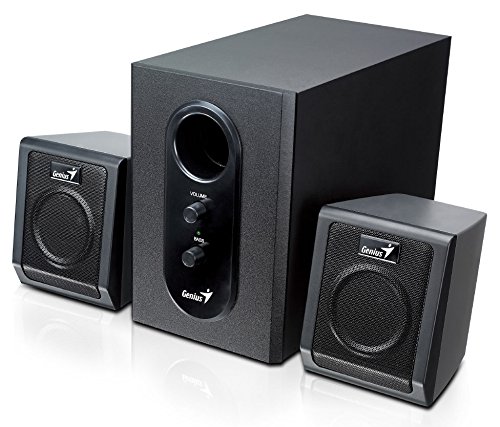
This image displays the Genius SW-2.1 355 Speaker System. It features a central, larger subwoofer unit with volume and bass control knobs on its front panel, and two smaller satellite speakers positioned on either side. All components are black.
اجزاء:
- سبوفر: The main unit housing the bass driver and control panel.
- سیٹلائٹ اسپیکر: Two compact speakers for mid-range and high-frequency audio.
- کنٹرول پینل: Located on the subwoofer, featuring Volume and Bass adjustment knobs.
سیٹ اپ
- Positioning Speakers: Place the subwoofer on the floor or a sturdy surface. Position the satellite speakers on either side of your listening area, facing towards you for optimal stereo separation.
- Connecting Satellite Speakers: Connect the cables from the two satellite speakers to the corresponding output jacks on the rear of the subwoofer unit. Ensure a secure connection.
- Connecting Audio Source: Connect one end of the 3.5mm audio input cable to the "Audio In" jack on the subwoofer. Connect the other end to the audio output jack (e.g., headphone jack) of your computer, MP3 player, smartphone, or other audio source.
- کنیکٹنگ پاور: Plug the power adapter into the DC input jack on the subwoofer. Then, plug the power adapter into a standard electrical outlet.
- پاور آن: Turn on the speaker system using the power switch, usually integrated with the volume knob.
آپریشن
- پاور آن/آف اور والیوم کنٹرول: The main knob on the subwoofer controls both power and overall volume. Rotate clockwise to turn on and increase volume; rotate counter-clockwise to decrease volume and turn off.
- باس ایڈجسٹمنٹ: Use the "Bass" knob on the subwoofer to adjust the level of low-frequency sound. Rotate clockwise to increase bass, and counter-clockwise to decrease it, according to your preference.
- Audio Source Volume: For optimal sound quality, set the volume on your audio source (computer, phone, etc.) to about 75% and then use the speaker system's volume control for fine adjustments.
دیکھ بھال
- صفائی: Use a soft, dry cloth to clean the surfaces of the speakers. Do not use liquid cleaners or abrasive materials.
- ذخیرہ: اگر سپیکر کو طویل مدت کے لیے ذخیرہ کر رہے ہیں، تو انہیں بجلی سے منقطع کریں اور انہیں ٹھنڈی، خشک جگہ پر محفوظ کریں۔
- کیبل مینجمنٹ: Ensure cables are not tangled or pinched to prevent damage.
خرابی کا سراغ لگانا
| مسئلہ | ممکنہ وجہ | حل |
|---|---|---|
| کوئی آواز نہیں۔ |
|
|
| مسخ شدہ آواز |
|
|
| کمزور باس |
|
|
وضاحتیں
| فیچر | تفصیل |
|---|---|
| ماڈل کا نام | SW-2.1 355 |
| اسپیکر کی قسم | 2.1 Channel Multimedia Speaker System (Bookshelf, Satellite, Subwoofer) |
| کل آؤٹ پٹ پاور | 10 Watts RMS (5W Subwoofer + 2.5W x 2 Satellites) |
| مواد | Wood (Subwoofer) |
| کنیکٹوٹی ٹیکنالوجی | وائرڈ (3.5 ملی میٹر آڈیو ان پٹ) |
| ہم آہنگ آلات | MP3 Player, Personal Computer, Smartphones, Tablets, Televisions |
| کنٹرول کرتا ہے۔ | حجم، باس |
| طاقت کا منبع | DC |
| شے کا وزن | 2.78 کلوگرام |
| پیکیج کے طول و عرض | 39.6 x 25 x 18.4 سینٹی میٹر |
وارنٹی اور سپورٹ
Genius products are designed for reliability and performance. For information regarding warranty coverage, technical support, or service inquiries, please refer to the warranty card included with your product or visit the official Genius webسائٹ خریداری کے ثبوت کے طور پر اپنی خریداری کی رسید اپنے پاس رکھیں۔


