تعارف
The Logitech UE Boom is a 360-degree wireless Bluetooth speaker designed for portable audio. It features a durable, go-anywhere shape and is equipped with a water and stain resistant acoustic skin. This speaker allows for wireless music playback, phone calls, and can be paired with another UE Boom for stereo sound.

تصویر: سامنے view of the Logitech UE Boom Wireless Bluetooth Speaker in Northern Light color.
کلیدی خصوصیات
- 360 ڈگری آواز: Delivers immersive audio in all directions.
- پورٹیبل ڈیزائن: Versatile, cylindrical shape for easy transport.
- Water and Stain Resistant: Features a colorful acoustic skin with plasma coating for durability against water and stains.
- وائرلیس رابطہ: Connects via Bluetooth from up to 50 feet away. Easy pairing via NFC for compatible devices.
- Double Up Feature: Wirelessly connect two UE BOOM speakers in stereo using the UE BOOM app for enhanced sound.
- لمبی بیٹری کی زندگی: Rechargeable battery provides up to 15 hours of playback.
- اسپیکر فون: Integrated crystal-clear speakerphone for calls.
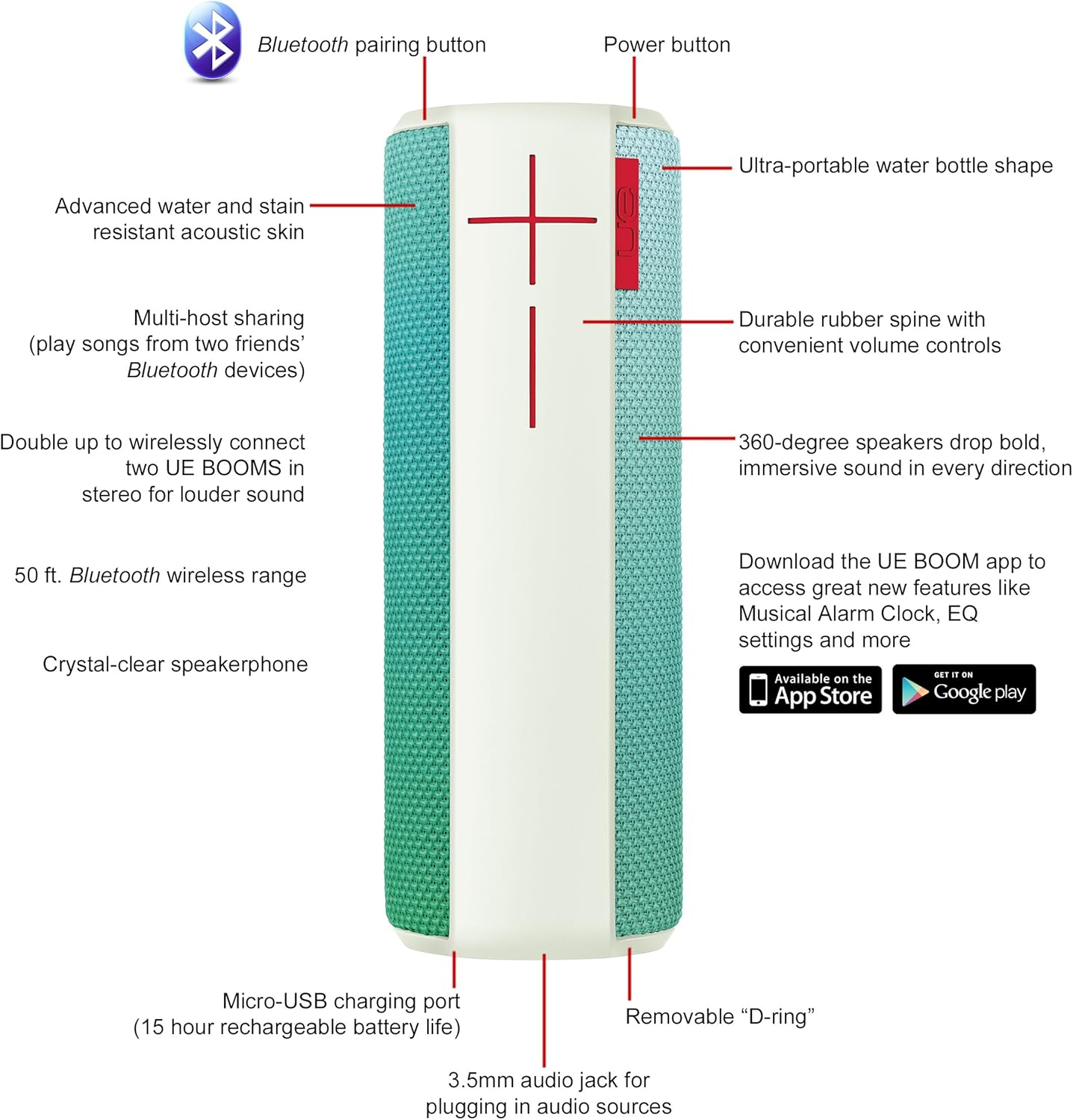
Image: Diagram highlighting key features and controls of the UE Boom speaker, including Bluetooth pairing button, power button, volume controls, micro-USB charging port, and 3.5mm audio jack.
سیٹ اپ
اسپیکر کو چارج کرنا
Before initial use, fully charge your UE Boom speaker. Connect the provided micro-USB cable to the charging port located at the bottom of the speaker and plug the other end into a USB power source. The speaker's battery provides approximately 15 hours of playback on a full charge.
بلوٹوت جوڑی بنانا
- Power on your UE Boom speaker by pressing the power button.
- Press and hold the Bluetooth pairing button (usually indicated by a Bluetooth icon) until you hear an audible tone and the LED indicator flashes rapidly.
- On your mobile device (smartphone or tablet), navigate to the Bluetooth settings.
- Select "UE Boom" from the list of available devices to pair.
- Once paired, you will hear a confirmation tone from the speaker.
For NFC-enabled devices, simply tap your device to the NFC area on the speaker for quick pairing.
آپریٹنگ ہدایات
بنیادی کنٹرولز
- پاور بٹن: Located on the top of the speaker to turn it on or off.
- حجم کنٹرول: Large '+' and '-' buttons on the side of the speaker adjust the volume.
- بلوٹوتھ بٹن: بلوٹوتھ پیئرنگ موڈ شروع کرتا ہے۔
Using the UE BOOM App
Download the official UE BOOM app from your device's app store (available on App Store and Google Play) to unlock additional features:
- Musical Alarm Clock: Wake up to your favorite music.
- ریموٹ ایکٹیویشن: Turn your speaker on/off from your device.
- EQ کی ترتیبات: ساؤنڈ پرو کو حسب ضرورت بنائیںfile اپنی پسند کے مطابق۔
- ڈبل اپ: Connect two UE BOOM speakers for a stereo sound experience.
اسپیکر فون کی فعالیت
When connected to a smartphone, the UE Boom can be used as a speakerphone. Incoming calls will be routed through the speaker, allowing for hands-free communication.
دیکھ بھال
The UE Boom speaker features a water and stain resistant acoustic skin. To clean, gently wipe the speaker with a damp cloth. Avoid using harsh chemicals or abrasive cleaners. Ensure all ports are dry before charging or connecting other devices.
خرابی کا سراغ لگانا
- کوئی طاقت نہیں: Ensure the speaker is charged. Connect it to a power source using the micro-USB cable.
- بلوٹوتھ کے ذریعے جوڑا نہیں بنایا جا سکتا:
- یقینی بنائیں کہ اسپیکر پیئرنگ موڈ میں ہے (فلیشنگ LED)۔
- چیک کریں کہ آپ کے آلے پر بلوٹوتھ فعال ہے۔
- Move your device closer to the speaker (within 50 feet).
- آلہ کا جوڑا ختم کرنے اور دوبارہ جوڑا بنانے کی کوشش کریں۔
- کم حجم یا مسخ شدہ آواز:
- اسپیکر اور اپنے منسلک آلہ دونوں پر والیوم کو ایڈجسٹ کریں۔
- یقینی بنائیں کہ اسپیکر پوری طرح سے چارج ہے۔
- Check for any obstructions around the speaker.
- ایپ منسلک نہیں ہو رہی ہے: Ensure the speaker is powered on and connected via Bluetooth to your device. Update the app to the latest version.
مصنوعات کی وضاحتیں
| ماڈل کا نام | Logitech UE Boom Wireless Bluetooth Speaker |
| ماڈل نمبر | 980-001023 |
| برانڈ | Logitech |
| رنگ | Northern Light |
| اسپیکر کی قسم | آؤٹ ڈور |
| کنیکٹوٹی ٹیکنالوجی | بلوٹوتھ، وائرلیس |
| وائرلیس رینج | 50 فٹ (15.24 میٹر) تک |
| طاقت کا منبع | بیٹری سے چلنے والی (1 لیتھیم آئن بیٹری شامل ہے) |
| بیٹری کی اوسط زندگی | 15 گھنٹے |
| پانی کی مزاحمت کی سطح | واٹر پروف |
| شے کا وزن | 2.2 پاؤنڈز |
| پروڈکٹ کے طول و عرض (LxWxH) | 2.6 x 2.6 x 7.1 انچ |
| مواد | پلاسٹک |
| یو پی سی | 097855112125 |
آفیشل پروڈکٹ ویڈیو
ویڈیو: ایک اوورview of the Logitech UE Boom speaker's features, including 360-degree sound, water resistance, wireless connectivity, and the ability to pair two speakers for louder sound. This video demonstrates the speaker's durability and portability in various environments.
وارنٹی اور سپورٹ
The Logitech UE Boom Wireless Bluetooth Speaker comes with a Limited Warranty. For specific warranty details, please refer to the documentation included with your product or visit the official Logitech webسائٹ
For technical support or customer service, you may contact Logitech at: 646-454-3200.


