تعارف
This manual provides detailed instructions for the safe and effective use of your Proster Digital LCD Anemometer Thermometer. This device is designed for measuring wind speed and temperature, suitable for various outdoor activities and professional applications. Please read this manual thoroughly before operating the device and keep it for future reference.
مصنوعات کی خصوصیات
- Measures wind speed and temperature.
- LCD display with backlight for clear readings in various lighting conditions.
- Data hold function to freeze current readings.
- Automatic and manual power off options.
- High-precision pressure sensor for quick response.
- External thermistor for accurate temperature measurement.
- Multiple wind speed units: m/s, km/h, ft/min, knots, mph.
- Temperature units: Celsius (°C) and Fahrenheit (°F).
- Beaufort scale indicator.
- بیٹری اسٹیٹس انڈیکیٹر۔
پیکیج کے مشمولات
پیک کھولنے پر، براہ کرم تصدیق کریں کہ نیچے دی گئی تمام اشیاء موجود ہیں اور اچھی حالت میں ہیں:
- 1 x Proster Digital Anemometer
- 1 x CR2032 3V بیٹری
- 1 ایکس لینیارڈ
- 1 ایکس صارف دستی
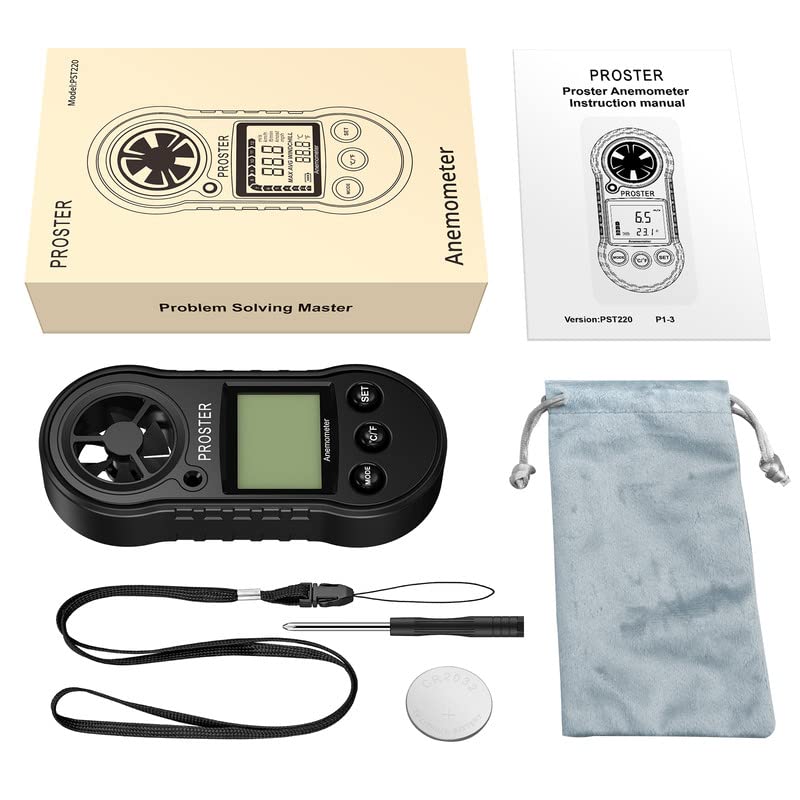
Image: Contents of the Proster Digital Anemometer package, showing the device, a CR2032 battery, a lanyard, and the instruction manual.
ڈیوائس ختمview
Familiarize yourself with the components of your anemometer:
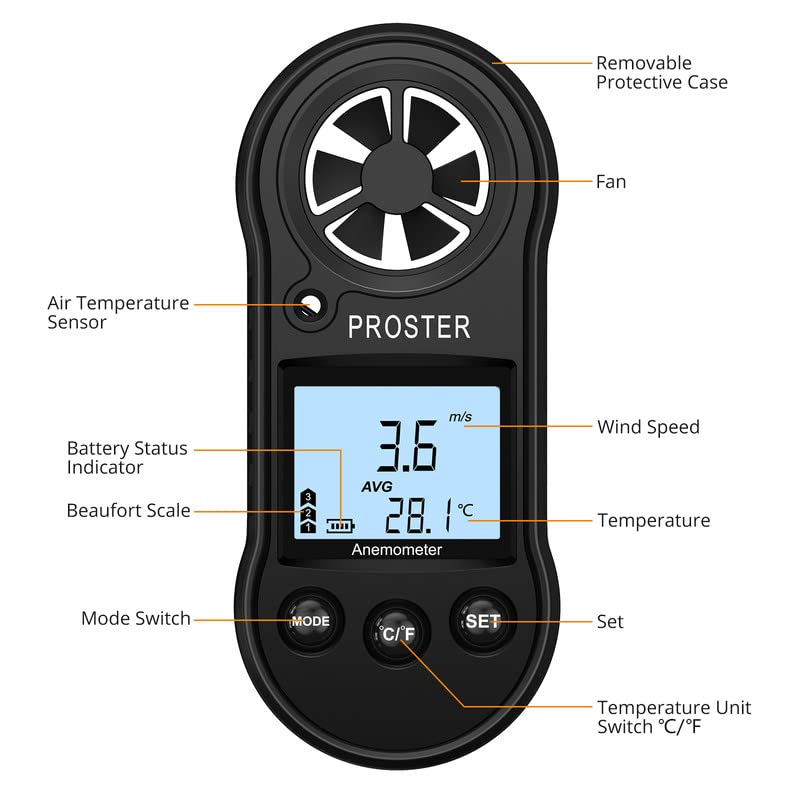
Image: Detailed diagram of the Proster Digital Anemometer, labeling its key parts including the fan, air temperature sensor, LCD display, control buttons (Mode, C/F, Set), battery status indicator, and removable protective case.
- Removable Protective Case: Protects the device when not in use.
- مداح: Measures wind speed. Ensure it is unobstructed.
- Air Temperature Sensor: Detects ambient air temperature.
- بیٹری اسٹیٹس انڈیکیٹر: Shows remaining battery life on the LCD.
- Beaufort Scale: Visual indicator of wind force.
- ہوا کی رفتار ڈسپلے: Shows current, average, or maximum wind speed.
- درجہ حرارت ڈسپلے: Shows current air temperature.
- موڈ سوئچ: Cycles through measurement modes (Current, Max, Average).
- °C/°F بٹن: سیلسیس اور فارن ہائیٹ درجہ حرارت کی اکائیوں کے درمیان ٹوگل کرتا ہے۔
- سیٹ بٹن: Used for various settings and data hold function.
سیٹ اپ
1. بیٹری کی تنصیب
- ڈیوائس کے پچھلے حصے میں بیٹری کے ٹوکرے کا پتہ لگائیں۔
- Use a small screwdriver or coin to open the battery cover by turning it counter-clockwise to the "OPEN" position.
- Insert the CR2032 3V lithium battery with the positive (+) side facing up.
- Replace the battery cover and turn it clockwise to the "CLOSE" position to secure it.
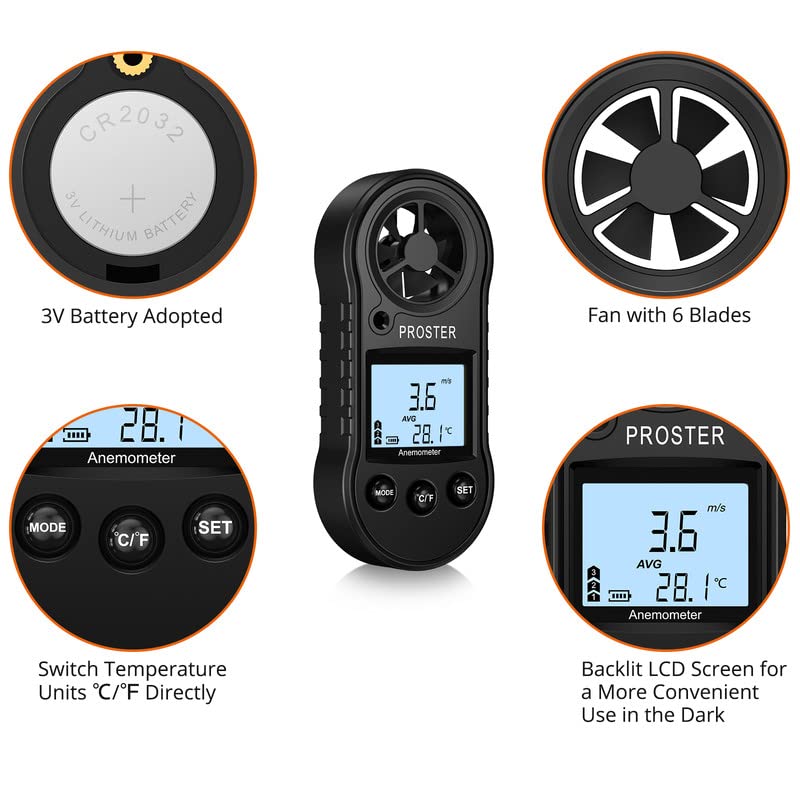
Image: Illustration showing the CR2032 battery being inserted into the compartment and a close-up of the device's fan and LCD display.
2. لینیارڈ کو جوڑنا
Thread the provided lanyard through the designated loop on the device to prevent accidental drops during use.
آپریٹنگ ہدایات
1. پاور آن/آف
- پاور آن کرنے کے لیے: دبائیں موڈ button briefly. The LCD will light up.
- To Power Off Manually: دبائیں اور تھامیں۔ موڈ تقریبا 3 سیکنڈ کے لئے بٹن.
- خودکار پاور آف: بیٹری کی زندگی کو بچانے کے لیے آلہ 14 منٹ کی غیرفعالیت کے بعد خود بخود بند ہو جائے گا۔
2. Changing Wind Speed Units
ڈیوائس کے آن ہونے کے ساتھ، دبائیں۔ سیٹ button briefly to cycle through the available wind speed units: m/s, km/h, ft/min, knots, mph.
3. درجہ حرارت کی اکائیوں کو تبدیل کرنا
دبائیں ° C / ° F button briefly to switch between Celsius (°C) and Fahrenheit (°F).
4. پیمائش کے طریقے
دبائیں موڈ button (after initial power-on) to cycle through the following wind speed measurement display modes:
- Current Wind Speed: Displays the instantaneous wind speed.
- Maximum Wind Speed (MAX): Displays the highest wind speed recorded since the device was powered on or reset.
- Average Wind Speed (AVG): پیمائش کی مدت میں ہوا کی اوسط رفتار دکھاتا ہے۔
To reset the MAX/AVG readings, press and hold the سیٹ button while in MAX or AVG mode until the display clears or resets.
5. بیک لائٹ کنٹرول
The backlight automatically activates when the device is powered on. It will turn off after a short period of inactivity to save battery. There is no manual control for the backlight.
6. پیمائش کرنا
Hold the anemometer upright, ensuring the fan is exposed to the wind flow. The wind speed and temperature will be displayed on the LCD. For accurate temperature readings, allow the device to stabilize in the environment for a few minutes.
دیکھ بھال
- صفائی: Wipe the device with a soft, dry cloth. Do not use abrasive cleaners or solvents. Ensure the fan blades are free from dust and debris.
- ذخیرہ: When not in use for extended periods, remove the battery to prevent leakage. Store the device in a cool, dry place, away from direct sunlight and extreme temperatures.
- Fan Care: Avoid touching the fan blades directly. If the fan becomes stiff or dirty, gently clean it with a soft brush or compressed air. Do not apply lubricants.
- بیٹری کی تبدیلی: Replace the CR2032 battery when the low battery indicator appears on the display. Dispose of old batteries responsibly.
خرابی کا سراغ لگانا
| مسئلہ | ممکنہ وجہ | حل |
|---|---|---|
| ڈیوائس آن نہیں ہوتی ہے۔ | بیٹری ختم ہو چکی ہے یا غلط طریقے سے انسٹال ہوئی ہے۔ | Check battery orientation. Replace with a new CR2032 battery. |
| ہوا کی رفتار کی غلط ریڈنگ۔ | Fan obstructed or damaged. Device not held correctly. | Ensure fan is clean and rotates freely. Hold the device upright and directly into the wind. |
| درجہ حرارت کی غلط ریڈنگ۔ | Device not stabilized to ambient temperature. Sensor obstructed. | Allow device to acclimate to the environment for several minutes. Ensure temperature sensor is clear. |
| ڈسپلے مدھم یا ٹمٹماتا ہے۔ | کم بیٹری۔ | CR2032 بیٹری کو تبدیل کریں۔ |
وضاحتیں
| ماڈل نمبر | ٹی ایل 0090 |
| ہوا کی رفتار کی پیمائش کی حد | 0 - 30 m/s, 0 - 90 km/h, 0 - 65 mph, 0 - 55 knots |
| ہوا کی رفتار کا حل | 0.1 m/s, 0.3 km/h, 0.2 mph, 0.2 knots |
| ہوا کے درجہ حرارت کی حد | -10 °C سے 45 °C (14 °F سے 113 °F) |
| درجہ حرارت کی قرارداد | 0.2 °C |
| درجہ حرارت کی درستگی | ± 2 °C |
| آپریٹنگ نمی | Less than or equal to 90% RH |
| اسٹوریج کا درجہ حرارت | -40 °C سے 60 °C (-40 °F سے 140 °F) |
| طاقت کا منبع | 1 x CR2032 3V Lithium Battery |
| طول و عرض (LxWxH) | 4.13 x 1.57 x 0.71 سینٹی میٹر (112 x 49 x 21 ملی میٹر) |
| وزن | 49.9 گرام |
| مواد | پولی پروپیلین (پی پی) |
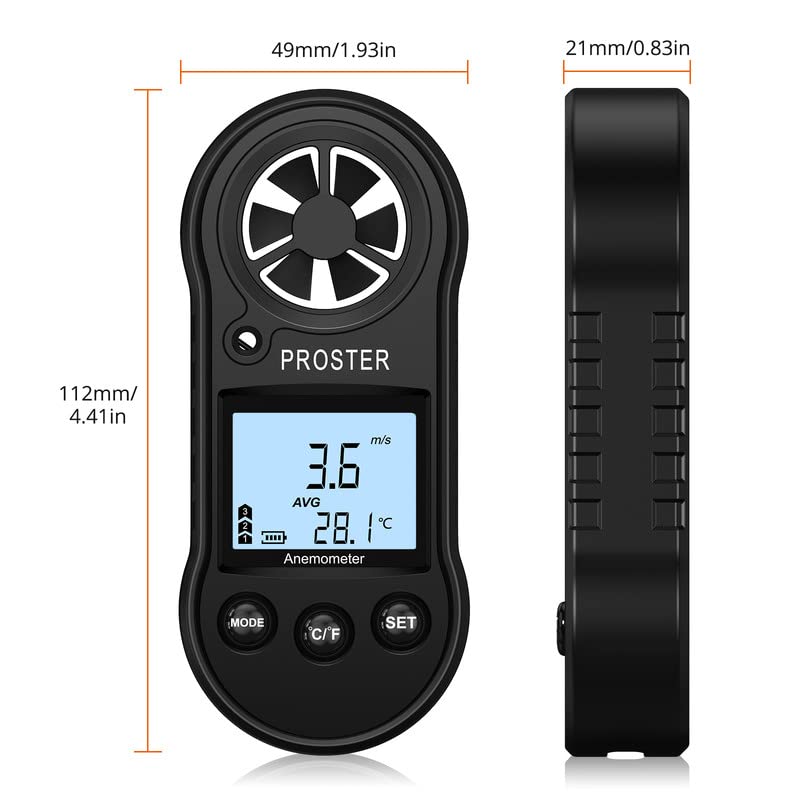
Image: Diagram illustrating the physical dimensions of the Proster Digital Anemometer.
وارنٹی اور سپورٹ
وارنٹی کی معلومات
Proster products are designed and manufactured to high-quality standards. For specific warranty details, please refer to the warranty card included with your purchase or visit the official Proster webسائٹ وارنٹی دعووں کے لیے خریداری کے ثبوت کے طور پر اپنی خریداری کی رسید رکھیں۔
کسٹمر سپورٹ
If you encounter any issues or have questions regarding your Proster Digital LCD Anemometer Thermometer, please contact Proster customer support. Contact information can typically be found on the product packaging, the official Proster webسائٹ، یا اپنے خوردہ فروش کے ذریعے۔
مزید معلومات کے لیے، ملاحظہ کریں۔ Proster Store.


