1. تعارف
This manual provides essential information for the safe and efficient operation of your Motorola RMU2040 Two-Way Radio Walkie Talkie. Please read this manual thoroughly before using the device to ensure optimal performance and to prevent damage.

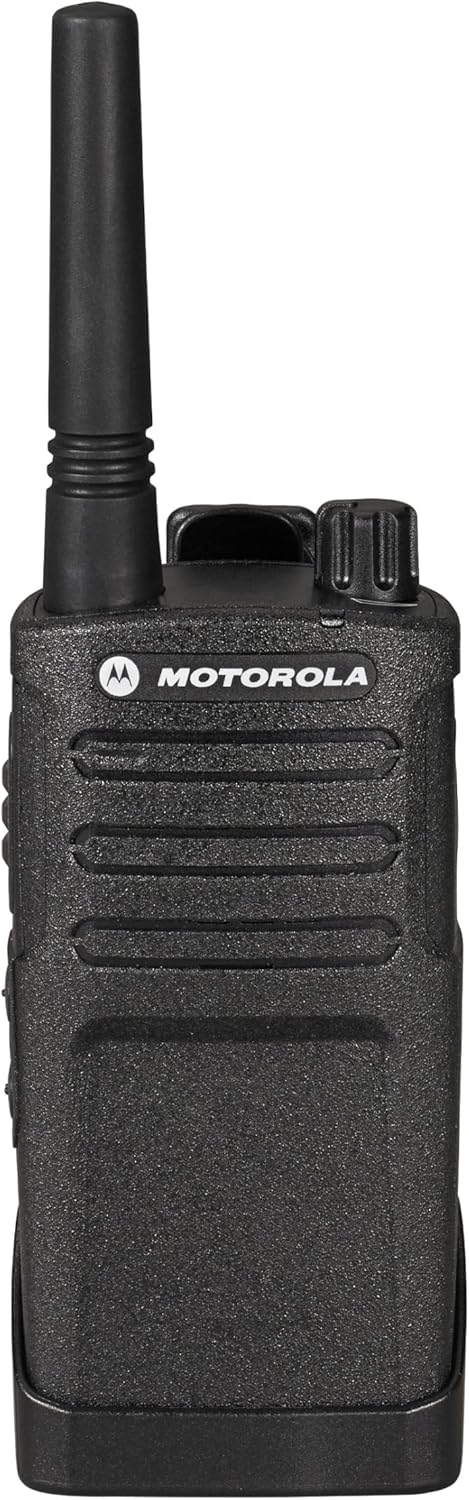
Figure 1: Motorola RMU2040 Two-Way Radio Walkie Talkie with belt clip.
2. پیکیج کے مشمولات
Your Motorola RMU2040 package includes:
- Motorola RMU2040 Two-Way Radio (4 units)
- Single-unit charger for each radio
- 15-hour Lithium-Ion battery for each radio
- Swivel belt holster for each radio

Figure 2: Included accessories: single-unit charger, Lithium-Ion battery, and swivel belt holster.
3. سیٹ اپ
3.1. بیٹری کی تنصیب
- یقینی بنائیں کہ ریڈیو بند ہے۔
- ریڈیو کے پچھلے حصے میں بیٹری کے ڈبے کے ساتھ بیٹری کو سیدھ میں کریں۔
- بیٹری کو آہستہ سے اس وقت تک دھکیلیں جب تک کہ یہ محفوظ طریقے سے کلک نہ کرے۔
3.2. بیٹری چارج کرنا
- Place the radio with the installed battery into the single-unit charger.
- چارجر کو پاور آؤٹ لیٹ سے جوڑیں۔
- The charging indicator light on the charger will illuminate to show charging status. A full charge typically takes several hours.
3.3. Attaching the Belt Holster
- Slide the radio into the swivel belt holster until it locks into place.
- Attach the holster to your belt or clothing for convenient carrying.
4. آپریٹنگ ہدایات
4.1. پاور آن/آف اور والیوم کنٹرول
تصویر 3: اوپر view of the radio with power/volume and channel knobs.
- To power on the radio, rotate the On/Off/Volume knob (leftmost knob on top) clockwise until you hear a click.
- Continue rotating the knob to adjust the volume to your desired level.
- پاور آف کرنے کے لیے، نوب کو گھڑی کی مخالف سمت میں اس وقت تک گھمائیں جب تک کہ یہ بند نہ ہو جائے۔
4.2 چینل کا انتخاب

شکل 4: سامنے view of the radio, showing the display and control buttons.
- Rotate the Channel Selector knob (rightmost knob on top) to choose one of the available channels.
- The RMU2040 supports 4 channels, with 2 activated out of the box.
4.3 ترسیل اور وصول کرنا

شکل 5: طرف view of the radio, highlighting the Push-to-Talk (PTT) button.
- To transmit, press and hold the Push-to-Talk (PTT) button located on the side of the radio. Speak clearly into the microphone.
- منتقلی کو روکنے کے لیے PTT بٹن جاری کریں اور جواب سنیں۔
- یقینی بنائیں کہ آپ اسی چینل پر ہیں جس شخص سے آپ بات چیت کرنا چاہتے ہیں۔
4.4. Earpiece Connection
The radio features a port for connecting an earpiece for private communication. This port is typically located on the side of the radio, covered by a protective flap.

Figure 6: User demonstrating proper radio usage in a work environment.
5 خصوصیات
- پاور آؤٹ پٹ: 2-watt, covering up to 20 floors or 250,000 square feet.
- چینلز: 4 communication groups total, with 2 channels activated by default.
- تعدد: Set to factory default UHF frequencies, suitable for both indoor and outdoor use.
- بیٹری کی زندگی: Equipped with a 15-hour Lithium-Ion battery.
- استحکام: Designed as a reliable, simple, heavy-duty radio.
- پانی کی مزاحمت: پانی مزاحم.
6 دیکھ بھال
- صفائی: ایک نرم استعمال کریں، ڈیamp ریڈیو کے بیرونی حصے کو صاف کرنے کے لیے کپڑا۔ سخت کیمیکلز یا کھرچنے والے کلینر سے پرہیز کریں۔
- بیٹری کی دیکھ بھال: Fully charge batteries before first use. Store radios and batteries in a cool, dry place when not in use for extended periods.
- اینٹینا: Do not bend or force the antenna, as this can affect signal quality.
7 خرابیوں کا سراغ لگانا
7.1. کوئی طاقت نہیں۔
- یقینی بنائیں کہ بیٹری مناسب طریقے سے انسٹال اور پوری طرح سے چارج ہے۔
- Check that the On/Off/Volume knob is rotated clockwise past the click.
7.2. Cannot Transmit or Receive
- Verify that both radios are on the same channel.
- Ensure the PTT button is fully pressed when transmitting.
- Check the radio's range; obstacles and distance can affect communication. The maximum talking range is 36 miles in optimal conditions.
7.3 خراب آڈیو کوالٹی
- والیوم نوب کو ایڈجسٹ کریں۔
- Ensure the microphone and speaker are not obstructed.
- Move to an area with fewer obstructions or closer to the other radio.
8. وضاحتیں
| تفصیلات | قدر |
|---|---|
| شے کا وزن | 8.6 اونس (0.54 پاؤنڈ) |
| مصنوعات کے طول و عرض | 7.38 x 1.5 x 2.25 انچ |
| آئٹم ماڈل نمبر | SG_B012B7J2FS_US |
| بیٹریاں | 4 لیتھیم آئن بیٹریاں درکار ہیں (شامل) |
| برانڈ | موٹرولا |
| رنگ | سیاہ |
| چینلز کی تعداد | 4 |
| خصوصی خصوصیت | UHF |
| تعدد کی حد | 450-512Mhz |
| بات کرنے کی حد زیادہ سے زیادہ | 36 میل |
| والیومtage | 3.7 وولٹ |
| پانی کی مزاحمت کی سطح | پانی مزاحم |
9. وارنٹی اور سپورٹ
Your Motorola RMU2040 Two-Way Radio comes with a 2 Year Manufacturer Replacement Warranty. For warranty claims or technical support, please contact an authorized Motorola dealer or refer to the official Motorola support channels.
Legal Disclaimer: Motorola Recommends Only Purchasing From An Authorized Dealer.


