1. تعارف
The Elgato HD60 Pro is an internal PCIe capture card designed for high-quality gameplay capture and streaming. This device allows users to record and stream console gameplay in 1080p resolution at 60 frames per second (1080p60) with ultra-low-latency passthrough. It integrates directly into your PC, providing a dedicated hardware encoder for efficient performance.
2. کلیدی خصوصیات
- 1080p60 Capture: Share your gameplay in superb viewمعیار
- True Passthrough: Play your console games with zero lag.
- Instant Gameview: Power your workflow with ultra-low-latency technology.
- لامحدود گرفتاری: Record hours of footage directly to your hard drive.
- Flashback Recording: Slide back in time to save epic moments retroactively.

Image: The Elgato HD60 Pro highlights its 1080p60 capture capability, enabling high-quality recording and streaming.
3. سیٹ اپ گائیڈ
3.1. جسمانی تنصیب
- اپنے کمپیوٹر کو تیار کریں: Power down your computer and unplug all cables. Open your PC case.
- Locate a PCIe slot: Find an available PCIe x1 slot on your motherboard.
- Insert the HD60 Pro: Carefully align the HD60 Pro card with the PCIe slot and firmly press it down until it is securely seated.
- کارڈ کو محفوظ کریں: Use a screw to fasten the HD60 Pro bracket to your PC case.
- Close PC case: Reattach your PC case cover and reconnect all cables.

Image: The Elgato HD60 Pro PCIe Capture Card, ready for installation into a computer's motherboard.

Image: A hand carefully inserting the Elgato HD60 Pro into an available PCIe slot on a motherboard.
3.2. سافٹ ویئر کی تنصیب
- سافٹ ویئر ڈاؤن لوڈ کریں: Visit the official Elgato website (elgato.com/download) to download the latest Elgato Game Capture HD software and drivers for your operating system (Windows or macOS).
- سافٹ ویئر انسٹال کریں: سافٹ ویئر انسٹال کرنے کے لیے اسکرین پر دی گئی ہدایات پر عمل کریں۔
- Alternative Software: The HD60 Pro is compatible with popular streaming software such as OBS Studio, Streamlabs OBS, and XSplit.
3.3. منسلک آلات
- HDMI میں: Connect an HDMI cable from your gaming console's HDMI output (e.g., PS5, PS4, Xbox Series X/S, Xbox One) to the HDMI-IN port on the Elgato HD60 Pro.
- HDMI آؤٹ: سے ایک اور HDMI کیبل جوڑیں۔ HDMI آؤٹ port on the Elgato HD60 Pro to your TV or gaming monitor's HDMI input. This provides zero-lag passthrough for your gameplay.

تصویر: کلوز اپ view of the Elgato HD60 Pro's HDMI IN and HDMI OUT ports for connecting gaming consoles and displays.
4. Operating the HD60 Pro
4.1. Recording Gameplay
- سافٹ ویئر لانچ کریں: Open the Elgato Game Capture HD software or your preferred streaming application (OBS Studio, etc.).
- ڈیوائس منتخب کریں: In the software, select the Elgato HD60 Pro as your video capture device.
- ترتیبات کو ترتیب دیں: Set your desired resolution (e.g., 1080p) and frame rate (60 fps).
- ریکارڈنگ شروع کریں: Click the record button within the software to begin capturing your gameplay.
4.2. Instant Gameview and Passthrough
The HD60 Pro features Instant Gameview, providing ultra-low-latency passthrough directly to your TV or monitor. This allows you to play your games without any noticeable delay, ensuring a seamless gaming experience while simultaneously capturing footage on your PC.

Image: The Instant Gameview feature of the Elgato HD60 Pro ensures ultra-low latency for real-time broadcasting and gaming.
4.3. Flashback Recording
Never miss an epic moment. With Flashback Recording, you can retroactively save gameplay even if you didn't hit the record button. The software continuously buffers your gameplay, allowing you to scroll back in time and capture past events.
4.4. Live Commentary
Add your voice to your streams and recordings. The software allows you to integrate live commentary as a separate audio track, providing flexibility for post-production and enhancing viewer مصروفیت.
Video: Elgato Gaming Curated Scenes - This video showcases various features and use cases for Elgato gaming products, including recording and streaming.
Video: Elgato Gaming Instant Gameview for HD60 S and HD60 Pro - Demonstrates the low-latency Instant Gameview feature, crucial for a smooth gaming and streaming experience.
Video: Elgato Game Capture HD60 Pro - Stream and record in 1080p60, superior low latency technology, H.264 - An official product video highlighting the core capabilities of the HD60 Pro.
5 دیکھ بھال
The Elgato HD60 Pro is designed for durability and requires minimal maintenance. Ensure your PC case has adequate airflow to prevent overheating. Periodically clean your PC's interior to prevent dust buildup on the capture card and other components.
6 خرابیوں کا سراغ لگانا
- کوئی سگنل/بلیک اسکرین نہیں:
- Verify all HDMI cables are securely connected to the correct IN/OUT ports.
- Ensure your gaming console's HDCP (High-bandwidth Digital Content Protection) is disabled. Refer to your console's settings for instructions.
- Check your software settings to ensure the HD60 Pro is selected as the input device and the resolution/frame rate are correctly configured.
- آڈیو کے مسائل:
- Confirm audio input/output settings within your capture software.
- Ensure any external audio devices (headsets, microphones) are properly connected and selected.
- Performance/Lag:
- Ensure your PC meets the minimum system requirements for the HD60 Pro and your chosen capture software.
- Update your graphics card drivers and Elgato software to the latest versions.
- سسٹم کے وسائل کو خالی کرنے کے لیے غیر ضروری پس منظر کی ایپلی کیشنز کو بند کریں۔
7. وضاحتیں
| برانڈ | ایلگاٹو |
| سلسلہ | ایلگاٹو گیم کیپچر HD60 پرو |
| ماڈل نمبر | 1 جی سی 109901002 |
| ہارڈ ویئر پلیٹ فارم | PlayStation 4, Xbox Series X/S, Xbox One, PS5 |
| آپریٹنگ سسٹم | ونڈوز، میک او ایس |
| شے کا وزن | 0.634 اونس |
| مصنوعات کے طول و عرض | 4.8 x 0.55 x 2.2 انچ |
| ہارڈ ویئر انٹرفیس | پی سی آئی ایکسپریس x1 |
| ویڈیو کیپچر ریزولوشن | 1080ص |
8. باکس میں کیا ہے۔
- Elgato HD60 Pro Capture Card
- انسٹالیشن گائیڈ
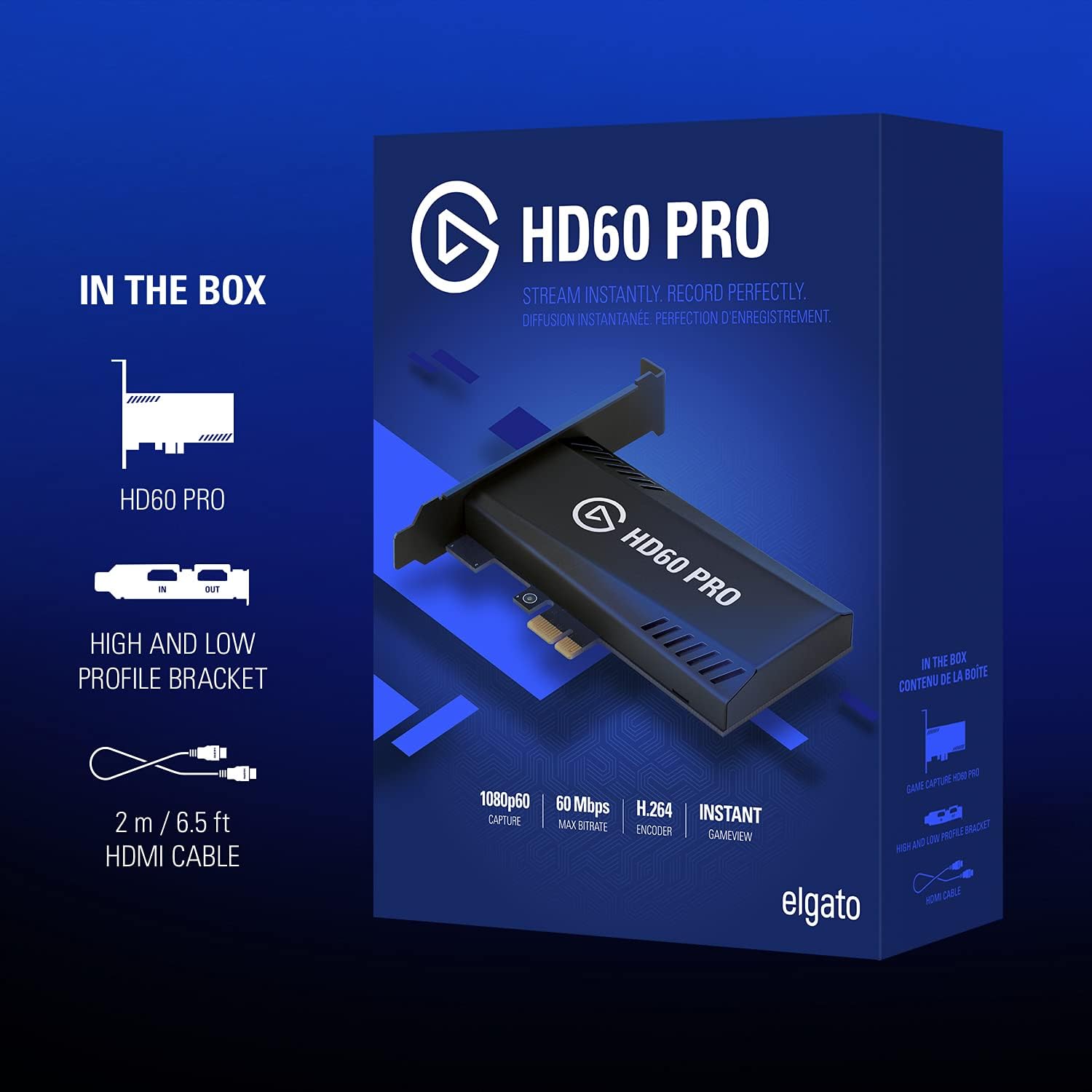
Image: The retail box for the Elgato HD60 Pro, illustrating the included capture card and HDMI cable.
9. وارنٹی اور سپورٹ
For detailed warranty information and technical support, please refer to the official Elgato website. You can find drivers, software updates, and troubleshooting resources at elgato.com/download.


