تعارف
This manual provides comprehensive instructions for the operation and maintenance of your ONN X5 HiFi Music Player. Please read this manual thoroughly before using the device to ensure proper functionality and to maximize your listening experience. The ONN X5 is designed to deliver high-fidelity audio playback in a compact and user-friendly format.
پروڈکٹ ختمview
The ONN X5 is a portable HiFi music player featuring a 2.0-inch TFT screen and an aluminum alloy shell. It supports a wide range of audio formats, including lossless files, and offers expandable storage via a MicroSD card.
اہم خصوصیات:
- ہائی فیڈیلیٹی آڈیو: Supports WAV, FLAC, ALAC, APE, OGG lossless formats, and high-definition music up to 24Bit/192 KHz.
- ڈسپلے: 2.0-inch TFT screen (176x220 pixels) for clear navigation and information display.
- ذخیرہ: 8GB internal memory, expandable up to 32GB with a MicroSD/TF card.
- پائیدار ڈیزائن: Lightweight aluminum alloy body (60g) for enhanced durability and reduced external interference noise.
- یوزر انٹرفیس: Intuitive key-based operation.
- اضافی خصوصیات: FM Radio support.
- بیٹری: High-capacity rechargeable lithium polymer battery.
- کثیر زبان کی حمایت: English, Russian, Korean, German, Japanese, Polish, Indonesian, Chinese.
ڈیوائس لے آؤٹ:

تصویر: سامنے view of the ONN X5 HiFi Music Player, showing its display and control buttons. The screen displays track information, audio quality (e.g., 24BIT, 88HHZ), and playback status.

تصویر: سائیڈ view of the ONN X5 HiFi Music Player, illustrating the location of the MicroSD card slot on the right side of the device.

تصویر: سامنے اور پیچھے view of the ONN X5 HiFi Music Player. The back panel shows the model number "X5" and branding information.
سیٹ اپ
1. ڈیوائس کو چارج کرنا:
- Connect the ONN X5 to a power source using the provided USB cable.
- اسکرین پر بیٹری کا اشارے چارج ہونے کی حالت دکھائے گا۔
- A full charge is recommended before first use. The device uses a high-capacity rechargeable lithium polymer battery.
2. Inserting a MicroSD/TF Card:
- Locate the MicroSD/TF card slot on the side of the player.
- آہستہ سے ایک ہم آہنگ مائیکرو ایس ڈی/ٹی ایف کارڈ (32 جی بی تک) سلاٹ میں داخل کریں جب تک کہ یہ جگہ پر کلک نہ کرے۔
- Ensure the card is inserted correctly to avoid damage.

Image: Contents of the ONN X5 package, showing the player, USB charging cable, and other accessories. This illustrates the components available for setup.
3. Transferring Music Files:
- Connect the ONN X5 to your computer using the USB cable.
- آلہ ہٹنے کے قابل اسٹوریج ڈرائیو کے طور پر ظاہر ہوگا۔
- اپنی مطلوبہ آڈیو کو گھسیٹیں اور چھوڑیں۔ files (MP3, WMA, APE, FLAC, WAV, ALAC, OGG) into the player's internal storage or the MicroSD card.
- USB کیبل کو منقطع کرنے سے پہلے آلہ کو اپنے کمپیوٹر سے محفوظ طریقے سے نکال دیں۔
آپریٹنگ ہدایات
پاور آن/آف:
- To power on, press and hold the power button (usually marked with a universal power symbol) until the screen illuminates.
- پاور آف کرنے کے لیے، ڈیوائس کے بند ہونے تک پاور بٹن کو دبائے رکھیں۔
نیویگیشن:
The ONN X5 uses physical buttons for navigation. Refer to the device layout for button identification.
- والیوم: حجم کو ایڈجسٹ کرتا ہے۔
- M (مینو): Accesses menus and confirms selections.
- Arrow Buttons (< / >): Navigate through menus, select tracks, or fast forward/rewind during playback.
- پاور بٹن: Also functions as a play/pause button during music playback.
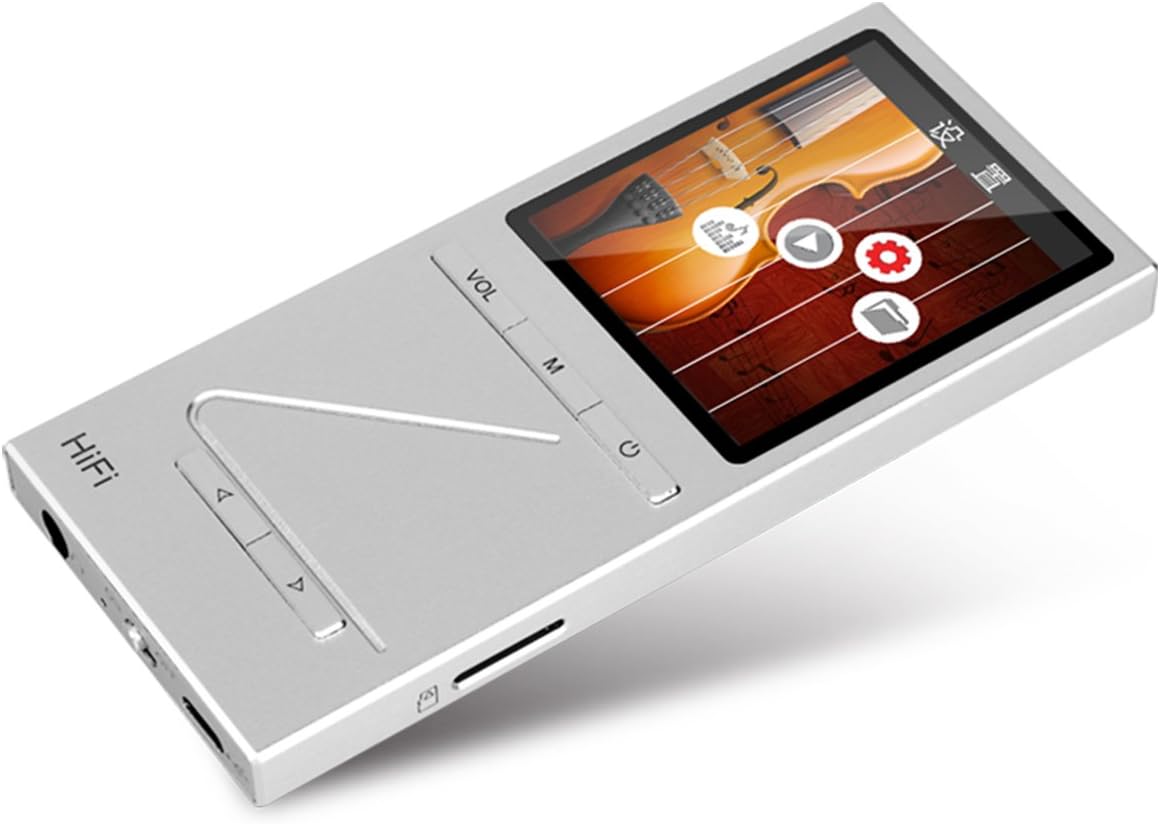
تصویر: زاویہ دار view of the ONN X5 HiFi Music Player, showing the screen with various menu icons, indicating the user interface for navigation.
میوزک پلے بیک:
- From the main menu, navigate to "Music" or "Files ".
- Browse through your folders and select a track to play.
- Press the Power/Play button to start or pause playback.
- Use the arrow buttons to skip tracks or fast forward/rewind.
- VOL بٹن کا استعمال کرتے ہوئے والیوم کو ایڈجسٹ کریں۔
ایف ایم ریڈیو:
- Navigate to the "FM Radio" option from the main menu.
- Use the navigation buttons to scan for stations or manually tune to a frequency.
- Ensure headphones are connected as they often act as the antenna for FM radio.
زبان کی ترتیبات:
ڈیوائس متعدد زبانوں کو سپورٹ کرتی ہے۔ زبان کو تبدیل کرنے کے لیے:
- Go to "Settings" from the main menu.
- Select "Language" and choose your preferred language from the list (English, Russian, Korean, German, Japanese, Polish, Indonesian, Chinese).
دیکھ بھال
- صفائی: آلے کو صاف کرنے کے لیے نرم، خشک کپڑا استعمال کریں۔ مائع کلینر یا کھرچنے والے مواد سے پرہیز کریں۔
- ذخیرہ: پلیئر کو براہ راست سورج کی روشنی اور انتہائی درجہ حرارت سے دور ٹھنڈی، خشک جگہ پر اسٹور کریں۔
- بیٹری کی دیکھ بھال: بیٹری کی زندگی کو طول دینے کے لیے، بار بار بیٹری کو مکمل طور پر خارج کرنے سے گریز کریں۔ آلہ کو باقاعدگی سے چارج کریں، چاہے وہ طویل عرصے تک استعمال میں نہ ہوں۔
- اثر سے بچیں: The aluminum alloy shell provides durability, but avoid dropping the device or subjecting it to strong impacts.
- پانی کی نمائش: یہ آلہ واٹر پروف نہیں ہے۔ پانی یا زیادہ نمی کی نمائش سے بچیں.
خرابی کا سراغ لگانا
Device Will Not Power On:
- Ensure the battery is charged. Connect the device to a power source and allow it to charge for at least 30 minutes before attempting to power on again.
- Try performing a hard reset (if applicable, refer to manufacturer's specific instructions for hard reset, usually involves holding power button for an extended period).
کوئی آواز نہیں:
- Check the volume level and ensure it is not muted.
- Verify that headphones or external speakers are properly connected.
- Test with different headphones or audio output devices.
- آڈیو کو یقینی بنائیں file is not corrupted or in an unsupported format.
منتقل نہیں ہو سکتا Files:
- یقینی بنائیں کہ USB کیبل پلیئر اور کمپیوٹر دونوں سے محفوظ طریقے سے جڑی ہوئی ہے۔
- اپنے کمپیوٹر پر ایک مختلف USB پورٹ یا ایک مختلف USB کیبل آزمائیں۔
- Verify that the device is recognized by your computer as a removable drive.
- Check if the MicroSD card is properly inserted and not full.
سکرین جواب نہیں دے رہی / منجمد:
- زبردستی دوبارہ شروع کرنے کے لیے پاور بٹن کو تقریباً 10-15 سیکنڈ تک دبائے رکھیں۔
- If the issue persists, ensure the battery is charged.
وضاحتیں
| فیچر | تفصیل |
|---|---|
| ماڈل نمبر | X5 |
| برانڈ | او این این |
| اسکرین کا سائز | 2.0 Inches TFT (176x220 PIXEL) |
| اندرونی میموری | 8 جی بی |
| قابل توسیع اسٹوریج | MicroSD/TF card up to 32 GB |
| سپورٹ شدہ آڈیو فارمیٹس | APE, FLAC, ALAC, WAV, WMA, OGG, MP3 (up to 24Bit/192 KHz) |
| کنیکٹوٹی ٹیکنالوجی | آکس، یو ایس بی |
| خصوصی خصوصیت | ایف ایم ریڈیو |
| بیٹری | 1 Lithium Ion battery required (High-capacity rechargeable lithium polymer) |
| شے کا وزن | 7 اونس (تقریباً 0.2 کلوگرام) |
| پیکیج کے طول و عرض | 6.21 x 4.7 x 1.2 انچ |
| کارخانہ دار | SZTZWY |
وارنٹی اور سپورٹ
For detailed warranty information, please refer to the warranty card included with your purchase or visit the official ONN product support website. For technical assistance or further inquiries, please contact ONN customer support through their official channels.


