1. تعارف
This manual provides detailed instructions for the installation, operation, and maintenance of your Alpine CDE-163BT Advanced Bluetooth CD Receiver. Please read this manual thoroughly before using the unit to ensure proper operation and to prevent damage. Keep this manual for future reference.
The Alpine CDE-163BT is a versatile car stereo receiver featuring advanced Bluetooth connectivity for hands-free calling and audio streaming, CD playback, USB input, and FM/AM tuner capabilities. It is designed to deliver high-quality audio performance and user-friendly control.
2. سیٹ اپ اور انسٹالیشن
2.1 پیکیج کے مشمولات
تنصیب شروع کرنے سے پہلے، تصدیق کریں کہ تمام اجزاء موجود ہیں:
- Alpine CDE-163BT Head Unit
- وائرنگ کنٹرول
- ماؤنٹنگ آستین اور ٹرم رنگ
- بلوٹوتھ ہینڈز فری کالنگ کے لیے مائیکروفون
- مالک کا دستورالعمل (یہ دستاویز)
- بڑھتے ہوئے ہارڈ ویئر (پیچ، بریکٹ)
2.2 وائرنگ ڈایاگرام
Refer to the wiring diagram provided with the unit's installation guide for specific connections. Key connections include:
- طاقت: Yellow (constant 12V), Red (switched 12V), Black (ground).
- مقررین: White/White-Black (Front Left), Gray/Gray-Black (Front Right), Green/Green-Black (Rear Left), Purple/Purple-Black (Rear Right).
- اینٹینا: Blue (power antenna/amplifier remote turn-on).
- مائیکروفون: Connect the supplied microphone to the dedicated input for hands-free calling.
احتیاط: Incorrect wiring can cause damage to the unit or vehicle's electrical system. If you are unsure about any wiring connections, consult a qualified professional installer.
2.3 ابتدائی پاور آن
تنصیب کے بعد، اپنی گاڑی کا اگنیشن آن کریں۔ یونٹ کو آن ہونا چاہیے۔ ابتدائی سیٹ اپ کے لیے کسی بھی آن اسکرین پرامپٹس پر عمل کریں، جیسے کہ زبان کا انتخاب یا گھڑی کی ترتیب۔
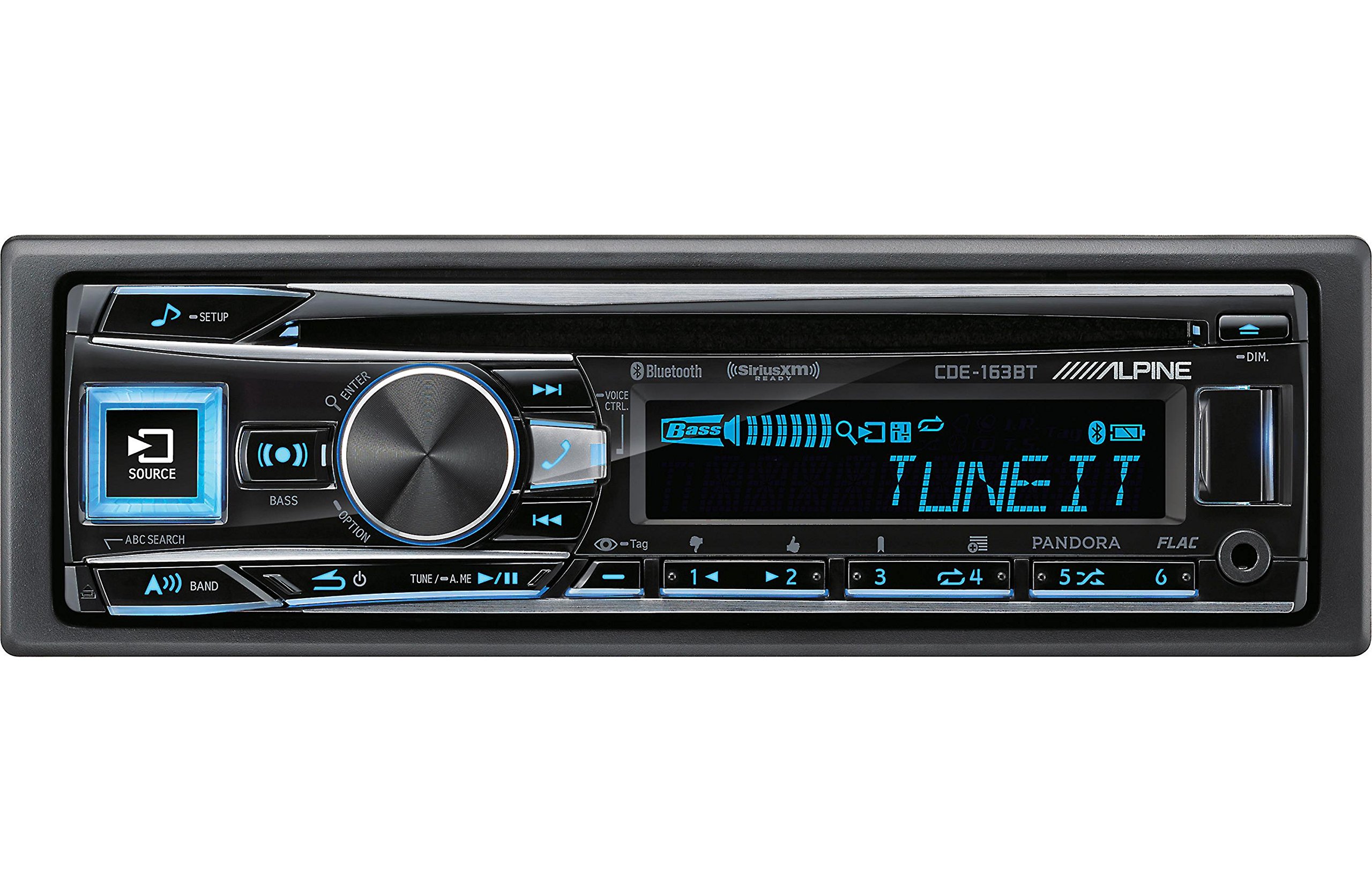
Figure 2.3.1: Front panel of the Alpine CDE-163BT receiver. This image displays the main controls, including the large rotary knob, source button, setup button, and display screen showing "TUNEIT" and "Bass" indicators.
3. آپریشن
3.1 فرنٹ پینل کنٹرول اوورview
Familiarize yourself with the main controls on the front panel:
شکل 3.1.1: تفصیلی view of the Alpine CDE-163BT front panel. Key controls include the SOURCE button (left, illuminated), SETUP button (top left), large central rotary knob for volume and selection, BASS/OPTION button, VOICE CTRL button, and various preset/track skip buttons along the bottom.
- سورس بٹن: Selects the audio source (CD, Tuner, USB, Bluetooth Audio, AUX).
- سیٹ اپ بٹن: Accesses the main setup menu for system adjustments.
- Rotary Knob (Volume/ENTER): Turns to adjust volume. Press to confirm selections in menus.
- BASS/OPTION Button: Provides quick access to bass settings or other options depending on the current mode.
- VOICE CTRL Button: Activates voice control features on connected smartphones.
- بینڈ بٹن: Switches between FM1, FM2, FM3, and AM bands in tuner mode.
- TUNE/A.ME/II Buttons: Used for manual tuning, auto memory, and play/pause functions.
- Track Skip/Preset Buttons (1-6): Used for skipping tracks or selecting radio presets.
- DIM بٹن: ڈسپلے کی چمک کو ایڈجسٹ کرتا ہے۔
3.2 Power On/Off and Source Selection
- یونٹ کو تبدیل کرنے کے لئے ON, press any button (e.g., SOURCE or the Rotary Knob).
- یونٹ کو تبدیل کرنے کے لئے آف, press and hold the power button (often integrated with the TUNE/A.ME button).
- دبائیں ذریعہ button repeatedly to cycle through available audio sources: CD, Tuner, USB, Bluetooth Audio, AUX.
3.3 والیوم کنٹرول
Rotate the large central روٹری نوب حجم بڑھانے کے لیے گھڑی کی سمت اور حجم کم کرنے کے لیے گھڑی کی سمت۔
3.4 آڈیو سیٹنگز
دبائیں BASS/OPTION button or navigate through the SETUP menu to adjust audio settings such as Bass, Treble, Balance (left/right), and Fader (front/rear). Use the Rotary Knob to adjust values and press it to confirm.
3.5 Radio Operation (FM/AM Tuner)
- Select "Tuner" as the source using the ذریعہ بٹن
- دبائیں بینڈ FM1، FM2، FM3، اور AM بینڈز کے درمیان سوئچ کرنے کے لیے بٹن۔
- دستی ٹیوننگ: دبائیں ٹیون buttons (◀ / ▶) to manually tune frequencies.
- ٹیوننگ کی تلاش: دبائیں اور تھامیں۔ ٹیون بٹن خود بخود اگلے مضبوط اسٹیشن کو تلاش کرنے کے لیے۔
- پیش سیٹ اسٹیشنز: To store a station, tune to the desired frequency, then press and hold one of the numbered preset buttons (1-6) until you hear a beep. To recall a preset, simply press the corresponding numbered button.
3.6 سی ڈی پلے بیک
- Insert a CD into the disc slot. The unit will automatically switch to CD source and begin playback.
- Use the ◀ / ▶ buttons to skip tracks.
- دبائیں TUNE/A.ME/II button for Play/Pause.
- دبائیں ABC SEARCH button to search for tracks by name.
3.7 بلوٹوتھ کنیکٹیویٹی
The CDE-163BT features built-in Bluetooth for hands-free calling and audio streaming.
3.7.1 بلوٹوتھ ڈیوائس کا جوڑا بنانا
- یقینی بنائیں کہ آپ کے موبائل آلہ پر بلوٹوتھ فعال ہے۔
- On the CDE-163BT, go to the SETUP menu and select "Bluetooth Setup".
- Choose "Pairing" or "Device Search".
- On your mobile device, search for available Bluetooth devices and select "Alpine CDE-163BT".
- Confirm the pairing code if prompted. Once paired, the Bluetooth icon on the receiver's display will illuminate.
3.7.2 ہینڈز فری کالنگ
- When a call comes in, the unit will display the caller ID. Press the داخل کریں۔ button (Rotary Knob) to answer.
- کال ختم کرنے کے لیے، دبائیں۔ داخل کریں۔ دوبارہ بٹن.
- Use the supplied microphone for clear communication.
- دبائیں VOICE CTRL button to activate your smartphone's voice assistant.
3.7.3 بلوٹوتھ آڈیو سٹریمنگ
- Select "Bluetooth Audio" as the source.
- Start playback on your paired mobile device. Audio will stream through the receiver.
- Use the ◀ / ▶ buttons on the receiver to skip tracks.
3.8 USB پلے بیک
- Connect a USB storage device (e.g., USB flash drive) to the USB port.
- Select "USB" as the source. The unit will automatically detect and begin playing compatible audio files (including FLAC format).
- Use the ◀ / ▶ buttons to skip tracks.
- The unit supports various audio formats.
3.9 Pandora and SiriusXM Ready
- پنڈورا: Connect your iPhone or Android smartphone via USB or Bluetooth and launch the Pandora app. Select Pandora as the source on the receiver to control the app.
- SiriusXM: This unit is SiriusXM Ready. An optional SiriusXM Connect Vehicle Tuner and subscription are required for satellite radio reception. Connect the tuner and select SiriusXM as the source.
3.10 ڈسپلے کی ترتیبات
- دبائیں DIM ڈسپلے کی چمک کو ایڈجسٹ کرنے کے لیے بٹن۔
- Access the SETUP menu to customize display colors for buttons and the screen.
4 دیکھ بھال
4.1 یونٹ کی صفائی
Wipe the front panel with a soft, dry cloth. For stubborn stains, dampen the cloth lightly with water. Avoid using harsh chemicals, abrasive cleaners, or solvents as they can damage the finish.
4.2 ڈسک کی دیکھ بھال
Handle CDs by their edges. Keep discs clean and free of scratches. If a disc is dirty, wipe it gently from the center outwards with a soft, lint-free cloth. Do not use solvents or abrasive cleaners on discs.
5 خرابیوں کا سراغ لگانا
If you experience issues with your CDE-163BT, refer to the table below for common problems and solutions.
| مسئلہ | ممکنہ وجہ | حل |
|---|---|---|
| کوئی طاقت نہیں۔ | غلط وائرنگ؛ اڑا ہوا فیوز؛ گاڑی کی اگنیشن بند۔ | Check power connections; Replace fuse; Turn vehicle ignition on. |
| کوئی آواز نہیں۔ | حجم بہت کم؛ خاموش کر دیا گیا اسپیکر کی غلط وائرنگ؛ Ampزیادہ دور | حجم میں اضافہ؛ خاموش کو غیر فعال کریں؛ اسپیکر کنکشن چیک کریں؛ چیک کریں۔ ampزندہ کرنے والی طاقت. |
| بلوٹوتھ کنیکٹ نہیں ہو رہا ہے۔ | Device not in pairing mode; Bluetooth off on phone; Interference. | Ensure phone Bluetooth is on and discoverable; Re-attempt pairing; Move closer to unit. |
| CD skips or won't play | Dirty or scratched disc; Disc inserted incorrectly. | Clean disc; Insert disc correctly; Try a different disc. |
| USB ڈیوائس کی شناخت نہیں ہوئی۔ | غیر مطابقت پذیر شکل؛ خراب USB ڈیوائس؛ ڈھیلا کنکشن۔ | یقینی بنائیں files are compatible; Try a different USB device; Reconnect USB device. |
If the problem persists after attempting these solutions, please contact Alpine customer support.
6. وضاحتیں
Below are the technical specifications for the Alpine CDE-163BT Advanced Bluetooth CD Receiver:
- ماڈل نمبر: 79380
- مصنوعات کے طول و عرض: 5 x 11 x 10 انچ
- آئٹم کا وزن: 4.05 pounds (4.1 Pounds)
- وائرلیس کمیونیکیشن ٹیکنالوجیز: بلوٹوتھ
- کنیکٹیویٹی ٹیکنالوجیز: بلوٹوتھ
- خصوصی خصوصیات: Built-In Bluetooth, FM Tuner
- دیگر ڈسپلے کی خصوصیات: وائرلیس
- رنگ: سیاہ
- مینوفیکچرر: الپائن
- کنیکٹوٹی ٹیکنالوجی: بلوٹوتھ
- ہم آہنگ آلات: اسمارٹ فون
- کنیکٹر کی قسم: 3.5 ملی میٹر جیک، یو ایس بی
- آڈیو آؤٹ پٹ موڈ: مونو ، سٹیریو
- سراؤنڈ ساؤنڈ چینل کنفیگریشن: 4 چینل
- واٹtage: 200 واٹ
- تاریخ پہلی دستیابی: 19 جنوری 2016
7. وارنٹی اور کسٹمر سپورٹ
7.1 وارنٹی کی معلومات
Alpine products are manufactured to the highest quality standards. This product is covered by a limited warranty. Please refer to the separate warranty card included with your purchase for specific terms, conditions, and duration of coverage. Retain your proof of purchase for warranty claims.
7.2 کسٹمر سپورٹ
For technical assistance, troubleshooting beyond this manual, or warranty service, please contact Alpine customer support:
- Webسائٹ: Visit the official Alpine webمعاون وسائل، عمومی سوالنامہ، اور رابطہ فارم کے لیے سائٹ۔
- فون: Refer to the Alpine website or your warranty card for regional customer service phone numbers.
- مجاز سروس سینٹرز: For repairs, locate an authorized Alpine service center through the official webسائٹ
When contacting support, please have your product model number (CDE-163BT) and serial number ready.


