Biconic Bluetooth Tough Weatherproof Portable Wireless Speaker User Manual
Model: ABC-AU-BS-103-BK
برانڈ: Bytech
1. پروڈکٹ ختمview
The Biconic Bluetooth Tough Weatherproof Portable Wireless Speaker is designed for robust outdoor and indoor use, providing enhanced bass and clear audio. Its wireless capabilities allow for easy connection to various devices, and its durable, weatherproof construction ensures reliable performance in diverse environments.

شکل 1.1: سامنے view of the Biconic Bluetooth Speaker, showcasing اس کا مضبوط ڈیزائن اور اسپیکر گرل۔
اہم خصوصیات:
- وائرلیس رابطہ: Seamless Bluetooth pairing with smartphones, tablets, and other compatible devices.
- ویدر پروف ڈیزائن: IPX6 water resistance protects against strong jets of water, making it suitable for outdoor use.
- بہتر باس: Delivers rich, deep bass for a superior audio experience.
- پورٹیبل: Compact design with a durable strap for easy transport.
- طویل کھیل کا وقت: ایک ہی چارج پر 4 گھنٹے تک مسلسل آڈیو پلے بیک۔
2. حفاظتی معلومات
محفوظ آپریشن کو یقینی بنانے اور نقصان کو روکنے کے لیے براہ کرم اس پروڈکٹ کو استعمال کرنے سے پہلے تمام حفاظتی انتباہات اور ہدایات کو احتیاط سے پڑھیں۔
- Do not expose the speaker to extreme temperatures (hot or cold).
- Do not immerse the speaker in water. While it is IPX6 water resistant, it is not designed for submersion.
- Keep the speaker away from direct heat sources, open flames, and flammable liquids.
- Use only the provided charging cable and a compatible power adapter (5V/1A recommended) to charge the device.
- Do not attempt to disassemble, repair, or modify the speaker. This will void the warranty and may cause harm.
- بچوں کی پہنچ سے دور رکھیں۔
- اسپیکر کو نرم، خشک کپڑے سے صاف کریں۔ کھرچنے والے کلینر یا سالوینٹس کا استعمال نہ کریں۔
3. پیکیج کے مشمولات
تصدیق کریں کہ ان باکسنگ پر تمام اشیاء پیکج میں موجود ہیں:
- Biconic Bluetooth Tough Weatherproof Portable Wireless Speaker
- USB چارجنگ کیبل
- صارف دستی (یہ دستاویز)
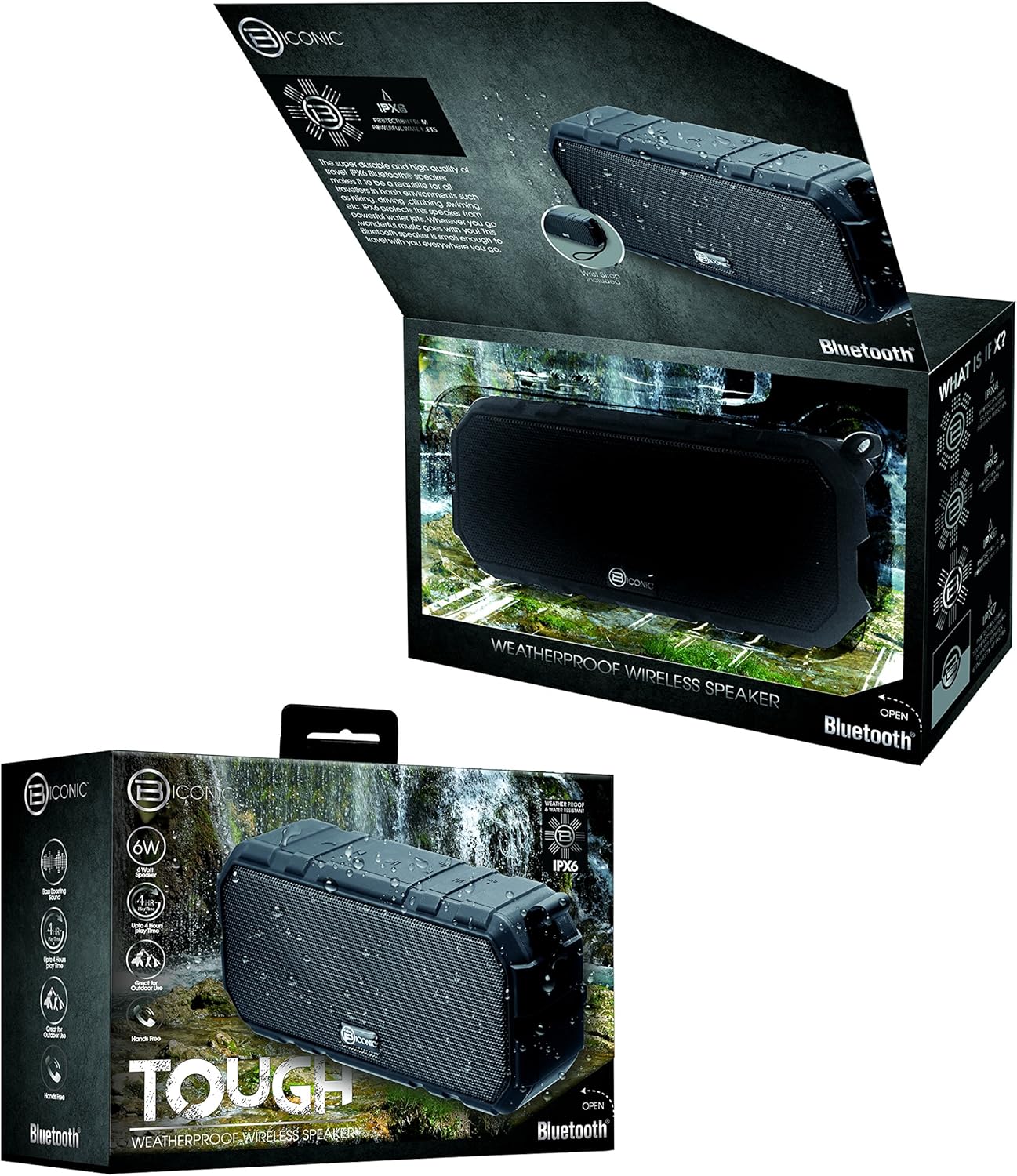
Figure 3.1: The Biconic Bluetooth Speaker shown with its retail packaging, indicating typical package contents.
4. سیٹ اپ
4.1 اسپیکر کو چارج کرنا
- Locate the charging port on the side of the speaker. This port is typically protected by a rubber flap to maintain water resistance.
- ربڑ کا فلیپ کھولیں۔
- فراہم کردہ USB چارجنگ کیبل کے چھوٹے سرے کو اسپیکر کے چارجنگ پورٹ سے جوڑیں۔
- USB کیبل کے بڑے سرے کو USB پاور سورس سے جوڑیں (مثلاً کمپیوٹر USB پورٹ، USB وال اڈاپٹر)۔
- The charging indicator light will illuminate, typically red, to show that the speaker is charging.
- Once fully charged (approximately 2-3 hours), the indicator light will change color (e.g., turn off or turn blue/green). Disconnect the charging cable and close the rubber flap securely to maintain water resistance.
4.2 پاور آن/آف۔
- پاور آن کرنے کے لیے: Press and hold the Power button (usually marked with a power symbol) for a few seconds until you hear an audible tone or see an indicator light illuminate.
- پاور آف کرنا: Press and hold the Power button again for a few seconds until you hear an audible tone or the indicator light turns off.
5. آپریٹنگ ہدایات
5.1 بلوٹوتھ جوڑی
Before first use, you need to pair the speaker with your Bluetooth-enabled device.
- Ensure the speaker is fully charged and powered on. It will automatically enter pairing mode, indicated by a flashing blue LED light.
- On your smartphone, tablet, or other Bluetooth device, go to the Bluetooth settings menu.
- بلوٹوتھ کو فعال کریں اگر یہ پہلے سے فعال نہیں ہے۔
- Scan for available devices. You should see "Biconic Speaker" or a similar name appear in the list.
- Select "Biconic Speaker" to connect. Once successfully paired, you will hear a confirmation tone, and the blue LED light on the speaker will stop flashing and remain solid.
- اگر پاس ورڈ کے لیے کہا جائے تو "0000" درج کریں۔
- پاور آن ہونے پر اسپیکر خود بخود آخری جوڑی والے آلے سے دوبارہ جڑ جائے گا، اگر ڈیوائس رینج کے اندر ہے اور بلوٹوتھ فعال ہے۔
5.2 میوزک پلے بیک
Once paired, you can control music playback directly from your connected device or using the speaker's controls.
- چلائیں/روکیں: Press the Play/Pause button (often marked with a triangle or || symbol) once to play or pause music.
- اواز بڑھایں: Press the Volume Up button (+) to increase the volume.
- آواز کم: Press the Volume Down button (-) to decrease the volume.
- اگلا ٹریک: Press and hold the Volume Up button (+) for a few seconds to skip to the next track.
- پچھلا ٹریک: Press and hold the Volume Down button (-) for a few seconds to go to the previous track.

تصویر 5.1: اوپر view of the Biconic Bluetooth Speaker, highlighting the control buttons for power, volume, and playback.
5.3 Answering Calls (Hands-Free Function)
The speaker supports hands-free calling when connected to a smartphone.
- کال کا جواب دیں: When a call comes in, press the Play/Pause button once to answer.
- کال ختم کریں: کال کے دوران، کال ختم کرنے کے لیے ایک بار پلے/پاز بٹن دبائیں۔
- کال مسترد کریں: Press and hold the Play/Pause button for a few seconds to reject an incoming call.
6 دیکھ بھال
مناسب دیکھ بھال آپ کے اسپیکر کی لمبی عمر اور بہترین کارکردگی کو یقینی بناتی ہے۔
- صفائی: اسپیکر کو نرم سے مسح کریں ، d۔amp cloth. Do not use harsh chemicals, solvents, or abrasive cleaners. Ensure the charging port flap is closed before cleaning with a damp کپڑا
- ذخیرہ: سپیکر کو ٹھنڈی، خشک جگہ پر براہ راست سورج کی روشنی اور انتہائی درجہ حرارت سے دور رکھیں جب طویل مدت تک استعمال نہ ہو۔
- بیٹری کی دیکھ بھال: To preserve battery life, fully charge the speaker before storing it for long periods. Recharge every 3-6 months if not used regularly.
- پانی کی مزاحمت: Always ensure the rubber flap covering the charging port is securely closed to maintain the IPX6 water resistance rating.

Figure 6.1: The Biconic Bluetooth Speaker demonstrating its water-resistant capabilities, highlighting the importance of proper sealing for maintenance.
7 خرابیوں کا سراغ لگانا
| مسئلہ | ممکنہ وجہ | حل |
|---|---|---|
| سپیکر پاور آن نہیں کرتا۔ | بیٹری ختم ہو گئی ہے۔ | اسپیکر کو پوری طرح سے چارج کریں۔ |
| بلوٹوتھ ڈیوائس کے ساتھ جوڑا نہیں بنایا جا سکتا۔ | Bluetooth is off on your device; speaker is not in pairing mode; device is too far. | Ensure Bluetooth is enabled on your device. Power off and on the speaker to re-enter pairing mode. Move device closer to the speaker (within 10 meters). Forget the device on your phone and try pairing again. |
| کوئی آواز یا کم والیوم نہیں۔ | اسپیکر یا ڈیوائس پر والیوم بہت کم ہے۔ اسپیکر منسلک نہیں ہے. | Increase volume on both the speaker and your connected device. Ensure the speaker is properly paired and connected. |
| صوتی مسخ | حجم بہت زیادہ مداخلت کم بیٹری. | حجم کو کم کریں۔ اسپیکر کو دیگر الیکٹرانک آلات سے دور رکھیں۔ اسپیکر کو چارج کریں۔ |
8. وضاحتیں
| فیچر | تفصیل |
|---|---|
| ماڈل نمبر | ABC-AU-BS-103-BK |
| برانڈ | بائیٹیک |
| کنیکٹوٹی ٹیکنالوجی | بلوٹوتھ |
| اسپیکر زیادہ سے زیادہ آؤٹ پٹ پاور | 3 واٹ |
| آڈیو آؤٹ پٹ وضع | سٹیریو |
| پانی کی مزاحمت کی درجہ بندی | IPX6 (Water resistant, not submersible) |
| بیٹری کی قسم | 1 لیتھیم آئن بیٹری (ضرورت ہے) |
| کھیلنے کا وقت | 4 گھنٹے تک |
| مصنوعات کے طول و عرض | 2.54 x 2.54 x 2.54 سینٹی میٹر |
| شے کا وزن | 522 گرام |
| چڑھنے کی قسم | ٹیبل ٹاپ |
9. وارنٹی اور سپورٹ
For warranty information and technical support, please contact Bytech customer service. Details are typically provided on the product packaging or the official Bytech webسائٹ
کسی بھی وارنٹی دعووں کے لیے براہ کرم اپنے خریداری کا ثبوت اپنے پاس رکھیں۔
نوٹ: وارنٹی کی شرائط علاقے کے لحاظ سے مختلف ہو سکتی ہیں۔


