1. تعارف
This user manual provides detailed instructions for the Logitech G533 Wireless 7.1 Dolby Surround Gaming Headset. It covers essential information regarding product features, setup, operation, maintenance, and troubleshooting to ensure optimal performance and longevity of your device. Please read this manual thoroughly before using your headset.
2. پیکیج کے مشمولات
تصدیق کریں کہ نیچے دی گئی تمام اشیاء آپ کے پیکیج میں شامل ہیں:
- Logitech G533 وائرلیس گیمنگ ہیڈسیٹ
- USB وائرلیس اڈاپٹر۔
- USB چارجنگ کیبل
- صارف کی دستاویزات (یہ دستی)
3. پروڈکٹ ختمview
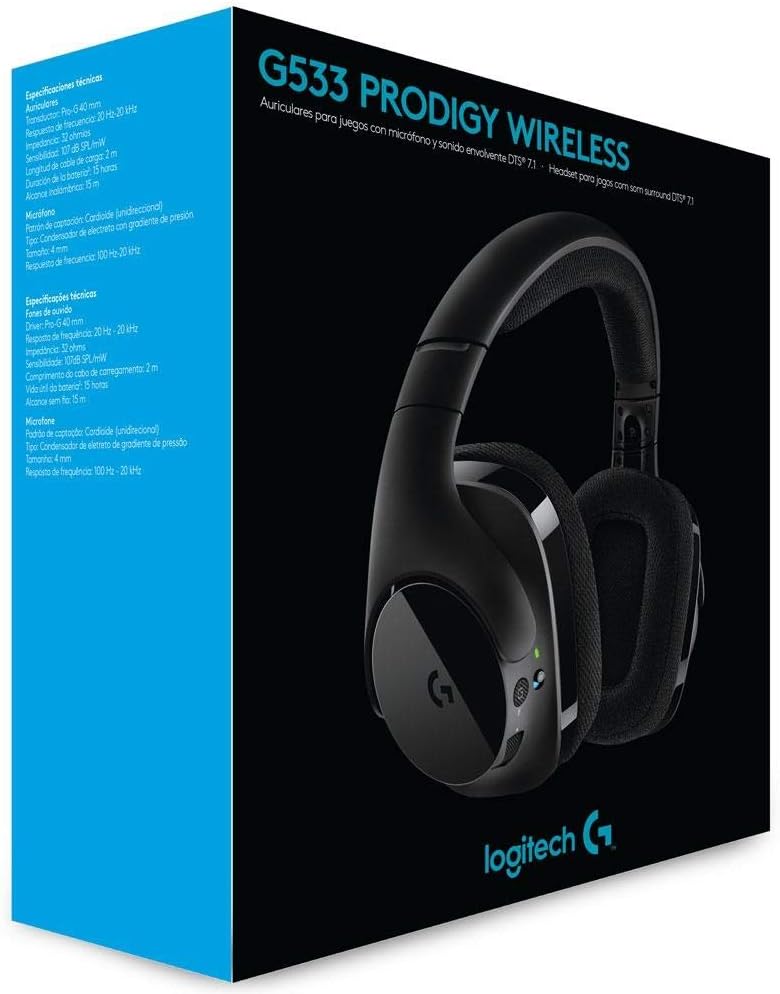
The Logitech G533 Wireless Gaming Headset is designed for immersive gaming audio with 7.1 Dolby Surround Sound and Pro-G audio drivers. It features a lightweight, durable design with breathable ear pads for extended comfort.

تصویر 1: Logitech G533 Wireless Gaming Headset. This image shows the overall design of the headset, highlighting its sleek black finish and comfortable earcups.
3.1 ہیڈسیٹ کے اجزاء
- سایڈست ہیڈ بینڈ: آرام دہ اور پرسکون فٹ کے لئے.
- Breathable Ear Pads: Removable and washable for hygiene and comfort during long gaming sessions.
- Flip-up Microphone: Features noise reduction and automatically mutes when flipped up.
- کان پر کنٹرول: Volume roller, microphone mute button, and power button located on the left earcup.

تصویر 2: Left Earcup Controls. This image displays the volume roller, microphone mute button, and power button on the left earcup for easy access during use.

تصویر 3: Flip-up Microphone. This image shows the flexible, noise-reducing microphone that can be flipped up to mute.
4. سیٹ اپ گائیڈ
Follow these steps to set up your Logitech G533 Wireless Gaming Headset:
- ہیڈسیٹ چارج کریں: Connect the USB charging cable to the headset and a powered USB port on your computer or a USB wall adapter. Allow the headset to fully charge before first use (approximately 2-3 hours). The LED indicator will show charging status.
- Connect the USB Wireless Adapter: Plug the USB wireless adapter into an available USB port on your computer.
- Power On the Headset: Press and hold the power button on the left earcup until the LED indicator lights up. The headset should automatically connect to the USB wireless adapter.
- Install Logitech G HUB Software (Optional but Recommended): For full functionality, including 7.1 surround sound customization, equalizer settings, and microphone adjustments, download and install the Logitech G HUB software from the official Logitech webسائٹ (www.logitechg.com/ghub).
- آڈیو کی ترتیبات کو ترتیب دیں: After installing G HUB, open the software to customize your audio experience. Ensure the Logitech G533 is selected as your default audio input and output device in your operating system's sound settings.

تصویر 4: USB Wireless Adapter. This compact adapter provides the wireless connection between your headset and computer.
تصویر 5: USB Charging Cable. Use this cable to recharge your headset's internal battery.
5. آپریٹنگ ہدایات
5.1 پاور آن/آف
- پاور آن کرنے کے لیے، بائیں ایئرکپ پر پاور بٹن دبائے رکھیں جب تک کہ LED انڈیکیٹر روشن نہ ہو جائے۔
- پاور آف کرنے کے لیے، LED انڈیکیٹر آف ہونے تک پاور بٹن کو دبائے رکھیں۔
5.2 والیوم کنٹرول
Adjust the audio volume using the scroll wheel located on the left earcup. This control is integrated with your computer's system volume.
5.3 مائیکروفون کا استعمال
- مائیکروفون کو چالو کریں: Flip the microphone boom down to activate it.
- مائیکروفون خاموش کریں:
- Flip the microphone boom up to automatically mute it. A distinct sound will indicate the mute status.
- Press the dedicated microphone mute button on the left earcup to mute/unmute.
- The microphone features noise reduction for clear communication.
5.4 DTS Headphone:X 7.1 Surround Sound
The G533 utilizes DTS Headphone:X technology to accurately reproduce 7.1 speaker placement and positional audio, enhancing in-game environmental effects. This feature is configurable via the Logitech G HUB software.
5.5 بیٹری کی زندگی اور چارجنگ
The headset provides up to 15 hours of battery life on a single charge. Connect the USB charging cable to recharge. You can continue using the headset while it charges.
6 دیکھ بھال
6.1 ہیڈسیٹ کی صفائی
- ہیڈسیٹ کو نرم سے صاف کریں، ڈیamp کپڑا سخت کیمیکلز یا کھرچنے والے مواد کے استعمال سے پرہیز کریں۔
- The ear pads are removable and washable. Gently detach them and hand wash with mild soap and water. Allow them to air dry completely before reattaching.
6.2 بیٹری کی دیکھ بھال
- بیٹری کی زندگی کو طول دینے کے لیے، ہیڈسیٹ کو بار بار مکمل طور پر خارج کرنے سے گریز کریں۔
- استعمال میں نہ ہونے پر ہیڈسیٹ کو ٹھنڈی، خشک جگہ پر اسٹور کریں۔
7 خرابیوں کا سراغ لگانا
7.1 No Audio or Disconnection
- یقینی بنائیں کہ ہیڈسیٹ آن ہے اور مکمل چارج ہے۔
- Verify the USB wireless adapter is securely plugged into a working USB port on your computer.
- Check your computer's sound settings to ensure the Logitech G533 is selected as the default playback and recording device.
- Try restarting both your computer and the headset.
- If using Logitech G HUB, ensure the software is running and the headset is recognized.
7.2 مائیکروفون کام نہیں کر رہا ہے۔
- Ensure the microphone boom is flipped down and not muted via the mute button.
- Check your computer's sound settings to ensure the Logitech G533 is selected as the default recording device and microphone volume is not set to zero.
- In Logitech G HUB, verify microphone settings and ensure noise reduction is not causing issues (some users report issues with aggressive noise reduction settings).
- Test the microphone in different applications.
7.3 Robotic or Distorted Audio
- This can sometimes occur with multiple audio sources playing simultaneously. Try closing unnecessary applications.
- Ensure your wireless adapter is not too far from the headset and there are no significant obstructions.
- Update your audio drivers and Logitech G HUB software to the latest versions.
7.4 Annoying Noise While Charging
- Some users report a notification sound when the battery percentage increases during charging. This is a known characteristic of the device.
- If the noise is excessive or unusual, ensure you are using the provided charging cable and a stable power source.
8. تکنیکی تفصیلات
| فیچر | تفصیلات |
|---|---|
| ماڈل کا نام | جی 533 |
| کنیکٹوٹی | وائرلیس (2.4 GHz) |
| وائرلیس رینج | 15 میٹر (4.57 فٹ) تک |
| ہیڈ فون ڈرائیور | 40 mm Pro-G (Neodymium) |
| ہیڈ فون فریکوئینسی کا جواب | 20 Hz - 20 kHz |
| ہیڈ فون کی رکاوٹ | 32 اوہم |
| صوتی دباؤ کی سطح (SPL) | 107 dB SPL/mW |
| مائکروفون کی قسم | Fold-Up, Noise-Reducing |
| مائیکروفون فریکوئنسی رسپانس | 100 Hz - 20 kHz |
| مائیکروفون کی رکاوٹ | 2200 اوہم |
| بیٹری کی قسم | ریچارج ایبل لتیم آئن۔ |
| بیٹری کی زندگی | 15 گھنٹے تک |
| سسٹم کے تقاضے | Windows 10, Windows 8.1, Windows 8, Windows 7; USB Port; Internet connection for optional software download |
| مصنوعات کے طول و عرض | 18.9 x 8.5 x 19.7 سینٹی میٹر (7.44 x 3.35 x 7.76 انچ) |
| پروڈکٹ کا وزن | 675 گرام (1.49 پونڈ) |
9. وارنٹی اور سپورٹ
The Logitech G533 Wireless Gaming Headset comes with a two-year manufacturer's warranty. For detailed warranty information, technical support, or to contact customer service, please visit the official Logitech support webسائٹ:
Ensure you have your product model number (G533) and proof of purchase available when contacting support.


