1. تعارف
This manual provides comprehensive instructions for the installation, operation, and maintenance of your FIBARO FGT-001 Z-Wave Plus Smart Heating Radiator Thermostat. The FIBARO Heat Controller is designed to provide precise temperature management for your home, integrating seamlessly with Z-Wave smart home systems. Please read this manual thoroughly before using the device to ensure proper functionality and safety.

Image 1.1: The FIBARO FGT-001 Z-Wave Plus Smart Heating Radiator Thermostat and its retail packaging.
2. حفاظتی معلومات
- استعمال سے پہلے تمام ہدایات کو احتیاط سے پڑھیں۔
- Do not attempt to repair or modify the device yourself. Refer all servicing to qualified personnel.
- آلے کو پانی اور زیادہ نمی سے دور رکھیں۔
- آلہ کو انتہائی درجہ حرارت یا براہ راست سورج کی روشنی کے سامنے نہ رکھیں۔
- Ensure the device is securely installed on the radiator valve.
- مقامی قواعد کے مطابق بیٹریاں ڈسپوز کریں۔
3. پیکیج کے مشمولات
The FIBARO FGT-001 package typically includes:
- FIBARO Heat Controller Head (FGT-001)
- صارف دستی (یہ دستاویز)
- Adapters for various radiator valves (M30 x 1.5, Danfoss RTD-N, Danfoss RA-N) - Note: Specific adapters may vary by region or package.
4. پروڈکٹ ختمview
The FIBARO Heat Controller is a smart radiator thermostat designed to regulate the temperature in rooms by controlling the flow of hot water through the radiator. It features Z-Wave Plus connectivity for integration into smart home systems, allowing for remote control and automation. The device is powered by a built-in rechargeable battery.
اہم خصوصیات:
- Z-Wave Plus Compatibility: Works with any Z-Wave or Z-Wave+ Controller.
- سیکورٹی موڈز: Supports S0 with AES-128 encryption and S2 with PRNG-based encryption.
- ریچارج ایبل بیٹری: Built-in battery recharged via a standard micro-USB port.
- والو مطابقت: Designed for M30 x 1.5, Danfoss RTD-N, and Danfoss RA-N valves.
- ایل ای ڈی اشارے: Features an LED ring that changes color to indicate temperature settings.

Image 4.1: A hand manually adjusting the FIBARO Heat Controller on a radiator valve.

Image 4.2: The FIBARO Heat Controller displaying a target temperature of 18°C.
5. سیٹ اپ اور انسٹالیشن
5.1. ڈیوائس کو چارج کرنا
Before installation, ensure the device's built-in battery is fully charged. Connect a standard micro-USB cable to the charging port on the device. The LED indicator will show charging status.
5.2. Mounting on Radiator Valve
The FIBARO Heat Controller is designed for easy, tool-free installation.
- Identify Valve Type: Determine if your radiator valve is M30 x 1.5, Danfoss RTD-N, or Danfoss RA-N. Select the appropriate adapter if necessary.
- Remove Existing Thermostat: Unscrew and remove any existing thermostat head from your radiator valve.
- اڈاپٹر منسلک کریں (اگر ضرورت ہو): If your valve is not M30 x 1.5, attach the correct adapter to the valve.
- Mount Heat Controller: Screw the FIBARO Heat Controller onto the radiator valve or adapter. Ensure it is hand-tightened securely.
- انشانکن: The device will automatically begin a calibration process after installation. This may involve the valve opening and closing to learn its range.

Image 5.1: The FIBARO Heat Controller installed on a radiator in a residential setting.
5.3 Z-Wave نیٹ ورک کی شمولیت
To integrate the Heat Controller into your Z-Wave network:
- Place the Heat Controller within direct range of your Z-Wave controller.
- Set your Z-Wave controller into inclusion (add) mode. Refer to your Z-Wave controller's manual for specific instructions.
- Press the button on the Heat Controller three times quickly.
- The device will be detected and added to your Z-Wave network. The LED ring may indicate successful inclusion.
6. آپریٹنگ ہدایات
6.1۔ دستی درجہ حرارت کی ایڈجسٹمنٹ
You can manually adjust the desired temperature by rotating the outer ring of the Heat Controller. The LED ring will change color to indicate the set temperature:
- نیلا: Lower temperatures
- سبز: معتدل درجہ حرارت
- سرخ: Higher temperatures
- جامنی: Boost/Maximum heating
6.2. Z-Wave Control and Automation
Once included in your Z-Wave network, the FIBARO Heat Controller can be controlled remotely via your Z-Wave gateway's interface or mobile application. This allows for:
- Setting precise temperature schedules.
- Creating scenes and automations (e.g., turn off heating when a window is open).
- Monitoring current room temperature (if an external sensor is paired).
- Voice control integration with compatible smart assistants (e.g., Google Assistant).

Image 6.1: Remote control of the heating system via a smartphone application.
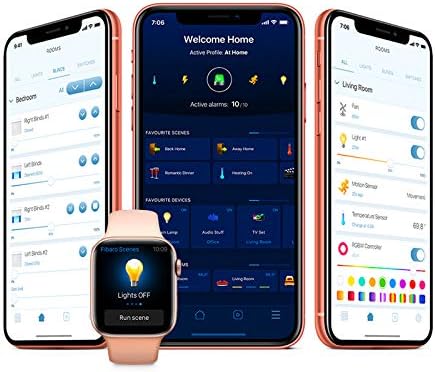
تصویر 6.2: مثال کے طور پرample of the FIBARO smart home application interface for managing devices and settings.
7 دیکھ بھال
7.1۔ بیٹری چارج ہو رہی ہے
The built-in battery should be recharged when the low battery indicator appears (usually a flashing LED). Connect the device to a micro-USB power source. A full charge typically takes several hours.
7.2. صفائی
Clean the device with a soft, dry cloth. Do not use abrasive cleaners or solvents, as these can damage the surface.
8 خرابیوں کا سراغ لگانا
8.1. آلہ جواب نہیں دے رہا ہے۔
- بیٹری چیک کریں: Ensure the battery is charged. Connect to a micro-USB charger.
- Z-Wave نیٹ ورک: Verify the device is properly included in your Z-Wave network and within range of the controller.
- Recalibration: If the valve movement seems incorrect, try re-calibrating the device by detaching and reattaching it, or through your Z-Wave controller's interface if supported.
8.2. Incorrect Temperature Readings
- The Heat Controller measures temperature near the radiator, which can be warmer than the room's ambient temperature. Consider pairing with an external FIBARO temperature sensor for more accurate room temperature readings.
- Ensure the device is not obstructed or exposed to direct heat sources (e.g., direct sunlight, other appliances).
8.3. Difficulty with Z-Wave Inclusion/Exclusion
- Ensure the device is close to the Z-Wave controller during the inclusion/exclusion process.
- Perform a factory reset on the Heat Controller if it fails to include or exclude. Refer to the FIBARO support webمخصوص ری سیٹ کے طریقہ کار کے لیے سائٹ۔
9. وضاحتیں
| فیچر | تفصیل |
|---|---|
| برانڈ | فبارو |
| ماڈل کا نام | Head (FGT-001) |
| کنیکٹوٹی ٹیکنالوجی | Z-Wave پلس |
| طاقت کا منبع | Built-in rechargeable Lithium Polymer battery (charged via Micro-USB) |
| کنٹرولر کی قسم | Z-Wave Gateway, Google Assistant (via compatible gateway) |
| خصوصی خصوصیت | سمارٹ ہوم سسٹمز کے ساتھ انضمام |
| رنگ | سفید |
| مواد | پلاسٹک |
| شے کا وزن | 3.53 اونس (100 گرام) |
| مصنوعات کے طول و عرض | 2.28 x 3.43 x 2.56 انچ |
| ڈسپلے کی قسم | Digital (LED ring) |
| کنٹرول کا طریقہ | App, Voice, Manual Rotation |
| چڑھنے کی قسم | Radiator Valve Mount |
| والو مطابقت | M30 x 1.5، Danfoss RTD-N، Danfoss RA-N |
10. وارنٹی اور سپورٹ
FIBARO products are covered by a manufacturer's warranty. For detailed warranty terms and conditions, please refer to the warranty card included with your product or visit the official FIBARO webسائٹ
For technical support, troubleshooting assistance, or further information, please visit the FIBARO support portal or contact their customer service.
- فبارو Webسائٹ: www.fibaro.com
- سپورٹ: آفیشل پر سپورٹ سیکشن دیکھیں website for FAQs, guides, and contact information.


