تعارف
This manual provides detailed instructions for the setup, operation, and maintenance of your Zebronics ZEB-BT6860RUCF 5.1 Channel Multimedia Speaker System. Please read this manual thoroughly before using the product to ensure proper functionality and to maximize your audio experience.
پیکیج کے مشمولات
تصدیق کریں کہ نیچے دی گئی تمام اشیاء آپ کے پیکیج میں شامل ہیں:
- 1 ایکس سب ووفر یونٹ
- 5 x Satellite Speaker Units
- 1 ایکس ریموٹ کنٹرول
- Audio Cables (AUX, RCA)
- صارف دستی
پروڈکٹ ختمview

Image: The complete Zebronics ZEB-BT6860RUCF 5.1 speaker system, including the subwoofer, five satellite speakers, and the remote control.

Image: Close-up of the subwoofer's front panel, illustrating the 'Input', 'Previous', 'Next', 'Play', 'Volume' controls, along with the SD/MMC card slot and USB port.
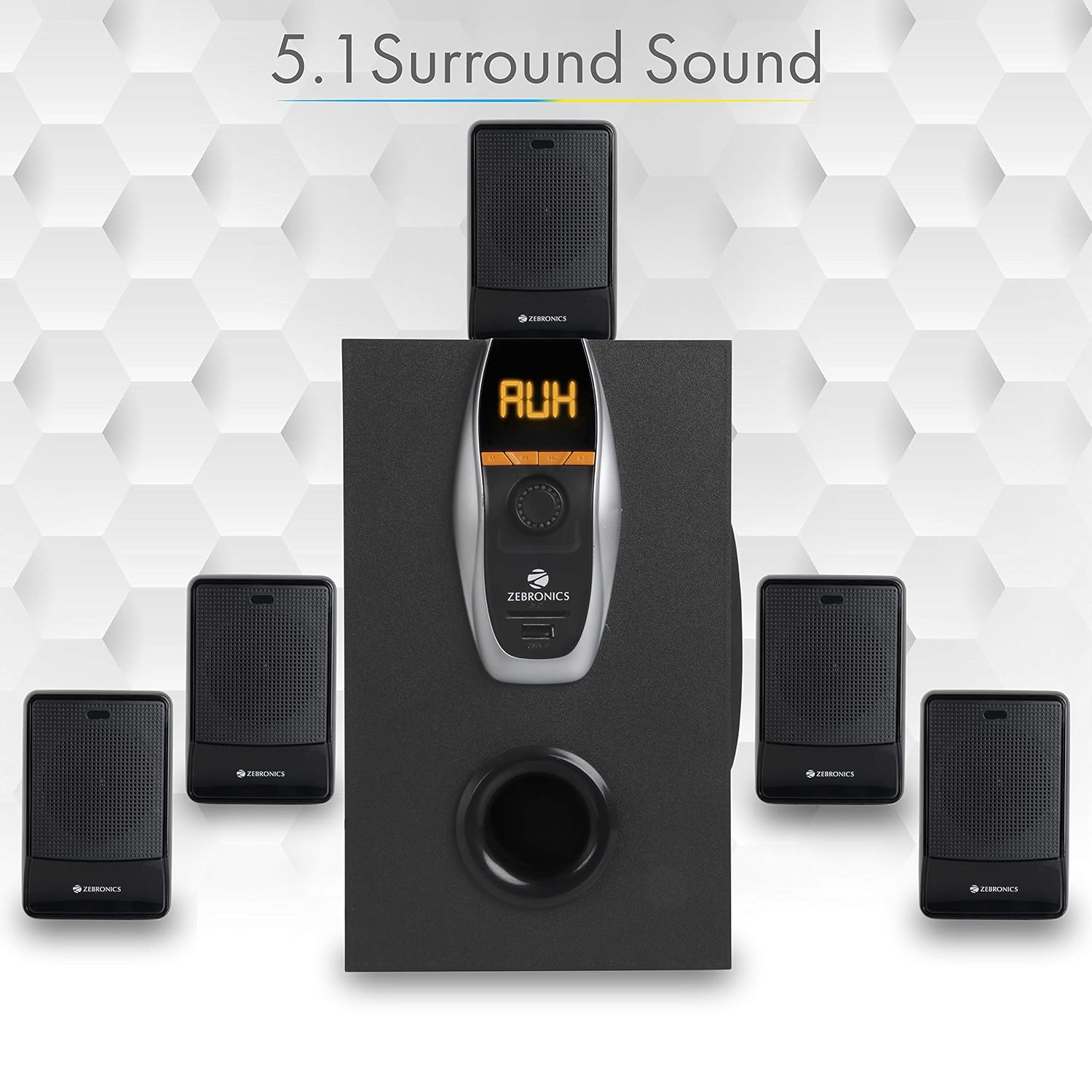
Image: A visual representation of the recommended 5.1 surround sound speaker setup, showing the central subwoofer and the five satellite speakers positioned for optimal audio distribution.

تصویر: ایک تفصیلی view of the subwoofer, highlighting its wooden enclosure design, which contributes to sound quality.

Image: The rear panel of the subwoofer, showing the various input and output ports, including Stereo Input, 5.1 Input, Satellite Output terminals, and the main Power Switch.

Image: A diagram illustrating the physical dimensions of the subwoofer unit: 160 mm (Width), 240 mm (Depth), and 277 mm (Height).
سیٹ اپ کی ہدایات
- اسپیکر کی جگہ کا تعین: Position the subwoofer centrally. Place the five satellite speakers around your listening area for optimal 5.1 surround sound. Refer to the 5.1 Surround Sound Speaker Placement image for guidance.
- سیٹلائٹ اسپیکرز کو جوڑیں: Connect each of the five satellite speakers to the corresponding output terminals on the rear panel of the subwoofer. Ensure correct polarity (positive to positive, negative to negative).
- پاور کنکشن: Connect the power cable to the subwoofer and then plug it into a suitable power outlet.
- آڈیو ماخذ کنکشن:
- For 5.1 Input: Use the provided RCA cables to connect your 5.1 channel audio source (e.g., DVD player, compatible TV) to the 5.1 Input ports on the subwoofer's rear panel.
- For Stereo/AUX Input: Use a 3.5mm to RCA cable to connect your stereo audio source (e.g., computer, laptop, MP3 player) to the Stereo Input (AUX) ports on the subwoofer's rear panel.
- پاور آن: Flip the power switch on the rear panel of the subwoofer to the 'ON' position. The front display will illuminate.
آپریٹنگ ہدایات
فرنٹ پینل کنٹرولز
The subwoofer's front panel features controls for various functions:
- ان پٹ: Press to cycle through input modes (Bluetooth, USB, SD, AUX, FM).
- پچھلا: Short press for previous track/station. Long press for fast rewind (USB/SD).
- اگلا: Short press for next track/station. Long press for fast forward (USB/SD).
- چلائیں/روکیں: Play or pause audio playback. In FM mode, long press to auto-scan and save stations.
- حجم نوب: ماسٹر والیوم لیول کو ایڈجسٹ کرنے کے لیے گھمائیں۔
- USB پورٹ: MP3 پلے بیک کے لیے USB فلیش ڈرائیو داخل کریں۔
- SD/MMC کارڈ سلاٹ: Insert an SD or MMC card for MP3 playback.
ریموٹ کنٹرول کے افعال
شامل ریموٹ کنٹرول اسپیکر کے تمام افعال تک آسان رسائی فراہم کرتا ہے۔
- طاقت: Turn the speaker system On/Off.
- موڈ: Select input source (BT/USB/SD/AUX/FM).
- حجم +/-: ماسٹر والیوم کو ایڈجسٹ کریں۔
- خاموش کریں: آڈیو کو خاموش یا چالو کریں۔
- چلائیں/روکیں: پلے بیک کو کنٹرول کریں۔
- پچھلا اگلا: Navigate tracks or FM stations.
- EQ: Select equalizer presets (if available).
- عددی کلیدیں: Direct track selection (USB/SD) or FM station input.
بلوٹوتھ آپریشن
- Power on the speaker system.
- Press the 'Input' button on the front panel or 'Mode' button on the remote until 'BT' mode is selected. The display will show 'BT' and a pairing indicator will flash.
- اپنے موبائل ڈیوائس یا کمپیوٹر پر بلوٹوتھ کو فعال کریں اور دستیاب آلات تلاش کریں۔
- Select 'ZEB-BT6860RUCF' from the list of devices.
- Once paired, the speaker will confirm the connection, and you can begin playing audio from your device.
USB/SD کارڈ آپریشن۔
- Insert a USB flash drive or SD/MMC card (up to 32GB) containing MP3 audio files into the respective port/slot on the front panel.
- The speaker system will automatically switch to USB or SD mode and begin playing the first track. If not, press the 'Input' or 'Mode' button to select the correct source.
- Use the 'Previous', 'Next', and 'Play/Pause' buttons on the front panel or remote control to manage playback.
AUX ان پٹ آپریشن
- Connect your audio source to the AUX input ports on the rear panel using an appropriate audio cable.
- Press the 'Input' button on the front panel or 'Mode' button on the remote until 'AUX' mode is selected.
- اپنے منسلک آلے سے آڈیو چلائیں۔
ایف ایم ریڈیو آپریشن
- Press the 'Input' button on the front panel or 'Mode' button on the remote until 'FM' mode is selected.
- To auto-scan and save available FM stations, long press the 'Play/Pause' button on the front panel or remote control. The system will scan and store stations automatically.
- Use the 'Previous' and 'Next' buttons to navigate through the saved FM stations.
دیکھ بھال
- صفائی: Use a soft, dry cloth to clean the speaker surfaces. Do not use abrasive cleaners, waxes, or solvents.
- وینٹیلیشن: Ensure the subwoofer and satellite speakers have adequate ventilation. Do not block any ventilation openings.
- ماحولیات: Avoid exposing the speaker system to direct sunlight, extreme temperatures, high humidity, or dusty environments.
- بجلی بند: Always power off the system and unplug it from the power outlet before cleaning or if it will be unused for an extended period.
خرابی کا سراغ لگانا
| مسئلہ | ممکنہ وجہ | حل |
|---|---|---|
| کوئی طاقت نہیں۔ | Power cable not connected; Power switch off; Power outlet faulty. | Ensure power cable is securely connected. Turn the power switch ON. Test the power outlet with another device. |
| کوئی آواز نہیں۔ | Volume too low; Incorrect input mode; Audio cables loose/faulty; Mute activated. | Increase volume. Select correct input mode. Check audio cable connections. Deactivate mute function. |
| بلوٹوتھ کنیکٹ نہیں ہو رہا ہے۔ | Speaker not in BT mode; Device Bluetooth off; Already connected to another device; Interference. | Ensure speaker is in BT mode. Turn on device Bluetooth. Disconnect from other devices. Move closer to the speaker. |
| USB/SD پلے بیک کے مسائل | غلط file فارمیٹ کرپٹ files; USB/SD card not inserted correctly; Max memory size exceeded. | یقینی بنائیں files are MP3 format. Check for corrupted files. Reinsert USB/SD card. Use cards up to 32GB. |
| ریموٹ کنٹرول کام نہیں کر رہا ہے۔ | Batteries depleted; Obstruction; Remote sensor blocked. | Replace remote control batteries. Remove any obstructions between remote and speaker. Ensure remote sensor on subwoofer is clear. |
| ناقص ایف ایم کا استقبال۔ | کمزور سگنل؛ اینٹینا بڑھا نہیں ہے۔ | Extend the FM antenna fully. Try repositioning the antenna or the speaker system for better signal. |
وضاحتیں
| فیچر | تفصیلات |
|---|---|
| ٹوٹل آؤٹ پٹ پاور (RMS) | 70 واٹ |
| سب ووفر آؤٹ پٹ پاور | 40 واٹ |
| سیٹلائٹ آؤٹ پٹ پاور | 6 واٹ x 5۔ |
| تعدد رسپانس | 35Hz - 20KHz |
| حساسیت | 600mV |
| بلوٹوتھ ورژن | 2.1 + EDR |
| USB/SD Max. Memory Size | 32 جی بی |
| USB/SD File فارمیٹ سپورٹ | MP3 |
| کنیکٹیویٹی کے اختیارات | Bluetooth, USB, SD/MMC, AUX, FM |
| ہم آہنگ آلات | Desktop, Laptop, MP3 Player, DVD Players, Televisions |
| Subwoofer Dimensions (D x W x H) | 35D x 39W x 45H Centimeters (Product Dimensions) |
| شے کا وزن | 5.4 کلوگرام |
| بجلی کی کھپت | 45W |
| کنٹرول کا طریقہ | ریموٹ کنٹرول، آن یونٹ بٹن |
| اصل ملک | چین |
وارنٹی اور سپورٹ
Your Zebronics ZEB-BT6860RUCF Multimedia Speaker System comes with a 1 سال کی کیری ان وارنٹی to the service center from the date of purchase. Please retain your purchase receipt for warranty claims.
For technical support, service, or warranty inquiries, please contact Zebronics customer service. Refer to the official Zebronics webموجودہ رابطے کی معلومات کے لیے سائٹ یا آپ کی مصنوعات کی پیکیجنگ۔
درآمد کنندہ: ZEBRONICS INDIA PVT LTD, NO : 118, POONAMMALE HIGH ROAD , VEPERY


