تعارف
This manual provides detailed instructions for the installation, operation, and maintenance of your Hifonics BXX1600.1D Brutus Class D 1600W RMS 1 Ohm Mono Car Subwoofer Ampزندہ کرنے والا مناسب کام اور حفاظت کو یقینی بنانے کے لیے براہ کرم انسٹالیشن یا آپریشن کی کوشش کرنے سے پہلے اس دستی کو اچھی طرح پڑھیں۔
سیٹ اپ اور انسٹالیشن
زیادہ سے زیادہ کارکردگی اور حفاظت کے لیے مناسب تنصیب بہت ضروری ہے۔ یہ سفارش کی جاتی ہے کہ تنصیب کو ایک مستند پیشہ ور کے ذریعہ انجام دیا جائے۔
وائرنگ کنکشنز
Ensure all power, ground, and remote wires are securely connected. Use appropriate gauge wiring for your installation to prevent overheating and ensure stable power delivery.

تصویر: پیچھے view of the Hifonics BXX1600.1D amplifier. This image highlights the power input terminals (+12V, REM, GND) on the right, and the mono speaker output terminals on the left. Two 70A fuses are visible between the power and speaker terminals, indicating the amplifier's power handling capabilities.
دی amplifier features zero-gauge power and ground terminals for robust power delivery, and eight-gauge speaker terminals for secure speaker connections. Always disconnect the vehicle's battery before making any electrical connections.
فیوز کی تنصیب
دی amplifier is equipped with internal fuses to protect against electrical overloads. Ensure these are correctly installed and of the specified rating (70A x 2) before operation.
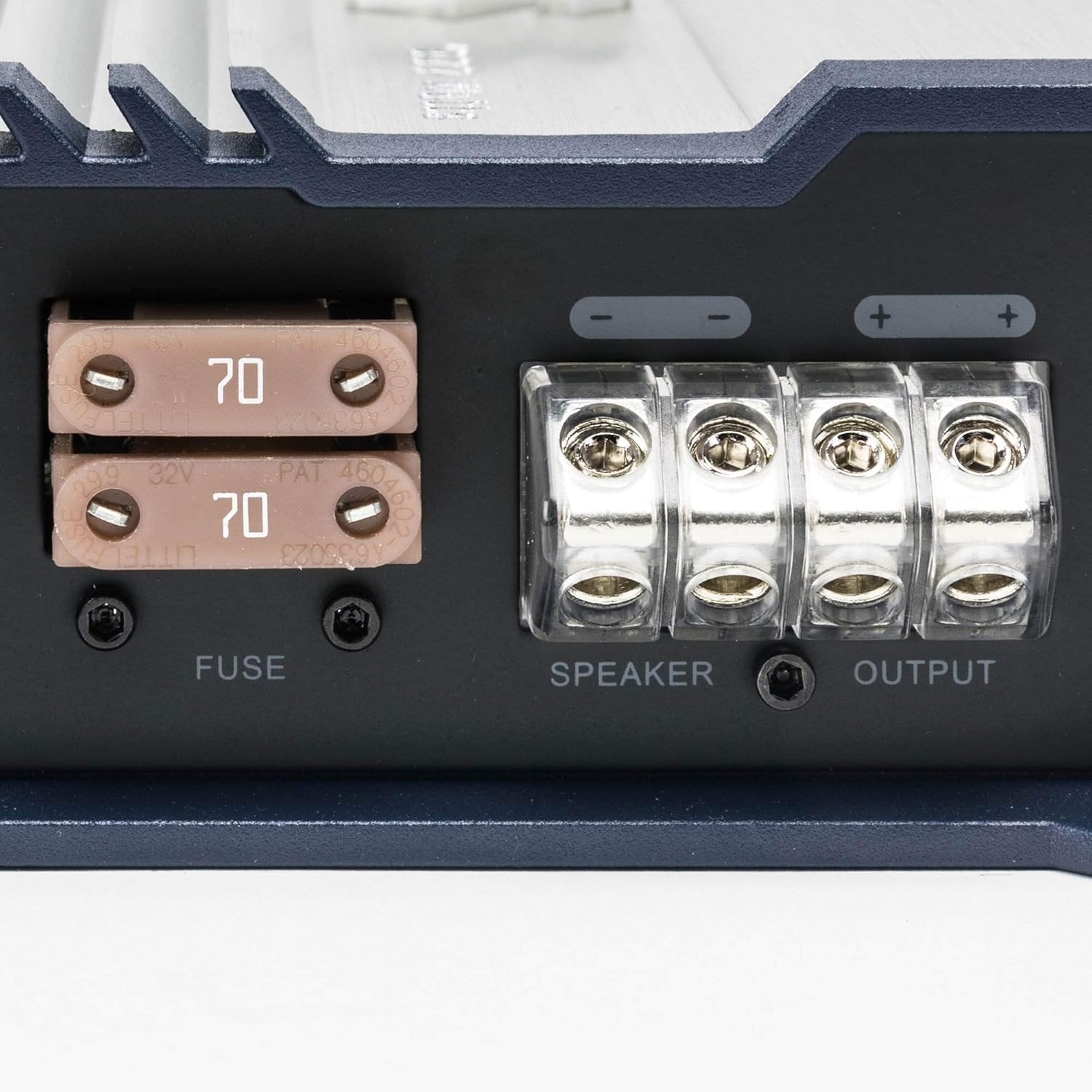
تصویر: ایک قریبی اپ view of the Hifonics BXX1600.1D amplifier's fuse compartment and speaker output terminals. Two 70A fuses are clearly visible, along with the robust speaker wire connections labeled "SPEAKER OUTPUT".
آپریٹنگ ہدایات
کے ساتھ اپنے آپ کو واقف کرو amplifier's controls to optimize your audio experience.

تصویر: سامنے والا view of the Hifonics BXX1600.1D amplifier's control panel. This image displays the RCA input and output jacks, remote bass knob port, and various adjustment controls including Level, Phase, Bass EQ, Subsonic Filter, and Low-Pass Filter (LPF).
کنٹرول پینل ختم۔view
- پاور/پروٹیکٹ انڈیکیٹرز: LEDs indicating operational status (green for power, red for protection mode).
- دور دراز: Port for connecting an optional remote bass level control.
- Input/Output RCAs: For connecting to your head unit and bridging multiple ampجان بچانے والے
- حاصل کنٹرول: آپ کے ہیڈ یونٹ کے آؤٹ پٹ سے ملنے کے لیے ان پٹ کی حساسیت کو ایڈجسٹ کرتا ہے۔
- ایل پی ایف (کم پاس فلٹر): Filters out high frequencies, allowing only low frequencies to pass to the subwoofer.
- سب سونک فلٹر: انتہائی کم تعدد کو فلٹر کرتا ہے جو ناقابل سماعت ہیں اور سب ووفرز کو نقصان پہنچا سکتی ہیں۔
- فیز کنٹرول: Adjusts the phase of the subwoofer output (0° to 180°) to match other speakers.
- Bass EQ/Boost: Provides adjustable bass equalization for enhanced low-frequency response.
ابتدائی پاور اپ
After all connections are made, turn on your head unit. The amplifier's power indicator should illuminate green. If the protect indicator lights up, immediately turn off the system and check all connections and wiring for faults.
ترتیبات کو ایڈجسٹ کرنا
Start with the gain control at its minimum setting. Gradually increase the gain until the desired volume is achieved without distortion. Adjust the LPF, Subsonic Filter, and Phase controls to blend the subwoofer output seamlessly with your main speakers.
دیکھ بھال
باقاعدگی سے دیکھ بھال آپ کی لمبی عمر اور بہترین کارکردگی کو یقینی بناتی ہے۔ ampزندگی
- صفائی: رکھیں amplifier clean and free of dust and debris. Use a soft, dry cloth for cleaning. Do not use liquid cleaners.
- وینٹیلیشن: یقینی بنائیں amplifier has adequate ventilation. Do not block the cooling fins or mount the amplifier in an enclosed space without proper airflow.
- وائرنگ معائنہ: Periodically check all wiring connections for tightness and signs of corrosion or damage. Loose connections can lead to poor performance or damage.
- فیوز کی تبدیلی: If a fuse blows, replace it only with a fuse of the exact same type and rating (70A). Using an incorrect fuse can cause severe damage to the amplifier or vehicle's electrical system.
خرابی کا سراغ لگانا
اگر آپ کو اپنے ساتھ مسائل کا سامنا ہے۔ amplifier، مندرجہ ذیل عام خرابیوں کا سراغ لگانے کے اقدامات کا حوالہ دیتے ہیں:
- کوئی طاقت نہیں: Check the main power fuse, ground connection, and remote turn-on wire. Ensure the vehicle's battery has sufficient charge.
- Protection Mode (Red LED): This indicates a fault. Check for short circuits in speaker wiring, improper impedance loads, or overheating. Allow the amplifier to cool down if it's hot.
- کوئی آواز نہیں: Verify all RCA input/output connections, speaker wire connections, and head unit settings. Check the gain control and ensure it's not set too low.
- مسخ شدہ آواز: Reduce the gain setting. Check for proper LPF and Subsonic filter settings. Ensure speaker impedance matches the ampلیفائر کی صلاحیتیں.
If problems persist after troubleshooting, consult a qualified car audio technician.
وضاحتیں
| فیچر | تفصیل |
|---|---|
| ماڈل نمبر | BXX1600.1D |
| RMS پاور (1 Ohm) | 1600W |
| کلاس | کلاس ڈی |
| قسم | مونو Ampزندگی |
| مصنوعات کے طول و عرض | 19.5 x 10.2 x 3.6 انچ |
| شے کا وزن | 11.48 پاؤنڈ |
| کارخانہ دار | ہائفونکس |
| پہلی تاریخ دستیاب ہے۔ | 18 جنوری 2018 |
پروڈکٹ ختمview ویڈیو
ایک اوور کے لیے یہ آفیشل ویڈیو دیکھیںview of the Hifonics Brutus Gamma BG Amplifiers, which share similar features and design principles with your BXX1600.1D model.
ویڈیو: An official Hifonics video showcasing the Brutus Gamma BG Amplifiers. This video provides visual details and highlights key features, offering insights relevant to the Hifonics BXX1600.1D ampزندگی
وارنٹی کی معلومات
Your Hifonics BXX1600.1D amplifier is covered by a manufacturer's warranty against defects in materials and workmanship. Please refer to the warranty card included with your product for specific terms, conditions, and duration. Keep your proof of purchase for warranty claims.
کسٹمر سپورٹ
For technical assistance, troubleshooting, or warranty inquiries, please contact Hifonics customer support through their official webآپ کی مصنوعات کی پیکیجنگ میں فراہم کردہ سائٹ یا رابطے کی معلومات۔ آپ بھی ملاحظہ کر سکتے ہیں۔ Hifonics Store on Amazon اضافی وسائل کے ل.


