1. تعارف
Thank you for choosing the ASAKUKI Smart Wi-Fi Essential Oil Diffuser. This device combines aromatherapy with smart technology, allowing you to control it via a mobile application or voice commands. It is designed to humidify and purify the air, creating a relaxing atmosphere in your home or office.
This manual provides detailed instructions for the safe and efficient use of your diffuser. Please read it thoroughly before operation and retain it for future reference.

Image: The ASAKUKI Smart Wi-Fi Essential Oil Diffuser is versatile for various environments, including nurseries, family rooms, bedrooms, yoga studios, and workspaces.
2. حفاظتی احتیاطی تدابیر
محفوظ آپریشن کو یقینی بنانے اور نقصان کو روکنے کے لیے، براہ کرم درج ذیل کا مشاہدہ کریں:
- ڈفیوزر کو ہمیشہ فلیٹ، مستحکم سطح پر رکھیں۔
- زیادہ سے زیادہ پانی بھرنے کی لائن (500ml) سے تجاوز نہ کریں۔
- Use only clean tap water or distilled water. Avoid using hot water.
- Add essential oils carefully to avoid spilling on the exterior of the unit.
- ڈفیوزر کو بچوں اور پالتو جانوروں کی پہنچ سے دور رکھیں۔
- Do not cover the mist outlet during operation.
- Unplug the device from the power outlet before cleaning or refilling.
- پانی یا دیگر مائعات میں یونٹ کو نہ ڈبو۔
- If the unit is damaged, do not attempt to repair it yourself. Contact customer support.
- The diffuser features an automatic shut-off when water runs out, but it is recommended to monitor water levels.
3. پیکیج کے مشمولات
تصدیق کریں کہ تمام اشیاء آپ کے پیکیج میں موجود ہیں:
- ASAKUKI Smart Wi-Fi Essential Oil Diffuser (Model DF010)
- پاور اڈاپٹر
- صارف دستی
- Measuring Cup (may be included)
4. پروڈکٹ ختمview
Familiarize yourself with the main components of your diffuser:

Image: The ASAKUKI Smart Wi-Fi Essential Oil Diffuser, showing its sleek design and the accompanying mobile app for control.
- ڈھکن: Top cover of the diffuser.
- مسٹ آؤٹ لیٹ: جہاں دھند چھائی ہوئی ہے۔
- پانی کا ٹینک: Holds up to 500ml of water.
- Max Water Line: Indicates the maximum fill level.
- الٹراسونک پلیٹ: Located at the bottom of the water tank, responsible for mist generation.
- ایئر آؤٹ لیٹ: Located on the base.
- Drain Side: Indicated for proper water drainage.
- لائٹ بٹن: Controls the LED light functions.
- Mist/Wi-Fi Button: Controls mist output and initiates Wi-Fi pairing.
- پاور جیک: پاور اڈاپٹر کو جوڑنے کے لیے۔
5. سیٹ اپ ہدایات
ابتدائی سیٹ اپ کے لیے ان اقدامات پر عمل کریں:
- ڈفیوزر رکھیں: Position the diffuser on a flat, stable, and water-resistant surface.
- ڑککن کو ہٹا دیں: Gently lift the top lid off the diffuser.
- پانی شامل کریں: Using a measuring cup, fill the water tank with clean tap water or distilled water up to the maximum water line (500ml). Do not overfill.
- ضروری تیل شامل کریں: Add 3-5 drops of your preferred essential oil directly into the water tank. Adjust the amount based on personal preference and room size.
- ڑککن کو تبدیل کریں: Securely place the lid back onto the diffuser.
- پاور سے رابطہ کریں: Plug the power adapter into the power jack at the base of the diffuser, then plug the adapter into a wall outlet.
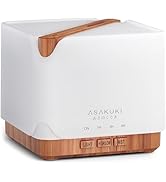
Image: Simple setup guide illustrating connecting power, app pairing, and wireless control.
6. آپریٹنگ ہدایات
6.1 دستی کنٹرول
- مسٹ کنٹرول: دبائیں Mist/Wi-Fi button once for continuous mist. Press again for intermittent mist (30 seconds on, 30 seconds off). Press a third time to turn off the mist.
- روشنی کنٹرول: دبائیں روشنی button once to turn on the LED light with automatic color cycling. Press again to fix the light to a specific color. Continue pressing to cycle through colors. Press and hold the Light button to turn off the light.
6.2 Smart Wi-Fi and App Control
The diffuser can be controlled remotely using the TuyaSmart app.
- ایپ ڈاؤن لوڈ کریں: تلاش کریں۔ "TuyaSmart" in your smartphone's app store (iOS or Android) and download it.
- رجسٹر/لاگ ان: ایپ کھولیں اور ایک نیا اکاؤنٹ رجسٹر کریں یا اگر آپ کے پاس پہلے سے موجود ہے تو لاگ ان کریں۔
- جوڑا بنانے کا موڈ درج کریں: With the diffuser plugged in, press and hold the Mist/Wi-Fi button for 5 seconds until the indicator light flashes rapidly. This indicates the diffuser is in pairing mode.
- ڈیوائس شامل کریں: In the TuyaSmart app, tap "Add Device" or the "+" icon. Select "Small Home Appliance" > "Diffuser" (Wi-Fi).
- Wi-Fi سے جڑیں: Follow the in-app instructions to connect the diffuser to your 2.4GHz Wi-Fi network. Ensure your phone is also connected to the same 2.4GHz network during setup.
- کنٹرول: Once successfully paired, you can control the mist, light, set timers, and create schedules directly from the TuyaSmart app.

Image: The mobile app allows for convenient control of the diffuser's functions.
6.3 الیکسا کے ساتھ وائس کنٹرول
The diffuser is compatible with Amazon Alexa for voice control.
- ہنر کو فعال کریں: In the Alexa app, search for and enable the "TuyaSmart" skill.
- اکاؤنٹ لنک کریں: Link your TuyaSmart account to your Alexa account.
- ڈیوائسز دریافت کریں: Ask Alexa to "Discover devices" or manually discover them in the Alexa app.
- وائس کمانڈز: Once discovered, you can use commands such as:
- "Alexa, turn on the diffuser."
- "Alexa, turn off the diffuser."
- "Alexa, set the diffuser to red."
- "Alexa, set diffuser brightness to 50%."

Image: Voice control with Alexa allows hands-free operation of the diffuser.
7 دیکھ بھال
Regular cleaning helps maintain optimal performance and extends the lifespan of your diffuser.
7.1 صفائی
Clean the diffuser after every 5-6 uses or every 3-5 days, especially when changing essential oils.
- ان پلگ: Disconnect the diffuser from the power outlet.
- خالی پانی: Remove the lid and carefully pour out any remaining water from the drain side of the water tank.
- صاف کرنا: Use a soft cloth or cotton swab with a small amount of mild dish soap to gently wipe the inside of the water tank and the ultrasonic plate.
- کللا: Rinse the water tank with clean water, being careful not to get water into the air outlet.
- خشک: Wipe all parts dry with a clean, soft cloth.
- Deep Clean (Optional): For stubborn residue, add a small amount of white vinegar to the water tank and let it sit for 10-15 minutes before wiping and rinsing.
7.2 اسٹوریج
When not in use for an extended period, ensure the diffuser is clean and completely dry. Store it in a cool, dry place away from direct sunlight.
8 خرابیوں کا سراغ لگانا
اگر آپ کو مسائل درپیش ہیں تو درج ذیل عام مسائل اور حل کا حوالہ دیں:
| مسئلہ | ممکنہ وجہ | حل |
|---|---|---|
| کوئی دھند یا کم دھند آؤٹ پٹ نہیں۔ |
|
|
| Diffuser does not power on |
|
|
| Wi-Fi/App سے منسلک نہیں ہو سکتا |
|
|
| پانی کا رساؤ |
|
|
9. وضاحتیں
| فیچر | تفصیل |
|---|---|
| برانڈ | آسکوکی |
| ماڈل نمبر | DF010 |
| صلاحیت | 500 ملی لیٹر |
| طول و عرض | 6"L x 6"W x 7"H |
| مواد | Acrylonitrile Butadiene Styrene (ABS), Polypropylene (PP) |
| طاقت کا منبع | کورڈڈ الیکٹرک |
| واٹtage | 10 واٹ |
| کوریج ایریا | 323 مربع فٹ تک |
| خصوصی خصوصیات | App Control, Automatic Shut-Off, Multiple Light Settings, Multiple Mist Settings, Voice Control (Alexa) |
| شور کی سطح | 35 ڈی بی سے کم |
| Runtime (Full Capacity) | Up to 16 hours (on weak mist setting) |
10. وارنٹی اور سپورٹ
The ASAKUKI Smart Wi-Fi Essential Oil Diffuser comes with a 1-year technical support warranty. This warranty covers manufacturing defects and issues arising from normal use.
For technical assistance, troubleshooting, or warranty claims, please contact ASAKUKI customer support through the retailer where you purchased the product or visit the official ASAKUKI webرابطے کی معلومات کے لیے سائٹ۔
Please have your model number (DF010) and proof of purchase ready when contacting support.


