1. تعارف
This manual provides essential information for the safe and efficient operation of your Digi International WR21-L52A-DE1-TB Cellular Wireless Router. Please read this manual thoroughly before installation and use, and retain it for future reference. This device is designed to provide reliable cellular connectivity for various applications.
2. حفاظتی معلومات
- بجلی کی فراہمی: Use only the power adapter supplied with the device. Using an incorrect adapter may damage the device and void the warranty.
- وینٹیلیشن: Ensure adequate ventilation around the router. Do not block ventilation openings.
- ماحولیات: Avoid exposing the device to extreme temperatures, humidity, direct sunlight, or corrosive environments.
- سروسنگ: خود ڈیوائس کو کھولنے یا مرمت کرنے کی کوشش نہ کریں۔ تمام خدمات کو اہل اہلکاروں سے رجوع کریں۔
- اینٹینا: Ensure antennas are securely connected before powering on the device.
3. پیکیج کے مشمولات
تصدیق کریں کہ تمام اشیاء پیکیج میں موجود ہیں:
- Digi International WR21-L52A-DE1-TB Cellular Wireless Router
- پاور اڈاپٹر
- Antennas (quantity may vary)
- ایتھرنیٹ کیبل
- فوری آغاز گائیڈ (اگر شامل ہو)
اگر کوئی آئٹم غائب یا خراب ہو تو فوری طور پر اپنے وینڈر سے رابطہ کریں۔
4. پروڈکٹ ختمview
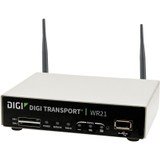
تصویر: سامنے view of the Digi International WR21-L52A-DE1-TB Cellular Wireless Router. This image displays the compact form factor of the device, likely showing ports for antennas, power, and network connections.
The Digi International WR21-L52A-DE1-TB is a robust cellular wireless router designed for reliable and secure connectivity. It features multiple connectivity options and is suitable for various industrial and enterprise applications requiring remote access and data transfer over cellular networks.
5. سیٹ اپ
5.1. سم کارڈ کی تنصیب
- یقینی بنائیں کہ روٹر پاور آف ہے اور پاور سورس سے منقطع ہے۔
- Locate the SIM card slot(s) on the device. Refer to the device's physical markings for exact location.
- Insert the activated cellular SIM card into the slot with the gold contacts facing down and the notched corner oriented correctly. Push until it clicks into place.
- If applicable, secure the SIM card tray or cover.
5.2. اینٹینا کنکشن
- Identify the cellular antenna ports (typically labeled 'MAIN' and 'DIV' or similar).
- Screw the provided cellular antennas onto the corresponding ports until finger-tight. Do not overtighten.
- زیادہ سے زیادہ سگنل ریسپشن کے لیے اینٹینا لگائیں۔
5.3. پاور کنکشن
- پاور اڈاپٹر کو روٹر کے پاور ان پٹ پورٹ سے جوڑیں۔
- پاور اڈاپٹر کو کسی مناسب الیکٹریکل آؤٹ لیٹ میں لگائیں۔
- The router will power on automatically or may require pressing a power button. Observe the LED indicators for power status.
5.4. نیٹ ورک کنکشن (اختیاری)
- To connect a device via Ethernet, plug one end of an Ethernet cable into an available LAN port on the router.
- Plug the other end of the Ethernet cable into the network port of your computer or other network device.
6. آپریٹنگ ہدایات
6.1. پر / آف پاور
- پاور آن: Connect the power adapter. The device will typically power on automatically. Observe the power LED.
- بجلی بند: Disconnect the power adapter from the electrical outlet. For controlled shutdown, refer to the device's web interface or specific documentation for a software shutdown procedure if available.
6.2. تک رسائی حاصل کرنا Web انٹرفیس
- Ensure your computer is connected to the router via Ethernet or Wi-Fi (if enabled).
- کھولنا a web براؤزر (جیسے کروم، فائر فاکس، ایج)۔
- Enter the router's default IP address (e.g., 192.168.1.1 or 192.168.0.1) into the address bar and press Enter. Refer to the Quick Start Guide or device label for the exact default IP address.
- Enter the default username and password when prompted. These are typically found on a label on the device or in the Quick Start Guide.
- Upon successful login, you will access the router's configuration interface.
6.3۔ بنیادی ترتیب
کے اندر اندر web انٹرفیس، آپ مختلف ترتیبات کو ترتیب دے سکتے ہیں:
- Cellular Settings: Verify APN settings, signal strength, and connection status.
- نیٹ ورک کی ترتیبات: Configure LAN IP address, DHCP server, and port forwarding.
- سیکورٹی: Change default login credentials, configure firewall rules, and VPN settings.
- فرم ویئر اپ ڈیٹ: بہترین کارکردگی اور سیکیورٹی کو یقینی بنانے کے لیے فرم ویئر اپ ڈیٹس کو چیک کریں اور ان کا اطلاق کریں۔
7 دیکھ بھال
- صفائی: روٹر کے بیرونی حصے کو صاف کرنے کے لیے نرم، خشک کپڑا استعمال کریں۔ مائع کلینر یا ایروسول استعمال نہ کریں۔
- فرم ویئر اپ ڈیٹس: باقاعدگی سے مینوفیکچررز کی جانچ پڑتال کریں website for firmware updates. Keeping the firmware updated ensures the latest features, security patches, and performance improvements.
- ماحولیاتی حالات: Ensure the router is operating within its specified temperature and humidity ranges to prevent overheating or damage.
8 خرابیوں کا سراغ لگانا
8.1. No Cellular Connection
- Verify the SIM card is correctly inserted and activated with your cellular provider.
- Check antenna connections and ensure they are positioned for optimal signal.
- میں لاگ ان کریں۔ web interface to check cellular signal strength and connection status.
- راؤٹر کو دوبارہ شروع کریں۔
8.2 رسائی نہیں ہو سکتی Web انٹرفیس
- یقینی بنائیں کہ آپ کا کمپیوٹر ایتھرنیٹ کے ذریعے روٹر سے براہ راست جڑا ہوا ہے۔
- Verify your computer's IP address is in the same subnet as the router (e.g., if router is 192.168.1.1, computer should be 192.168.1.x).
- اپنے براؤزر کی کیش کو صاف کرنے یا کوئی مختلف براؤزر استعمال کرنے کی کوشش کریں۔
- If you forgot the password, a factory reset might be necessary (refer to specific device documentation for this procedure, as it will erase all configurations).
8.3 سست کنکشن کی رفتار
- Check cellular signal strength in the web interface. Weak signal can lead to slow speeds.
- Ensure antennas are properly positioned and unobstructed.
- Verify your cellular data plan has not reached its data cap or is being throttled.
- Restart the router and connected devices.
9. وضاحتیں
| فیچر | تفصیل |
|---|---|
| ماڈل | WR21-L52A-DE1-TB |
| برانڈ | ڈیجی انٹرنیشنل |
| کنیکٹیویٹی پروٹوکول | سیلولر |
| کنیکٹوٹی ٹیکنالوجی | یو ایس بی |
| کنٹرول کا طریقہ | ریموٹ |
| خصوصی خصوصیت | ڈبلیو پی ایس |
| ہم آہنگ آلات | پرسنل کمپیوٹر |
| تجویز کردہ استعمال | گھر |
| یو پی سی | 747356312219 |
10. وارنٹی اور سپورٹ
For detailed warranty information, please refer to the warranty card included with your product or visit the official Digi International website. Technical support is available through the manufacturer's support channels. Please have your product model number (WR21-L52A-DE1-TB) and serial number ready when contacting support.


