1. تعارف
This manual provides essential information for the installation, operation, and maintenance of your Samsung 970 EVO Plus 1TB NVMe M.2 Internal Solid State Drive. Please read these instructions carefully before proceeding to ensure proper usage and to maximize the performance and lifespan of your SSD.

Figure 1: Samsung 970 EVO Plus SSD and its retail packaging.
2. پروڈکٹ ختمview
The Samsung 970 EVO Plus is a high-performance NVMe M.2 SSD designed for demanding computing tasks. It leverages V-NAND technology and a PCIe Gen 3.0 x4 interface to deliver exceptional read and write speeds, making it suitable for gaming, graphics, and intensive workloads.
اہم خصوصیات:
- صلاحیت: 1 ٹی بی
- انٹرفیس: NVMe M.2 (PCIe Gen 3.0 x4)
- ترتیب وار پڑھنے کی رفتار: 3,500 MB/s تک
- ترتیب وار لکھنے کی رفتار: 3,300 MB/s تک
- ٹیکنالوجی: V-NAND, Dynamic Thermal Guard, Intelligent TurboWrite
- سافٹ ویئر: Samsung Magician for drive management

Figure 2: The 970 EVO Plus SSD delivering high performance in a laptop environment.
3. سیٹ اپ اور انسٹالیشن
Before installation, ensure your system's motherboard supports NVMe M.2 SSDs and has an available M.2 slot. Refer to your motherboard's manual for specific M.2 slot locations and installation procedures.
حفاظتی احتیاطی تدابیر:
- Always power off your computer and disconnect it from the power source before installing any internal components.
- ایس ایس ڈی کو سنبھالنے سے پہلے کسی گراؤنڈ دھاتی چیز کو چھو کر کسی بھی جامد بجلی کو خارج کریں۔
- سونے کے کنیکٹرز یا اجزاء کو چھونے سے بچنے کے لیے SSD کو اس کے کناروں سے ہینڈل کریں۔
تنصیب کے مراحل:
- اپنے مدر بورڈ پر دستیاب M.2 سلاٹ تلاش کریں۔
- Carefully insert the Samsung 970 EVO Plus SSD into the M.2 slot at a slight angle.
- SSD کو آہستہ سے نیچے دھکیلیں جب تک کہ یہ مدر بورڈ کے متوازی نہ ہو۔
- Secure the SSD with the provided screw (or the screw from your motherboard's M.2 standoff).
- اپنے کمپیوٹر کیس کو بند کریں اور پاور کو دوبارہ جوڑیں۔
- Boot your computer and initialize the new SSD through your operating system's Disk Management utility.
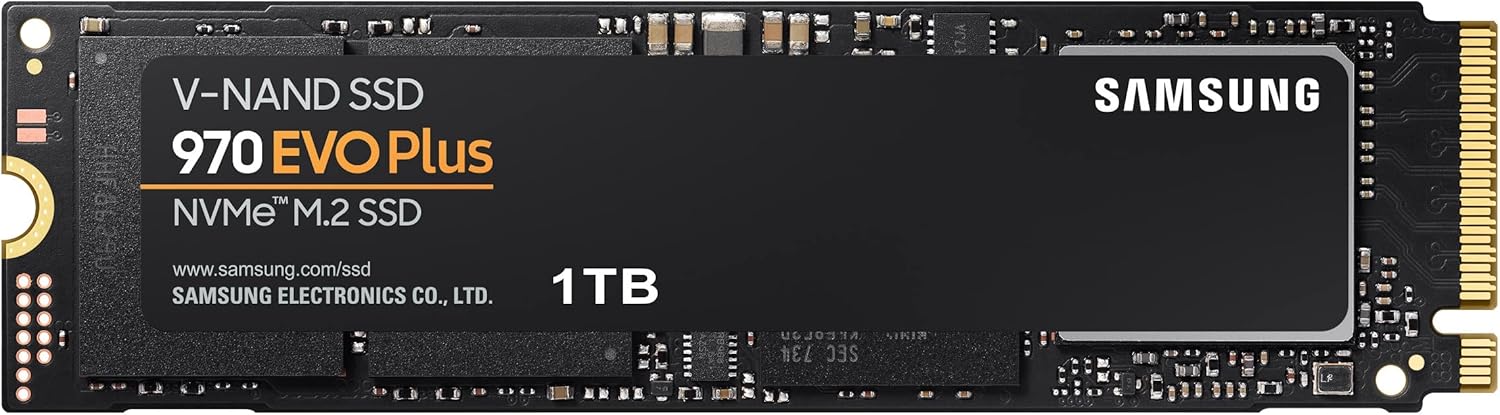
Figure 3: The Samsung 970 EVO Plus NVMe M.2 SSD module.
4. آپریٹنگ ہدایات
Once installed and initialized, your Samsung 970 EVO Plus SSD is ready for use. For optimal performance and drive health management, it is recommended to install the Samsung Magician software.
سام سنگ جادوگر سافٹ ویئر:
Samsung Magician is a suite of user-friendly tools designed to help you manage your SSD. It allows you to:
- Monitor drive health and temperature.
- Benchmark performance.
- فرم ویئر کو اپ ڈیٹ کریں۔
- Optimize performance settings.
- Securely erase data.
آفیشل Samsung سے Samsung Magician کا تازہ ترین ورژن ڈاؤن لوڈ کریں۔ webسائٹ

Figure 4: The Samsung Magician software interface for SSD management.
5 دیکھ بھال
Regular maintenance helps ensure the longevity and optimal performance of your SSD.
فرم ویئر اپ ڈیٹس:
Periodically check for and install firmware updates using the Samsung Magician software. Firmware updates can improve performance, stability, and compatibility.
حرارت کا انتظام:
The 970 EVO Plus features Dynamic Thermal Guard technology, which automatically monitors and maintains optimal operating temperatures to minimize performance drops. Ensure adequate airflow within your computer case to assist with heat dissipation.

Figure 5: Illustration of Dynamic Thermal Guard for heat dissipation.
6 خرابیوں کا سراغ لگانا
If you encounter issues with your Samsung 970 EVO Plus SSD, consider the following troubleshooting steps:
- SSD کا پتہ نہیں چلا:
- یقینی بنائیں کہ SSD M.2 سلاٹ میں صحیح طریقے سے بیٹھا ہے۔
- Check your motherboard's BIOS/UEFI settings to confirm the M.2 slot is enabled and configured correctly.
- Verify that your motherboard drivers are up to date.
- کارکردگی کے مسائل:
- Ensure the latest firmware is installed via Samsung Magician.
- Check for sufficient free space on the drive (performance can degrade with very full drives).
- Monitor drive temperature using Samsung Magician to ensure it's not overheating.
- آپریٹنگ سسٹم بوٹ نہیں ہو رہا:
- Verify the boot order in your BIOS/UEFI settings.
- If migrating an OS, ensure the migration process was completed successfully.
مستقل مسائل کے لیے سام سنگ سپورٹ سے رجوع کریں۔ webسائٹ یا کسٹمر سروس سے رابطہ کریں۔
7. وضاحتیں
| فیچر | تفصیل |
|---|---|
| ماڈل نمبر | MZ-V7S1T0B/AM |
| صلاحیت | 1 ٹی بی |
| انٹرفیس | NVMe (PCIe Gen 3.0 x4) |
| فارم فیکٹر | M.2 (2280) |
| ترتیب وار پڑھنے کی رفتار | 3,500 MB/s تک |
| ترتیب وار لکھنے کی رفتار | 3,300 MB/s تک |
| V-NAND Technology | جی ہاں |
| Dynamic Thermal Guard | جی ہاں |
| آئٹم کے طول و عرض (LxWxH) | 3.15 x 0.87 x 0.09 انچ |
| شے کا وزن | 0.32 اونس |
| والیومtage | 3.3 V ± 5% Allowable voltage |

Figure 6: Physical dimensions of the Samsung 970 EVO Plus SSD.
8. وارنٹی اور سپورٹ
محدود وارنٹی:
The Samsung 970 EVO Plus 1TB SSD comes with a 5-year limited warranty or up to 600 Terabytes Written (TBW), whichever comes first. For detailed warranty terms and conditions, please refer to the enclosed warranty statement in the product package.
کسٹمر سپورٹ:
For further assistance, technical support, or warranty claims, please visit the official Samsung website or contact their customer service department. Keep your product's model number (MZ-V7S1T0B/AM) and serial number handy when seeking support.


