1. تعارف
خریداری کے لیے آپ کا شکریہasing the astrum ST370 Wireless Barrel Speaker. This manual provides essential information for the safe and efficient operation of your device. Please read it thoroughly before use and retain it for future reference.
The astrum ST370 is a portable wireless speaker designed for outdoor use, offering robust sound with deep bass. It features multiple connectivity options including Bluetooth, FM radio, USB, Micro SD card, and AUX input, powered by a rechargeable battery.
2. حفاظتی معلومات
- اسپیکر کو پانی، نمی، یا انتہائی درجہ حرارت کے سامنے نہ رکھیں۔
- سپیکر کو شدید اثرات سے گریز کرنے یا اس کے تابع کرنے سے گریز کریں۔
- ڈیوائس کو جدا کرنے، مرمت کرنے یا اس میں ترمیم کرنے کی کوشش نہ کریں۔ اس سے وارنٹی ختم ہو جائے گی۔
- اسپیکر کو گرمی کے ذرائع، براہ راست سورج کی روشنی اور آتش گیر مواد سے دور رکھیں۔
- صرف فراہم کردہ چارجنگ کیبل یا تصدیق شدہ مساوی استعمال کریں۔
- سماعت کو پہنچنے والے نقصان کو روکنے کے لیے لمبے عرصے تک سپیکر کو بہت زیادہ والیوم پر نہ چلائیں۔
- پروڈکٹ اور اس کی بیٹری کو مقامی ضابطوں کے مطابق ذمہ داری سے ضائع کریں۔
3. پیکیج کے مشمولات
براہ کرم درج ذیل آئٹمز کے لیے باکس کو چیک کریں:
- 1 x astrum ST370 Wireless Speaker
- 1 ایکس چارجنگ کیبل
- 1 ایکس وکس کیبل
- 1 ایکس صارف دستی
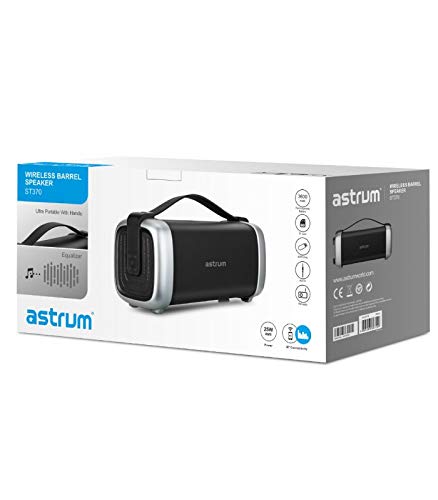
Image: The retail packaging for the astrum ST370 Wireless Barrel Speaker, showing the speaker and its key features.
4. پروڈکٹ ختمview
Familiarize yourself with the components and controls of your astrum ST370 speaker.
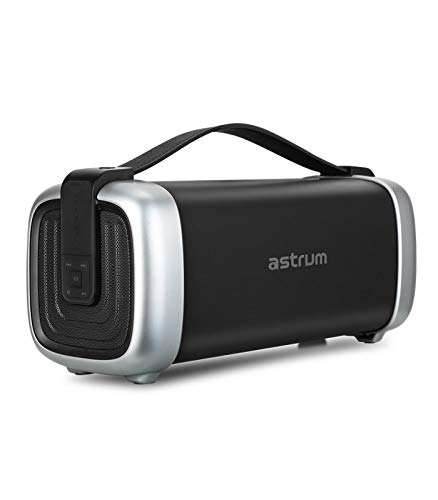
تصویر: سامنے view of the astrum ST370 Wireless Barrel Speaker, showcasing its black body, silver end caps, and integrated carrying handle.
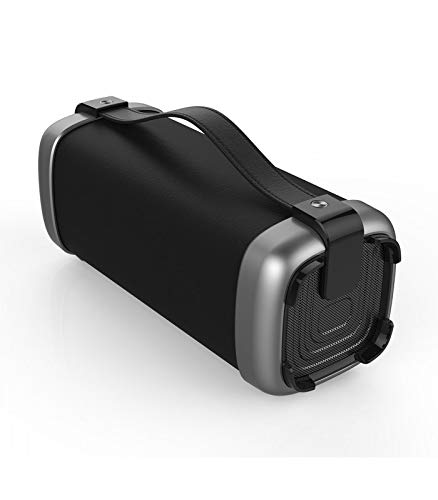
تصویر: زاویہ دار view of the astrum ST370 speaker, highlighting the textured side panel and the robust carrying handle.
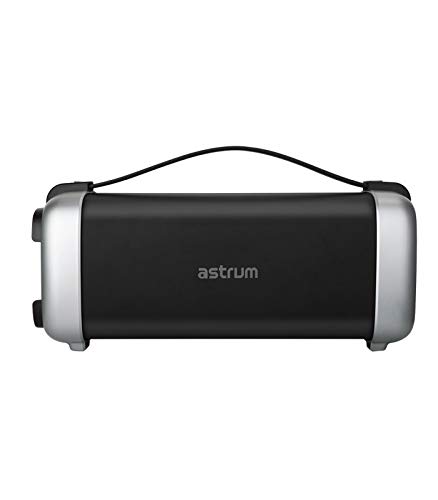
تصویر: سامنے view of the astrum ST370 speaker, displaying the control panel on the side with various buttons.
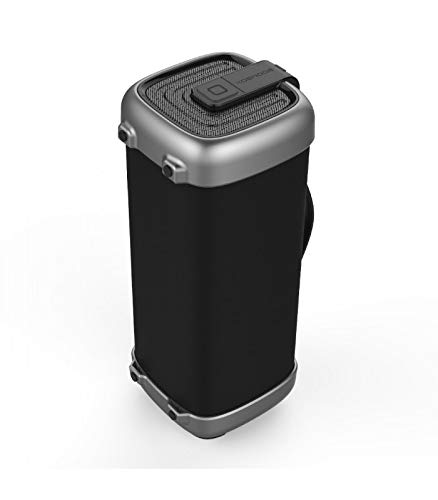
تصویر: سائیڈ پروfile of the astrum ST370 speaker, illustrating its compact barrel design and stable base.
Controls and Ports (Refer to images for location)
- پاور بٹن: اسپیکر کو آن یا آف کرتا ہے۔
- موڈ بٹن: Switches between Bluetooth, FM, USB, Micro SD, and AUX modes.
- پلے/پاز بٹن: آڈیو چلاتا یا روکتا ہے۔
- والیوم اپ / نیکسٹ ٹریک بٹن: حجم بڑھاتا ہے یا اگلے ٹریک پر چلا جاتا ہے۔
- والیوم کم / پچھلا ٹریک بٹن: Decreases volume or goes to the previous track.
- USB پورٹ: USB ڈرائیو پلے بیک کے لیے۔
- مائیکرو ایسڈی کارڈ سلاٹ: مائیکرو ایس ڈی کارڈ پلے بیک کے لیے۔
- AUX ان پٹ: بیرونی آڈیو آلات کو 3.5mm کیبل کے ذریعے جوڑنے کے لیے۔
- چارجنگ پورٹ: چارجنگ کیبل کو جوڑنے کے لیے۔
5. سیٹ اپ
5.1 اسپیکر کو چارج کرنا
- Connect the provided charging cable to the speaker's charging port.
- چارجنگ کیبل کے دوسرے سرے کو USB پاور اڈاپٹر (شامل نہیں) یا کمپیوٹر کے USB پورٹ سے جوڑیں۔
- چارجنگ انڈیکیٹر لائٹ چارجنگ کے دوران، عام طور پر سرخ، روشن ہوگی۔
- Once fully charged, the indicator light may change color or turn off. Disconnect the speaker from the power source.
نوٹ: بیٹری کی بہترین زندگی کے لیے، پہلے استعمال سے پہلے اسپیکر کو مکمل چارج کریں۔
5.2 پاور آن/آف۔
- پاور آن کرنے کے لیے: Press and hold the Power Button for a few seconds until you hear an audible prompt or see an indicator light.
- پاور آف کرنا: Press and hold the Power Button again for a few seconds until the speaker powers down.
6. آپریٹنگ ہدایات
6.1 بلوٹوت وضع
- اسپیکر پر پاور۔ یہ خود بخود بلوٹوتھ پیئرنگ موڈ میں داخل ہو جائے گا، جس کا اشارہ چمکتی ہوئی LED لائٹ اور ایک قابل سماعت پرامپٹ سے ہوتا ہے۔
- اپنے اسمارٹ فون، ٹیبلیٹ، یا بلوٹوتھ سے چلنے والے دوسرے آلے پر بلوٹوتھ کو فعال کریں۔
- تلاش کریں۔ available devices and select "ST370" from the list.
- Once paired, the speaker will provide an audible confirmation, and the LED light will stop flashing.
- اب آپ اسپیکر کے ذریعے اپنے آلے سے آڈیو چلا سکتے ہیں۔
6.2 ایف ایم ریڈیو موڈ
- Press the Mode Button repeatedly until you enter FM Radio mode.
- To auto-scan for stations, press and hold the Play/Pause Button. The speaker will scan and save available FM stations.
- Use the Volume Up/Next Track and Volume Down/Previous Track buttons to navigate between saved stations.
6.3 USB / مائیکرو SD کارڈ پلے بیک
- Insert a USB drive or a Micro SD card (with pre-loaded audio files) متعلقہ پورٹ/ سلاٹ میں۔
- The speaker will automatically detect the storage device and switch to USB or Micro SD mode, beginning playback. If not, press the Mode Button to select the correct mode.
- پلے بیک کو کنٹرول کرنے کے لیے پلے/پاز، نیکسٹ ٹریک، اور پچھلا ٹریک بٹن استعمال کریں۔
6.4 AUX ان پٹ موڈ
- Connect one end of the provided 3.5mm AUX cable to the speaker's AUX input port.
- AUX کیبل کے دوسرے سرے کو اپنے بیرونی ڈیوائس کے آڈیو آؤٹ پٹ جیک سے جوڑیں (مثلاً MP3 پلیئر، لیپ ٹاپ)۔
- Press the Mode Button until you enter AUX mode.
- Control playback and volume directly from your connected external device.
6.5 والیوم اور پلے بیک کنٹرول
- والیوم ایڈجسٹمنٹ: والیوم اپ (+) یا والیوم ڈاؤن (-) بٹنوں کو مختصر دبائیں۔
- ٹریک نیویگیشن: Long press the Volume Up (+) button for the next track, and long press the Volume Down (-) button for the previous track (in Bluetooth, USB, or Micro SD modes).
- چلائیں/روکیں: پلے/پز بٹن کو مختصر دبائیں۔
7 دیکھ بھال
7.1 صفائی
- اسپیکر کے بیرونی حصے کو نرم، خشک، لنٹ فری کپڑے سے صاف کریں۔
- کھرچنے والے کلینر، سالوینٹس یا کیمیائی سپرے استعمال نہ کریں۔
- کسی بھی سوراخ میں نمی حاصل کرنے سے گریز کریں۔
7.2 اسٹوریج
- اسپیکر کو ٹھنڈی، خشک جگہ پر براہ راست سورج کی روشنی اور انتہائی درجہ حرارت سے دور رکھیں۔
- اگر لمبے عرصے تک ذخیرہ کر رہے ہیں تو، بیٹری کی صحت کو برقرار رکھنے کے لیے ہر چند ماہ بعد تقریباً 50% تک بیٹری چارج کریں۔
8 خرابیوں کا سراغ لگانا
| مسئلہ | ممکنہ وجہ | حل |
|---|---|---|
| سپیکر پاور آن نہیں کرتا۔ | کم بیٹری۔ | اسپیکر کو پوری طرح سے چارج کریں۔ |
| بلوٹوتھ کے ذریعے جوڑا نہیں بنایا جا سکتا۔ | Speaker not in pairing mode; Bluetooth disabled on device; too far from speaker. | Ensure speaker is in Bluetooth mode; enable Bluetooth on your device; move device closer to speaker (within 10 meters). |
| کوئی آواز نہیں۔ | Volume too low; incorrect mode selected; cable not connected properly (AUX). | Increase volume; press Mode button to select correct input; check AUX cable connection. |
| ایف ایم ریڈیو کا استقبال ناقص ہے۔ | کمزور سگنل۔ | Move the speaker to a location with better reception. |
9. وضاحتیں
| ماڈل کا نام | ST370 |
| آؤٹ پٹ پاور | 25 واٹ |
| کنیکٹوٹی ٹیکنالوجی | بلوٹوتھ، معاون، USB، وائرلیس |
| خصوصی خصوصیات | Portable, Wireless, FM Radio, Micro SD Card Support |
| طاقت کا منبع | بیٹری سے چلنے والا |
| بیٹری کی اوسط زندگی | 8 گھنٹے |
| کنٹرول کا طریقہ | چھوئے۔ |
| سب ووفر قطر۔ | 4 انچ |
| Tweeter قطر | 1 انچ |
| پروڈکٹ کے طول و عرض (LxWxH) | 32.7 x 13 x 14.2 سینٹی میٹر |
| شے کا وزن | 1.45 کلوگرام |
| رنگ | سیاہ |
| تجویز کردہ استعمال | آؤٹ ڈور |
10. وارنٹی اور سپورٹ
The astrum ST370 Wireless Barrel Speaker comes with a 1 سال کی وارنٹی خریداری کی تاریخ سے. وارنٹی کے دعووں کے لیے براہ کرم اپنی خریداری کا ثبوت اپنے پاس رکھیں۔
For technical support, troubleshooting assistance beyond this manual, or warranty inquiries, please visit the official astrum website or contact their customer service department. Contact details can typically be found on the brand's official webسائٹ یا آپ کی مصنوعات کی پیکیجنگ پر۔
مینوفیکچرر: Astrum Holdings Ltd, Unit-1618, Asia Trade Centre, 79 Lei Muk Road, Kwai Chung, New Territories, Hong Kong
درآمد کنندہ: Astrum Electronics India Pvt Ltd, Plot No.80&81, Gajulamandyam, Renigunta Mandal, Chittoor, Tirupati, Andhra Pradesh-517547


