1. تعارف
This manual provides essential information for the safe and efficient operation, setup, maintenance, and troubleshooting of the Keba KeTop T50-xxx/67641/06 industrial control panel. The KeTop T50-xxx/67641/06 is designed for robust performance in industrial environments, serving as a human-machine interface (HMI) for various control applications.
مناسب استعمال کو یقینی بنانے اور نقصان یا چوٹ سے بچنے کے لیے براہ کرم ڈیوائس کو چلانے سے پہلے اس دستی کو اچھی طرح پڑھیں۔
2. حفاظتی معلومات
ذاتی چوٹ یا سامان کو پہنچنے والے نقصان کو روکنے کے لیے ہمیشہ درج ذیل حفاظتی تدابیر پر عمل کریں:
- قابل عملہ: Installation, operation, and maintenance should only be performed by qualified and authorized personnel.
- بجلی کا کنکشن: Always disconnect power before performing any installation, maintenance, or repair work.
- ماحولیاتی حالات: Operate the device within specified environmental limits (temperature, humidity, etc.).
- ایمرجنسی اسٹاپ: Familiarize yourself with the location and operation of the emergency stop button on the device and the connected system.
- کیبل مینجمنٹ: اس بات کو یقینی بنائیں کہ ٹرپنگ کے خطرات یا نقصان کو روکنے کے لیے تمام کیبلز صحیح طریقے سے روٹ اور محفوظ ہیں۔
3. پروڈکٹ ختمview
The Keba KeTop T50-xxx/67641/06 is a robust handheld control panel designed for industrial applications. It features a display screen, various control buttons, and an emergency stop button, all integrated into an ergonomic housing.

شکل 1: سامنے view of the KeTop T50-xxx/67641/06 control panel, showing the display, control buttons, and the attached red connection cable.
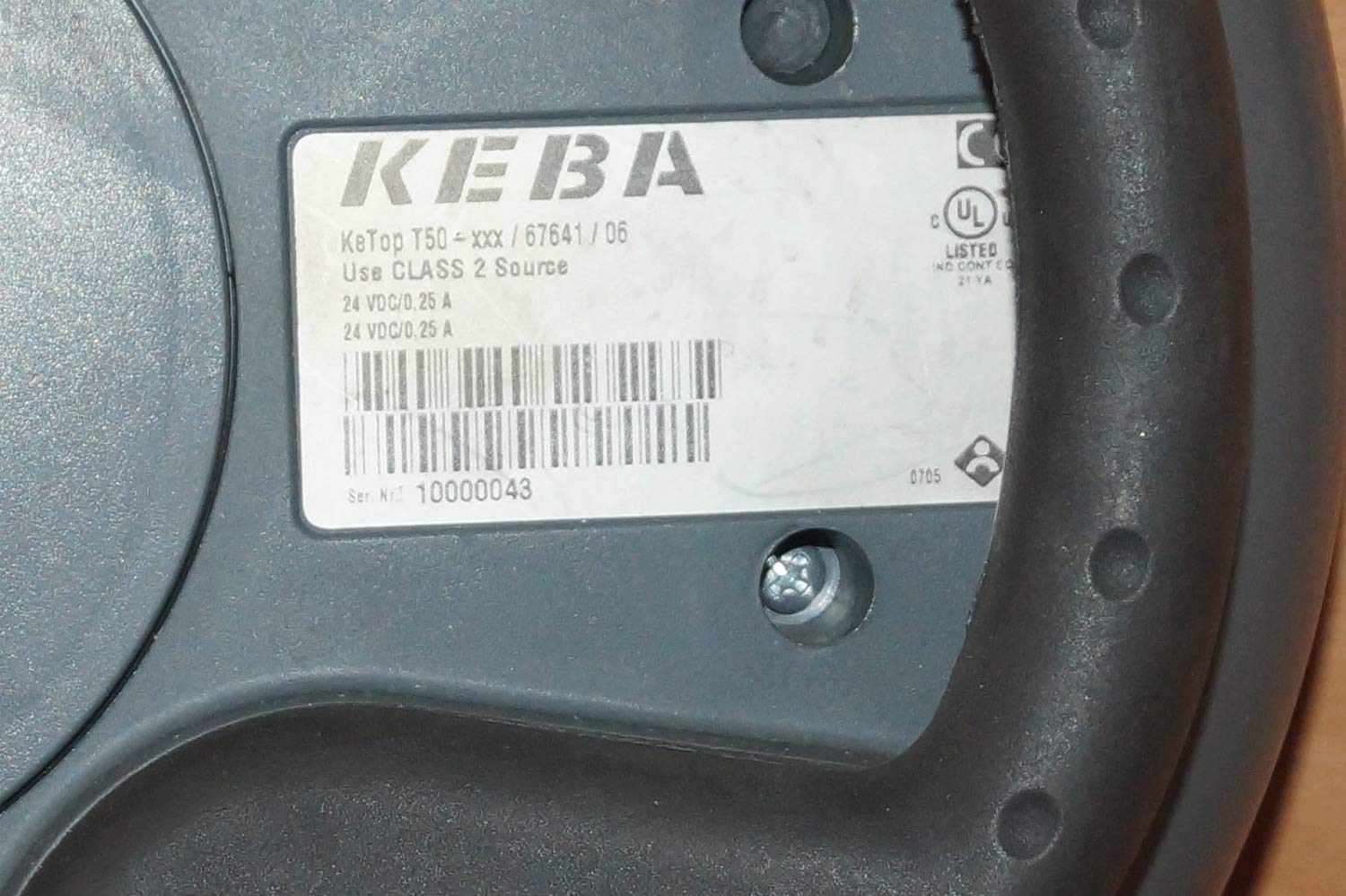
Figure 2: Rear label of the KeTop T50-xxx/67641/06, indicating model details and power requirements.
4. سیٹ اپ اور انسٹالیشن
Before connecting the KeTop T50-xxx/67641/06, ensure the host system is powered off and secured.
- ڈیوائس کا معائنہ کریں: Unpack the control panel and inspect it for any visible damage during transit.
- کیبل کو جوڑیں: Connect the red multi-pin cable from the KeTop T50-xxx/67641/06 to the corresponding port on your industrial control system. Ensure the connection is secure and properly seated.
- بجلی کی فراہمی: Verify that the power supply for the control system meets the specifications required by the KeTop T50-xxx/67641/06 (24 VDC/0.25 A).
- ماؤنٹنگ (اختیاری): If applicable, use the integrated mounting points to secure the panel in a convenient location, or ensure it is placed on a stable surface when not handheld.
- ابتدائی پاور اپ: Once all connections are secure, power on the host system. The KeTop T50-xxx/67641/06 display should illuminate, indicating successful power-up.
5. آپریٹنگ ہدایات
The KeTop T50-xxx/67641/06 serves as an interface for controlling industrial machinery. Specific operations will depend on the programming of the connected system.
- ڈسپلے نیویگیشن: Use the directional buttons (if present) or touch screen (if applicable) to navigate through menus and display information.
- فنکشن بٹن: The various buttons around the display are typically assigned specific functions by the system integrator. Refer to your system's documentation for button assignments.
- ایمرجنسی اسٹاپ: In case of an emergency, press the large red emergency stop button immediately. This will typically halt all connected machine operations. Ensure the button is reset before resuming operations.
- ڈیٹا ان پٹ: Use the integrated keypad or on-screen keyboard for data entry as required by the application.
- تاثرات: Pay attention to visual cues on the display and any audible signals from the device or connected system.
6 دیکھ بھال
Regular maintenance ensures the longevity and reliable operation of your KeTop T50-xxx/67641/06.
- صفائی:
- صفائی سے پہلے بجلی منقطع کریں۔
- بیرونی سطحوں کو نرم سے صاف کریں، ڈیamp کپڑا
- Do not use abrasive cleaners, solvents, or excessive moisture.
- اس بات کو یقینی بنائیں کہ آلہ میں کوئی مائع داخل نہ ہو۔
- کیبل معائنہ: Periodically inspect the connection cable for signs of wear, cuts, or damage. Replace damaged cables immediately.
- بٹن کی فعالیت: Regularly test all buttons, including the emergency stop, to ensure they respond correctly.
- ذخیرہ: When not in use, store the device in a clean, dry environment, away from extreme temperatures and direct sunlight.
7 خرابیوں کا سراغ لگانا
This section provides solutions to common issues. For more complex problems, contact qualified service personnel.
| مسئلہ | ممکنہ وجہ | حل |
|---|---|---|
| ڈیوائس آن نہیں ہوتی ہے۔ | No power from host system; loose cable connection; faulty power supply. | Check host system power; ensure cable is securely connected; verify power supply output. |
| ڈسپلے خالی یا ٹمٹماہٹ ہے۔ | Insufficient power; cable issue; internal fault. | Verify power supply; check cable integrity; if problem persists, contact support. |
| بٹن غیر جوابی ہیں۔ | Software issue on host system; physical button damage. | Restart the host system; inspect buttons for physical damage. |
| Emergency Stop button is stuck. | Button mechanism issue. | Do not force. Contact qualified service personnel immediately. |
8. وضاحتیں
| فیچر | تفصیل |
|---|---|
| ماڈل | KeTop T50-xxx/67641/06 |
| برانڈ | Keba |
| پاور ان پٹ | 24 VDC / 0.25 A (as per device label) |
| ASIN | B07NSF65HM |
| صنعت کار حوالہ | 2186 |
| پہلی دستیاب تاریخ | 10 مئی 2019 |
| اسپیئر پارٹس کی دستیابی | معلومات دستیاب نہیں ہیں۔ |
9. وارنٹی اور سپورٹ
Information regarding specific warranty terms and conditions for the Keba KeTop T50-xxx/67641/06 is not provided in the product details. Please refer to the original purchase documentation or contact your supplier for warranty details.
For technical support or service inquiries, please contact the manufacturer, Keba, or your authorized distributor. Ensure you have the model number (KeTop T50-xxx/67641/06) and serial number (if applicable) ready when contacting support.


