1. ختمview
The Motorola M700 is a cordless landline phone designed for clear communication and ease of use. It features DECT 6.0 technology for enhanced sound quality and security, along with essential functions like caller ID and a built-in phonebook.
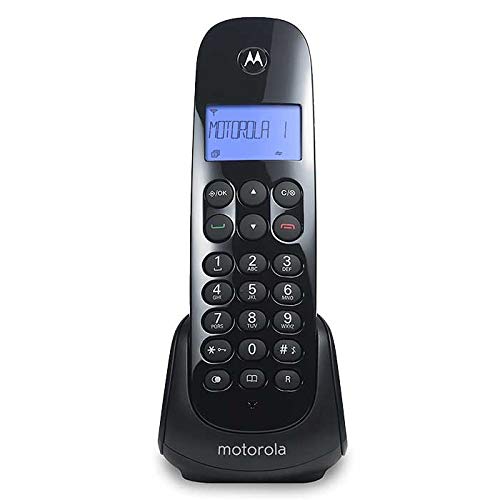
Figure 1: Motorola M700 Cordless Phone and Base
2. پیکیج کے مشمولات
یقینی بنائیں کہ تمام اشیاء پیکیج میں موجود ہیں:
- Motorola M700 Handset
- بیس یونٹ
- AC پاور اڈاپٹر
- ٹیلی فون لائن کی ہڈی
- 2 ایکس AAA ریچارج ایبل بیٹریاں
- صارف دستی (یہ دستاویز)
3. سیٹ اپ
3.1. بیٹری کی تنصیب
- ہینڈ سیٹ کے پچھلے حصے پر بیٹری کے ٹوکری کا احاطہ تلاش کریں۔
- Slide the cover downwards to open.
- درست قطبیت (+ اور -) کا مشاہدہ کرتے ہوئے، دو AAA ریچارج ایبل بیٹریاں داخل کریں۔
- بیٹری کے کمپارٹمنٹ کور کو تبدیل کریں، اسے اوپر کی طرف اس وقت تک سلائیڈ کریں جب تک کہ یہ جگہ پر نہ آجائے۔
3.2 بیس یونٹ کو جوڑنا
- ٹیلی فون لائن کی ہڈی کے ایک سرے کو بیس یونٹ پر TEL LINE جیک سے جوڑیں۔
- ٹیلی فون لائن کی ہڈی کے دوسرے سرے کو ٹیلی فون وال جیک سے جوڑیں۔
- Plug the small end of the AC power adapter into the POWER jack on the base unit.
- AC پاور اڈاپٹر کے بڑے سرے کو معیاری الیکٹریکل آؤٹ لیٹ میں لگائیں۔
3.3. ابتدائی چارجنگ
Place the handset on the base unit. The handset will begin charging. For optimal battery performance, allow the handset to charge continuously for at least 15-20 hours before its first use.
4. بنیادی آپریشن
4.1. کال کرنا
- Pick up the handset from the base or press the ٹاک / فلیش بٹن
- مطلوبہ فون نمبر ڈائل کریں۔
- کال ختم کرنے کے لیے، دبائیں۔ END بٹن دبائیں یا ہینڈ سیٹ کو واپس بیس پر رکھیں۔
4.2. کالز کا جواب دینا
جب فون بجتا ہے:
- دبائیں ٹاک / فلیش بٹن
- Alternatively, if the Auto Answer feature is enabled, simply pick up the handset from the base.
4.3. حجم کو ایڈجسٹ کرنا
کال کے دوران، استعمال کریں۔ UP اور نیچے arrow buttons on the handset to adjust the earpiece volume.
5. اعلی درجے کی خصوصیات
5.1. کالر ID
The phone displays the caller's name and number (if available and subscribed to Caller ID service) before you answer. You can review the list of the last 10 received calls using the navigation buttons.
5.2. Phonebook (Agenda)
The Motorola M700 allows you to store up to 20 contacts in its phonebook. Refer to the on-screen menu for instructions on adding, editing, and deleting entries.
5.3. رنگ ٹونز
Customize your phone's ringtone by selecting from various available melodies in the settings menu.
5.4. Paging (Handset Locator)
اگر آپ اپنے ہینڈ سیٹ کو غلط جگہ دیتے ہیں تو دبائیں صفحہ بیس یونٹ پر بٹن. ہینڈ سیٹ کی گھنٹی بج جائے گی، جس سے آپ اسے تلاش کر سکیں گے۔
5.5 یاد دہانی کا الارم
Set a reminder alarm through the handset's menu options.
6 دیکھ بھال
- Clean the handset and base unit with a soft, damp کپڑا کھرچنے والے کلینر یا سالوینٹس کا استعمال نہ کریں۔
- Avoid exposing the phone to direct sunlight, moisture, or extreme temperatures.
- Ensure the battery contacts on the handset and base are clean for proper charging.
7 خرابیوں کا سراغ لگانا
7.1. No Dial Tone
- چیک کریں کہ ٹیلی فون لائن کی ہڈی بیس یونٹ اور وال جیک دونوں سے محفوظ طریقے سے جڑی ہوئی ہے۔
- Ensure the AC power adapter is properly connected to the base unit and a working electrical outlet.
- تصدیق کریں کہ آپ کی ٹیلی فون سروس فعال ہے۔
7.2. Handset Not Charging
- Make sure the handset is correctly seated in the base unit.
- Clean the charging contacts on both the handset and base with a dry cloth.
- Confirm that the AC power adapter is connected and the outlet is functional.
7.3. ناقص صوتی معیار
- Move closer to the base unit to improve signal strength.
- اس بات کو یقینی بنائیں کہ کوئی بڑی دھاتی اشیاء یا دیگر الیکٹرانک آلات سگنل میں مداخلت نہیں کر رہے ہیں۔
- Check for any damage to the telephone line cord.
8. وضاحتیں
| برانڈ | موٹرولا |
| ماڈل نمبر | ایم 700 |
| رنگ | سیاہ |
| فون کی قسم | بے تار |
| ٹیکنالوجی | DECT 6.0 |
| کالر ID | جی ہاں |
| فون بک کی صلاحیت | 20 رابطے |
| کال کی تاریخ | Last 10 received calls |
| بیٹریاں | 2 x AAA (شامل) |
| Dimensions (Handset) | 11.3 x 8.3 x 17.9 سینٹی میٹر |
| وزن | 490 گرام |
9. وارنٹی اور سپورٹ
For warranty information and technical support, please refer to the documentation included with your purchase or visit the official Motorola support webسائٹ وارنٹی کے دعووں کے لیے اپنی خریداری کا ثبوت رکھیں۔


