1. تعارف
Thank you for choosing the Hama TH-130 Thermo/Hygrometer. This device provides accurate measurements of indoor temperature and humidity, helping you maintain a comfortable and healthy environment. Please read this instruction manual carefully before using the device to ensure proper operation and to prevent damage.
2. حفاظتی ہدایات
- آلے کو نمی، براہ راست سورج کی روشنی اور انتہائی درجہ حرارت سے دور رکھیں۔
- ڈیوائس نہ کھولیں۔ مرمت صرف اہل اہلکاروں کے ذریعہ کی جانی چاہئے۔
- Keep packaging materials away from children due to choking hazards.
- Use only the specified battery type. Incorrect battery usage can lead to leakage or explosion.
- بیٹریاں ہٹا دیں اگر آلہ طویل مدت تک استعمال نہیں کیا جائے گا۔
3. پیکیج کے مشمولات
- Hama TH-130 Thermo/Hygrometer
- 1 x CR2025 Lithium Metal battery (included)
- یہ ہدایت نامہ
4. آلہ ختمview
The Hama TH-130 features a clear digital display for temperature and humidity readings. It is designed for tabletop placement.
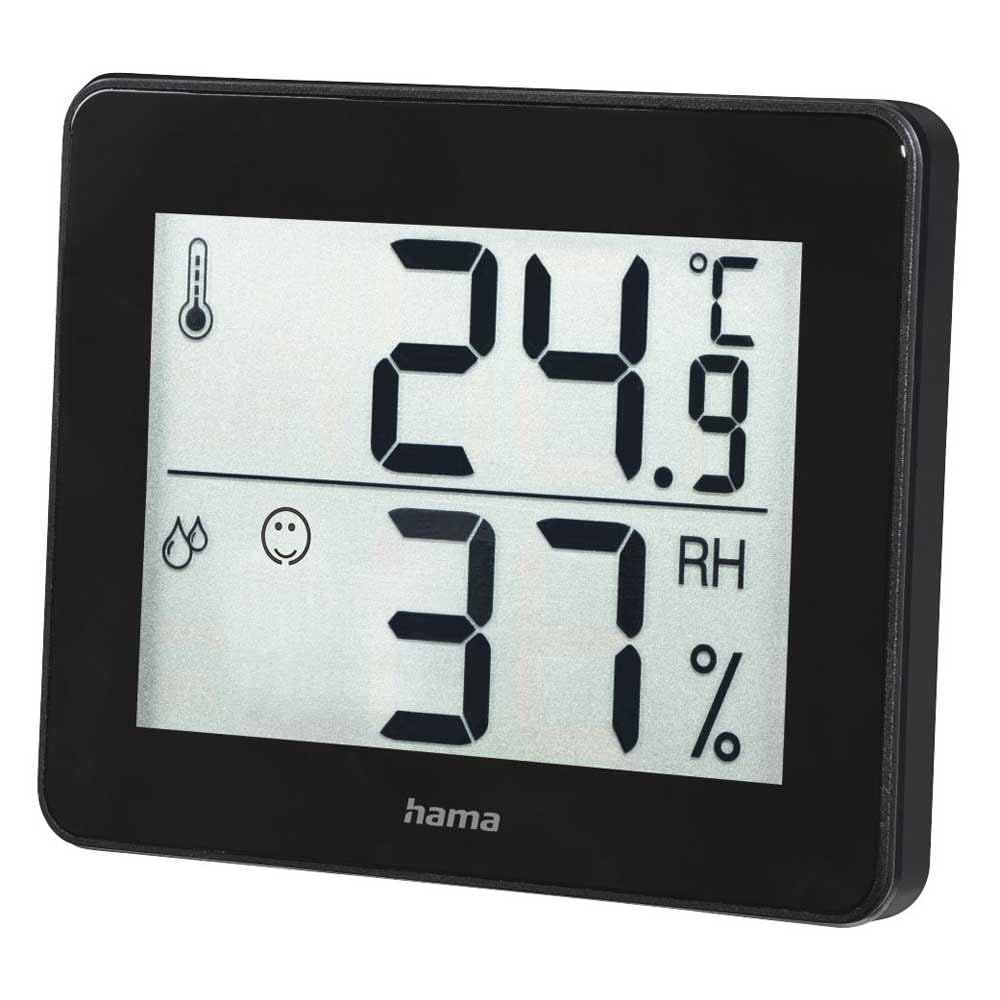
تصویر 1: سامنے والا view of the Hama TH-130 Thermo/Hygrometer. The display shows temperature in Celsius (24.9°C) at the top and relative humidity (37% RH) at the bottom. A thermometer icon indicates temperature, and a droplet icon with a smiley face indicates humidity levels.
4.1 ڈسپلے عناصر
- درجہ حرارت ڈسپلے: Shows current temperature in degrees Celsius (°C).
- نمی ڈسپلے: Shows current relative humidity in percentage (RH%)۔
- کمفرٹ انڈیکیٹر: A smiley face icon indicates comfort levels based on humidity and temperature.
- بیٹری ٹوکری: ڈیوائس کی پشت پر واقع ہے۔
5. سیٹ اپ
5.1 بیٹری کی تنصیب
- ڈیوائس کے پچھلے حصے میں بیٹری کے ٹوکرے کا پتہ لگائیں۔
- بیٹری کے ٹوکری کا احاطہ کھولیں۔
- Insert one CR2025 Lithium Metal battery, ensuring correct polarity (+/-). The positive (+) side should face upwards.
- بیٹری کے کمپارٹمنٹ کور کو محفوظ طریقے سے بند کریں۔
- The display should now activate, showing current temperature and humidity readings.
5.2 جگہ کا تعین
- Place the thermo/hygrometer on a flat, stable surface, such as a tabletop.
- For accurate readings, avoid placing the device near heat sources (e.g., radiators, direct sunlight), air conditioning vents, or in areas with high drafts.
- Ensure the device is placed in the area where you wish to monitor temperature and humidity.
6. ڈیوائس کو چلانا
The Hama TH-130 is designed for straightforward operation. Once batteries are installed, it automatically begins displaying current temperature and humidity.
6.1 ڈسپلے کو پڑھنا
- The upper large digits indicate the current temperature in degrees Celsius (°C).
- The lower large digits indicate the current relative humidity in percentage (RH%)۔
- The comfort indicator (smiley face) provides a quick visual reference for indoor climate comfort.
6.2 Comfort Level Interpretation
The comfort indicator typically changes based on the humidity level, sometimes also considering temperature. Refer to the following general guidelines:
- خوش چہرہ: Indicates optimal comfort (e.g., 20-25°C and 40-70% RH).
- غیر جانبدار چہرہ: Indicates acceptable but not optimal conditions.
- اداس چہرہ: Indicates uncomfortable conditions (e.g., too dry or too humid).
7. دیکھ بھال اور دیکھ بھال
- ڈیوائس کو صرف تھوڑا سا ڈی سے صاف کریں۔amp, lint-free cloth. Do not use abrasive cleaning agents.
- Ensure no moisture enters the device.
- Replace the battery when the display becomes dim or stops functioning.
8 خرابیوں کا سراغ لگانا
| مسئلہ | ممکنہ وجہ | حل |
|---|---|---|
| کوئی ڈسپلے یا مدھم ڈسپلے نہیں۔ | بیٹری ختم ہو گئی ہے یا غلط طریقے سے ڈالی گئی ہے۔ | بیٹری (CR2025) کو تبدیل کریں اور درست قطبیت کو یقینی بنائیں۔ |
| غلط پڑھنا۔ | Device placed near heat/cold sources or in a drafty area. | Relocate the device to a more stable environment. Allow 15-30 minutes for readings to stabilize. |
| Display shows "---" | Temperature or humidity is outside the measurable range. | Move the device to an environment within the specified operating range. |
9. وضاحتیں
- ماڈل: Hama TH-130 (00186361)
- مصنوعات کے طول و عرض: 11.5 x 10.5 x 2 سینٹی میٹر
- آئٹم کا وزن: 92 گرام
- بجلی کی فراہمی: 1 x CR2025 Lithium Metal battery (included)
- چڑھنے کی قسم: ٹیبل ٹاپ
- Optimal Operating Humidity: 30-70% RH (for comfort indication)
- رنگ: سیاہ
10. ضائع کرنے کی معلومات
Do not dispose of the device or batteries with household waste. Electronic devices and batteries must be collected separately and recycled in an environmentally sound manner. Contact your local authorities for information on proper disposal facilities.
11. وارنٹی اور سپورٹ
Hama GmbH & Co KG assumes no liability and provides no warranty for damage resulting from improper installation/mounting, improper use of the product, or failure to observe the operating instructions and/or safety notes. For technical support or warranty claims, please contact your retailer or Hama customer service. Please retain your proof of purchase.
نوٹ: مخصوص وارنٹی شرائط علاقے کے لحاظ سے مختلف ہو سکتی ہیں۔


