1. تعارف
This manual provides essential information for the safe and efficient installation, operation, and maintenance of your Cata UC-10 Bathroom Exhaust Fan. Please read this manual thoroughly before installation and use, and retain it for future reference. Proper installation and adherence to these instructions will ensure optimal performance and longevity of the product.
2. حفاظتی معلومات
آگ، برقی جھٹکا، یا چوٹ کے خطرے کو کم کرنے کے لیے ہمیشہ درج ذیل حفاظتی تدابیر پر عمل کریں۔
- برقی حفاظت: Ensure the power supply is disconnected before installation, maintenance, or cleaning. All electrical wiring must be performed by a qualified electrician and comply with local regulations.
- تنصیب: Install the fan in accordance with the instructions provided. Do not install in areas where temperatures exceed 40°C. Ensure proper ventilation and clearance around the unit.
- استعمال: یہ آلات کم جسمانی، حسی، یا دماغی صلاحیتوں، یا تجربے اور علم کی کمی والے افراد (بشمول بچوں) کے استعمال کے لیے نہیں ہے، جب تک کہ ان کی حفاظت کے لیے ذمہ دار کسی شخص کی طرف سے آلات کے استعمال سے متعلق نگرانی یا ہدایات نہ دی گئی ہوں۔ .
- دیکھ بھال: Only use original spare parts for repairs. Do not attempt to modify the fan. Regular cleaning is recommended to maintain performance.
3. پروڈکٹ ختمview
The Cata UC-10 is a high-efficiency bathroom exhaust fan designed for effective ventilation, featuring an extra-flat design, low noise operation, and adjustable speed settings. It includes a humidity sensor (Hygro) and a timer function for automated control.
3.1 کلیدی خصوصیات
- Extra-Flat Design: Modern and discreet aesthetic.
- Very Silent Operation: Minimum sound level of 26 dB(A).
- اعلی توانائی کی کارکردگی: Maximum power consumption of 8 W.
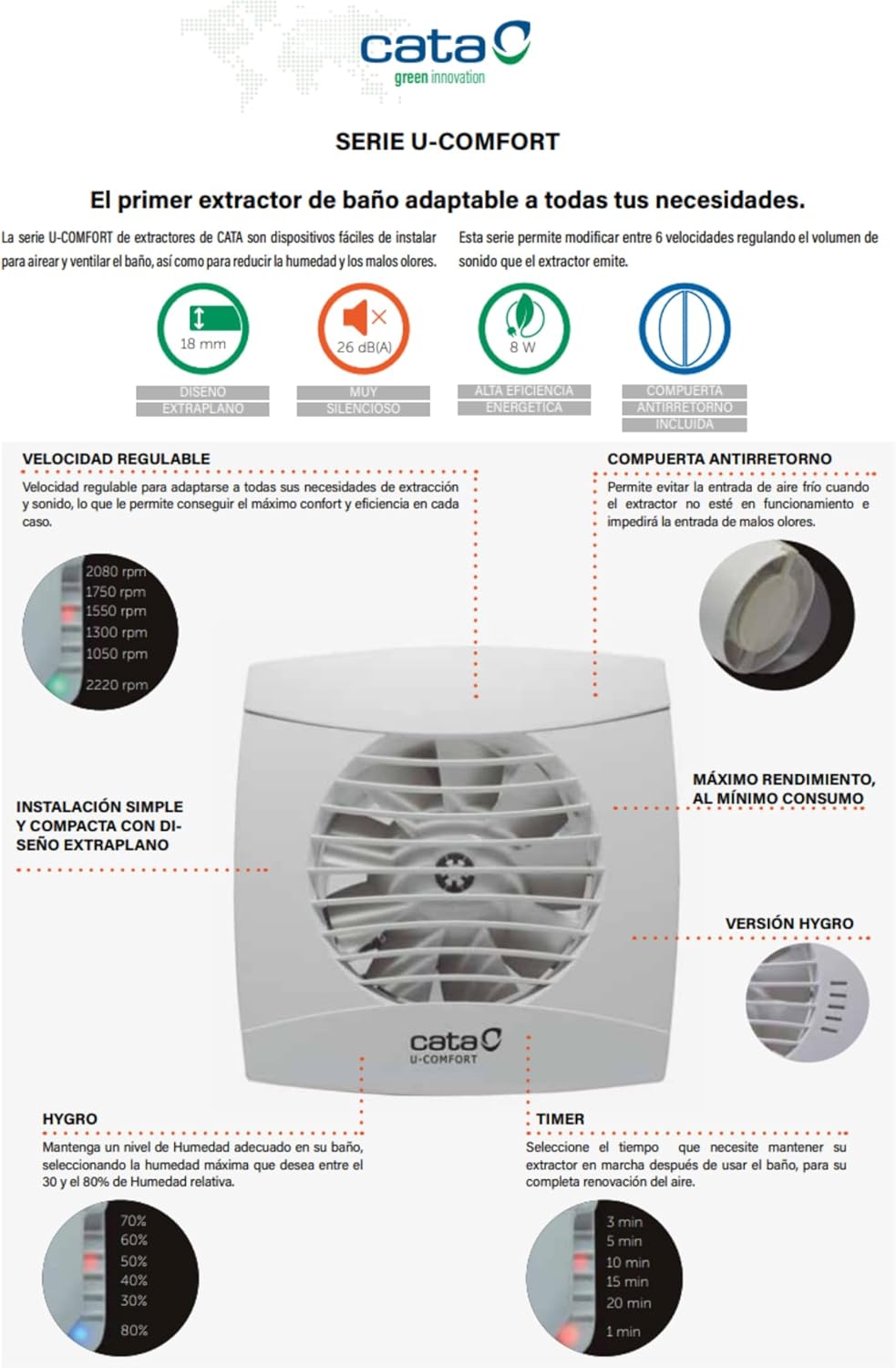
- سایڈست رفتار: Six selectable speed levels for optimal airflow control.
- Humidity Sensor (Hygro): Automatically activates the fan based on ambient humidity levels.
- ٹائمر فنکشن: Adjustable run-on timer after activation.
- بیک ڈرافٹ ڈیamper: Prevents unwanted air entry when the fan is off.
- تھرمل محافظ: Ensures safe operation up to 40°C ambient temperature.
- IP-44 Rated & Double Insulated: Provides protection against splashing water and electrical hazards.
3.2 اجزاء
The Cata UC-10 fan unit typically includes the main fan body, a removable front cover, and necessary electrical cabling for installation.

تصویر 1: سامنے والا view of the Cata UC-10 Bathroom Exhaust Fan. This image displays the fan's white, extra-flat design with its central impeller visible through the protective grille.

تصویر 2: زاویہ سامنے view of the Cata UC-10 fan, highlighting its compact and modern aesthetic suitable for various bathroom decors.

تصویر 3: طرف view of the Cata UC-10 fan, showing the depth of the unit and the exhaust duct connection point.
4. سیٹ اپ اور انسٹالیشن
Installation of the Cata UC-10 fan requires electrical knowledge and should be performed by a qualified professional. The fan is designed for wall mounting.
4.1 ابعاد
تصویر 4: Technical diagram illustrating the dimensions of the Cata UC-10 fan. The front panel measures 150x150 mm, with a depth of 18.5 mm. The exhaust duct has a diameter of 100 mm and a length of 77.5 mm.
4.2 تنصیب کے مراحل (عام رہنما خطوط)
- تیاری: Disconnect power at the main circuit breaker. Choose a suitable wall mounting location, ensuring adequate space for the fan and ducting.
- چڑھنا: Create an opening in the wall according to the fan's duct diameter (100 mm). Secure the fan body to the wall using appropriate fasteners.
- ڈکٹنگ: Connect suitable ducting from the fan's exhaust outlet to the exterior. Ensure ducting is sealed to prevent air leakage.
- وائرنگ: Connect the electrical cable to the fan's terminal block. Ensure correct polarity and secure all connections. The fan operates on 220-240V, 50/60Hz.
- حتمی اسمبلی: Attach the front cover securely to the fan body.
- جانچ: Restore power and test the fan's operation, including the timer and humidity sensor functions.
5. آپریٹنگ ہدایات
The Cata UC-10 fan offers automated and adjustable operation modes.

تصویر 5: Diagram illustrating the adjustable speed, humidity sensor (Hygro), and timer settings of the Cata UC-10 fan.
5.1 Adjustable Speed
The fan features six adjustable speed levels, allowing you to optimize airflow and noise levels according to your needs. The available speeds range from 1050 RPM to 2220 RPM. Consult the internal adjustment mechanism (typically potentiometers or switches accessible after removing the front cover) to select the desired speed setting.
5.2 Humidity Sensor (Hygro)
The integrated humidity sensor automatically activates the fan when the ambient humidity exceeds a preset threshold. This threshold can typically be adjusted (e.g., from 30% to 80% relative humidity) using a control knob or potentiometer located inside the fan unit. The fan will run until the humidity level drops below the set point.
5.3 ٹائمر فنکشن
The timer function allows the fan to continue operating for a set period after it has been manually switched off or after the humidity level has dropped below the sensor's threshold. The timer duration is adjustable, commonly offering settings such as 3, 5, 10, 15, or 20 minutes. This setting is usually adjusted via a control knob or potentiometer within the fan unit.
6 دیکھ بھال
Regular maintenance ensures the efficient and safe operation of your Cata UC-10 fan.
6.1 صفائی
- پاور منقطع کریں: Always ensure the power supply to the fan is disconnected before cleaning.
- سامنے کا احاطہ ہٹا دیں: Carefully detach the extra-flat front cover.
- صاف اجزاء: ایک نرم استعمال کریں، ڈیamp cloth to wipe down the front cover and the fan blades. Avoid using abrasive cleaners or solvents. Ensure no water enters the electrical components.
- دوبارہ جوڑنا: Once all parts are dry, reattach the front cover securely.
It is recommended to clean the fan at least once every six months, or more frequently in dusty or high-humidity environments.
7 خرابیوں کا سراغ لگانا
If you encounter issues with your Cata UC-10 fan, refer to the following common problems and solutions:
| مسئلہ | ممکنہ وجہ | حل |
|---|---|---|
| پنکھا آن نہیں ہوتا۔ | بجلی کی فراہمی نہیں ہے۔ ناقص وائرنگ۔ Humidity sensor not triggered. ٹائمر سیٹ نہیں ہے۔ | سرکٹ بریکر اور پاور کنکشن چیک کریں۔ Verify wiring connections (consult an electrician). Increase humidity or manually activate. ٹائمر کی ترتیبات کو ایڈجسٹ کریں۔ |
| پنکھا بہت زیادہ شور کر رہا ہے۔ | Dirty fan blades. ڈھیلا لگانا۔ نالیوں میں رکاوٹ۔ | Clean fan blades (see Maintenance). Ensure fan is securely mounted. رکاوٹوں کے لئے نالیوں کو چیک کریں۔ |
| Poor air extraction. | Blocked ducting. Dirty fan blades. رفتار کی غلط ترتیب۔ | Clear any obstructions in the duct. پنکھے کے بلیڈ صاف کریں۔ زیادہ رفتار کی ترتیب کو ایڈجسٹ کریں۔ |
| Humidity sensor not working. | Sensor setting too high. سینسر کی خرابی۔ | Adjust the humidity threshold to a lower percentage. اگر مسئلہ برقرار رہے تو سپورٹ سے رابطہ کریں۔ |
If the problem persists after attempting these solutions, please contact Cata customer support or a qualified technician.
8. وضاحتیں
| فیچر | تفصیلات |
|---|---|
| ماڈل | UC-10 (1200200) |
| برانڈ | کیٹا |
| قسم | باتھ روم ایگزاسٹ فین |
| چڑھنے کی قسم | وال ماؤنٹ |
| طاقت کا منبع | کورڈڈ الیکٹرک |
| والیومtagای / فریکوئنسی | 220-240V، 50/60Hz |
| زیادہ سے زیادہ بجلی کی کھپت | 8 ڈبلیو |
| زیادہ سے زیادہ ہوا کا بہاؤ | 110 m³/h |
| Minimum Noise Level | 26 dB(A) |
| پنکھے کی رفتار | Adjustable, up to 2220 RPM (6 levels) |
| آؤٹ لیٹ قطر | 100 ملی میٹر |
| Front Panel Dimensions (W x H) | 150 ملی میٹر x 150 ملی میٹر |
| Front Panel Depth | 18.5 ملی میٹر |
| ڈکٹ لمبائی | 77.5 ملی میٹر |
| وزن | 0.65 کلوگرام |
| مواد | پلاسٹک (Kunststoff) |
| آئی پی کی درجہ بندی | IP-44 |
| موصلیت کی کلاس | Double Insulation (Class B) |
| تھرمل پروٹیکشن | Up to 40°C ambient temperature |
| خصوصی خصوصیات | Timer, Humidity Sensor (Hygro), Adjustable Speed, Backdraft Damper |
9. وارنٹی اور سپورٹ
Cata products are manufactured to high-quality standards and are covered by a manufacturer's warranty against defects in materials and workmanship. Please refer to the warranty card included with your product or visit the official Cata webتفصیلی وارنٹی شرائط و ضوابط کے لیے سائٹ۔
For technical assistance, spare parts, or warranty claims, please contact your local dealer or Cata customer service. Ensure you have your product model number (UC-10, 1200200) and proof of purchase available when contacting support.


