1. تعارف
This manual provides detailed instructions for the setup, operation, and maintenance of your Natec TURBOT Wireless Keyboard with Touchpad (model NKL-0968). This device is designed to enhance your experience with Smart TVs, cellphones, and other compatible devices, offering convenient wireless control via 2.4 GHz technology.
مناسب فعالیت کو یقینی بنانے اور نقصان کو روکنے کے لیے براہ کرم پروڈکٹ کو استعمال کرنے سے پہلے اس دستی کو اچھی طرح پڑھیں۔
2. پیکیج کے مشمولات
تصدیق کریں کہ تمام اشیاء پیکیج میں موجود ہیں:
- Natec TURBOT Wireless Keyboard with Touchpad
- USB 2.4 GHz Receiver
- صارف دستی (یہ دستاویز)
- (Note: 2 AAA batteries are required and may not be included)
3. سیٹ اپ گائیڈ
3.1. بیٹری کی تنصیب
The Natec TURBOT keyboard requires two (2) AAA batteries for operation. Locate the battery compartment on the underside of the keyboard. Open the cover, insert the batteries according to the polarity markings (+/-), and close the cover securely.
3.2. USB وصول کنندہ کو جوڑنا
The USB 2.4 GHz receiver is typically stored in a dedicated compartment on the keyboard itself for safekeeping. Carefully remove the receiver from its storage slot.

Figure 1: USB receiver stored in the keyboard compartment.
Insert the USB receiver into an available USB port on your Smart TV, computer, or other compatible device. The device should automatically detect and install the necessary drivers.
3.3. کی بورڈ پر پاورنگ
Locate the power switch on the side of the keyboard. Slide the switch to the "ON" position. The keyboard should now be ready for use.
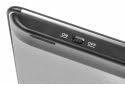
Figure 2: Power switch on the keyboard.
4. آپریٹنگ ہدایات
4.1. کی بورڈ کے افعال

Figure 3: Natec TURBOT Wireless Keyboard Layout.
The keyboard features a standard QWERTY layout for typing. It also includes dedicated function keys (F1-F12) which may have secondary multimedia functions (e.g., volume control, media playback). These secondary functions are often accessed by holding down the Fn key and pressing the corresponding function key.
- کیپس لاک: Toggles uppercase/lowercase letters.
- شفٹ: Used for uppercase letters and secondary symbols.
- Ctrl / Alt / Win: Standard modifier keys for various shortcuts depending on the operating system.
- بیک لائٹ: The keyboard features a backlight for improved visibility in low-light conditions. Refer to your device's operating system or the keyboard's specific function key combinations (often involving the Fn key) to activate or adjust the backlight.
4.2. Touchpad Functions
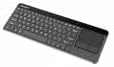
Figure 4: Integrated Touchpad.
The integrated touchpad allows for mouse-like navigation. It supports various gestures:
- Single Finger Tap: Functions as a left-click.
- دو انگلیوں کا تھپتھپائیں۔: Functions as a right-click.
- دو انگلیوں کا اسکرول: Drag two fingers up or down to scroll through content.
- جسمانی بٹن: Below the touchpad, there are two physical buttons. The left button acts as a left-click, and the right button acts as a right-click.
Touchpad sensitivity and other settings may be adjustable through your connected device's operating system settings.
5 دیکھ بھال
- صفائی: Use a soft, dry cloth to clean the keyboard and touchpad. For stubborn dirt, a slightly damp cloth with mild cleaning solution can be used, ensuring no liquid enters the device.
- بیٹری کی تبدیلی: Replace batteries when the keyboard's performance degrades or it stops responding. Always use fresh AAA batteries.
- ذخیرہ: When not in use for extended periods, turn off the keyboard to conserve battery life. Store the USB receiver in its designated compartment to prevent loss.
- انتہائی حالات سے بچیں۔: Do not expose the keyboard to extreme temperatures, direct sunlight, or high humidity.
6 خرابیوں کا سراغ لگانا
6.1۔ کی بورڈ جواب نہیں دے رہا ہے۔
- یقینی بنائیں کہ کی بورڈ آن ہے۔
- چیک کریں کہ آیا بیٹریاں صحیح طریقے سے انسٹال ہیں اور کافی چارج ہیں۔ اگر ضروری ہو تو تبدیل کریں۔
- Verify that the USB receiver is securely plugged into a working USB port on your device.
- USB ریسیور کو مختلف USB پورٹ میں لگانے کی کوشش کریں۔
- Restart your connected device (Smart TV, computer, etc.).
6.2. Touchpad Not Working
- یقینی بنائیں کہ کی بورڈ آن اور منسلک ہے۔
- Clean the touchpad surface to remove any dirt or obstructions.
- Check your device's settings for any touchpad-related configurations.
6.3 وقفے وقفے سے رابطہ
- Ensure there are no large metallic objects or other 2.4 GHz wireless devices causing interference between the keyboard and the USB receiver.
- کی بورڈ کو USB ریسیور کے قریب لے جائیں۔
7. وضاحتیں
| برانڈ | Natec |
| ماڈل نمبر | NKL-0968 |
| کنیکٹوٹی ٹیکنالوجی | 2.4 گیگا ہرٹز وائرلیس |
| ہم آہنگ آلات | Smart TV, Cellphone |
| آپریٹنگ سسٹم کی مطابقت | Android 10.0 (and compatible systems) |
| خصوصی خصوصیات | Integrated Touchpad, Backlit Keys |
| کی بورڈ کی تفصیل | ملٹی میڈیا |
| رنگ | سیاہ/چاندی |
| مواد | Acrylonitrile Butadiene Styrene (ABS) |
| طاقت کا منبع | 2 ایکس اے اے اے بیٹریاں |
8. وارنٹی اور سپورٹ
For warranty information, technical support, or further assistance, please refer to the official Natec webسائٹ یا ان کے کسٹمر سروس ڈیپارٹمنٹ سے رابطہ کریں۔ وارنٹی کے دعووں کے لیے اپنی خریداری کی رسید اپنے پاس رکھیں۔
Natec does not provide specific information regarding spare parts availability or software updates beyond the initial purchase.


