1. تعارف
The YABER V3 Mini Bluetooth Projector is designed to provide a versatile and high-quality viewing experience for home entertainment and outdoor use. Featuring native 1280x720p resolution with 1080P support, a 6000:1 contrast ratio, and an advanced German LED light source, it delivers clear and accurate images. This projector also includes Bluetooth 5.0 for wireless audio connectivity and supports wireless screen mirroring via Anycast or Chromecast (adapters sold separately).
2. باکس میں کیا ہے۔
- YABER V3 Mini Bluetooth Projector
- HDMI کیبل
- پاور کی ہڈی
- صارف دستی
- اے وی کیبل
- لینس کی صفائی کلاتھ
- ریموٹ کنٹرول (بیٹریاں شامل نہیں)
3. مصنوعات کی خصوصیات
- Native 720P & 1080P Supported: Offers a native resolution of 1280x720 pixels, supporting up to 1080P input for clear images.
- ہائی کنٹراسٹ تناسب: Features a 6000:1 contrast ratio for enhanced image depth and detail.
- بلوٹوتھ 5.0 کنیکٹیویٹی: Allows wireless connection to Bluetooth headsets, speakers, and Airpods for enhanced audio.
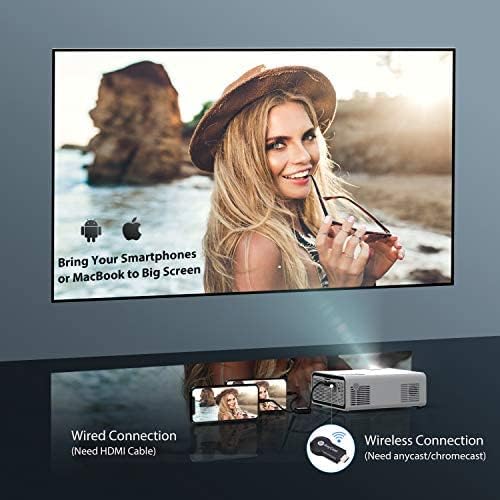
- وائرلیس سکرین مررنگ: Supports Anycast and Chromecast for mirroring content from smartphones and other devices (adapters required).
- زوم فنکشن: Adjusts image size from 100% to 50% using the remote control without moving the projector.
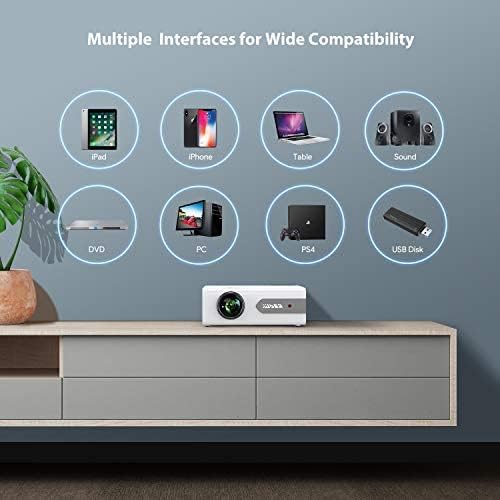
- متعدد انٹرفیس: Equipped with HDMI, USB, VGA, AV, and Audio ports for wide compatibility with various devices.
- HIFI سٹیریو آواز: Built-in dual stereo speakers with an SRS sound system provide a good auditory experience.
- اعلی درجے کا کولنگ سسٹم: Designed to minimize lamp power consumption and extend lamp 100,000،XNUMX گھنٹے تک زندگی۔


4. سیٹ اپ
4.1 ابتدائی جگہ کا تعین
Place the projector on a stable, flat surface or mount it to the ceiling. Ensure there is adequate ventilation around the projector to prevent overheating. The projection distance and screen size can be adjusted based on your viewماحول.

4.2 پاور کنکشن
Connect the power cord to the projector's power input and then plug it into a power outlet.
4.3 پاور آن/آف
یونٹ کو آن یا آف کرنے کے لیے پروجیکٹر یا ریموٹ کنٹرول پر پاور بٹن دبائیں۔
5. آپریٹنگ ہدایات
5.1 فوکس اور کی اسٹون کی تصحیح
Adjust the focus ring on the projector lens until the image is clear. Use the keystone correction feature (manual or digital, if available) to correct any trapezoidal distortion of the image.
5.2 ان پٹ ماخذ کا انتخاب
Use the 'Source' button on the remote or projector to select the desired input source (HDMI, USB, VGA, AV).
5.3 بلوٹوتھ کنکشن
To connect to a Bluetooth audio device:
- Ensure your Bluetooth speaker or headset is in pairing mode.
- پروجیکٹر پر بلوٹوتھ سیٹنگز پر جائیں۔
- جوڑا بنانے کے لیے دستیاب آلات کی فہرست سے اپنا آلہ منتخب کریں۔
- Once connected, audio will play through the Bluetooth device.
نوٹ: The V3 mini projector supports Bluetooth output devices (speakers, headphones) but does not connect to phones/pads via Bluetooth for mirroring. Turn off Bluetooth when not in use to avoid potential issues.
5.4 وائرلیس اسکرین مررنگ
The YABER V3 supports wireless screen mirroring from iOS and Android devices using an external Anycast or Chromecast dongle (purchased separately). Connect the dongle to an HDMI port and follow the dongle's instructions for mirroring.
5.5 زوم فنکشن
To adjust the image size without moving the projector, use the zoom function via the remote control. This allows you to shrink the image from 100% down to 50%.
5.6 استعمال کے منظرنامے۔
The YABER V3 projector is suitable for various applications:
- ہوم تھیٹر: Enjoy movies and shows on a large screen.
- گیمنگ: Connect gaming consoles for an immersive experience.
- Outdoor Movies: Perfect for backyard movie nights in dark environments.

6 دیکھ بھال
6.1 لینز کی صفائی
Regularly clean the projector lens using the provided lens cleaning cloth or a soft, lint-free cloth. Avoid using abrasive cleaners or harsh chemicals.
6.2 ایئر فلٹر کی صفائی
Check and clean the air filter periodically to ensure proper airflow and prevent dust buildup, which can affect performance and lamp زندگی
6.3 ایلamp زندگی
پروجیکٹر کی ایل ای ڈی ایلamp has a lifespan of up to 100,000 hours. Proper maintenance, including adequate ventilation and cleaning, helps maximize its longevity.
7 خرابیوں کا سراغ لگانا
- بغیر تصویر:
- چیک کریں کہ آیا پاور کیبل محفوظ طریقے سے منسلک ہے۔
- یقینی بنائیں کہ صحیح ان پٹ ماخذ کا انتخاب کیا گیا ہے۔
- Verify that the connected device (e.g., TV Stick, PC) is powered on and outputting a signal.
- Adjust focus and keystone.
- کوئی آواز نہیں:
- پروجیکٹر اور منسلک ڈیوائس دونوں پر والیوم سیٹنگ چیک کریں۔
- اگر بلوٹوتھ استعمال کر رہے ہیں تو یقینی بنائیں کہ آلہ مناسب طریقے سے جوڑا اور جڑا ہوا ہے۔
- If using an external speaker via AUX, ensure the cable is fully inserted.
- Some content (e.g., certain streaming services) may have audio format incompatibilities; try a different source or content.
- دھندلی تصویر:
- لینس پر فوکس کی انگوٹھی کو ایڈجسٹ کریں۔
- یقینی بنائیں کہ پروجیکشن کی سطح فلیٹ ہے اور پروجیکٹر مستحکم ہے۔
- پروجیکٹر کے لینس کو صاف کریں۔
- ریموٹ کنٹرول کام نہیں کر رہا:
- ریموٹ کنٹرول میں بیٹریاں تبدیل کریں۔
- یقینی بنائیں کہ ریموٹ اور پروجیکٹر کے IR ریسیور کے درمیان کوئی رکاوٹ نہیں ہے۔
- زیادہ گرم ہونا:
- پروجیکٹر کے ارد گرد مناسب وینٹیلیشن کو یقینی بنائیں۔
- Clean the air filter and vents to remove dust.
- Avoid operating in excessively hot environments.
8. وضاحتیں
| ماڈل نمبر | V3 |
| ڈسپلے ریزولوشن | Native 1280 x 720 (Supports 1080P) |
| کنٹراسٹ ریشو | 6000:1 |
| پہلو کا تناسب | 16:9 / 4:3 |
| روشنی کا ذریعہ | ایل ای ڈی |
| Lamp زندگی | 100,000 گھنٹے تک |
| کنیکٹوٹی ٹیکنالوجی | 3.5mm Jack, Bluetooth, HDMI, USB, VGA, AV |
| بلوٹوتھ ورژن | 5.0 |
| مصنوعات کے طول و عرض | 8.19 x 6.61 x 3.07 انچ |
| شے کا وزن | 2.2 پاؤنڈ |
| تجویز کردہ استعمال | Home Cinema, Gaming, Business (not recommended for professional presentations) |
9. وارنٹی اور سپورٹ
YABER provides a 6-month return policy and 3-year repair service for the V3 Mini Bluetooth Projector. Lifetime professional technical support is also available. For any issues or inquiries, please contact YABER customer service.


