1. تعارف
This manual provides comprehensive instructions for the safe and effective use of your FaceLake HTD8813C No-Touch Forehead Thermometer. Please read this manual thoroughly before using the device and retain it for future reference.
The FaceLake HTD8813C is a non-contact infrared thermometer designed for measuring body temperature from the forehead and surface temperatures of objects. It features a high-sensitivity sensor and microchip for quick and accurate readings.

شکل 1: سامنے view of the FaceLake HTD8813C No-Touch Forehead Thermometer.
2. حفاظتی معلومات
- تھرمامیٹر کو پانی یا دیگر مائعات میں نہ ڈوبیں۔
- آلے کو براہ راست سورج کی روشنی اور انتہائی درجہ حرارت سے دور رکھیں۔
- Do not drop or subject the thermometer to strong impact.
- Ensure the sensor is clean before each use for accurate readings.
- This device is intended for household use. Consult a medical professional for health concerns.
- بچوں کی پہنچ سے دور رکھیں۔
3. پروڈکٹ ختمview
Familiarize yourself with the components of your FaceLake HTD8813C thermometer:
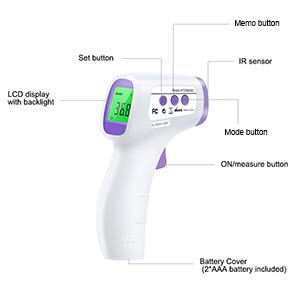
Figure 2: Labeled components of the FaceLake HTD8813C Thermometer.
- IR سینسر: Detects infrared heat for temperature measurement.
- LCD ڈسپلے: درجہ حرارت کی ریڈنگز، موڈ، اور دیگر اشارے دکھاتا ہے۔
- ON/Measure Button: Powers on the device and initiates temperature measurement.
- موڈ بٹن: Switches between Body and Surface temperature modes.
- Memo Button: ذخیرہ شدہ درجہ حرارت کی ریڈنگ تک رسائی حاصل کرتا ہے۔
- سیٹ بٹن: Used for adjusting settings (e.g., °C/°F, sound).
- بیٹری کور: بیٹری کے ٹوکری کی حفاظت کرتا ہے۔
4. سیٹ اپ
4.1. بیٹری کی تنصیب
- Locate the battery cover at the bottom of the handle.
- بیٹری کور کو کھول کر سلائیڈ کریں۔
- درست قطبیت (+/-) کو یقینی بناتے ہوئے دو AAA بیٹریاں داخل کریں۔
- بیٹری کور کو محفوظ طریقے سے بند کریں۔
Note: 2 AAA batteries are included with the product.
4.2. ابتدائی پاور آن
Press the ON/Measure button to power on the thermometer. The LCD display will light up, indicating the device is ready for use.
5. آپریٹنگ ہدایات
5.1. Taking a Body Temperature (Forehead)
- Ensure the thermometer is in "Body" mode. If not, press the "Mode" button to switch.
- تھرمامیٹر کو پیشانی کے بیچ سے تقریباً 1-2 انچ (2-5 سینٹی میٹر) کی دوری پر رکھیں۔
- Press and release the ON/Measure button.
- The temperature reading will appear on the LCD display within 1 second.

Figure 3: Measuring forehead temperature.
Note: The LCD display may change color to indicate temperature status (e.g., green for normal, yellow for slight fever, red for high fever).
5.2. Taking a Surface Temperature
- Press the "Mode" button to switch to "Surface" mode.
- Point the thermometer at the desired surface.
- Press and release the ON/Measure button.
- The surface temperature reading will appear on the LCD display.
5.3. Switching Temperature Units (°C/°F)
With the device powered on, press the "Set" button to toggle between Celsius (°C) and Fahrenheit (°F) units. The selected unit will be displayed on the screen.
5.4۔ یاد داشت۔
The thermometer can store up to 50 previous temperature readings. To access these readings:
- Press the "Memo" button.
- Each subsequent press of the "Memo" button will cycle through the stored readings, from most recent to oldest.

Figure 4: Memory recall function displaying previous readings.
5.5. آواز آن/آف
To turn the sound (beeps) on or off, press and hold the "Set" button for a few seconds until the sound icon appears or disappears on the display.
6 دیکھ بھال
6.1. صفائی
Wipe the thermometer clean with a soft, dry cloth. For disinfection, use an alcohol swab. Do not use abrasive cleaners or immerse the device in water.
6.2. ذخیرہ
Store the thermometer in a cool, dry place, away from direct sunlight and extreme temperatures. Remove batteries if the device will not be used for an extended period.
7 خرابیوں کا سراغ لگانا
- کوئی ڈسپلے نہیں: بیٹری کی تنصیب کو چیک کریں اور یقینی بنائیں کہ بیٹریاں ختم نہیں ہوئی ہیں۔ اگر ضروری ہو تو تبدیل کریں۔
- غلط پڑھنا: Ensure the sensor is clean and free from obstructions. Verify the thermometer is held at the correct distance from the forehead. Allow the device to acclimate to room temperature for 30 minutes if moved from a different environment.
- "Lo" or "Hi" on Display: Indicates the measured temperature is outside the normal operating range for body or surface mode.
8. وضاحتیں
| فیچر | تفصیل |
|---|---|
| برانڈ | FaceLake |
| ماڈل کا نام | HTD8813C۔ |
| خصوصی خصوصیت | غیر رابطہ |
| رنگ | سفید |
| عمر کی حد (تفصیل) | Adult (also suitable for kids) |
| شامل اجزاء | 2 AAA بیٹریاں |
| بیرونی مواد | پلاسٹک |
| تفصیلات میٹ | ایف ڈی اے |
| ڈسپلے کی قسم | LCD |
| کنیکٹوٹی ٹیکنالوجی | اورکت |
| مصنوعات کی دیکھ بھال کی ہدایات | اچھی طرح صاف کرنا |
| طاقت کا منبع | بیٹری سے چلنے والا |
| بیٹریوں کی تعداد | 2 AAA بیٹریاں درکار ہیں (شامل) |
| Upper Temperature Range | 212 ڈگری فارن ہائیٹ (100 ° C) |
| رسپانس ٹائم | 1 سیکنڈ |
| دوبارہ استعمال کی صلاحیت | دوبارہ قابل استعمال |
| Lower Temperature Range | 32 ڈگری فارن ہائیٹ (0 ° C) |
| انڈور آؤٹ ڈور استعمال | انڈور |
| جی ٹی آئی این | 703457515867 |
9. وارنٹی اور سپورٹ
For warranty information or technical support, please refer to the contact details provided with your product packaging or visit the official FaceLake webسائٹ خریداری کے ثبوت کے طور پر اپنی خریداری کی رسید اپنے پاس رکھیں۔


