تعارف
Thank you for choosing the WEKOME D6 Desktop Mini Bluetooth Speaker. This compact and portable speaker delivers clear sound quality and offers versatile connectivity options. This manual provides detailed instructions on how to set up, operate, and maintain your speaker to ensure optimal performance.
پروڈکٹ ختمview

تصویر 1: سامنے والا view of the WEKOME D6 Mini Bluetooth Speaker, highlighting its compact cylindrical design and control panel.
The WEKOME D6 is a palm-sized desktop speaker designed for portability and ease of use. It features Bluetooth connectivity for wireless audio streaming and a TF card slot for direct music playback. Its robust design ensures clear audio output for various compatible devices.
اہم خصوصیات:
- بلوٹوتھ کنیکٹیویٹی: Seamless wireless pairing with smartphones, tablets, and laptops.
- کومپیکٹ ڈیزائن: Palm-sized for easy portability.
- صاف ساؤنڈ کوالٹی: Delivers crisp and clear audio.
- لمبی بیٹری کی زندگی: 500 mAh battery provides approximately 4-5 hours of playback.
- توسیعی رینج: Bluetooth transmission distance of up to 10 meters (33 feet).
- TF کارڈ سپورٹ: Maximum support for 32GB TF (MicroSD) cards for direct music playback.
- آؤٹ پٹ پاور: Speaker maximum output power of 10 Watts.
پیکیج کے مشمولات
براہ کرم درج ذیل اشیاء کے لیے پیکج چیک کریں:
- WEKOME D6 Desktop Mini Bluetooth Speaker
- USB چارجنگ کیبل
- صارف دستی (یہ دستاویز)
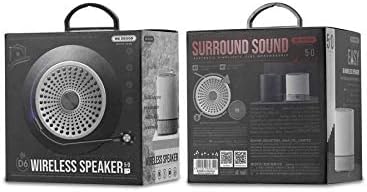
تصویر 2: Retail packaging of the WEKOME D6 Mini Bluetooth Speaker, illustrating the product's branding and key information on the box.
سیٹ اپ
1. اسپیکر کو چارج کرنا:
- USB چارجنگ کیبل کے چھوٹے سرے کو اسپیکر پر چارجنگ پورٹ سے جوڑیں۔
- USB کیبل کے دوسرے سرے کو USB پاور اڈاپٹر (شامل نہیں) یا کمپیوٹر کے USB پورٹ سے مربوط کریں۔
- The charging indicator light will illuminate during charging and turn off once fully charged. A full charge typically takes 2-3 hours.
2. پاور آن/آف:
- پاور آن کرنے کے لیے: دبائیں اور تھامیں۔ پاور بٹن for a few seconds until you hear an audible prompt or see an indicator light.
- پاور آف کرنا: دبائیں اور تھامیں۔ پاور بٹن چند سیکنڈ کے لیے دوبارہ.
3. بلوٹوت جوڑی:
- Ensure the speaker is powered on and in Bluetooth pairing mode (it will usually enter this mode automatically upon first power-on or if no device is connected). The indicator light will typically flash rapidly.
- اپنے آلے پر (اسمارٹ فون، ٹیبلیٹ، لیپ ٹاپ)، بلوٹوتھ کو فعال کریں اور دستیاب آلات تلاش کریں۔
- Select "WEKOME D6" from the list of found devices.
- Once paired, the speaker will provide an audible confirmation, and the indicator light will stop flashing and remain solid.
- پاور آن ہونے پر اسپیکر خود بخود آخری جوڑی والے آلے سے دوبارہ جڑ جائے گا، اگر ڈیوائس کا بلوٹوتھ فعال ہے اور رینج کے اندر ہے۔
4. TF Card Insertion:
- Locate the TF card slot on the speaker.
- Gently insert a TF (MicroSD) card (up to 32GB) with pre-loaded music files into the slot until it clicks into place.
- The speaker will automatically switch to TF card playback mode if a card is detected.
سپیکر کو چلانا
کنٹرول بٹن:
Refer to Figure 1 for the location of the control buttons.
- پاور بٹن: پاور آن/آف کرنے کے لیے دبائیں اور تھامیں۔
- والیوم اپ / نیکسٹ ٹریک بٹن (+):
- مختصر دبائیں: والیوم بڑھائیں۔
- Long press: Skip to the next track.
- پلے/پاز بٹن (||): موسیقی چلانے یا روکنے کے لیے مختصر دبائیں۔
- والیوم کم / پچھلا ٹریک بٹن (-):
- مختصر دبائیں: والیوم کم کریں۔
- Long press: Go to the previous track.
- Mode Button (Dot between + and Play/Pause): Short press to switch between Bluetooth mode and TF card mode (if a TF card is inserted).
دیکھ بھال
- صفائی: Use a soft, dry cloth to clean the speaker's surface. Do not use abrasive cleaners, alcohol, or other chemical solvents, as these may damage the finish.
- ذخیرہ: اسپیکر کو ٹھنڈی، خشک جگہ پر براہ راست سورج کی روشنی اور انتہائی درجہ حرارت سے دور رکھیں۔
- بیٹری کی دیکھ بھال: To prolong battery life, avoid fully discharging the speaker frequently. Charge the speaker regularly, even if not in use for extended periods.
- پانی کی مزاحمت: This speaker is not water-resistant. Avoid exposure to liquids.
خرابی کا سراغ لگانا
| مسئلہ | ممکنہ وجہ | حل |
|---|---|---|
| سپیکر پاور آن نہیں کرتا۔ | کم بیٹری۔ | اسپیکر کو پوری طرح سے چارج کریں۔ |
| کوئی آواز نہیں۔ | Volume too low; Speaker not paired; Incorrect mode. | Increase volume; Ensure speaker is paired; Switch to correct mode (Bluetooth/TF card). |
| بلوٹوتھ ڈیوائس کے ساتھ جوڑا نہیں بنایا جا سکتا۔ | اسپیکر جوڑا بنانے کے موڈ میں نہیں ہے۔ ڈیوائس بلوٹوتھ آف؛ اسپیکر سے بہت دور۔ | Ensure speaker is in pairing mode; Turn on device Bluetooth; Move device closer to speaker (within 10M). |
| Music stops playing from TF card. | TF card not inserted correctly; Corrupted files; Unsupported format. | Reinsert TF card; Check TF card for errors; Ensure music files تعاون یافتہ فارمیٹ میں ہیں (جیسے MP3)۔ |
وضاحتیں
| برانڈ | ویکوم |
| ماڈل کا نام | D6 |
| کنیکٹوٹی ٹیکنالوجی | بلوٹوتھ |
| اسپیکر کی قسم | Desktop Mini Speaker |
| اسپیکر زیادہ سے زیادہ آؤٹ پٹ پاور | 10 واٹ |
| بیٹری کی صلاحیت | 500 mAh (approx. 4-5 hours playback) |
| ترسیل کا فاصلہ | 10 میٹر (33 فٹ) |
| TF کارڈ سپورٹ | 32GB تک |
| ہم آہنگ آلات | لیپ ٹاپ، اسمارٹ فون، ٹیبلٹ |
| چڑھنے کی قسم | ٹیبل ٹاپ |
| پیکیج کے طول و عرض | 12.4 x 11.4 x 7.6 سینٹی میٹر |
| وزن | 210 گرام |
وارنٹی اور سپورٹ
For warranty information and technical support, please refer to the warranty card included with your product or contact WEKOME customer service through their official website or authorized retailers. Keep your purchase receipt as proof of purchase for warranty claims.


