1. تعارف
Thank you for choosing the FREESTYLE FH0955 LED Bluetooth Headphones. This manual provides essential information for the proper setup, operation, and maintenance of your new headphones. Please read it carefully before use to ensure optimal performance and longevity of the product.
2. پروڈکٹ ختمview
The FREESTYLE FH0955 headphones offer a wireless audio experience with integrated features designed for convenience and style. Key features include Bluetooth 5.0 + EDR connectivity, a built-in microSD card slot for direct music playback, a foldable headband for portability, and subtle LED backlighting on the earcups.

تصویر 2.1: سامنے view of the FREESTYLE FH0955 LED Bluetooth Headphones, showcasing the over-ear design and LED lighting.

تصویر 2.2: سائیڈ پروfile of the FREESTYLE FH0955 LED Bluetooth Headphones, highlighting the earcup and headband design.

Image 2.3: A person wearing the FREESTYLE FH0955 LED Bluetooth Headphones, demonstrating typical usage.
3. سیٹ اپ
3.1. ہیڈ فون چارج کرنا
Before first use, fully charge the headphones. The FH0955LB model is equipped with a 400 mAh Lithium-ion battery.
- Connect the supplied MicroUSB charging cable to the charging port on the headphones.
- Connect the other end of the cable to a USB power source (e.g., computer USB port, USB wall adapter, or power bank).
- The LED indicator will illuminate during charging and turn off or change color once fully charged.
- A full charge typically takes approximately 2 hours and provides up to 10 hours of continuous music playback.
3.2. بلوٹوت جوڑی بنانا
اپنے ہیڈ فون کو وائرلیس طریقے سے کسی ڈیوائس سے جوڑنے کے لیے:
- یقینی بنائیں کہ ہیڈ فون چارج اور پاور آف ہیں۔
- Press and hold the Power button on the headphones until the LED indicator flashes, indicating pairing mode.
- اپنے آلے پر (اسمارٹ فون، ٹیبلیٹ، کمپیوٹر)، بلوٹوتھ کو فعال کریں اور دستیاب آلات تلاش کریں۔
- Select "FH0955" or a similar name from the list of found devices.
- Once connected, the LED indicator will stop flashing and remain solid or turn off, depending on the model.
- The Bluetooth 5.0 + EDR technology allows for a stable connection up to 10 meters.
3.3. MicroSD Card Playback
The headphones feature an integrated microSD card slot for direct music playback without a connected device.
- Insert a microSD card (pre-loaded with audio files) into the designated slot on the headphones.
- The headphones should automatically switch to microSD playback mode. If not, use the Mode button (if available) to switch.
- Use the playback controls on the headphones to manage your music.
3.4. Wired Connection (3.5mm Audio Jack)
For devices without Bluetooth or when the battery is depleted, you can use the included 3.5mm audio cable.
- 3.5mm آڈیو کیبل کے ایک سرے کو ہیڈ فون پر آڈیو جیک سے جوڑیں۔
- دوسرے سرے کو اپنے آلے کے 3.5mm آڈیو آؤٹ پٹ سے جوڑیں۔
- The headphones will operate in passive mode, and Bluetooth functionality will be disabled.
4. آپریٹنگ ہدایات
4.1. پاور آن/آف
- پاور آن: پاور بٹن کو تقریباً 3 سیکنڈ تک دبائے رکھیں جب تک کہ LED انڈیکیٹر روشن نہ ہو۔
- بجلی بند: پاور بٹن کو تقریباً 3-5 سیکنڈ تک دبائے رکھیں جب تک کہ LED اشارے بند نہ ہو جائے۔
4.2. میوزک پلے بیک۔
- چلائیں/روکیں: پلے/پاز بٹن کو ایک بار دبائیں۔
- اگلا ٹریک: Press the "Next" button (often Volume Up, long press).
- پچھلا ٹریک: Press the "Previous" button (often Volume Down, long press).
- اواز بڑھایں: والیوم اپ بٹن کو مختصر دبائیں۔
- آواز کم: والیوم ڈاؤن بٹن کو شارٹ دبائیں۔
4.3. کال مینجمنٹ۔
With the built-in microphone, you can manage phone calls when connected via Bluetooth.
- جواب / کال ختم کریں: آنے والی کال کے دوران ایک بار پلے/پز بٹن دبائیں۔
- کال مسترد کریں: Press and hold the Play/Pause button for approximately 2 seconds during an incoming call.
- آخری نمبر دوبارہ ڈائل کریں: پلے/پاز بٹن کو دو بار دبائیں۔
4.4. LED Backlighting
The headphones feature subtle LED backlighting. Refer to the specific controls on your device for toggling or changing LED modes, if available. This feature is primarily aesthetic.
5 دیکھ بھال
5.1. صفائی
- Use a soft, dry cloth to clean the surface of the headphones.
- Do not use abrasive cleaners, alcohol, or chemical solvents, as these may damage the finish.
- چارجنگ پورٹ اور آڈیو جیک کو دھول اور ملبے سے پاک رکھیں۔
5.2. ذخیرہ
- ہیڈ فونز کو کسی ٹھنڈی، خشک جگہ پر براہ راست سورج کی روشنی اور انتہائی درجہ حرارت سے دور رکھیں۔
- When not in use for extended periods, charge the battery at least once every three months to maintain battery health.
- Utilize the foldable headband feature for compact storage and transport.
6 خرابیوں کا سراغ لگانا
| مسئلہ | ممکنہ وجہ | حل |
|---|---|---|
| ہیڈ فون آن نہیں ہوتے۔ | کم بیٹری۔ | ہیڈ فون کو مکمل چارج کریں۔ |
| بلوٹوتھ کے ذریعے جوڑا نہیں بنایا جا سکتا۔ | ہیڈ فون پیئرنگ موڈ میں نہیں ہیں۔ ڈیوائس بلوٹوتھ آف؛ ڈیوائس سے بہت دور۔ | Ensure headphones are in pairing mode. Turn device Bluetooth off/on. Move closer to device (within 10m). |
| کوئی آواز نہیں۔ | حجم بہت کم؛ غلط آڈیو ذریعہ؛ ہیڈ فون منسلک نہیں ہیں۔ | Increase volume on headphones and device. Check Bluetooth connection or 3.5mm cable. Ensure correct mode (Bluetooth/MicroSD). |
| MicroSD card not playing. | Card not inserted correctly; unsupported file format; card corrupted. | Reinsert card. Ensure audio files are in a supported format (e.g., MP3). Try a different microSD card. |
7. وضاحتیں
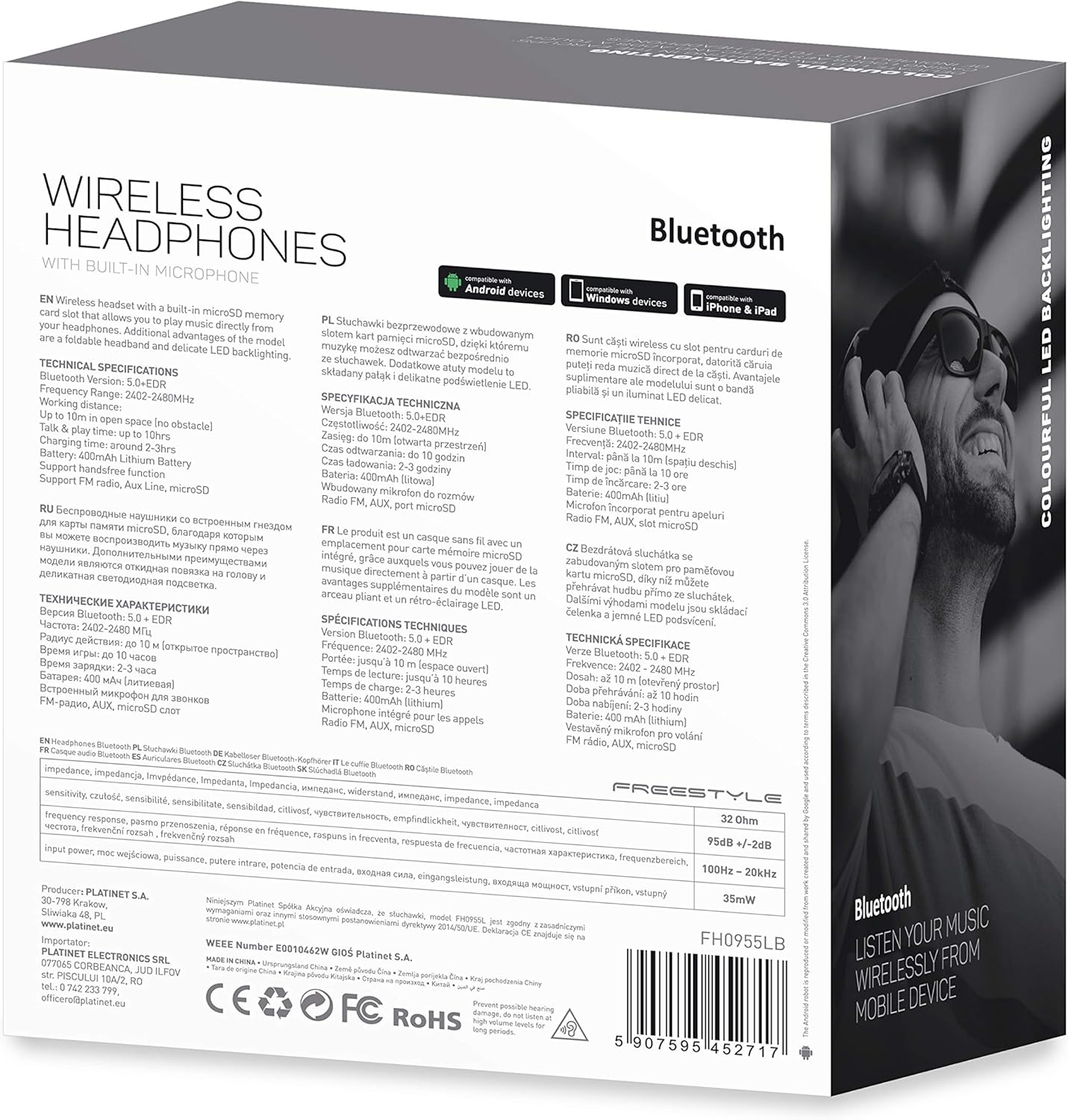
تصویر 7.1: تفصیلی view of the product packaging, showing technical specifications and compliance information.
| فیچر | تفصیلات |
|---|---|
| ماڈل نمبر | FH0955LB |
| برانڈ | فری اسٹائل |
| کنیکٹوٹی ٹیکنالوجی | Wireless (Bluetooth 5.0 + EDR) |
| وائرلیس رینج | 10 میٹر تک |
| آڈیو جیک | 3.5 ملی میٹر |
| فارم فیکٹر | Over-Ear (Circum-Auricular) |
| خصوصی خصوصیات | Noise Cancellation, LED Backlighting, MicroSD Card Slot |
| بیٹری کی قسم | Integrated Lithium-ion (400 mAh) |
| پلے بیک ٹائم | 10 گھنٹے تک |
| چارج کرنے کا وقت | تقریباً 2 گھنٹے |
| چارجنگ پورٹ | مائیکرو یو ایس بی |
| رنگ | سیاہ |
| مواد | Leather (earpads/headband) |
| پانی کی مزاحمت کی سطح | پانی مزاحم |
| شامل اجزاء | ہیڈ فون کا 1 جوڑا |
| کارخانہ دار | پلاٹینیٹ |
8. وارنٹی اور سپورٹ
وارنٹی کی مخصوص تفصیلات عام طور پر آپ کی خریداری کی دستاویزات کے ساتھ یا مینوفیکچرر کے اہلکار پر فراہم کی جاتی ہیں۔ webسائٹ کسی بھی وارنٹی دعووں کے لیے براہ کرم اپنے خریداری کا ثبوت اپنے پاس رکھیں۔
For technical support or inquiries, please refer to the contact information provided by your retailer or the manufacturer, Platinet.
9. حفاظتی معلومات
- ہیڈ فون کو انتہائی درجہ حرارت، نمی یا مائعات کے سامنے نہ رکھیں۔
- سماعت کو پہنچنے والے نقصان کو روکنے کے لیے لمبے عرصے تک زیادہ مقدار میں سننے سے گریز کریں۔
- Do not attempt to disassemble or modify the headphones, as this may void the warranty and cause damage.
- بچوں کی پہنچ سے دور رکھیں۔
- Dispose of the product responsibly according to local electronic waste regulations.


