1. تعارف
This manual provides detailed instructions for the installation, operation, and maintenance of the SINOTIMER TM919A-2 LCD Digital Programmable Timer Switch. This device is designed for automatic control of electrical appliances based on programmed time schedules, offering daily and weekly programming options.
2. مصنوعات کی خصوصیات
- Weekly 7-day programmable digital time switch.
- ایک سے زیادہ والیومtage options (5V, 12V, 24V, 110V, 220V, 85-265V). This specific model is 220V.
- Detachable battery design for backup power.
- 35mm DIN rail mounting for easy installation.
- LCD display for clear time and program viewing
- 16 ON/OFF programs per day or week.
- Manual override function.
- High capacity 16A switching contact.
3. حفاظتی معلومات
WARNING: Risk of electric shock. Installation should only be performed by a qualified electrician or competent person.
- یقینی بنائیں کہ تنصیب یا دیکھ بھال سے پہلے بجلی منقطع ہے۔
- Do not exceed the maximum load capacity of 16A.
- درست جلد کی تصدیق کریں۔tage supply for the specific model (220V for TM919A-2).
- آلے کو نمی اور انتہائی درجہ حرارت سے دور رکھیں۔
4. پروڈکٹ ختمview اور اجزاء
The SINOTIMER TM919A-2 features an LCD display, control buttons, and wiring terminals for power input and load control.

تصویر 4.1: سامنے والا view of the SINOTIMER TM919A-2 Digital Timer Switch, showing the LCD display, control buttons (P, D+, H+, M+, RESET, MANUAL), and wiring terminals.

تصویر 4.2: The timer switch with its transparent protective cover opened, revealing the control buttons for programming and manual operation.
کنٹرول بٹن:
- پی (پروگرام): Enters program setting mode.
- D+ (Day): Adjusts day of the week or program day.
- H+ (Hour): Adjusts hour or program hour.
- M+ (Minute): Adjusts minute or program minute.
- دوبارہ تلاش کریں: تمام ترتیبات کو فیکٹری ڈیفالٹس پر ری سیٹ کرتا ہے۔
- دستی: Toggles output ON/AUTO/OFF.
5. سیٹ اپ اور انسٹالیشن
5.1 وائرنگ ڈایاگرام
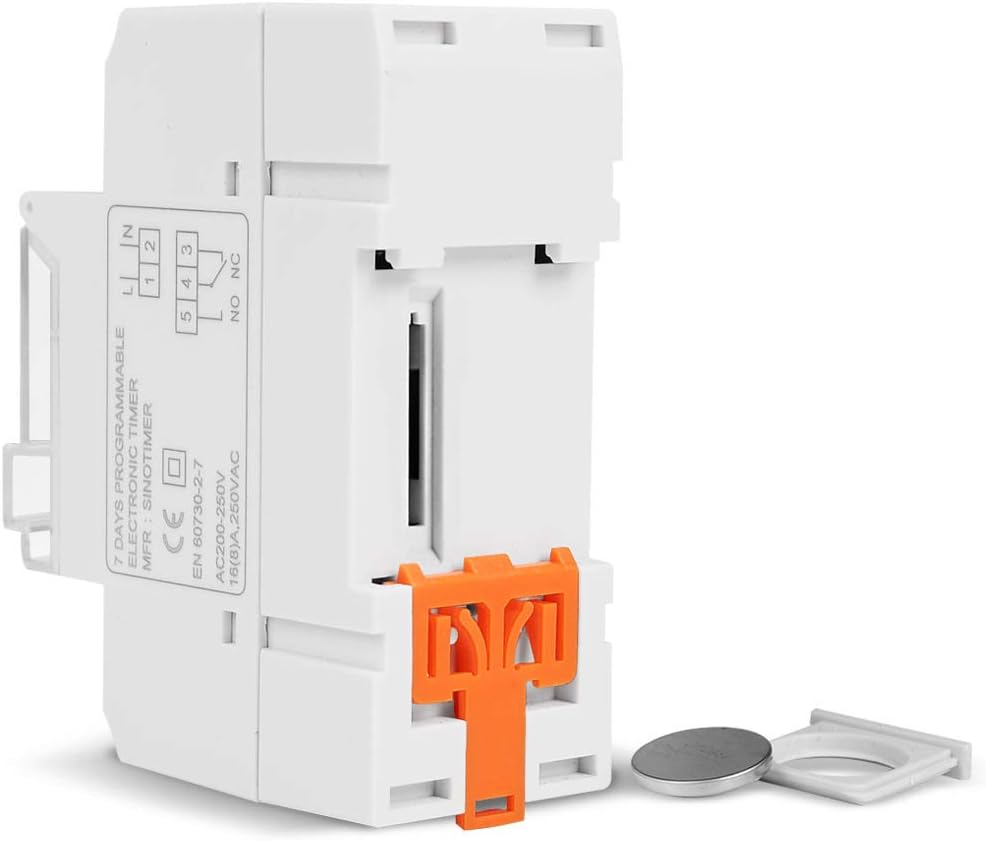
Refer to the wiring diagram on the side of the device and the illustration below for correct connection. Ensure all connections are secure.

تصویر 5.1: طرف view of the timer switch displaying the wiring diagram. Terminals 1 and 2 are for power input (L and N). Terminals 3, 4, and 5 are for the relay output (Common, Normally Open, Normally Closed).
- Terminals 1 & 2 (L, N): Connect to the main power supply (220V AC for this model).
- Terminal 3 (NO - Normally Open): Connects to the load when the timer is ON.
- Terminal 4 (COM - Common): Connects to one side of the load and the power supply.
- Terminal 5 (NC - Normally Closed): Connects to the load when the timer is OFF (less common for typical applications).
5.2 Initial Power-up and Reset
Upon first power-up or after a long period without power, the LCD display may be blank. The internal battery provides backup for settings. If the display is unresponsive or shows garbled characters, press the ری سیٹ کریں۔ button using a pointed object (e.g., a pen tip). This will clear all settings and restore the timer to its default state.
5.3 موجودہ وقت اور دن کی ترتیب
- دبائیں P button once. The display will show the current time setting.
- دبائیں D+ ہفتے کا موجودہ دن مقرر کرنے کے لیے۔
- دبائیں H+ موجودہ وقت مقرر کرنے کے لیے۔
- دبائیں M+ موجودہ منٹ سیٹ کرنے کے لیے۔
- دبائیں P button again to exit time setting mode and return to normal operation.
6. آپریٹنگ ہدایات
6.1 پروگرامنگ آن/آف سائیکل
The timer supports up to 16 ON/OFF programs. Each program consists of an ON time and an OFF time.
- دبائیں P button repeatedly until "1 ON" appears on the display. This is the first ON program.
- دبائیں D+ to select the day(s) for this program. Options include individual days, weekdays, weekends, or all 7 days.
- دبائیں H+ to set the desired hour for the "ON" event.
- دبائیں M+ to set the desired minute for the "ON" event.
- دبائیں P again. "1 OFF" will appear. This is the first OFF program.
- Repeat steps 2-4 to set the day(s), hour, and minute for the "OFF" event.
- دبانا جاری رکھیں P to cycle through "2 ON", "2 OFF", up to "16 ON", "16 OFF". If you do not need all 16 programs, simply press P until the display returns to the current time.
- To save and exit programming mode, press the P button until the current time is displayed.
6.2 دستی اوور رائڈ
دی دستی button allows you to override the programmed settings temporarily or permanently.
- دبائیں دستی once: Toggles between ON/AUTO/OFF modes.
- آن: The output is continuously ON, ignoring programs.
- بند: The output is continuously OFF, ignoring programs.
- آٹو: The timer operates according to the programmed ON/OFF cycles. This is the standard operating mode.
7 دیکھ بھال
7.1 بیٹری کی تبدیلی
The timer includes a detachable CR2032 lithium battery to maintain time and program settings during power outages. If the display becomes dim or resets frequently, the battery may need replacement.

تصویر 7.1: The timer switch shown with its battery compartment open and a CR2032 lithium battery, indicating the detachable battery design.
- Disconnect power to the timer before attempting battery replacement.
- Locate the battery compartment, typically on the side or back of the unit.
- پرانی CR2032 بیٹری کو احتیاط سے ہٹا دیں۔
- Insert a new CR2032 battery, ensuring correct polarity (+ side up).
- بیٹری کی ٹوکری بند کریں۔
- Reconnect power and reset the current time and day if necessary.
8 خرابیوں کا سراغ لگانا
- ڈسپلے خالی ہے:
- Check power supply connections (Terminals 1 & 2).
- Ensure the internal battery is charged or replaced if old.
- دبائیں ری سیٹ کریں۔ بٹن
- Programs are not running:
- یقینی بنائیں کہ ٹائمر اندر ہے۔ آٹو mode (check the display for "AUTO"). Press دستی سائیکل کے طریقوں کے لئے.
- Verify that the current time and day are set correctly.
- Check that the ON/OFF programs are correctly entered and enabled for the desired days.
- Confirm wiring to the load (Terminals 3, 4, 5) is correct.
- Timer resets unexpectedly:
- The internal battery may be low or depleted. Replace the CR2032 battery.
- Ensure stable power supply to the unit.
9. وضاحتیں
| فیچر | تفصیلات |
|---|---|
| ماڈل | TM919A-2 |
| بجلی کی فراہمی | 220V AC (as per model) |
| بجلی کی کھپت | 4.5 VA (MAX) |
| درجہ حرارت کی حد | -20°C سے +50°C |
| ڈسپلے | LCD |
| Switching Contact | 1 تبدیلی کا سوئچ |
| پروگرامز | 16 ON/OFF per day or week |
| Hysteresis | 2 sec/day (at 25°C) |
| صلاحیت | 16A |
| ٹائمر کی حد | 1 منٹ سے 168 گھنٹے |
| کم از کم وقفہ | 1 منٹ |
| Black-out Memory | 60 days (with internal battery) |
| شے کا وزن | 0.15 کلوگرام (5.3 اونس) |
| چڑھنا | 35 ملی میٹر DIN ریل |
| اسکرین کا سائز | 1.2 انچ |
تصویر 9.1: Dimensional drawing of the SINOTIMER TM919A-2, showing measurements in centimeters for height, width, and depth.
10. وارنٹی اور سپورٹ
Specific warranty information for the SINOTIMER TM919A-2 is not provided in the product details. For warranty claims or technical support, please contact your retailer or the manufacturer directly. Keep your purchase receipt as proof of purchase.


