1. تعارف
This manual provides comprehensive instructions for the One For All URC4912 Sony TV Replacement Remote Control. Designed to function identically to your original Sony TV remote, the URC4912 offers immediate compatibility with all Sony TV models (LCD, LED, Plasma) without requiring any setup. It also includes a learning feature for personalized customization of functions.
2. سیٹ اپ
2.1 بیٹریاں لگانا
The URC4912 remote control requires two AA batteries (not included). Follow these steps to install them:
- ریموٹ کنٹرول کے پیچھے بیٹری کے ٹوکری کا احاطہ تلاش کریں۔
- کور کو نیچے کی طرف سلائیڈ کریں یا اسے کھولنے کے لیے کنڈی کو دبائیں۔
- دو AA بیٹریاں ڈالیں، اس بات کو یقینی بناتے ہوئے کہ مثبت (+) اور منفی (-) ٹرمینلز کمپارٹمنٹ کے اندر نشانات کے ساتھ درست طریقے سے سیدھ میں ہوں۔
- بیٹری کے کمپارٹمنٹ کور کو واپس جگہ پر سلائیڈ کرکے اس وقت تک تبدیل کریں جب تک کہ یہ محفوظ طریقے سے کلک نہ کرے۔
Note: Always use new batteries and dispose of old batteries responsibly.
2.2 Initial Setup (No Configuration Required)
The One For All URC4912 remote control is pre-programmed for all Sony televisions. No setup or programming is required. Simply insert the batteries, and the remote is ready for immediate use with your Sony TV.
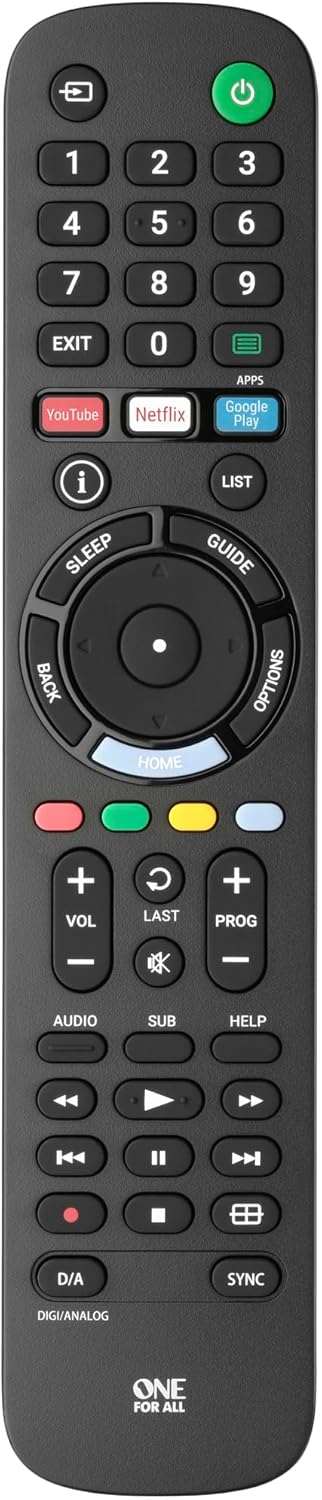
تصویر 1: سامنے view of the One For All URC4912 remote control. This image displays the remote's layout, including number buttons, navigation pad, volume and channel controls, and dedicated app buttons for services like YouTube and Netflix.
3. ریموٹ کنٹرول کو آپریٹ کرنا
3.1 بنیادی افعال
The URC4912 remote provides all standard functions found on an original Sony TV remote:
- پاور بٹن: ٹی وی کو آن یا آف کرتا ہے۔
- نمبر بٹن (0-9): براہ راست چینل کے انتخاب کے لیے۔
- والیوم اوپر/نیچے (+/-): ٹی وی والیوم کو ایڈجسٹ کرتا ہے۔
- Channel Up/Down (PROG +/-): ٹی وی چینلز بدلتے ہیں۔
- بٹن خاموش کریں: TV آڈیو کو خاموش کر دیتا ہے۔
- نیویگیشن پیڈ (اوپر، نیچے، بائیں، دائیں، ٹھیک ہے): مینو نیویگیشن اور انتخاب کے لیے۔
- پیچھے کا بٹن: پچھلی اسکرین یا مینو پر واپس آجاتا ہے۔
- ہوم بٹن: Accesses the TV's main home screen or smart TV interface.
3.2 Specific Sony Functions
This remote supports common Sony-specific functions, including:
- تھیٹر: Activates or deactivates Theatre mode.
- i-Manual: Accesses the TV's electronic instruction manual.
- اختیارات: موجودہ اسکرین کے لیے سیاق و سباق سے متعلق حساس اختیارات دکھاتا ہے۔
3.3 سیکھنے کی خصوصیت
The URC4912 remote includes a learning feature, allowing you to copy functions directly from your original remote control. This is useful for any specific functions not pre-programmed or for personalizing button assignments.
- Place the URC4912 remote and your original remote on a flat surface, facing each other, with their IR emitters approximately 1-2 inches apart.
- On the URC4912, press and hold the سیٹ اپ button (if available, or refer to the full manual for specific button combination to enter learning mode) until the LED indicator blinks twice and then stays lit.
- Press the button on the URC4912 that you wish to program. The LED will blink rapidly.
- On your original remote, press and hold the corresponding function button until the URC4912's LED blinks twice to confirm successful learning.
- Repeat steps 3 and 4 for any other buttons you wish to program.
- سیکھنے کے موڈ سے باہر نکلنے کے لیے، دبائیں۔ سیٹ اپ ایک بار پھر بٹن ایل ای ڈی بند ہوجائے گا۔
Note: If the LED shows a long blink, the learning was unsuccessful. Try again, ensuring both remotes are stable and the original remote's batteries are fresh.

تصویر 2: زاویہ والا view of the One For All URC4912 remote control, highlighting its ergonomic design and button placement for easy access to various functions.
4 دیکھ بھال
اپنے ریموٹ کنٹرول کی لمبی عمر اور بہترین کارکردگی کو یقینی بنانے کے لیے:
- صفائی: Wipe the remote with a soft, dry cloth. Do not use abrasive cleaners or liquids.
- بیٹری کی تبدیلی: Replace batteries when the remote's response becomes sluggish or the LED indicator (if present) signals low power. Always replace both batteries simultaneously.
- ذخیرہ: ریموٹ کو براہ راست سورج کی روشنی اور انتہائی درجہ حرارت سے دور خشک جگہ پر رکھیں۔
5 خرابیوں کا سراغ لگانا
| مسئلہ | حل |
|---|---|
| ریموٹ جواب نہیں دیتا۔ |
|
| کچھ بٹن کام نہیں کرتے۔ |
|
| Learning feature fails. |
|
6. وضاحتیں
| برانڈ | سب کے لیے ایک |
| ماڈل | یو آر سی 4912 |
| ہم آہنگ آلات | Television (All Sony TV types: LCD, LED, Plasma) |
| خصوصی خصوصیات | Infrared, Learning Function |
| اشیاء کی تعداد | 1 |
| بیٹری کی قسم | 2 ایکس اے اے بیٹریاں (شامل نہیں) |
| مصنوعات کے طول و عرض | 19.5 x 4.4 x 2.5 سینٹی میٹر |
| شے کا وزن | 100 گرام |
7. وارنٹی کی معلومات
For detailed warranty information regarding your One For All URC4912 remote control, please refer to the official One For All website or the warranty card included with your purchase. Warranty terms and conditions may vary by region.
8. سپورٹ
Should you require further assistance, technical support, or have questions not covered in this manual, please visit the official One For All support website or contact their customer service. You can often find FAQs, additional guides, and contact information on their brand page:


