1. تعارف
This manual provides essential information for setting up, operating, and maintaining your Sony BRAVIA XR X90J 55 Inch 4K HDR LED Smart Google TV. Please read it thoroughly to ensure proper use and to maximize your viewتجربہ ہے.
اہم خصوصیات:
- Cognitive Processor XR: Revolutionary TV processing technology that understands how humans see and hear to deliver intense contrast with pure blacks, high peak brightness, and natural colors.
- XR Triluminos Pro: Billions of accurate colors for impressive picture quality that is natural and beautiful to the human eye.
- Full Array LED & XR Contrast Booster: Precisely controlled backlighting for real-life depth and detail with deep blacks and high peak brightness.
- گوگل ٹی وی: Seamlessly browse 700,000+ movies and TV episodes from across your favorite streaming services.
- Perfect for PlayStation 5: Exclusive features for the PS5 console, 4K/120fps (HDMI 2.1), and input lag as low as 8.5ms.
- اکوسٹک ملٹی آڈیو: Two sound positioning tweeters elevate the soundstage, enabling sound to follow the action for an immersive experience.
2. باکس میں کیا ہے۔
Upon unboxing your Sony BRAVIA XR X90J TV, ensure all the following components are present:
- ٹیلی ویژن
- ٹیبل ٹاپ اسٹینڈ (2 ٹکڑے)
- AC پاور کی ہڈی
- Voice remote control with 2 AAA batteries
- فوری سیٹ اپ گائیڈ
- آپریٹنگ ہدایات
- M6L12 Screws (4)
- VS Spacers (4)

Image: Sony X90J 55-inch TV box contents and dimensions. Includes TV, remote, stand, power cord, and documentation.
Video: Official unboxing of the Sony X90J BRAVIA XR Full Array LED TV, showing included accessories and initial setup steps.
3. سیٹ اپ
3.1 اسٹینڈ اسمبلی
Carefully attach the two table-top stand pieces to the bottom of the television using the provided screws. Ensure they are securely fastened. Refer to the quick setup guide for detailed diagrams.

تصویر: سامنے view of the Sony X90J 55-inch TV with its table-top stand correctly assembled.
3.2 کنیکٹنگ پاور
Connect the AC power cord to the TV's power input port located on the back panel, then plug the other end into a wall outlet.

Image: Close-up of the back panel of the Sony X90J TV, highlighting the various input/output ports including HDMI, USB, LAN, and optical audio.
3.3 ریموٹ کنٹرول سیٹ اپ
Insert the two AAA batteries into the voice remote control, ensuring correct polarity.
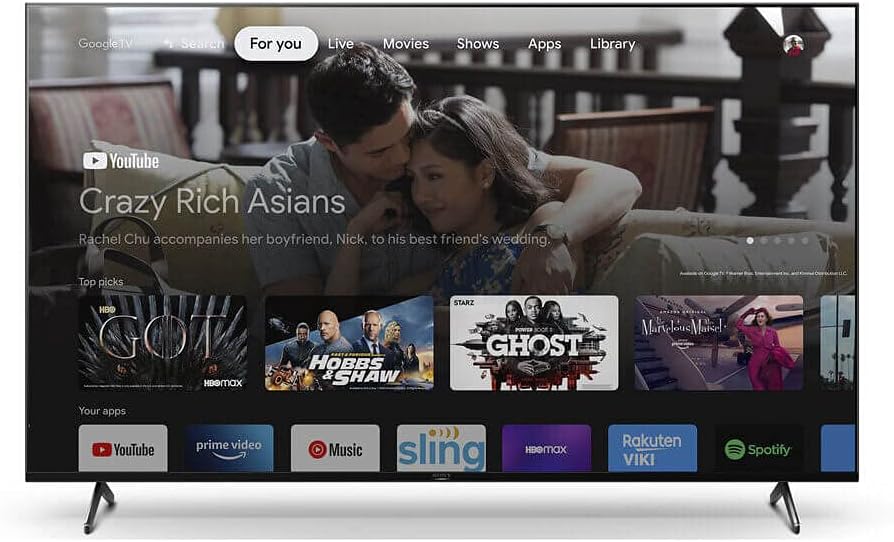
Image: The sleek black voice remote control for the Sony X90J TV, featuring dedicated buttons for streaming services and voice commands.
3.4 ابتدائی پاور آن
After connecting the power, the TV may take 10 to 20 seconds to initialize before it can be turned on using the remote control or the power button on the TV itself. This is normal behavior.
آپ کا ٹی وی چلانا
4.1 ریموٹ کنٹرول کا استعمال
The voice remote control provides access to all TV functions, including input selection, channel navigation, volume control, Google Assistant, and quick access buttons for popular streaming services.
4.2 گوگل ٹی وی انٹرفیس
Your Sony X90J TV features the Google TV interface, allowing you to browse content from various streaming services, access apps, and manage your watchlist all in one place.

Image: The Sony X90J TV screen showing the Google TV interface with various streaming apps and content recommendations.
ویڈیو: ایک اوورview of the Google TV interface on Sony BRAVIA XR, highlighting content discovery and app access.
5 تصویر کی ترتیبات
The Sony X90J offers various picture modes and advanced settings to optimize your viewing experience. Experiment with these settings to find what best suits your environment and content.
5.1 تصویر کے موڈز
Select from modes like Vivid, Standard, Cinema, Game, Graphics, Photo, and Professional. Each mode is pre-configured for different content types. For movie watching, 'Cinema' mode is generally recommended for true-to-life reproduction.
5.2 HDR (ہائی ڈائنامک رینج)
The TV supports Dolby Vision HDR, HDR10, and HLG. When HDR content is detected, the TV automatically adjusts to an HDR picture mode. You can fine-tune HDR brightness, contrast, and tone mapping preferences within the picture settings.
6. آواز کی ترتیبات
The Acoustic Multi-Audio system provides an immersive sound experience. You can customize sound settings to your preference.
- گھیر آواز: Enable or adjust surround sound effects.
- مکالمہ بڑھانے والا: Adjust to improve voice clarity.
- Equalizer کی: Fine-tune frequency bands for personalized audio.
- آٹو حجم: Turn on to prevent sudden volume changes during commercials.
- Dolby Audio Processing & DTS Virtual:X: Enhance audio quality for supported content.
7. گیمنگ کی خصوصیات
The Sony X90J is optimized for next-generation gaming, especially with PlayStation 5.
- 4K/120fps: Supports 4K resolution at 120 frames per second via HDMI 2.1 ports (HDMI 3 and 4).
- Ultra Low Input Lag: Experience input lag as low as 8.5ms for responsive gameplay.
- آٹو لو لیٹینسی موڈ (ALLM): Automatically switches to low-latency mode when a game console is connected.
- متغیر ریفریش ریٹ (VRR): Support for VRR may be added via future firmware updates.
Video: Sony BRAVIA XR TV showcasing features optimized for PlayStation 5, including 4K/120fps and low input lag.
8 دیکھ بھال
To ensure the longevity and optimal performance of your Sony X90J TV, follow these maintenance guidelines:
- اسکرین کی صفائی: نرم، خشک مائکرو فائبر کپڑے سے اسکرین کو آہستہ سے صاف کریں۔ ضدی smudges کے لیے، ہلکے سے dampur کپڑے میں پانی یا خصوصی سکرین کلینر (سخت کیمیکلز سے بچیں)۔
- کابینہ کی صفائی: Use a soft, dry cloth to wipe the TV's cabinet.
- وینٹیلیشن: زیادہ گرم ہونے سے بچنے کے لیے ٹی وی کے ارد گرد مناسب وینٹیلیشن کو یقینی بنائیں۔ وینٹیلیشن کے سوراخوں کو مسدود نہ کریں۔
- پاور کی ہڈی: Regularly check the power cord for any damage. If damaged, discontinue use and contact Sony support.
9 خرابیوں کا سراغ لگانا
TV Does Not Turn On After Unplugging
مسئلہ: When you unplug the TV and plug it in again, the TV may not be able to turn on for a while, even if you press the power button on the remote control or the TV.
حل: This is normal behavior as it takes time to initialize the system. Wait for about 10 to 20 seconds, then try again.
10. وضاحتیں
| فیچر | تفصیلات |
|---|---|
| برانڈ کا نام | سونی |
| ماڈل نمبر | XR55X90J |
| اسکرین کا سائز | 55 انچ |
| ڈسپلے ٹیکنالوجی | ایل ای ڈی (مکمل صف ایل ای ڈی) |
| قرارداد | 4K الٹرا ایچ ڈی |
| ریفریش ریٹ | 120 Hz |
| ایچ ڈی آر سپورٹ | Dolby Vision, HDR10, HLG |
| آپریٹنگ سسٹم | گوگل ٹی وی |
| کنیکٹوٹی ٹیکنالوجی | APPLE AIRPLAY, APPLE HOMEKIT, Bluetooth, Chromecast built-in, Mini Jack, HDMI (2.1 compatible), USB, WiFi |
| مصنوعات کے طول و عرض | 13.38"D x 48.63"W x 28"H |
| شے کا وزن | 17.4 کلوگرام (38.3 پاؤنڈ) |
| بجلی کی کھپت | Estimated Yearly Energy Cost: $20 (Based on 12 cents per kWh and 5 hours use per day) |

Image: Energy Guide label for the Sony X90J 55-inch TV, showing estimated yearly energy cost and consumption details. For more information, visit ftc.gov/energy۔.
11. وارنٹی اور سپورٹ
Your Sony X90J TV comes with a limited warranty. Please refer to the warranty card included in your product packaging for specific terms and conditions.
For technical support, troubleshooting assistance, or to register your product, please visit the official Sony support webسائٹ یا سونی کسٹمر سروس سے رابطہ کریں۔
آپ بھی ملاحظہ کر سکتے ہیں۔ ایمیزون پر سونی اسٹور اضافی مصنوعات کی معلومات اور وسائل کے لیے۔