1. تعارف
This manual provides essential instructions for the safe and effective operation and maintenance of your Airthereal PA1K-GO Portable Ozone Generator. Please read this manual thoroughly before use and retain it for future reference.
اہم حفاظتی معلومات:
Ozone generators produce ozone, which can be harmful if inhaled. This device must only be used in unoccupied spaces. Ensure no people or pets are present in the area during operation. Wait at least 30 minutes after ozone generation ends before re-entering the treated space and ventilate the area thoroughly.
The Airthereal PA1K-GO is designed to eliminate various odors, including those from pets, tobacco smoke, mold, cooking, and volatile organic compounds (VOCs) like formaldehyde and ammonia. It is suitable for small areas up to 500 sq ft, such as cars, hotel rooms, offices, and bathrooms.

The Airthereal PA1K-GO effectively targets and neutralizes a range of common odors.
2. پروڈکٹ ختمview
The Airthereal PA1K-GO is a compact, portable ozone generator featuring a simple control panel and robust design.

سامنے والا view of the Airthereal PA1K-GO Portable Ozone Generator.
اجزاء:
- پاور بٹن: Used to turn the device on and off.
- موڈ بٹن: Used to cycle through the operating modes.
- اسٹیٹس انڈیکیٹر لائٹس: Display battery level, charging status, and selected operating mode.
- Ozone Output Vent: Where ozone is released.
- ہوا کی مقدار: Where ambient air is drawn into the unit.
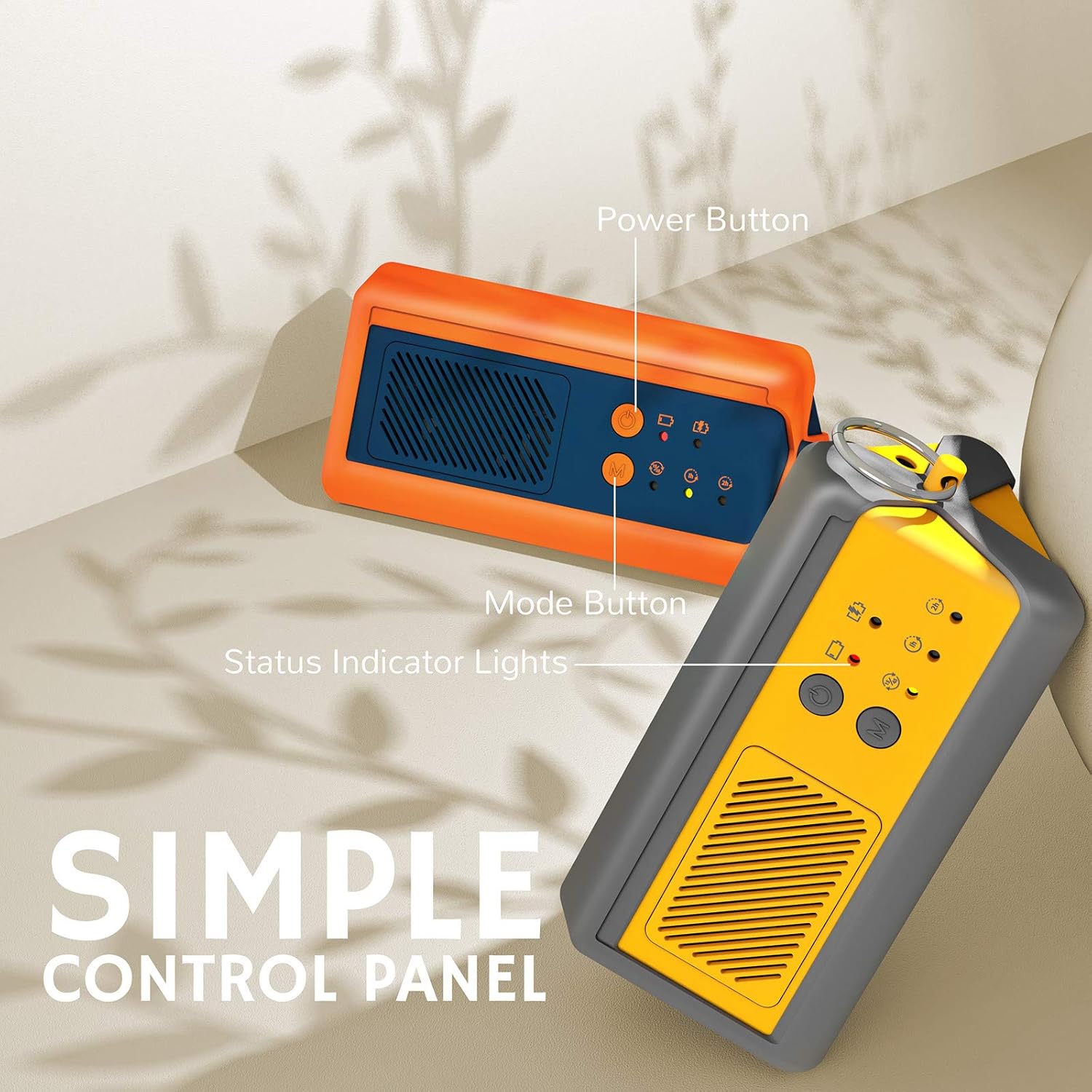
تفصیلی view of the control panel with labeled buttons and indicator lights.
3. سیٹ اپ
ڈیوائس کو چارج کرنا:
Before initial use, fully charge the Airthereal PA1K-GO. The device is battery-powered and comes with a 5V 2A USB charger.
- فراہم کردہ USB-C کیبل کو ڈیوائس پر چارجنگ پورٹ سے جوڑیں۔
- Plug the USB-A end of the cable into the included 5V 2A USB wall adapter.
- وال اڈاپٹر کو معیاری الیکٹریکل آؤٹ لیٹ میں لگائیں۔
- The battery indicator lights will show the charging progress. Once all lights are solid, the device is fully charged. A full charge provides approximately 4 hours of operation.

The Airthereal PA1K-GO includes a USB-C charging cable and a 5V 2A USB wall adapter.
4. آپریٹنگ ہدایات
Always ensure the area is unoccupied by people and pets before operating the ozone generator. Proper ventilation is required after treatment.
آپریٹنگ اقدامات:
- مرحلہ 1: علاقہ تیار کریں۔
Before starting ozone treatment, remove the source of the odors if possible (e.g., clean spills, remove trash). Close all windows and doors in the treatment area. Ensure no people or pets are present.
Preparation involves cleaning and securing the treatment area.
- Step 2: Select Operating Mode
Press the Power button to turn on the device. Then, press the Mode (M) button to cycle through the available operating modes. The corresponding indicator light will illuminate.
Use the mode button to select the desired operating cycle.
- Step 3: Begin Treatment and Vacate Area
Once the mode is selected, the device will begin generating ozone. Immediately leave the treatment area. Do not re-enter until the treatment cycle is complete and the area has been ventilated.
Ensure the area is unoccupied during ozone generation.
- Step 4: Post-Treatment Ventilation
After the ozone generation cycle finishes, wait at least 30 minutes before re-entering the treated space. Open windows and doors to thoroughly ventilate the area for an extended period to dissipate any residual ozone.
آپریٹنگ موڈز:
- مسلسل موڈ: The device operates continuously until manually shut off.
- 15-Minute Cycle Mode: The device runs for 15 minutes, then rests for 45 minutes, repeating this cycle.
- 1 گھنٹے کا ٹائمر موڈ: The device operates for 1 hour and then automatically shuts off.
- 2 گھنٹے کا ٹائمر موڈ: The device operates for 2 hours and then automatically shuts off.
For persistent odors, repeat treatments as necessary. Tough odors may require multiple cycles to eliminate completely.

Repeat treatments for stubborn odors or as part of a regular maintenance schedule.
5 دیکھ بھال
Regular maintenance ensures optimal performance and longevity of your Airthereal PA1K-GO.
صفائی:
- صاف کرنے سے پہلے یقینی بنائیں کہ آلہ بند ہے اور ان پلگ ہے۔
- یونٹ کے بیرونی حصے کو نرم، خشک کپڑے سے صاف کریں۔
- Do not use liquid cleaners, sprays, or harsh chemicals, as these can damage the unit.
- Keep the air intake and ozone output vents clear of dust and debris. Use a soft brush or vacuum cleaner attachment to gently clean these areas.
6 خرابیوں کا سراغ لگانا
If you encounter issues with your Airthereal PA1K-GO, refer to the following common problems and solutions:
| مسئلہ | ممکنہ وجہ | حل |
|---|---|---|
| آلہ آن نہیں ہوتا ہے۔ | کم بیٹری یا بجلی نہیں ہے۔ | Charge the device fully. Ensure the power button is pressed firmly. |
| No ozone smell detected | Device not operating, or area is too large | Check if indicator lights are on. Ensure the device is in an appropriate-sized space (up to 500 sq ft). |
| بیٹری چارج نہیں ہو رہی | ناقص کیبل یا اڈاپٹر | Try a different USB-C cable and 5V 2A USB adapter. Ensure connections are secure. |
| Odor persists after treatment | Source of odor not removed, or insufficient treatment time | Ensure the odor source is removed. Repeat treatment cycles, or use a longer mode. Ensure proper ventilation after each cycle. |
7. وضاحتیں
| فیچر | تفصیل |
|---|---|
| ماڈل نمبر | PA1K GO |
| اوزون آؤٹ پٹ | 1,000 ملی گرام فی گھنٹہ |
| تجویز کردہ کوریج ایریا | 500 مربع فٹ تک |
| بیٹری کی زندگی (مکمل چارج) | 4 گھنٹے تک |
| مصنوعات کے طول و عرض | 3.8"D x 7.1"W x 3"H (9.65 cm D x 18.03 cm W x 7.62 cm H) |
| وزن | 1.5 پاؤنڈ (0.68 کلوگرام) |
| سرٹیفیکیشنز | CE Certified, RoHS Certified |
| EPA اسٹیبلشمنٹ نمبر | 94720-سی ایچ این -1۔ |
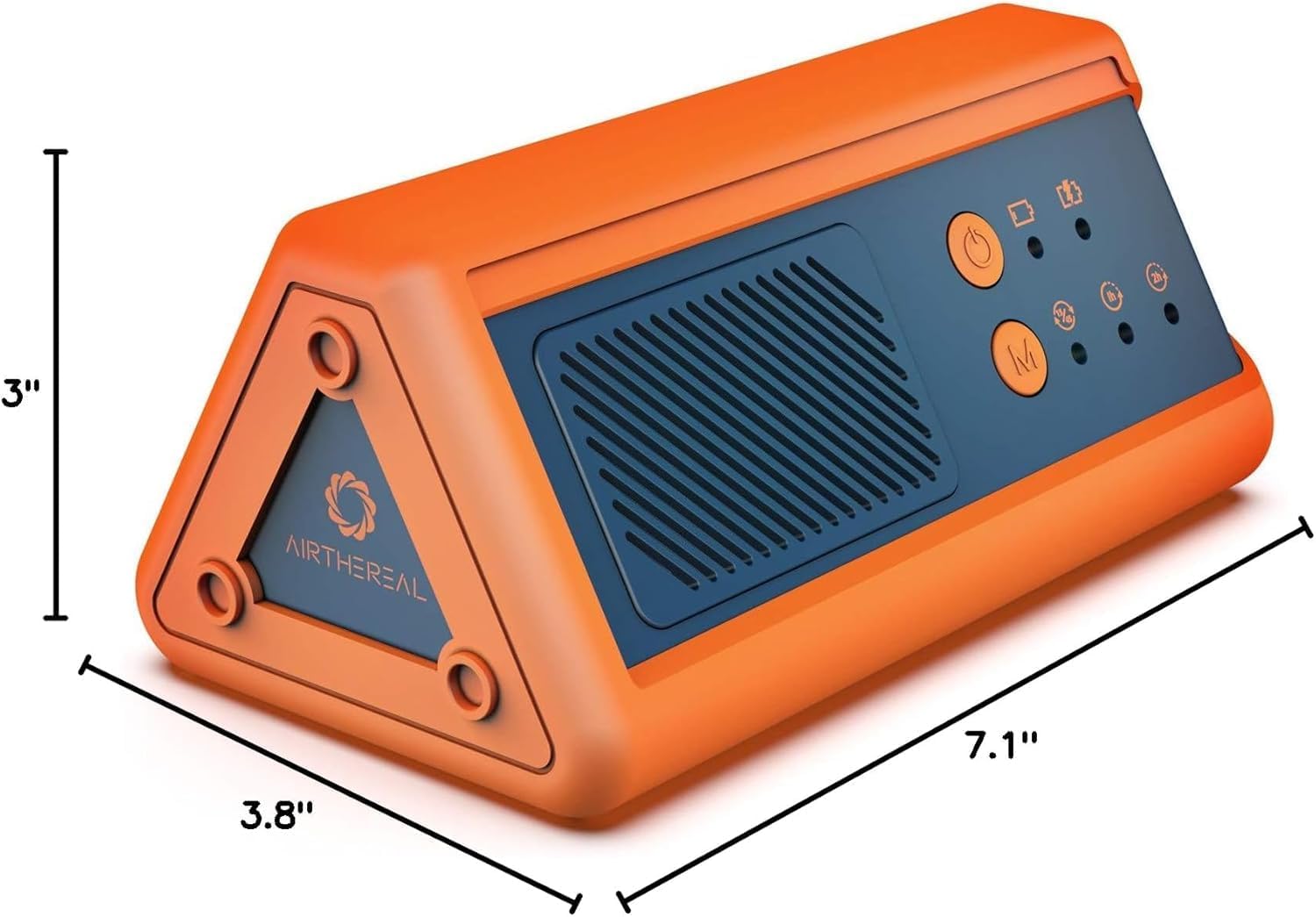
Physical dimensions of the Airthereal PA1K-GO Portable Ozone Generator.
8. وارنٹی اور سپورٹ
وارنٹی کی معلومات:
Airthereal products typically come with a manufacturer's warranty covering defects in materials and workmanship. Please refer to the warranty card included with your product or visit the official Airthereal webمخصوص وارنٹی شرائط و ضوابط کے لیے سائٹ۔
کسٹمر سپورٹ:
For technical assistance, troubleshooting not covered in this manual, or warranty claims, please contact Airthereal customer support. Contact information can usually be found on the official Airthereal webسائٹ یا مصنوعات کی پیکیجنگ پر۔
آن لائن وسائل: اضافی معلومات اور اکثر پوچھے گئے سوالات کے لیے، ملاحظہ کریں۔ Airthereal Store on Amazon.


