1. تعارف
Thank you for choosing the boAt Airdopes 641 Truly Wireless Earbuds. This manual provides essential information for setting up, operating, and maintaining your earbuds to ensure optimal performance and longevity. Please read this guide carefully before using the product.
2. پروڈکٹ ختمview
The boAt Airdopes 641 are designed for a seamless audio experience, featuring advanced connectivity and intuitive controls.

تصویر: Key features of the Airdopes 641, highlighting RGB LEDs, Instant Wake N' Pair (IWP) technology, Bluetooth 5.0 connectivity, 6mm Dual Drivers for audio, and a Capacitive Touch Panel for controls.
2.1 اجزاء
- ایربڈس: Left and Right truly wireless earbuds with in-ear design.
- چارجنگ کیس: ایئربڈز کو چارج کرنے اور اسٹور کرنے کے لیے پورٹ ایبل کیس۔
- USB ٹائپ سی کیبل: کیس چارج کرنے کے لیے۔
- صارف دستی: یہ دستاویز۔
2.2 خصوصیات
- بلوٹوتھ 5.0: مستحکم اور موثر وائرلیس کنیکٹیویٹی کے لیے۔
- IWP (Instant Wake N' Pair): Enables quick pairing with your device once the case lid is opened.
- Capacitive Touch Panel: For easy control of music, calls, and voice assistant.
- 6mm Dual Drivers: Delivers immersive audio experience.
- آرجیبی ایل ای ڈی: Indicator lights for status.
- بیسٹ موڈ: Low latency mode for gaming.
- IPX5 Water & Sweat Shield: چھڑکنے اور پسینے سے تحفظ فراہم کرتا ہے۔
- 30 گھنٹے تک کل پلے بیک: Combined battery life of earbuds and charging case.
- USB ٹائپ سی چارجنگ: جدید اور آسان چارجنگ پورٹ۔
3. سیٹ اپ
3.1 ایئربڈز اور کیس کو چارج کرنا
پہلے استعمال سے پہلے، یقینی بنائیں کہ ایئربڈز اور چارجنگ کیس دونوں پوری طرح سے چارج ہیں۔
- Place both earbuds into the charging case, ensuring they are correctly seated. The earbuds will automatically begin charging.
- USB Type-C چارجنگ کیبل کو کیس پر چارجنگ پورٹ سے جوڑیں اور دوسرے سرے کو ایک ہم آہنگ USB پاور اڈاپٹر (شامل نہیں) میں لگائیں۔
- The LED indicators on the case will show the charging status. Once fully charged, the indicators may change or turn off.
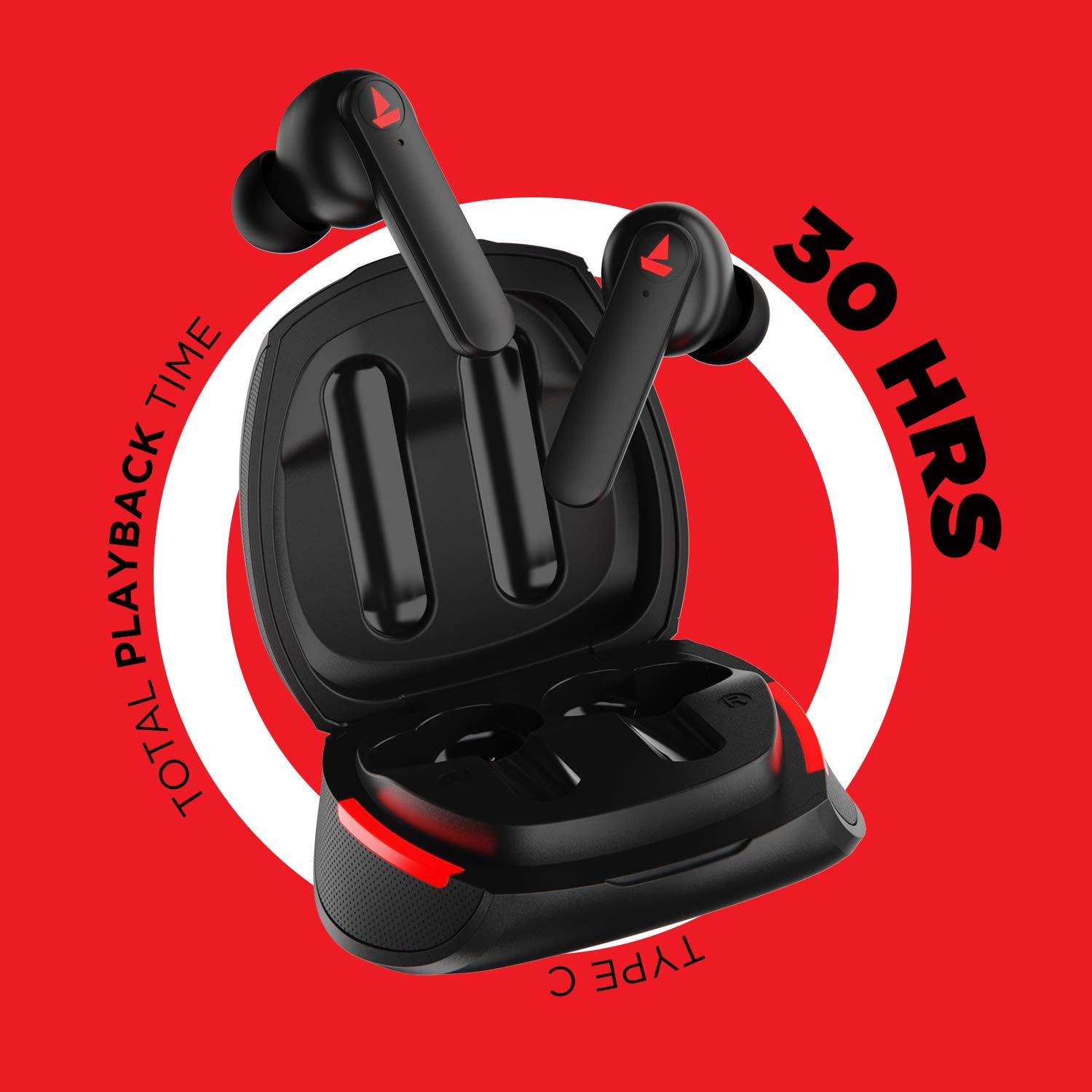
تصویر: The Airdopes 641 earbuds resting in their charging case, illustrating the Type-C charging capability and the impressive 30 hours of total playback time.
3.2 Initial Pairing (IWP Technology)
The Airdopes 641 feature Instant Wake N' Pair (IWP) technology for quick and effortless connection.
- چارجنگ کیس کا ڈھکن کھولیں۔ ایئربڈز خود بخود آن ہو جائیں گے اور پیئرنگ موڈ میں داخل ہو جائیں گے۔
- On your smartphone or Bluetooth-enabled device, enable Bluetooth.
- تلاش کریں۔ "Airdopes 641" in the list of available devices and select it to pair.
- Once paired, you will hear an audio prompt, and the earbuds will be ready for use.
- The earbuds will automatically connect to the last paired device when the case lid is opened, provided Bluetooth is enabled on the device.
4. آپریٹنگ ہدایات
4.1 پاور آن/آف
- پاور آن: Open the charging case lid. The earbuds will power on automatically. Alternatively, long-press the Capacitive Touch Control (CTC) on both earbuds for 3 seconds.
- بجلی بند: Place the earbuds back into the charging case and close the lid. They will power off automatically. Alternatively, long-press the CTC on both earbuds for 5 seconds.
4.2 Capacitive Touch Controls (CTC)
The Airdopes 641 feature intuitive touch controls on each earbud.
- چلائیں/روکیں: Single tap on either earbud's CTC.
- اگلا ٹریک: Double tap on the right earbud's CTC.
- پچھلا ٹریک: Double tap on the left earbud's CTC.
- جواب / کال ختم کریں: Single tap on either earbud's CTC.
- کال مسترد کریں: Long press on either earbud's CTC for 2 seconds.
- متحرک صوتی معاون: Triple tap on either earbud's CTC.
- اواز بڑھایں: Long press the right earbud's CTC.
- آواز کم: Long press the left earbud's CTC.
4.3 BEAST Mode (Low Latency Gaming)
Activate BEAST Mode for a low-latency audio experience, ideal for gaming.

تصویر: The Airdopes 641 earbuds and their sleek charging case, emphasizing the "BEAST Mode" feature designed to provide a low-latency audio experience for gamers.
- Activate BEAST Mode: Triple tap on the right earbud's CTC.
- Deactivate BEAST Mode: Triple tap on the right earbud's CTC again.
5 دیکھ بھال
Proper care ensures the longevity and performance of your Airdopes 641.
5.1 صفائی
- نرم، خشک، لنٹ سے پاک کپڑے سے ایئر بڈز اور چارجنگ کیس کو آہستہ سے صاف کریں۔
- کھرچنے والے کلینر، الکحل یا کیمیائی سالوینٹس کا استعمال نہ کریں۔
- موم کے جمع ہونے سے بچنے کے لیے کان کے اشارے اور جالی کو باقاعدگی سے صاف کریں، جو آواز کے معیار کو متاثر کر سکتا ہے۔
5.2 پانی اور پسینے کی مزاحمت (IPX5)

تصویر: The Airdopes 641 earbuds and their charging case surrounded by water splashes, illustrating their IPX5 rating for water and sweat resistance.
The Airdopes 641 are rated IPX5, meaning they are protected against low-pressure water jets from any direction. This makes them suitable for workouts and light rain.
- ایئربڈز کو پانی میں نہ ڈوبیں۔
- Do not expose them to high-pressure water or steam.
- اس بات کو یقینی بنائیں کہ ایئربڈز کو دوبارہ چارجنگ کیس میں رکھنے سے پہلے وہ خشک ہیں تاکہ نقصان سے بچا جا سکے۔
5.3 اسٹوریج
ایئربڈز کو ان کے چارجنگ کیس میں محفوظ کریں جب ان کی حفاظت اور چارج رکھنے کے لیے استعمال میں نہ ہوں۔
6 خرابیوں کا سراغ لگانا
If you encounter issues with your Airdopes 641, try the following solutions.
6.1 ایئربڈس جوڑا نہیں بن رہا/کنیکٹ نہیں ہو رہا ہے۔
- یقینی بنائیں کہ دونوں ایئربڈز چارج ہیں۔
- Make sure Bluetooth is enabled on your device and the earbuds are within range.
- Try forgetting "Airdopes 641" from your device's Bluetooth list and re-pairing.
- Perform a factory reset as described below.
6.2 فیکٹری ری سیٹ
A factory reset can resolve many common issues by restoring the earbuds to their original settings.

تصویر: A visual guide detailing the steps for a factory reset of the Airdopes 641. It emphasizes clearing the device from pairing history first, then long-pressing the Capacitive Touch Control (CTC) on both earbuds inside the case for 10 seconds until a green LED flashes three times, followed by closing and reopening the case.
- مرحلہ 1: Before performing the reset, clear "Airdopes 641" from your pairing device history by forgetting the device on your phone/tablet.
- مرحلہ 2: Place both earbuds back inside the charging case in the correct orientation.
- مرحلہ 3: Long press the Capacitive Touch Control (CTC) on both earbuds inside the case for up to 10 seconds. The successful reset will be indicated by the flashing of a green LED three times.
- مرحلہ 4: چارجنگ کیس کا ڈھکن بند کریں اور پھر اسے دوبارہ کھولیں۔
- مرحلہ 5: Once you take the earbuds out from the charging case, they automatically restart and are ready for a new pairing.
Note: Please make sure the case is charged before performing a factory reset.
6.3 کوئی آواز/کم والیوم نہیں۔
- اپنے آلے اور ایئربڈز دونوں پر والیوم لیول چیک کریں۔
- یقینی بنائیں کہ ایئربڈز آپ کے کانوں میں ٹھیک طرح سے بیٹھے ہیں۔
- ایئربڈ میش سے کوئی بھی ملبہ صاف کریں۔
- ایئربڈز کو دوبارہ جوڑنے کی کوشش کریں۔
7. وضاحتیں
| ماڈل کا نام | ایرڈوپس 641 |
| کنیکٹوٹی ٹیکنالوجی | وائرلیس (بلوٹوتھ) |
| وائرلیس کمیونیکیشن ٹیکنالوجی | بلوٹوتھ 5.0 |
| کنٹرول کی قسم | ٹچ، وائس کنٹرول |
| آڈیو ڈرائیور کی قسم | متحرک ڈرائیور (6 ملی میٹر) |
| کان کی جگہ کا تعین | کان میں |
| فارم فیکٹر | کان میں |
| مواد | پلاسٹک |
| پانی کی مزاحمت کی درجہ بندی | IPX5 |
| چارجنگ پورٹ | USB ٹائپ سی |
| ہم آہنگ آلات | Tablets, Cellphones, Laptops, Desktops, Smart Speaker, Television |
8. وارنٹی اور سپورٹ
For warranty information and customer support, please refer to the warranty card included with your product or visit the official boAt webسائٹ وارنٹی کے دعووں کے لیے اپنی خریداری کی رسید اپنے پاس رکھیں۔
مینوفیکچرر: Imagine Marketing Pvt Ltd


