تعارف
This manual provides essential information for the safe and proper assembly, operation, maintenance, and troubleshooting of your Arcade1Up Outrun Stand Up Edition arcade game. Please read this manual thoroughly before assembly and retain it for future reference.
The Arcade1Up Outrun cabinet includes four classic racing games: آگے بڑھنا, Turbo Outrun, Outrunners، اور Power Drift. It features a steering wheel, gas pedal, and brake pedal for an authentic arcade experience.
حفاظتی معلومات
Always follow basic safety precautions when assembling and operating this product to reduce the risk of fire, electric shock, or injury.
- پانی اور نمی سے دور رہیں۔
- یونٹ کو الگ کرنے یا اس میں ترمیم کرنے کی کوشش نہ کریں۔
- یقینی بنائیں کہ یونٹ ایک مستحکم، سطح کی سطح پر رکھا گیا ہے۔
- صفائی یا دیکھ بھال سے پہلے یونٹ کو پاور آؤٹ لیٹ سے ان پلگ کریں۔
- یہ پروڈکٹ صرف انڈور استعمال کے لیے ہے۔
پیکیج کے مشمولات
Verify that all components are present before beginning assembly. If any parts are missing or damaged, contact Arcade1Up customer support.
- Arcade Cabinet Panels
- Control Panel Assembly (Steering Wheel, Buttons)
- Gas and Brake Pedal Assembly
- Light-Up Marquee
- مانیٹر
- پاور اڈاپٹر
- Hardware Pack (Screws, Bolts, etc.)
- ہدایت نامہ
سیٹ اپ اور اسمبلی
Assembly typically requires two adults. Follow the numbered steps carefully. Tools required (not included): Phillips head screwdriver.
- ان پیک اجزاء: احتیاط سے پیکیجنگ سے تمام حصوں کو ہٹا دیں اور انہیں صاف، نرم سطح پر ڈالیں تاکہ خروںچ سے بچا جا سکے۔
- سائیڈ پینلز کو جمع کریں: Attach the base and back panels to the main side panels using the provided hardware. Ensure all connections are secure.
- Install Monitor: Mount the monitor into the designated slot within the cabinet structure. Connect the necessary video and power cables.
- کنٹرول پینل منسلک کریں: Secure the control panel, including the steering wheel and buttons, to the front of the cabinet. Connect the control panel wiring to the main board.
- Install Pedal Assembly: Place the gas and brake pedal assembly at the base of the cabinet and connect its cable to the main board.
- Mount Light-Up Marquee: Attach the light-up marquee to the top of the cabinet and connect its power cable.
- حتمی جانچ پڑتال: Before powering on, double-check all connections and ensure all screws are tightened.

Figure 1: Fully assembled Arcade1Up Outrun cabinet.

Figure 2: Close-up of the control panel and screen displaying game options.
آپریٹنگ ہدایات
Once assembled and plugged in, the unit is ready for operation.
- پاور آن: Locate the power switch, typically on the back or side of the cabinet, and switch it to the 'ON' position. The marquee will light up and the screen will display the game selection menu.
- کھیل منتخب کریں: Use the steering wheel or directional buttons (if present) and the 'SELECT' or 'ENTER' button to navigate through the available games: آگے بڑھنا, Turbo Outrun, Outrunners، اور Power Drift.
- کھیل شروع کریں: Press the 'START' button to begin playing the selected game.
- Gameplay Controls:
- سٹیئرنگ وہیل: Turn left or right to control your vehicle's direction.
- Gas Pedal: Press down to accelerate.
- بریک پیڈل: Press down to decelerate or stop.
- Shift Lever (if applicable): Use to change gears (High/Low).
- Exiting a Game: To return to the main game selection menu, press and hold the 'PLAYER 1 START' button for approximately 5 seconds.
- بجلی بند: When finished playing, switch the power button to the 'OFF' position.
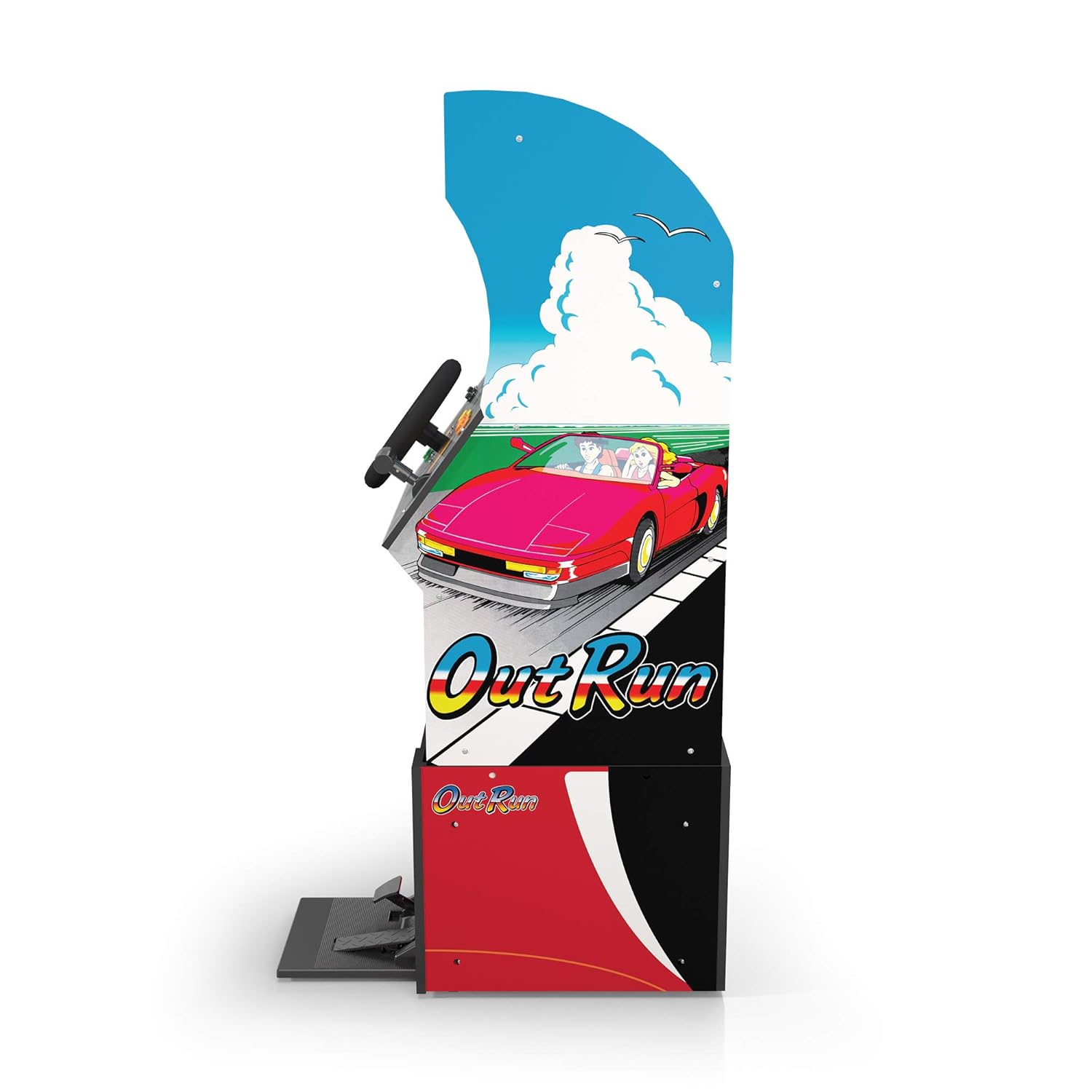
شکل 3: سائیڈ پروfile of the arcade cabinet, illustrating the driving controls.
دیکھ بھال
Regular maintenance ensures the longevity and optimal performance of your arcade cabinet.
- صفائی: Use a soft, dry cloth to wipe down the cabinet surfaces. For stubborn marks, a slightly damp cloth with mild soap can be used, followed by drying. Avoid abrasive cleaners or excessive moisture.
- سکرین کی دیکھ بھال: Clean the monitor screen with a microfiber cloth specifically designed for electronics. Do not spray liquid directly onto the screen.
- پیڈل کی دیکھ بھال: Periodically check the gas and brake pedals for any debris or obstructions that might hinder their movement. Keep the area around the pedals clean.
- کیبل مینجمنٹ: Ensure all cables are neatly tucked away and not pinched or exposed, which could lead to damage.
خرابی کا سراغ لگانا
عام مسائل اور ان کے حل کے لیے اس سیکشن کو دیکھیں۔ اگر مسئلہ برقرار رہتا ہے تو، کسٹمر سپورٹ سے رابطہ کریں۔
| مسئلہ | ممکنہ وجہ | حل |
|---|---|---|
| یونٹ آن نہیں ہوتا۔ | Power cable not connected; Power outlet issue; Power switch off. | Ensure power cable is securely plugged into the unit and a working outlet. Check power switch is 'ON'. |
| اسکرین پر کوئی تصویر نہیں۔ | Monitor cable loose; Monitor not powered. | Check monitor's power and video cables are securely connected. |
| Controls (steering wheel/pedals) unresponsive. | Control panel/pedal cables loose; Software glitch. | Verify all control panel and pedal cables are firmly connected to the main board. Try restarting the unit. |
| Game freezes or crashes. | عارضی سافٹ ویئر کا مسئلہ۔ | Power off the unit, wait 10 seconds, then power back on. |
وضاحتیں
- ماڈل نمبر: 195570000861
- طول و عرض (جمع): 47.75 x 23.75 x 10.5 انچ (اونچائی x چوڑائی x گہرائی)
- وزن: 89.5 پاؤنڈ
- Included Games: Outrun, Turbo Outrun, Outrunners, Power Drift
- کنٹرولز: Steering Wheel, Gas Pedal, Brake Pedal, Game Selection Buttons
- طاقت: AC Adapter (Input: 100-240V ~ 50/60Hz, Output: Specific to adapter, refer to label)
- مینوفیکچرر: Arcade 1Up
- ریلیز کی تاریخ: 7 اپریل 2021
وارنٹی اور سپورٹ
Arcade1Up products typically come with a limited manufacturer's warranty. For specific warranty terms and conditions, please refer to the warranty card included with your product or visit the official Arcade1Up webسائٹ
For technical support, missing parts, or warranty claims, please contact Arcade1Up Customer Support:
- Webسائٹ: arcade1up.com/pages/contact-us
- فون: اہلکار سے رجوع کریں۔ webعلاقائی رابطہ نمبروں کے لیے سائٹ۔
سپورٹ سے رابطہ کرتے وقت، براہ کرم اپنا ماڈل نمبر (195570000861) اور خریداری کا ثبوت آسانی سے دستیاب رکھیں۔


