1. تعارف
Thank you for choosing the Qlima PH635 Portable Reversible Air Conditioner. This manual provides essential information for the safe and efficient operation, maintenance, and troubleshooting of your appliance. Please read it thoroughly before use and keep it for future reference.
The Qlima PH635 is a versatile unit designed to provide comfort in various conditions, offering cooling, heating, dehumidification, and fan functions. It features automatic stop, programming backup in case of power interruption, and adjustable ventilation.
2. حفاظتی ہدایات
صارف یا دوسرے لوگوں کو چوٹ اور املاک کو پہنچنے والے نقصان کو روکنے کے لیے درج ذیل ہدایات پر عمل کرنا چاہیے۔ ہدایات کو نظر انداز کرنے کی وجہ سے غلط آپریشن نقصان یا نقصان کا سبب بن سکتا ہے۔
- Always ensure the unit is placed on a flat, stable surface to prevent tipping.
- Do not operate the unit with a damaged power cord or plug. If the supply cord is damaged, it must be replaced by the manufacturer, its service agent, or similarly qualified persons to avoid a hazard.
- انگلیوں یا غیر ملکی اشیاء کو ہوا کے داخلی راستوں یا آؤٹ لیٹس میں داخل نہ کریں۔
- یونٹ کو آتش گیر مواد اور کھلی آگ سے دور رکھیں۔
- Ensure proper ventilation around the unit; do not block air vents.
- صفائی یا دیکھ بھال کرنے سے پہلے آلے کو ان پلگ کریں۔
- اس آلے کو 8 سال یا اس سے زیادہ عمر کے بچے اور جسمانی، حسی یا ذہنی صلاحیتوں میں کمی یا تجربے اور علم کی کمی والے افراد استعمال کر سکتے ہیں اگر انہیں آلات کے محفوظ طریقے سے استعمال کے بارے میں نگرانی یا ہدایات دی گئی ہوں اور وہ اس میں شامل خطرات کو سمجھتے ہوں۔ .
- اس بات کو یقینی بنانے کے لیے بچوں کی نگرانی کی جانی چاہیے کہ وہ آلات سے نہ کھیلیں۔
3. پیکیج کے مشمولات
Please check that all items are present upon unpacking:
- Qlima PH635 Portable Air Conditioner Unit
- ایگزاسٹ نلی
- Window Sealing Kit (adaptor, window slide bar)
- ریموٹ کنٹرول
- صارف دستی (یہ دستاویز)
4. پروڈکٹ ختمview
4.1 اجزاء
Familiarize yourself with the main parts of your Qlima PH635 unit:
- Control Panel (top of unit)
- Air Outlet (front, adjustable louvers)
- Air Inlet (rear/sides, with air filter)
- Exhaust Air Outlet (rear, for hose connection)
- Continuous Drainage Port (rear, for dehumidification)
- Casters (bottom, for mobility)
- پاور کی ہڈی
4.2 مصنوعات کی شبیہہ
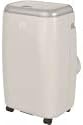
Image showing the Qlima PH635 portable reversible air conditioner from a slight angle, highlighting its compact, rectangular design with a light-colored casing and top control panel. The unit is equipped with casters for easy movement.
5. سیٹ اپ
5.1 پیک کھولنا
- یونٹ کو احتیاط سے اس کی پیکیجنگ سے ہٹا دیں۔
- تمام پیکنگ مواد کو ہٹا دیں اور انہیں ذمہ داری سے ٹھکانے لگائیں۔
- اس بات کو یقینی بنائیں کہ کوئی پرزہ غائب یا خراب نہیں ہے۔
5.2 جگہ کا تعین
- Place the air conditioner on a firm, level surface in a location that allows for proper air circulation.
- Maintain a minimum distance of 30 cm (12 inches) from walls or other objects to ensure adequate airflow.
- یونٹ کو براہ راست سورج کی روشنی میں یا گرمی کے ذرائع کے قریب رکھنے سے گریز کریں۔
5.3 ایگزاسٹ نلی کی تنصیب
- Attach one end of the exhaust hose to the exhaust air outlet on the rear of the unit. Twist clockwise until secure.
- Extend the exhaust hose to the nearest window or vent opening. Keep the hose as short and straight as possible to maximize efficiency.
5.4 ونڈو کٹ کی تنصیب
For optimal performance, use the provided window sealing kit to prevent hot air from re-entering the room.
- Adjust the window slide bar to fit your window opening.
- Secure the slide bar in the window.
- Connect the other end of the exhaust hose to the adaptor on the window kit.
- Ensure all connections are sealed to prevent air leakage.
5.5 Drainage Setup (Dehumidification Mode)
When using the dehumidification function, continuous drainage is recommended. Connect a drainage hose (not supplied) to the continuous drainage port on the rear of the unit and lead it to a suitable drain or container.
6. آپریٹنگ ہدایات
6.1 کنٹرول پینل اور ریموٹ کنٹرول
The unit can be operated via the control panel on top of the unit or the supplied remote control. The functions are generally identical.
6.2 پاور آن/آف
دبائیں پاور یونٹ کو آن یا آف کرنے کے لیے بٹن۔
6.3 موڈ کا انتخاب
دبائیں موڈ دستیاب طریقوں سے چکر لگانے کے لیے بٹن:
- کولنگ موڈ: کمرے کو ٹھنڈا کرنے کے لیے۔ مطلوبہ درجہ حرارت طے کریں۔
- حرارتی موڈ: کمرے کو گرم کرنے کے لیے۔ مطلوبہ درجہ حرارت طے کریں۔
- ڈیہومیڈیفیکیشن موڈ: Removes moisture from the air. Fan speed is typically fixed in this mode.
- فین موڈ: ٹھنڈک یا گرم کیے بغیر ہوا کو گردش کرتا ہے۔
6.4 درجہ حرارت کی ایڈجسٹمنٹ
کولنگ یا ہیٹنگ موڈ میں، استعمال کریں۔ UP اور نیچے arrow buttons to set your desired temperature. The temperature range is typically 16°C to 30°C (61°F to 86°F).
6.5 پنکھے کی رفتار
دبائیں پنکھے کی رفتار button to select between Low, Medium, or High fan speeds. This function is available in Cooling, Heating, and Fan modes.
6.6 ٹائمر فنکشن
The timer allows you to set a specific time for the unit to turn on or off automatically.
- دبائیں ٹائمر بٹن
- استعمال کریں۔ UP اور نیچے arrow buttons to set the desired time (in hours).
- دبائیں ٹائمر تصدیق کرنے کے لیے دوبارہ۔
6.7 سلیپ موڈ
Activate Sleep Mode for quieter operation and gradual temperature adjustment during sleep. Press the سونا بٹن
6.8 Automatic Stop and Programming Backup
The Qlima PH635 features an automatic stop function when the desired temperature is reached or the water tank is full (in dehumidification mode). In case of a power cut, the unit will automatically resume operation with the last settings once power is restored, thanks to its programming backup feature.
7 دیکھ بھال
باقاعدگی سے دیکھ بھال بہترین کارکردگی کو یقینی بناتی ہے اور آپ کے ایئر کنڈیشنر کی عمر میں توسیع کرتی ہے۔
7.1 یونٹ کی صفائی
- صفائی سے پہلے ہمیشہ یونٹ کو ان پلگ کریں۔
- ایک نرم کے ساتھ بیرونی مسح کریں، ڈیamp کپڑا سخت کیمیکل یا کھرچنے والے کلینر کا استعمال نہ کریں۔
- اس بات کو یقینی بنائیں کہ بجلی کے اجزاء میں پانی داخل نہ ہو۔
7.2 ایئر فلٹرز کی صفائی
استعمال اور ہوا کے معیار کے لحاظ سے ایئر فلٹرز کو ہر دو ہفتے یا اس سے زیادہ بار صاف کیا جانا چاہیے۔
- یونٹ کو بند کریں اور ان پلگ کریں۔
- Locate and remove the air filters from the rear/sides of the unit.
- Wash the filters under running water (warm, not hot) or use a vacuum cleaner to remove dust.
- فلٹرز کو دوبارہ انسٹال کرنے سے پہلے انہیں مکمل طور پر خشک ہونے دیں۔
7.3 موسمی ذخیرہ
اگر یونٹ کو توسیعی مدت کے لیے استعمال نہیں کیا جائے گا:
- Drain any accumulated water from the unit.
- Clean the air filters and the exterior.
- Store the unit in a dry, cool place, covered to protect it from dust.
8 خرابیوں کا سراغ لگانا
کسٹمر سپورٹ سے رابطہ کرنے سے پہلے، براہ کرم عام مسائل اور ان کے حل کے لیے درج ذیل جدول کو دیکھیں۔
| مسئلہ | ممکنہ وجہ | حل |
|---|---|---|
| یونٹ آن نہیں ہوتا ہے۔ | No power supply; Power cord not plugged in; Fuse blown; Water tank full (in dehumidification) | Check power outlet; Plug in power cord firmly; Replace fuse; Empty water tank. |
| No cooling/heating | Air filter clogged; Exhaust hose blocked or disconnected; Room temperature already reached; Doors/windows open; Room too large | Clean air filter; Check exhaust hose connection and ensure it's not blocked; Adjust desired temperature; Close doors/windows; Consider room size limitations. |
| پانی کا رساؤ | Drainage plug loose; Unit not level; Continuous drainage hose blocked | Ensure drainage plug is secure; Place unit on a level surface; Check and clear continuous drainage hose. |
| شور والا آپریشن | Unit not on a level surface; Air filter clogged; Foreign object in fan | Ensure unit is on a level surface; Clean air filter; Turn off and unplug, then check for obstructions (if safe to do so). |
9. وضاحتیں
Key technical specifications for the Qlima PH635 Portable Reversible Air Conditioner:
| فیچر | تفصیلات |
|---|---|
| برانڈ | کلیمہ |
| ماڈل کا نام | پی ایچ 635 |
| طول و عرض (L x W x H) | 71 x 33 x 44 سینٹی میٹر |
| وزن | 31 کلوگرام |
| کولنگ کی صلاحیت | 3200 Watts (approx. 12000 BTU) |
| حرارتی صلاحیت | 3500 واٹس (پروڈکٹ کے عنوان کے مطابق) |
| شور کی سطح | 55 ڈیسیبل |
| والیومtage | 240 وولٹ |
| خصوصی خصوصیات | Heating and Cooling Function, Programmable, Automatic Stop, Programming Backup |
| موسمی توانائی کی کارکردگی کا تناسب (SEER) | 6.1 |
| تنصیب کی قسم | پورٹیبل |
| طاقت کا منبع | کورڈڈ الیکٹرک |
10. وارنٹی اور سپورٹ
For warranty information and customer support, please refer to the documentation provided with your purchase or contact your retailer. Information regarding the availability of spare parts is currently unavailable.
When contacting support, please have your model number (PH635) and purchase details ready.


